
How to Keep Voices Consistent in Seedance 2.5 Across Every Shot

If a face stays stable but the voice becomes older, faster, or more accented in the next shot, the scene still feels broken. Treat each voice as a locked production asset: approve one clean reference, define it in words, assign it to one speaker, and reuse those rules. This guide applies that method to a presenter, a two-person conversation, and a multishot sequence—while separating voice drift from lip-sync and recording problems.
AI Overview
How do I keep the same voice in every Seedance 2.5 shot?
Use one approved, clean voice reference for the character, repeat the same speaker label and voice description in every prompt, and change only the line, action, and camera direction.
What should a Seedance audio reference contain?
Choose a short dry recording with one speaker, steady volume, neutral emotion, and no music, echo, effects, or overlapping speech. It should clearly expose accent, pitch, pacing, and vocal age.
Why does a character’s voice change between clips?
Drift usually begins when the reference changes, the prompt introduces conflicting traits, emotion becomes too extreme, or an extension is treated as a new performance instead of the next beat.
Can Seedance Agent help with voice continuity?
Yes. Seedance Agent can turn a brief into reusable speaker rules, keep reference roles attached to the task, and let you review the plan before approving paid generation.
What Voice Consistency Actually Means
Viewers recognize a speaker through timbre, accent, cadence, vocal age, energy, and breath pattern—not language or pitch alone. A useful test asks whether the audience would identify the person with the screen hidden.
Lock identity before performance
Separate permanent traits from shot direction. The fixed layer might read: “warm low-mid female voice, early 30s, neutral American English, measured pace, lightly textured timbre.” Performance can change from calm to urgent without replacing the speaker. Avoid “beautiful” or “cinematic”; four audible traits are easier to repeat and evaluate.
Do not confuse identity with recording quality
A voice can be the same person yet seem different because the next clip is louder, wetter, or noisier. Match room tone, microphone distance, loudness, and ambience before declaring identity drift. The native-audio production guide separates dialogue, effects, and ambience.
Review transitions, not thumbnails
Play the last phrase of one shot directly into the first phrase of the next. Jumps in pitch, speed, accent, age, or room sound often become obvious only at the cut.
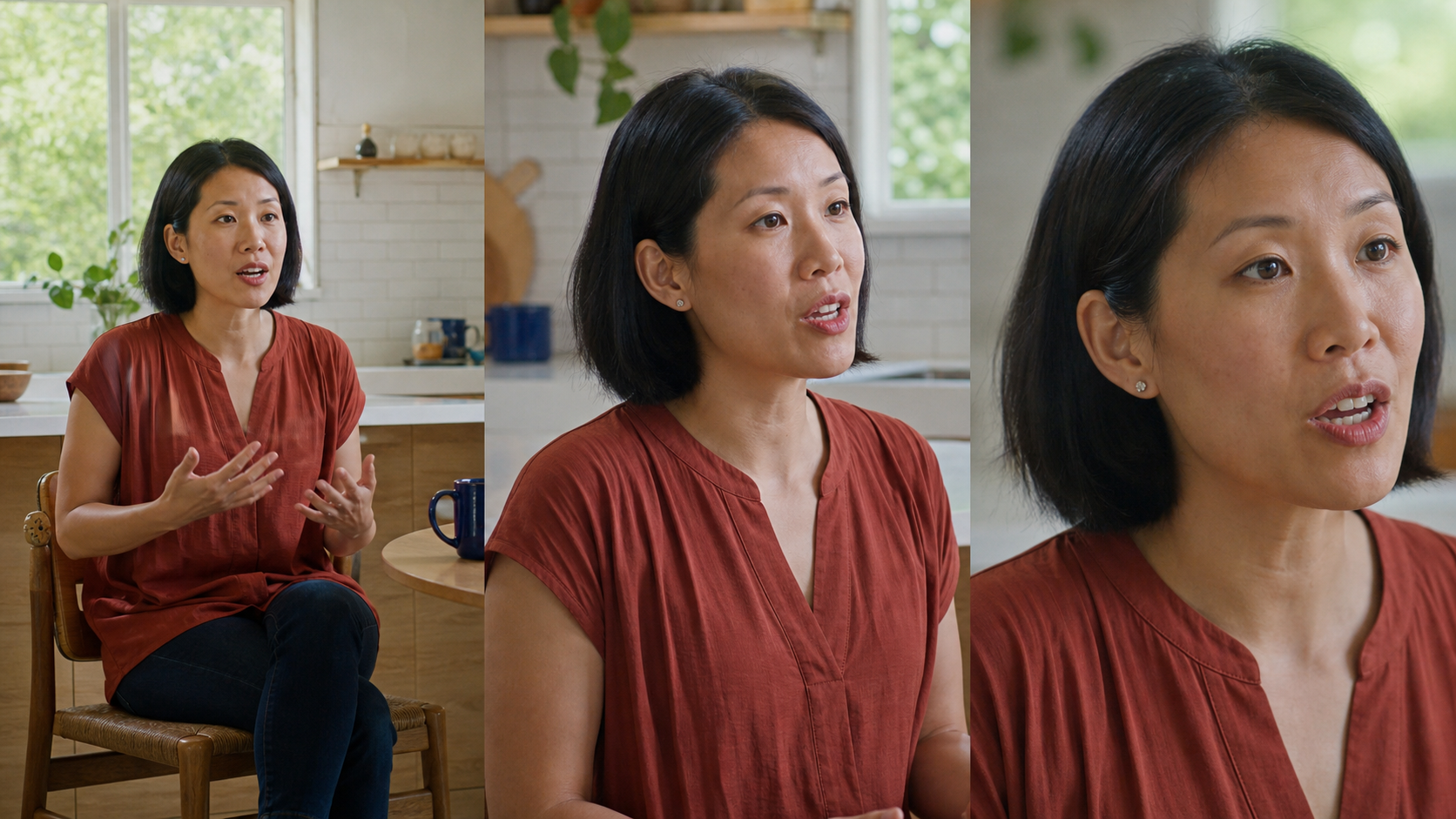
Different compositions prove continuity better than three nearly identical frames. The face, wardrobe, room, and vocal identity should persist while the performance advances.
Build a Reusable Seedance Voice Reference Pack
A voice reference pack is a small source-of-truth folder that keeps every new shot on the same approved material.
Approve one clean reference per speaker
Record 8–15 seconds of natural speech in a quiet room, using complete sentences and steady microphone distance. Remove clipping, music, reverb, and other voices. Do not splice several takes merely to make the sample longer; variation inside the reference can teach the inconsistency you want to avoid.

A plain reference is useful because the identity remains audible without music, room effects, or a second voice competing for attention.
Write a fixed voice identity card
Save the approved file beside a short text card:
- Speaker ID:
MARA_01 - Timbre: warm, lightly textured, low-mid register
- Accent: neutral American English
- Vocal age: early 30s
- Pace: measured, about 135 words per minute
- Delivery: intimate, confident, no singing
- Never change: accent, pitch range, vocal age, or breathiness
Reuse the card exactly. The Seedance 2.5 prompt guide further separates fixed constraints from creative direction.
Keep reference roles identical
Label a file as voice identity, not mood, soundtrack, or general audio. A take with better emotion but another accent may guide performance, but it must not replace the identity source.
Copy-Ready Prompt Formula for One Consistent Speaker
Begin with the speaker lock, then the line and visible action. Put camera language after the voice rules so a new composition does not become a new character.
Bind the speaker before the line
Repeat the same speaker ID and wording. Changing “measured” to “slow and smoky” can shift vocal age and texture.
SPEAKER LOCK — MARA_01
Use the attached approved voice reference as the only voice identity.
Keep: warm low-mid female timbre, early-30s vocal age, neutral American accent,
measured 135 wpm pace, intimate confidence, natural breath, no singing.

SHOT 03 — 6 seconds, medium close-up
Mara looks toward the interviewer and says exactly:
“The first test worked, but the transition still needs one clean pass.”
Emotion: quietly relieved; intensity 3/10. One speaker only.
Keep voice identity unchanged. Match the previous clip’s room tone and loudness.
Camera: slow five-percent push-in. No cut, no off-screen dialogue.
Give each timed beat one speaking task
Do not combine a whisper, laugh, face turn, and fast camera move in five seconds. Give each clip one line, one emotional level, and one main action; generate the reaction separately.
Judge the whole performance
Check the first syllable, fastest phrase, face turn, and final word. Keep the reference fixed while simplifying only the failed phrase or action. Use the Seedance video editing workflow for assembly and repair.
Keep Multiple Character Voices Separate
Two-person dialogue must preserve two identities and route each line correctly. Clear turn ownership matters more than literary prose.
Use fixed names and one reference per person
Create stable IDs such as MARA_01 and JONAH_01. Attach one approved voice to each and never reorder or rename them. Once the conversation begins, avoid “the woman” and “the man.”
State speaker and listener in every shot
Write: “Mara speaks; Jonah listens silently,” then specify the reaction. Explicitly reverse those roles for the answer. Unless both speak, only the active speaker’s mouth should move.

Clear speaker/listener blocking gives each voice an owner while the edit changes from a two-shot to shot–reverse-shot coverage.
Split difficult turns into separate clips
Interruptions, laughter under speech, and off-screen replies are high-risk. Generate clean turns separately and preserve a reaction pause. The multi-character dialogue guide covers timing and coverage.
Listen across the cut as well as within each shot: a believable exchange needs distinct voices, synchronized mouths, and one continuous acoustic space.
Fix Voice Drift, Lip Sync, and Extension Problems
Before regenerating, identify whether the failure belongs to identity, mouth timing, speaker routing, or the audio environment.
| Symptom | Likely cause | Targeted correction |
|---|---|---|
| Right voice, wrong mouth timing | Line is too dense or action competes with speech | Shorten the sentence; reduce head turns; keep the voice lock |
| Accent or vocal age changes | Conflicting adjectives or extreme emotion | Restore the exact identity card; lower emotional intensity |
| Two characters share one voice | Speaker ownership is ambiguous | Name the active speaker and mark the listener silent |
| Extension sounds newly recorded | Room tone, loudness, or reference changed | Reuse the approved source and match the previous clip’s acoustic profile |
| Dialogue becomes melodic | Musical reference or “singing” cues leaked into the brief | Remove music from the reference and add an explicit no-singing rule |
Repair lip sync without replacing the voice
If identity is right, keep it. Reduce syllables, limit fast profile turns, and place the hardest phrase in a clearer frontal beat. Changing the reference to solve mouth timing creates a second problem.
Correct drift with one variable change
Return to the last approved clip, original reference, and exact identity card. Change only the failed line, emotion, or motion. For unwanted melody, follow the stop Seedance from singing guide.
Continue from a clean handoff
For extensions, carry forward the final pose, camera direction, speaker ID, emotion, ambience, and loudness. A brief silent reaction at the start gives the edit room to hide small acoustic differences.
Use Seedance Agent for a Repeatable Voice Workflow
Voice continuity is easier when rules live above individual prompts. Seedance Agent can convert a brief into named speakers, reference roles, shot-level dialogue, and a checklist before paid rendering. It catches conflicting assignments, unapproved references, and sudden accent changes while they are still free to edit.
Plan, approve, and reroll selectively
Start with the deliverable, cast, language, duration, and voice cards. Make every spoken beat name its speaker and listener. Approve the hardest test first and lock successful results. If shot four fails, revise shot four—not the three accepted clips.
Use an acceptance checklist
Listen once without watching for identity, watch silently for mouth timing, then review both together. Score identity, accent, pacing, emotion, lip sync, room tone, and transition.
No workflow promises an identical waveform across generations. The Agent makes constraints, references, approvals, and retries visible so decisions remain repeatable.
Conclusion
Approve one clean reference per character, use a fixed identity card, bind every line to a named speaker, and review voice, lips, and room tone separately. Keep successful clips and change one failed variable at a time. To carry those rules across a full multishot plan with references, approval gates, selective rerolls, and finishing together, start a voice-consistent project with Seedance Agent.
Ready to try it yourself?
Put the steps from this guide into practice with Seedance and turn prompts or images into polished videos in minutes.
Free credits on signup. Plans from $28/month.
Related Articles
More posts in the same locale you may want to read next.

Seedance App Preview Video Generator 2026: Create App Store and Product Launch Clips
Use Seedance to turn app screenshots, feature copy, and launch goals into App Store previews, Google Play promo videos, and product launch clips.
Read article
Best AI Video-to-Video Models in 2026
The best AI video-to-video models in 2026 for editing footage you already shot: Higgsfield Genjutsu, Seedance 2.x, Runway Aleph, Luma Modify and Kling Omni compared.
Read article
Kling 4.0 vs Seedance 2.5: Full Comparison
Kling 4.0 vs Seedance 2.5 compared by spec: 30-second clips, keyframes vs 50 references, audio, 4K and 10-bit color, editing, and which model fits which job.
Read article