
Realistic Motion Transfer
Precisely map the movement from a reference video onto your character image. Whether it's dancing, walking, or complex actions, Kling 3.0 captures every detail with fluid, realistic physics.
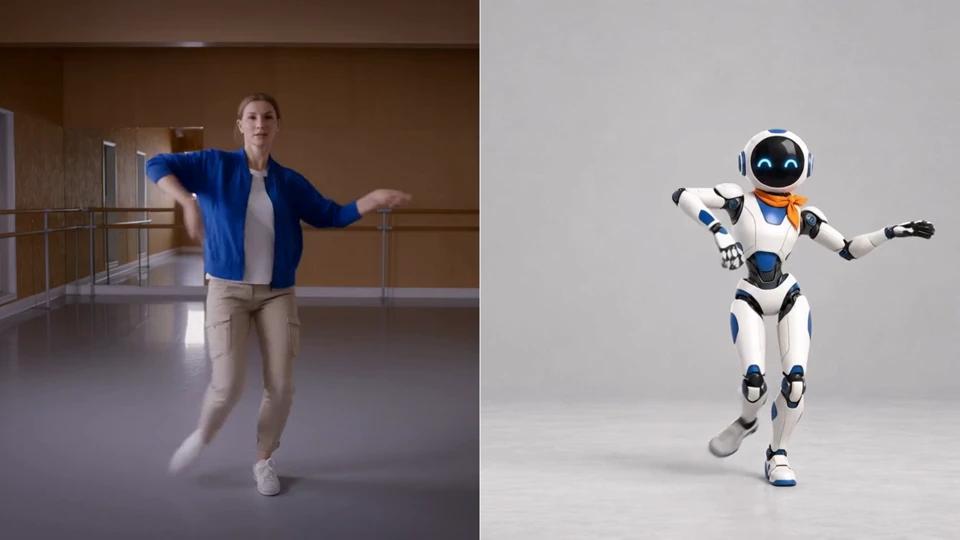
Transform character images into dynamic animations using reference videos. Powered by Kling 3.0 Motion Control for realistic movement and perfect character consistency.
Try Motion Control NowPrecisely map the movement from a reference video onto your character image. Whether it's dancing, walking, or complex actions, Kling 3.0 captures every detail with fluid, realistic physics.
Maintain your character's facial features, clothing, and unique style while they perform new actions. Our AI ensures that your character remains recognizable and consistent throughout the animation.
Generate long-form character animations. Refer to video orientation for up to 30 seconds of consistent movement, or use image orientation for high-quality 10-second clips.
Support for both Standard (720p) and Professional (1080p) modes. Get crisp, clear video output suitable for professional projects, social media, and cinematic storytelling.
Follow these simple steps to bring your character to life with Kling 3.0
Upload a clear image of the character you want to animate. PNG/JPG, max 10MB.
Upload a video containing the motion you want to mimic. MP4/MOV, max 100MB.
Choose orientation and quality, then click generate. Get your result in minutes.
Common questions about animating characters with reference videos
Kling 3.0 Motion Control is an advanced AI feature that allows you to drive the movement of a static character image using a reference video. It effectively transfers the 'motion' from the video to the 'subject' in the image.
Character Orientation determines the main pose reference. 'Image' keeps the person in the same orientation as the photo (max 10s). 'Video' makes the character follow the orientation of the reference video (max 30s).
Reference videos should be in MP4 or MOV format, up to 100MB in size. For best results, the movement in the video should be clear and the subject well-framed.
Motion Control cost is based on the final video duration and quality mode (720p/1080p). You can see the exact cost in the generator before you click create.
You can control camera pan (left/right), tilt (up/down), zoom in/out, rotation, and dolly push/pull. Subject motion is guided by a reference video you upload — the AI interprets the movement pattern and applies it to your generated scene for precise directorial control.
Focus your text prompt on the subject, scene description, and visual style. Let the reference video carry all motion information rather than describing movement in words. A clear 2–5 second clip showing deliberate motion produces much more accurate results than abstract textual motion descriptions.
Standard video generation uses only text or an image to determine all scene motion. Motion control adds a reference video as a third input, giving the AI explicit movement direction. This results in more predictable, controllable motion and is ideal for creators who need precise camera work or character choreography.
Kling 3.0 Motion Control outputs videos at up to 1080p in both landscape (16:9) and portrait (9:16) orientations. Standard clip length is 5 seconds with an option to extend to 10 seconds on supported plans. Results are delivered in MP4 format, ready for download or further editing.