
Seedance 2.5 Prompt Guide: How to Write Prompts for Cinematic AI Videos (2026)
Good Seedance 2.5 prompts are the difference between a clip you publish and a clip you regenerate five times. The model is powerful — it produces a single continuous 30-second shot in native 4K with synchronized audio in one pass — but it still does exactly what you tell it, and nothing you forget to mention. This guide is a practical, copy-paste playbook for writing Seedance 2.5 prompts: the prompt structure that works, camera-movement syntax, image-to-video prompting, how to use references, ready-to-use prompt examples, and the mistakes that quietly ruin a generation.
If you've written prompts for older models, the instincts carry over, but Seedance 2.5 rewards more direction, not less. A longer clip means more room for the model to drift — so the more clearly you describe the subject, the action, the camera, and the look, the more often you land a usable shot on the first try.
Quick Answer: The Seedance 2.5 Prompt Formula
If you only remember one thing, remember this structure:
Subject + Action + Camera + Lighting + Style (+ Audio)
A prompt that names all five parts gives the model the scaffolding it needs to keep a 30-second shot coherent. Here's the formula in action:
A young barista in a green apron steaming milk behind a marble counter, turning to smile at the camera. Slow dolly-in from a wide shot to a medium close-up. Warm morning light through a side window, soft shadows. Cinematic, shallow depth of field, 35mm film look. Ambient café noise and the hiss of the steam wand.
That single sentence tells Seedance 2.5 who is in frame, what they do, how the camera moves, how it's lit, the overall look, and what it should sound like. Drop any one of those and the model fills the gap with a guess. The rest of this guide breaks each part down and gives you prompts you can paste straight into Seedance.
You can try the full workflow on the Seedance 2.5 model page, and if you want the broader walkthrough of the interface and settings, see our how to use Seedance 2.5 guide.
The 5-Part Prompt Structure Explained
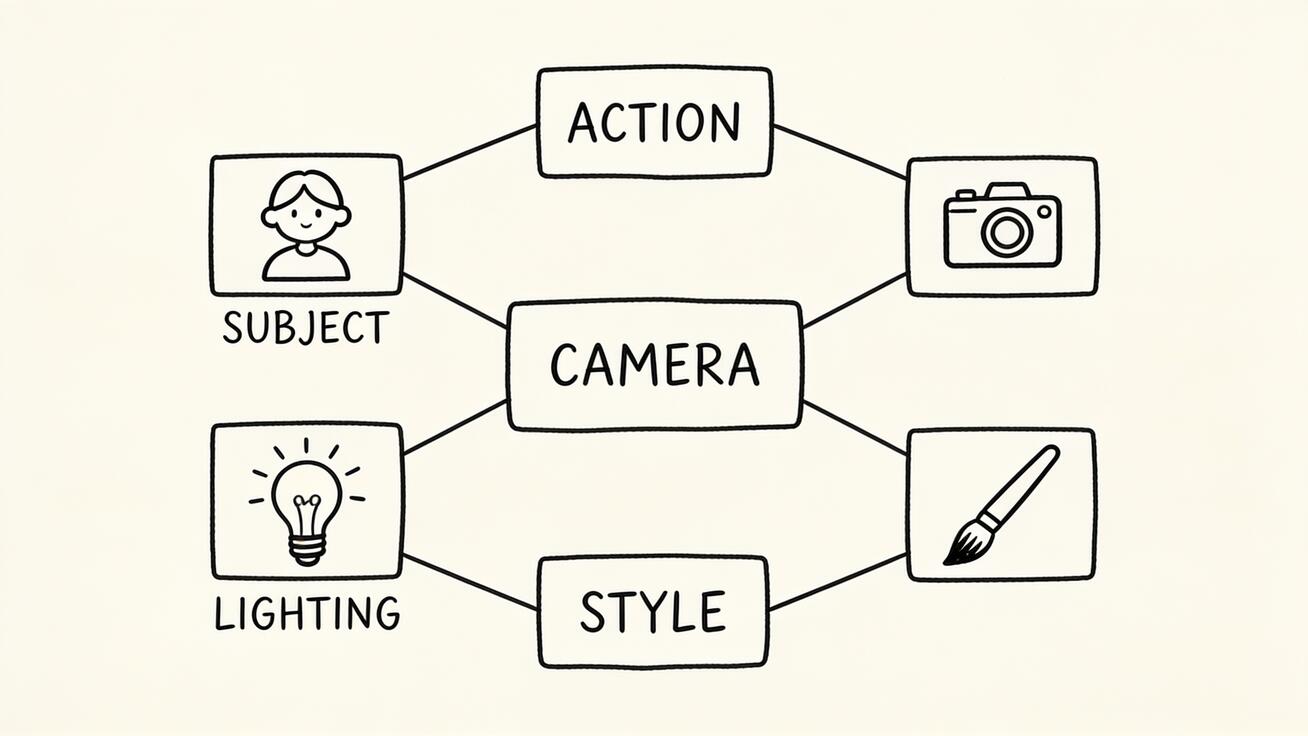
Every strong Seedance 2.5 prompt is built from the same five ingredients. Think of them as layers you stack, not a rigid order to obey.
1. Subject — be specific about who or what
Vague subjects produce generic, unstable footage. Don't write "a woman"; write "a woman in her thirties with short dark hair, wearing a beige trench coat." Concrete attributes — age, clothing, color, material, expression — give the model anchors to hold steady across all 30 seconds. For products, name the object, its material, and its finish: "a matte black wireless speaker with a fabric grille."
2. Action — describe one clear motion arc
A 30-second clip is long enough to contain a complete beat, so describe an arc with a beginning and end: "she picks up the cup, takes a sip, and sets it down." Avoid stacking three unrelated actions; the model handles a single, continuous motion far better than a list of jump-cuts. If you need multiple beats, describe them as a smooth sequence, not separate events.
3. Camera — state the shot and the move
Camera language is where most prompts are too thin. Specify the shot size (wide, medium, close-up), the angle (eye-level, low angle, overhead), and the movement (static, dolly-in, pan, orbit). Seedance 2.5 follows camera direction well, so use it to add production value — a slow push-in feels cinematic; a locked-off static shot feels like a product demo. The next section covers the exact syntax.
4. Lighting — set the mood
Lighting carries the emotional tone. "Golden hour backlight," "soft overcast daylight," "moody neon from the left," and "high-key studio lighting" each produce a completely different feel from the same subject. Because Seedance 2.5 outputs 4K with 10-bit color, lighting detail actually survives into the final file, so it's worth specifying.
5. Style — lock the overall look
Close with the aesthetic: "cinematic, shallow depth of field, 35mm film grain," "clean commercial product look," "documentary handheld," or "anime cel-shaded." Style words tie the whole frame together and keep the model from defaulting to a flat, in-between look.
Camera Movement Syntax for Seedance 2.5
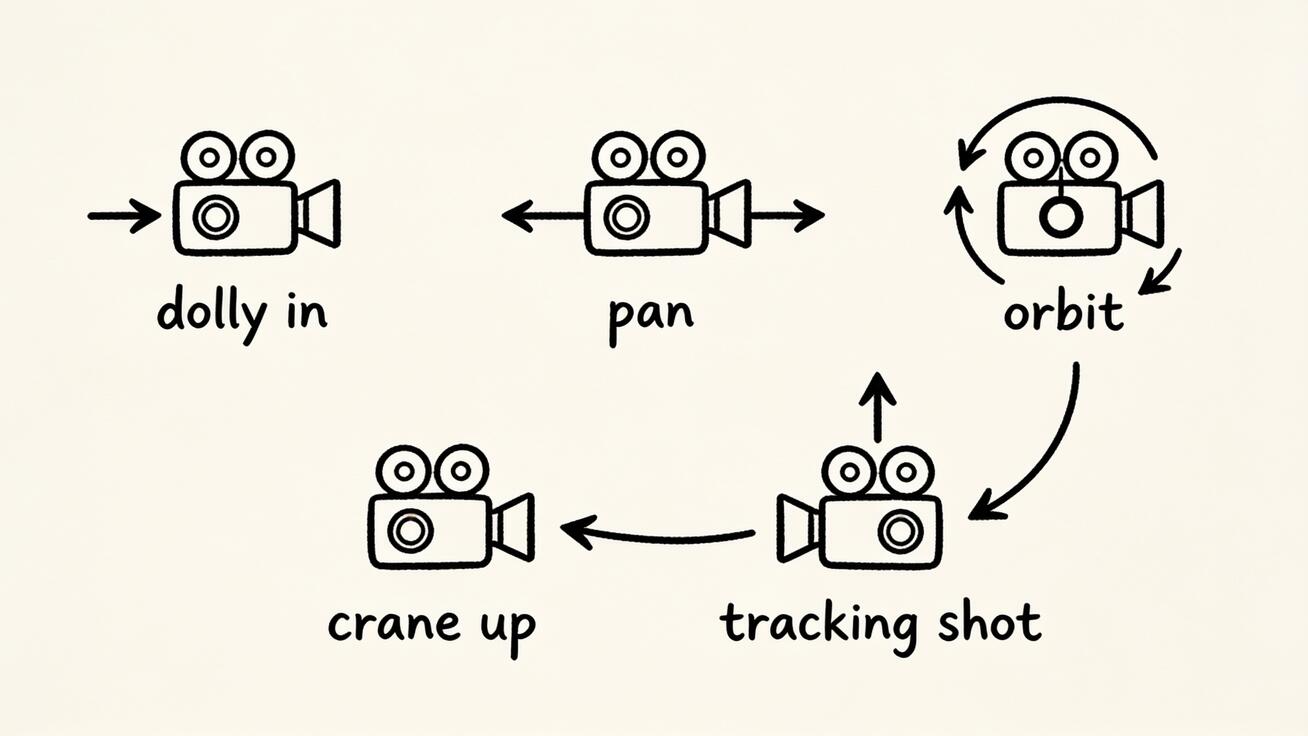
Camera moves are the fastest way to make AI video look intentional. Use plain film terms — Seedance 2.5 understands them — and pair each with a speed word ("slow," "smooth," "fast"):
- Dolly in / push in — camera moves toward the subject. Great for reveals and emphasis: "slow dolly-in to a close-up."
- Dolly out / pull back — camera retreats to reveal context: "pull back to reveal the full room."
- Pan left / right — camera pivots horizontally: "smooth pan right across the skyline."
- Tilt up / down — camera pivots vertically: "tilt up from the shoes to the face."
- Orbit / arc — camera circles the subject: "slow 180-degree orbit around the car."
- Crane up / down — camera rises or descends: "crane up from street level to a rooftop view."
- Tracking / follow — camera moves alongside a moving subject: "tracking shot following the runner from the side."
- Handheld — adds subtle, natural shake: "handheld documentary feel, slight camera movement."
- Static / locked-off — no movement, for clean product or interview shots.
Combine at most one or two moves per clip. Asking for a pan and an orbit and a crane in the same 30 seconds usually produces muddy, unstable motion. One decisive move almost always reads better.
10 Copy-Paste Seedance 2.5 Prompt Examples
These are written to take advantage of Seedance 2.5's long single-shot duration, 4K output, and native audio. Paste them in, then swap the details for your own subject.
1. Product reveal (ecommerce)
A matte black wireless speaker rotating slowly on a white pedestal, water droplets beading on its fabric grille. Slow 360-degree orbit, then a gentle dolly-in to the logo. Clean high-key studio lighting, soft reflections. Premium commercial product look, 4K, crisp detail. Subtle ambient electronic hum.
2. Café lifestyle (social/TikTok)
A barista in a denim apron pouring latte art into a ceramic cup, steam rising. Static medium shot, then a slow push-in to the cup. Warm morning window light, soft shadows. Cozy lifestyle aesthetic, shallow depth of field. Ambient café chatter and the clink of a spoon.
3. Cinematic character intro
A detective in a long coat steps out of the rain into a dim doorway, water dripping from the brim of his hat, looking off-screen. Slow dolly-in from a wide shot to a medium close-up. Moody blue night light with a single warm streetlamp. Noir cinematic look, film grain. Rain ambience and distant thunder.
4. Food close-up (restaurant/menu)
A chef's hand drizzling olive oil over a fresh burrata salad on a slate plate, basil leaves glistening. Overhead static shot tilting to a low angle. Soft natural daylight from the left. Appetizing food-commercial style, rich color, shallow focus. Gentle kitchen ambience.
5. Real estate walkthrough
A bright modern living room with floor-to-ceiling windows and minimalist furniture. Smooth forward tracking shot gliding from the entryway through to the balcony view. Natural midday light, airy and clean. Architectural-tour look, sharp 4K detail. Quiet ambient room tone.
6. App / UI promo
A smartphone floating against a soft gradient background, its screen animating through a clean fitness app interface. Slow dolly-in toward the screen, gentle parallax. Bright soft studio lighting, subtle reflections. Modern tech-commercial style, vivid color. Light UI tap sounds and a soft synth pad.
7. Nature / B-roll
Morning mist drifting over a pine forest valley as the sun breaks through the trees. Slow crane up revealing the layered mountain ridges beyond. Warm golden-hour backlight, volumetric god rays. Cinematic documentary look, deep 4K detail. Birdsong and a soft breeze.
8. Fashion / apparel
A model in a flowing red dress turning under studio lights, fabric catching the air. Smooth half-orbit around the model, then a slow tilt up. Dramatic high-contrast lighting with a dark background. Editorial fashion-film look, shallow depth of field. Subtle rhythmic music bed.
9. Talking-head explainer (with dialogue)
A friendly presenter in a casual blazer speaking directly to camera in a bright home office, gesturing naturally. Static medium shot with a very slow push-in. Soft key light from the front, warm and even. Clean YouTube-explainer look. Clear spoken dialogue: "Here's the one setting that changes everything."
10. Automotive hero shot
A sleek electric SUV driving along a coastal cliff road at sunset, dust trailing behind the wheels. Tracking shot following the car from the side, then a slow pull back to reveal the ocean. Warm golden light, long shadows. Premium automotive-ad look, cinematic 4K. Engine hum and wind, building music.
For more prompt patterns from the previous generation that still translate well, see our Seedance 2.0 prompts guide.
Image-to-Video Prompting
Image-to-video is where prompt writing changes the most. When you upload a still, the image already defines the subject, composition, and look — so your prompt's job is to describe motion and camera, not to re-describe what's already visible.
Start from the Seedance image-to-video tool, upload your frame, and write a prompt focused on what should happen:
The subject turns their head toward the camera and smiles. Gentle breeze moves the hair. Slow dolly-in. Keep the existing lighting and composition.
A few rules that keep image-to-video clean:
- Describe the change, not the scene. Don't repeat "a woman in a red dress" if she's already in the photo — say what she does.
- Add the line "keep the existing lighting and composition" when you want the model to preserve the look of your still rather than reinterpret it.
- Match physics to the image. If it's a calm portrait, ask for subtle motion; if it's an action frame, a bigger move fits. Mismatched motion is the most common reason an image-to-video result feels uncanny.
- One motion at a time. A single believable movement beats a complicated choreography that fights the source image.
Using References for Consistency
Seedance 2.5 accepts up to 50 multimodal references in a single generation — images, audio clips, 3D white models, and style references. This is the model's superpower for anyone producing more than one clip, and your prompt should work with the references, not against them.
- Character consistency: attach reference images of your character, then in the prompt write "the character from the reference images" instead of re-describing them. This keeps identity stable across multiple shots in a campaign.
- Style transfer: attach a style reference and prompt "in the visual style of the reference," then describe your new subject and action normally.
- Motion reference: in motion-reference mode, attach a clip whose movement you want to reproduce and describe your new subject performing that motion.
- Brand styling: reference your product shots and prompt for "brand-consistent styling and colors from the references."
The prompt and the references divide the labor: references lock identity and look, the prompt directs action and camera. When you find yourself writing a paragraph re-describing something that's already in a reference, delete it and point to the reference instead.
Writing Audio Into Your Prompt
Because Seedance 2.5 generates sound in the same pass as the picture, audio belongs in your prompt — not as an afterthought. Add a short audio clause at the end:
- Ambient/environmental: "ambient café noise," "ocean waves and wind," "quiet room tone."
- Sound effects: "footsteps on gravel," "the hiss of a steam wand," "a car engine starting."
- Dialogue: put the exact line in quotes — spoken dialogue: "Let's get started." Keep lines short for the best lip-sync.
- Music mood: "soft synth pad," "building cinematic score," "upbeat pop bed."
Keep audio direction concise. One clear ambience plus one optional effect or line is plenty; over-stuffing the audio clause makes the mix muddy. If you don't mention audio at all, the model still adds fitting sound, but you lose control over what it picks.
Common Prompt Mistakes to Avoid
- Too vague. "A nice video of a city" gives the model nothing to hold onto. Name the subject, time of day, and camera.
- Too many actions. Three unrelated motions in one clip produces stutter and morphing. Describe one continuous arc.
- Conflicting directions. "Static locked-off shot with a fast orbit" cancels itself out. Pick one camera behavior.
- Over-describing in image-to-video. Repeating what's already in your uploaded still confuses the model. Describe only the motion.
- Ignoring camera and lighting. These two add the most production value for the least effort — skipping them is why a prompt looks flat.
- Forgetting audio. With native sound available, leaving audio to chance wastes a built-in advantage.
- Padding with adjectives. "Beautiful stunning gorgeous amazing cinematic masterpiece" doesn't help. Concrete nouns and verbs beat stacked adjectives every time.
Seedance 2.5 Prompt QA Checklist
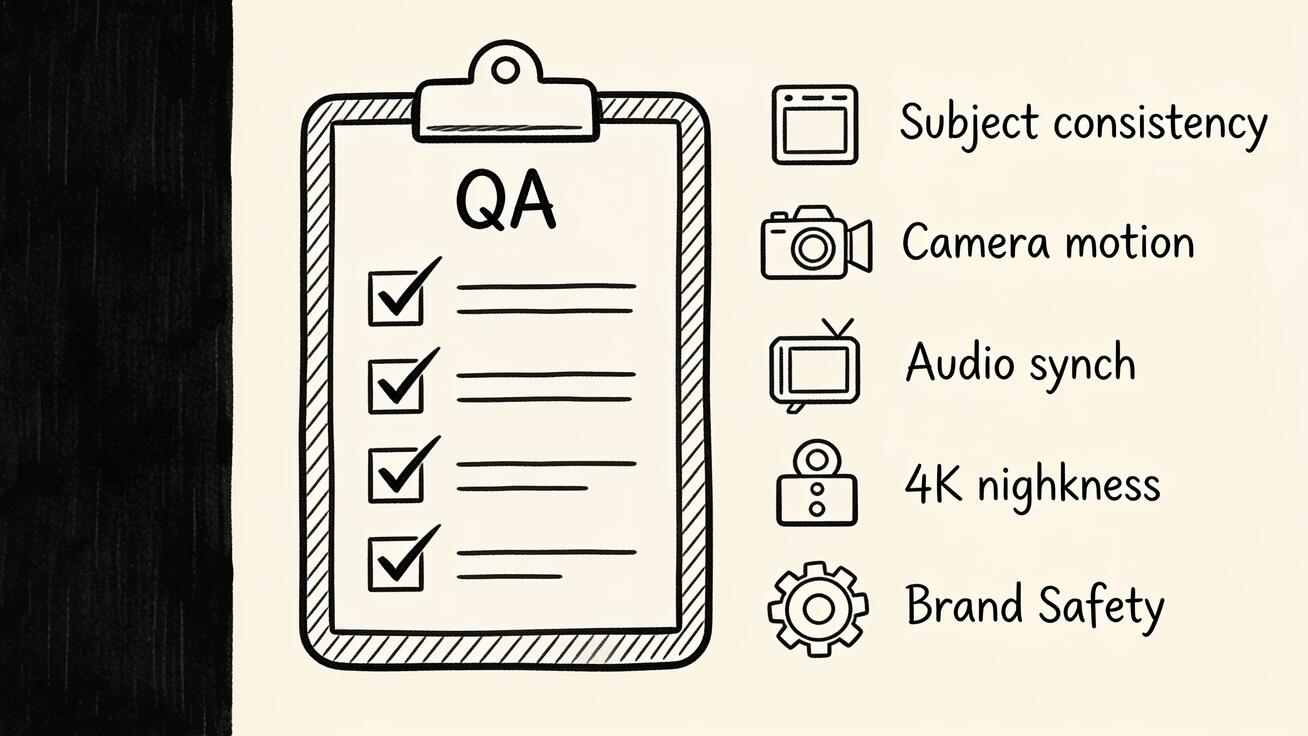
Before you publish a Seedance 2.5 generation, run this quick check — and regenerate with a tweaked prompt if anything fails:
- Subject consistency: does the character/product stay identical from the first frame to the 30-second mark? If it drifts, add references or sharpen the subject description.
- Motion quality: is the movement smooth and physically believable, with no morphing or warping? Simplify to one action if not.
- Camera move: did the model execute the shot you asked for? If it ignored the move, state it more plainly and remove competing directions.
- Audio sync: do sound effects and dialogue line up with the on-screen action? Shorten dialogue lines for better lip-sync.
- Resolution and detail: is the 4K output clean in close-ups, with no smeared textures?
- Brand safety: for commercial work, check text, logos, and anything on-screen that needs to be accurate before it goes live.
A failed check is usually a prompt problem, not a model problem — adjust one variable at a time so you can see what actually changed.
Frequently Asked Questions
What are the best Seedance 2.5 prompts for beginners? Start with the Subject + Action + Camera + Lighting + Style formula and one of the copy-paste examples above. Change the subject to yours and keep everything else, then adjust one element at a time. Single-action, single-camera-move prompts are the easiest to get right.
How long should a Seedance 2.5 prompt be? Long enough to cover all five parts, usually one to three sentences. You don't need a paragraph — you need specificity. A precise two-sentence prompt beats a vague five-sentence one.
Do I need different prompts for text-to-video vs image-to-video? Yes. Text-to-video prompts describe the entire scene; image-to-video prompts describe only the motion and camera, because the still already defines the subject and look.
How do I keep my character looking the same across clips? Use references. Attach reference images of the character and refer to "the character from the reference images" in your prompt instead of re-describing them each time. Seedance 2.5 supports up to 50 references for exactly this kind of consistency.
Can I write dialogue into a Seedance 2.5 prompt? Yes. Put the exact line in quotes and keep it short for the best lip-sync, since audio is generated together with the video in a single pass.
Why does my video ignore part of my prompt? Usually because the prompt has conflicting or stacked instructions. Remove competing camera directions, cut extra actions down to one arc, and state the most important element first.
Conclusion
Writing good Seedance 2.5 prompts comes down to a habit, not a trick: name the subject, give it one clear action, choose a camera move, set the lighting, lock the style, and add the audio you want. That structure turns Seedance 2.5's long single-shot, 4K, audio-native generations into footage you can actually publish — and it makes references and image-to-video far more predictable. Start from the prompt examples here, run the QA checklist before you publish, and refine one variable at a time. When you're ready, open the Seedance 2.5 model page and try your first prompt — and if you want to see how the model stacks up before you commit, read our Seedance 2.5 review and the Seedance 2.5 vs Veo 3.1 comparison.
Ready to try it yourself?
Put the steps from this guide into practice with Seedance and turn prompts or images into polished videos in minutes.
Free credits on signup. Plans from $28/month.
Related Articles
More posts in the same locale you may want to read next.

Seedance App Preview Video Generator 2026: Create App Store and Product Launch Clips
Use Seedance to turn app screenshots, feature copy, and launch goals into App Store previews, Google Play promo videos, and product launch clips.
Read article
Gemini AI Video Prompt Examples: Copy-Ready Veo Scenes and a Better Prompt Formula
Copy Gemini AI video prompt examples for cinematic motion, product ads, dialogue, and vertical clips, then adapt them with a practical Veo prompt formula.
Read article
How to Keep Product Shape Consistent in AI Video Ads
Lock product geometry, packaging, labels, references, camera angles, and approval checks so AI video ads preserve the real SKU across every shot.
Read article