
MiniMax H3 Ref2V vs FL2VA: Which Workflow Should You Use?
MiniMax H3 Ref2V vs FL2VA is not a simple quality contest. These are two task families built for different kinds of control. The official name for Ref2V is Ref2VA: it uses images, video, and audio as reusable references for the subject, style, motion, or voice. FL2VA uses zero, one, or two keyframes to define where one shot starts, where it ends, or both.
The practical question is therefore not “which checkpoint is better?” It is “what must stay fixed in this shot?” If the identity or product must survive a new camera and environment, choose Ref2VA. If the composition at the beginning or end must be exact, choose FL2VA.
AI Overview
What is the main difference between MiniMax H3 Ref2V and FL2VA?
Ref2VA carries reusable subject, style, video, or audio references into a newly composed shot. FL2VA animates from a first frame, toward a last frame, or between both endpoints.
Should I use Ref2VA or FL2VA for character consistency?
Use Ref2VA when the character must appear in new locations or camera angles. Use FL2VA when you already have the exact composition you want to animate.
Can both MiniMax H3 modes generate audio?
Yes. Both task families generate video with native stereo audio. Ref2VA is the stronger choice when an audio clip or voice timbre is part of the reference package.
Which mode is easier for a first test?
FL2VA is usually simpler because it can start from one image and one prompt. Ref2VA becomes valuable when a single frame no longer contains enough identity, motion, or audio information.
Ref2VA vs FL2VA: The Short Decision Rule
Searchers comparing these modes usually want a decision they can apply before loading hundreds of gigabytes of weights or building two ComfyUI graphs. Use this rule: FL2VA preserves an endpoint; Ref2VA preserves a reference role.
| Production need | Better starting point | Why |
|---|---|---|
| Animate one finished still | FL2VA | The source image is the exact first or last composition |
| Connect a designed opening and ending | FL2VA | Two keyframes define both endpoints |
| Put the same actor in a different location | Ref2VA | Identity can be separated from the new shot composition |
| Reuse a product across several ad setups | Ref2VA | Multiple views can describe geometry and materials |
| Reuse voice, ambience, or motion cues | Ref2VA | Audio and video can be assigned as references |
| Generate from text with no visual input | FL2VA family | The same checkpoint family also covers text-to-video |
H3 output is 24 fps with native 32 kHz stereo audio, and the base workflow normally produces 768p before any separate high-resolution regeneration stage. Those shared output specifications do not remove the difference in conditioning. The checkpoint choice still determines what kind of evidence the model receives.
For a broader introduction to multimodal reference assignment, see the MiniMax H3 reference video guide.
When Ref2VA Is the Better Tool
You want a subject, not a frozen composition
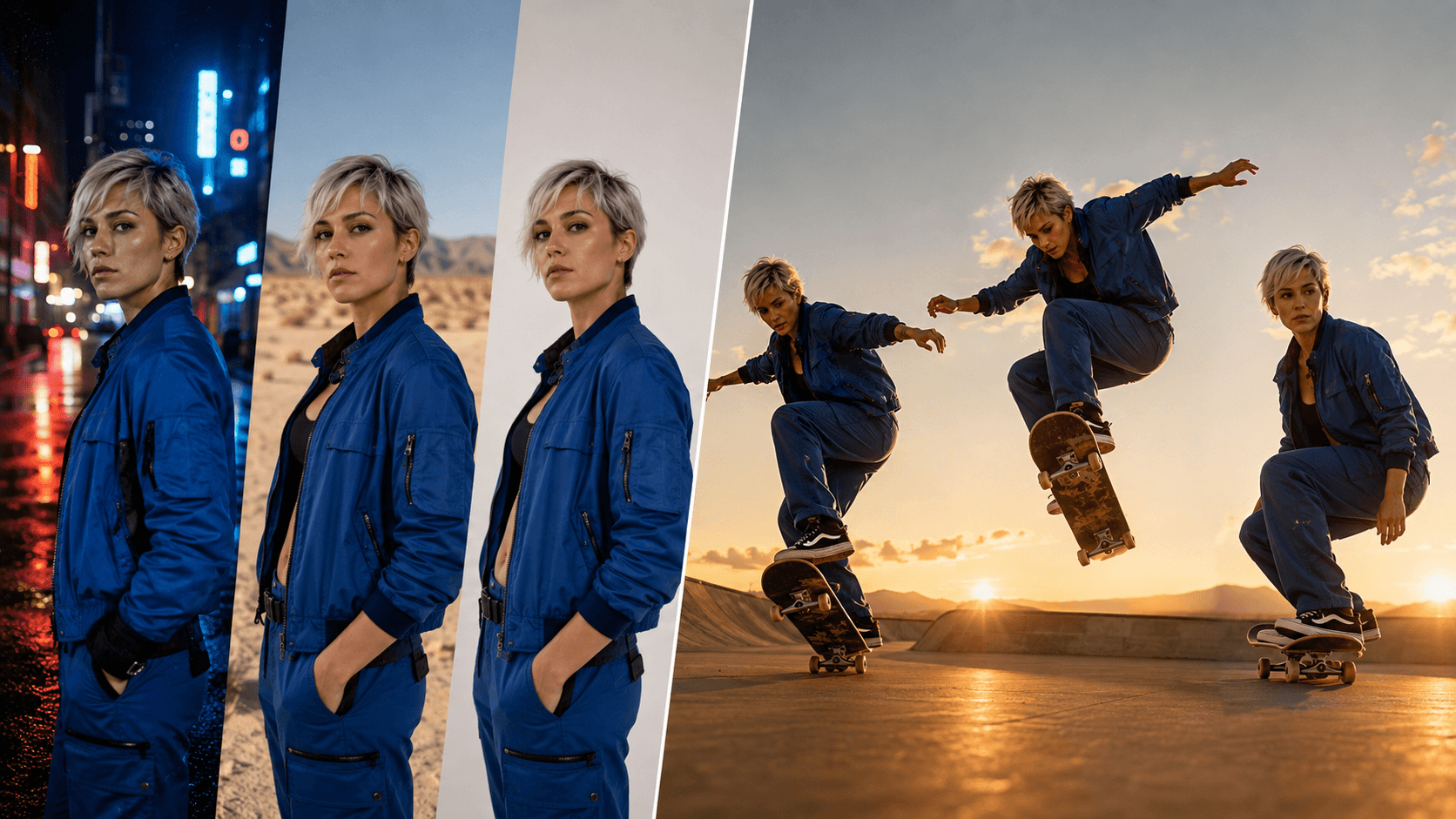
Ref2VA is best understood as casting. Give it evidence for who or what must remain recognizable, then describe a new shot. The open model accepts up to nine images, up to three reference videos, and up to three audio clips, with a maximum of twelve files across all reference types. Video and audio reference durations are limited, so each asset should have a clear job.
Do not feed nine near-duplicate portraits just because nine slots exist. A useful character package might contain a clean face view, a three-quarter body view, and one wardrobe detail. A product package might contain front, side, and close geometry. A motion reference should demonstrate timing or camera movement that still images cannot communicate.

Inspect face shape, silver hair, cobalt jacket, and earring across a wide change in lens, lighting, and environment—the kind of evidence a Ref2VA test should measure.
Assign one job to every reference
A strong Ref2VA prompt names each input and states its role. “Image 1 defines the actor,” “Video 1 provides the dolly motion,” and “Audio 1 provides the voice timbre” is clearer than asking the model to copy everything from everything. When two references disagree, say which one wins for face, wardrobe, movement, environment, and sound.
An official Ref2VA template result: evaluate whether identity and style survive the newly generated motion instead of judging only one sharp frame.
For a copy-ready structure, the MiniMax H3 prompting guide explains how to separate subject definitions from the target shot and soundscape.
When FL2VA Is the Better Tool
One frame already contains the answer
Choose FL2VA when the source still is not merely inspiration; it is the shot. With one image, you can treat it as the first frame and animate forward, or as the last frame and make the motion arrive there. With two images, the model has explicit visual endpoints. This makes FL2VA useful for controlled reveals, match cuts, loops, title-card arrivals, product transformations, and action that must land on a designed pose.
The common mistake is demanding a camera angle that the source frame cannot support. A close portrait does not contain the back of the jacket, the full room, or the actor's gait. FL2VA can invent missing information, but every invention creates a continuity risk. If the job requires a genuinely new shot rather than motion inside the supplied composition, switch to Ref2VA.
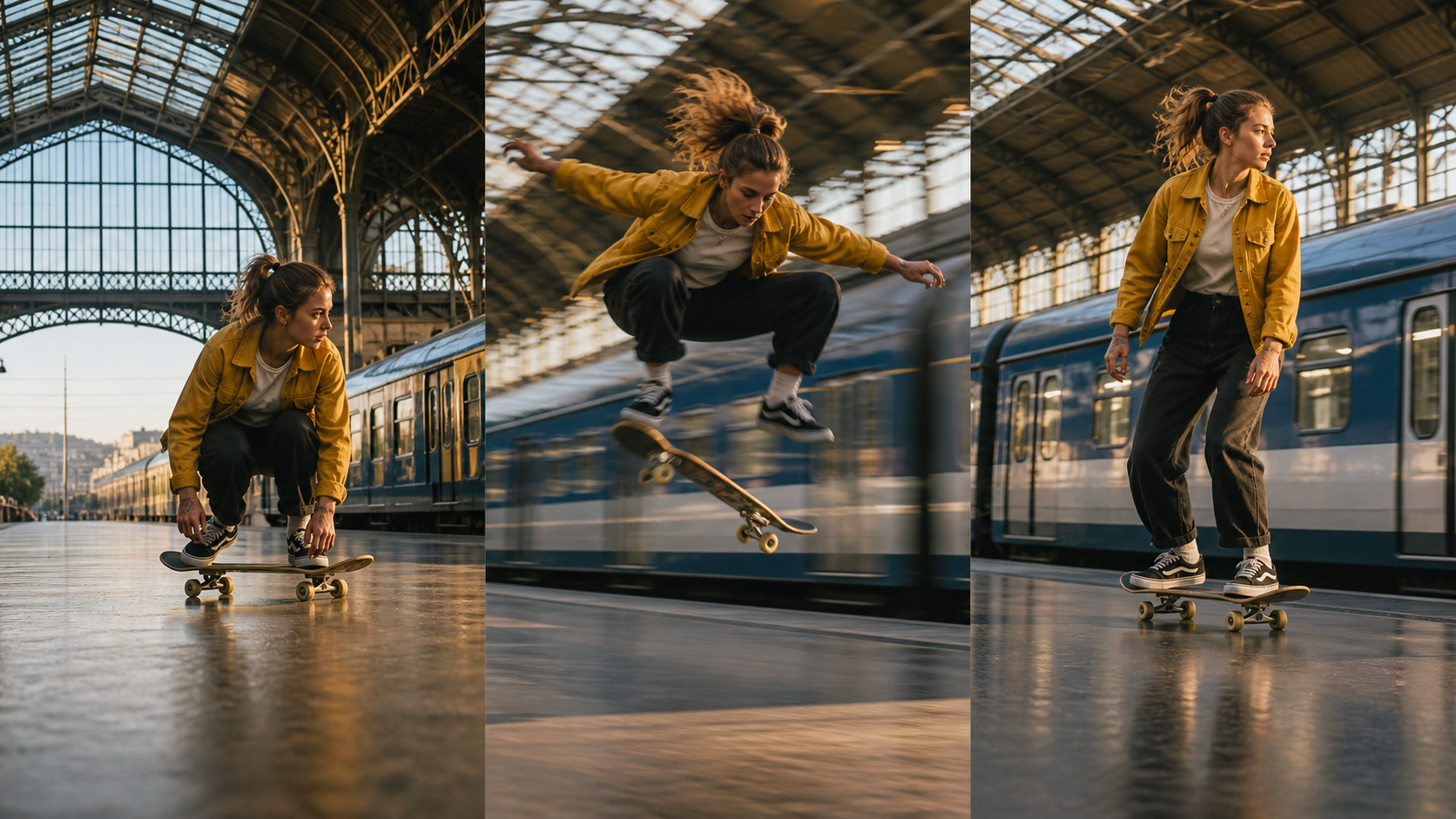
A useful FL2VA evaluation checks whether the middle motion is believable while the final pose, train geometry, direction, and wardrobe still resolve to the planned endpoint.
Design compatible endpoints
First and last frames should agree on subject identity, wardrobe, scene geometry, aspect ratio, and plausible movement. Large unexplained changes force the model to solve several problems at once. If the first image shows a standing actor in a station and the last shows a different lens, outfit, season, and location, the transition may spend its limited duration morphing rather than performing.
An official FL2VA result: look at endpoint accuracy, the path between frames, and whether native audio follows the visual action.
The MiniMax H3 first-and-last-frame guide covers endpoint design in more detail.
Build the Correct ComfyUI Workflow
Load only the task family you need
MiniMax H3 distributes separate FL2VA and Ref2VA checkpoint families. They are not two menu labels attached to one identical graph. FL2VA accepts text plus optional first and last image conditions. Ref2VA accepts ordered image, video, and audio references plus a prompt that defines how those references relate to the target.
Start by proving the smallest graph. For FL2VA, use one clean first frame, a short motion instruction, a fixed seed, and a short duration. Add a last frame only after the single-frame result moves naturally. For Ref2VA, begin with one identity image and one target-shot description. Add a second view, motion video, or voice clip only when the failure tells you what evidence is missing.
The MiniMax H3 ComfyUI setup guide provides the full local installation path. Keep model families in clearly named directories so a cached loader does not make a Ref2VA test look like an FL2VA test.
Prompt the target, not the reference inventory
After defining references, describe the finished video in temporal order. State the camera, action, environment, dialogue, ambience, and music. Do not spend the whole prompt repeating what is visible in the reference images. Ref2VA needs a new shot specification; FL2VA needs a plausible motion path between what is already visible.
Test Both Modes on the Same Brief
Score the failure that matters
Run the same creative brief through both modes only when the brief can be expressed fairly for both. Freeze duration, aspect ratio, prompt intent, seed policy, and review criteria. Then score identity, object geometry, endpoint accuracy, motion quality, camera control, audio relevance, and usable-frame rate.
Ref2VA should win when the same subject must survive a new composition. FL2VA should win when the first or final composition must match the input. A sharper frame does not compensate for the wrong actor; a consistent actor does not compensate for missing the required end card.

For products, inspect grille geometry, dial placement, handle shape, paint wear, and button count across environments—not just overall color.
Count accepted outputs, not render attempts
The cheapest workflow is the one that produces an approved shot with fewer reruns. Record why each version failed. If FL2VA repeatedly changes identity during a large camera move, the brief likely needs Ref2VA. If Ref2VA repeatedly misses an exact opening or closing composition, provide that endpoint through FL2VA instead of adding more descriptive adjectives.
For longer sequences, carry the approved result into the MiniMax H3 multi-keyframe workflow rather than expecting one generation to solve an entire scene.
Use Seedance Agent When You Do Not Want Two Local Pipelines
The local open-model route gives deep control, but the operational cost grows when every shot requires checkpoint selection, reference cleanup, prompt restructuring, version tracking, and manual reruns. That is precisely where Seedance Agent fits naturally.
Give the Agent the creative goal and reference pack, then review the proposed shot plan before spending on final generations. It can keep reference roles attached to the brief, choose an appropriate generation path, organize alternatives, and rerun only the failed shot instead of forcing you to rebuild the entire local graph. The useful benefit is not hiding the model; it is keeping the decision, evidence, output, and approval history together.
Use local Ref2VA or FL2VA when you need reproducible node-level control and have the hardware to maintain both task families. Use the hosted Agent when you want to move from references to approved shots without treating checkpoint plumbing as a second production. You can start the workflow with Seedance Agent and compare real outputs before committing to a larger sequence.
Conclusion
MiniMax H3 Ref2V vs FL2VA becomes simple once you define the invariant. Choose Ref2VA when the actor, product, style, motion cue, or voice must survive a newly composed shot. Choose FL2VA when one supplied frame is the exact composition to animate, or two frames define the required start and finish. Build the smallest possible graph, assign one role to each reference, test on accepted-output rate, and switch modes when the failure shows you are protecting the wrong thing. If you want the same reference planning, model choice, review, and partial-rerun logic without maintaining two local pipelines, try the Seedance Agent workflow.
Ready to try it yourself?
Put the steps from this guide into practice with Seedance and turn prompts or images into polished videos in minutes.
Free credits on signup. Plans from $28/month.
Related Articles
More posts in the same locale you may want to read next.

Seedance App Preview Video Generator 2026: Create App Store and Product Launch Clips
Use Seedance to turn app screenshots, feature copy, and launch goals into App Store previews, Google Play promo videos, and product launch clips.
Read article
Best AI Video-to-Video Models in 2026
The best AI video-to-video models in 2026 for editing footage you already shot: Higgsfield Genjutsu, Seedance 2.x, Runway Aleph, Luma Modify and Kling Omni compared.
Read article
Kling 4.0 vs Seedance 2.5: Full Comparison
Kling 4.0 vs Seedance 2.5 compared by spec: 30-second clips, keyframes vs 50 references, audio, 4K and 10-bit color, editing, and which model fits which job.
Read article