
MiniMax H3 AI Agent Skill: Install, Prompt, and Run Video Workflows

AI Overview
What is the MiniMax H3 AI agent skill?
It is a reusable instruction package that helps an AI agent turn a rough video idea and reference media into a structured H3 prompt. It does not replace the video model.
How do you install the official H3 prompt-writing skill?
Install h3-prompt-writing from the official MiniMax H3 repository with a compatible Skills installer. Then confirm that its SKILL.md and prompt references are readable.
Does the H3 prompt-writing skill generate the video?
The portable prompt-writing skill prepares instructions but makes no external API call. Rendering still happens through an H3 app, API, local deployment, or production pipeline.
Which MiniMax H3 workflow should you use?
Use text mode for an idea, first/last-frame mode for a controlled transition, and reference mode when images, video, audio, identity, motion, or rhythm must be preserved.
What the MiniMax H3 AI Agent Skill Actually Does
Searchers often mix up a Skill, an agent, the H3 model, and the rendering service. Installing the prompt-writing Skill alone will not create an MP4.
| Layer | What it does | What the user provides | What it returns |
|---|---|---|---|
| Agent | Reads the request and coordinates the task | Goal, files, constraints | A plan and tool calls |
| Skill | Teaches the agent how to structure H3 work | Brief and reference roles | A production-ready prompt |
| H3 model | Generates synchronized video and audio | Structured context | Rendered frames and sound |
| App, API, or local service | Submits, monitors, and delivers the job | Prompt, media, settings | Task status and final file |
Portable prompt-writing Skill versus Hub-only creative Skills
The official repository contains one portable h3-prompt-writing Skill plus eight style-specific generators. The portable Skill is Markdown with reference guides and makes no external API call. The style generators depend on MiniMax Hub canvas tools; copying their folders into a generic agent does not recreate that environment.
Skill versus model versus API
Treat the Skill as production knowledge, not a hidden model. It teaches an agent to identify the subject, action, camera, timing, audio, reference roles, and constraints. The model performs generation, while the API or app handles submission and retrieval. This separation makes failures easier to diagnose.
Who should use it?
The workflow suits creators building repeatable product ads, character shots, music videos, or brand scenes, plus developers who want consistent inputs. For one simple shot, starting in text to video may be faster than adding an agent layer.
Install and Verify the H3 Prompt-Writing Skill
Installation prerequisites
Use an agent environment that can discover local Skills and read SKILL.md files. You also need Node and npm for the installer command. The portable prompt-writing Skill itself does not need an H3 API key because it does not submit a paid generation request.
Install from the official GitHub repository
Run the official installation command in your terminal:
npx skills add https://github.com/MiniMax-AI/MiniMax-H3 --skill h3-prompt-writing
Restart or refresh the agent if its Skill catalog is cached. Then ask it to list the installed Skill by name. A successful install should expose the main instructions and two reference guides: one for text/keyframe work and one for full-reference work.
Inspect the Skill before running it
Open SKILL.md and check its activation rules, input modes, references, and output format. Confirm whether any shell command, upload, key, or API call is present. This prevents a prompt-only Skill from being mistaken for a renderer.
Run the H3 Agent Workflow from Brief to Final Video
Step 1: Give the Agent a production goal
Replace “make a great video” with one job: a product reveal, character entrance, music insert, or vertical campaign hook. State the audience, format, duration, and approval condition so the agent has a concrete finish line.
Step 2: Assign one role to every reference
References should not compete. Name each file and its purpose: one portrait controls identity, one product image controls geometry, one motion clip controls movement, and one audio file controls rhythm or ambience. When a single file has several roles, say which details have priority and what may change.
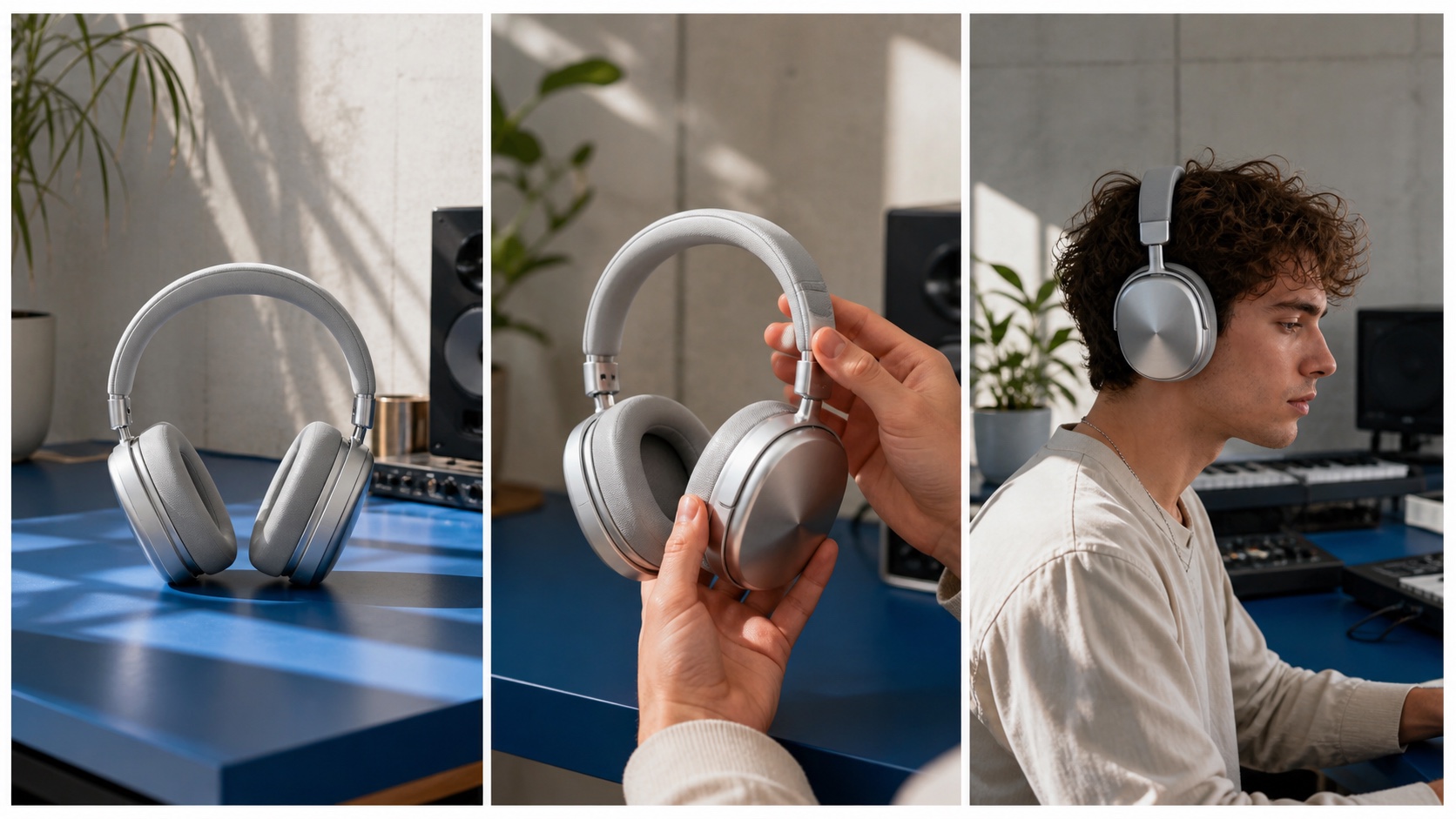
A useful reference test follows the same product from clean hero shot to hand interaction and real-world use; color, hinge shape, materials, and scale should survive every cut.
Step 3: Let the Skill build the structured prompt
A strong H3 prompt describes the subject, scene, action, camera path, temporal order, audio, invariant details, and ending state. Ask the agent to separate facts taken from references from creative additions. That makes review faster and prevents the agent from quietly changing an approved product or character.
Step 4: Render, review, and revise one variable
Submit the prompt through your H3 surface. Review motion, composition, identity, material detail, audio, and the final frame. Change one variable per retry so you know what improved, then save the successful correction in the project template.
Choose the Right H3 Input Mode
Text-to-video for idea-first generation
Choose text mode when no source frame is approved and visual exploration is the goal. Describe one shot with a clear action and camera move before adding secondary atmosphere. For alternative interpretations of the same brief, a multi-model AI video workflow can route the prompt to different generators and compare approved outputs.
First- and last-frame workflow for controlled transitions
Use first/last-frame mode when the opening composition, closing composition, or both must be fixed. The two images should share plausible subject scale, scene geometry, and visual style. The prompt should explain the physical transition between them rather than redescribing what the frames already show.
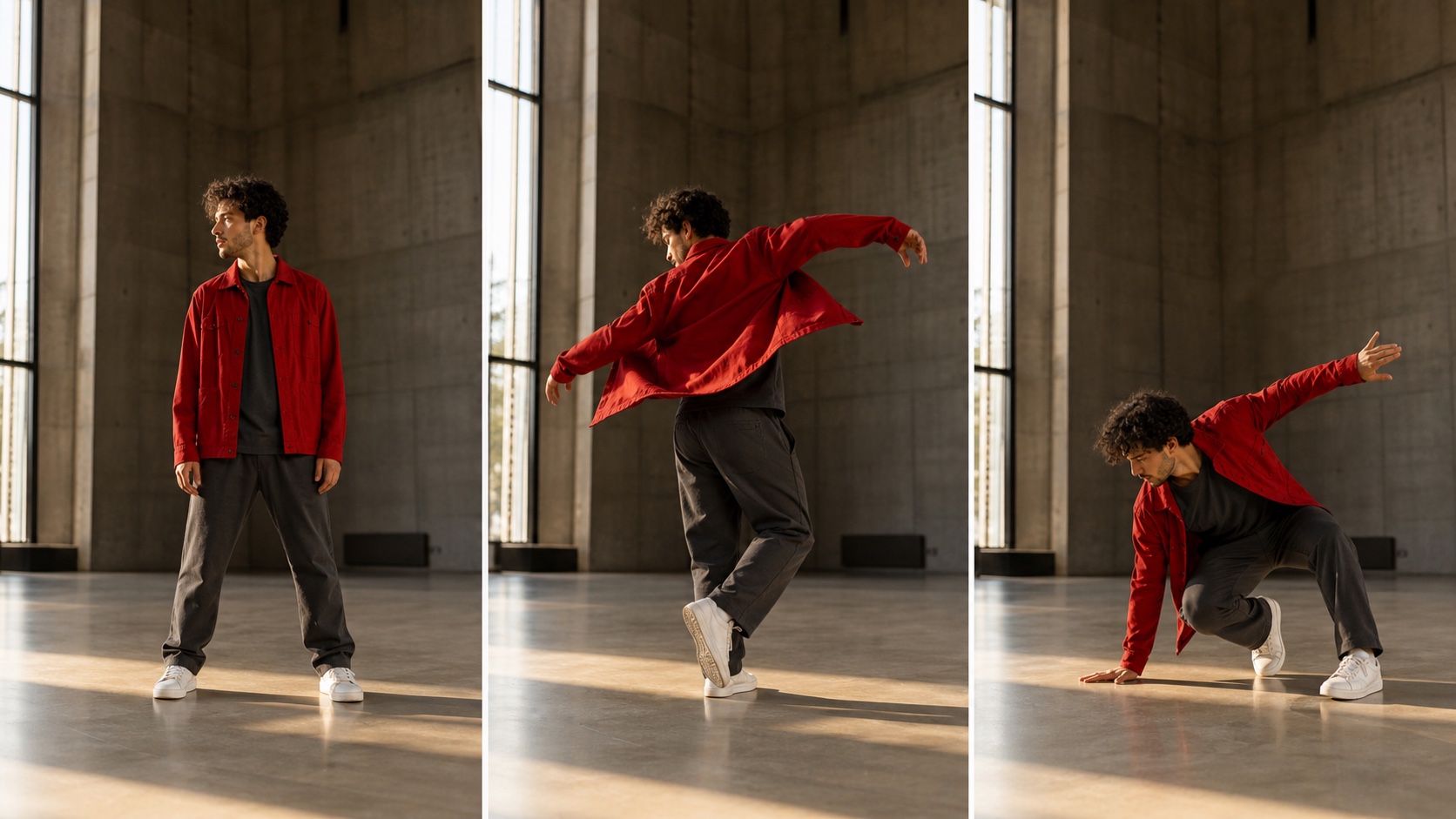
A controlled frame workflow has a readable journey: stable beginning, physically plausible middle action, and a final pose that matches the intended endpoint.
You can prepare the opening composition in image to video, then reuse the evaluation method here: inspect anatomy, cloth motion, floor contact, camera stability, and whether the ending arrives naturally.
Reference-to-video for identity, motion, and audio control
Reference mode is appropriate when the task depends on a recognizable person or product, a demonstrated movement, visual style, or a specific audio rhythm. Use the smallest set of strong references that covers those jobs. More files do not automatically create more control; they can introduce contradictory evidence.
Quick mode-selection table
| What you already have | Recommended mode | Agent should extract | Common failure |
|---|---|---|---|
| Written idea only | Text-to-video | Subject, action, camera, sound | Prompt tries to contain several shots |
| One approved image | First-frame video | Invariants and motion after frame one | Static image is overdescribed |
| Approved start and end | First/last-frame | Transition path and timing | Endpoints are physically incompatible |
| Identity, motion, or audio references | Reference-to-video | One explicit role per asset | References conflict or dilute priority |
Build a Reusable H3 Skill for Real Production
Product advertisement workflow
Create variables for product images, audience, platform, hook, duration, aspect ratio, must-preserve details, and prohibited claims. The Skill should ask for missing essentials, then output a brief, shot plan, structured prompt, and review checklist. This is more reusable than storing one giant “perfect prompt.”
Character consistency workflow
Define identity anchors—face, hair, age, clothing, proportions, signature props—and separate them from elements that may change, such as expression, pose, camera distance, and lighting. After rendering, compare identity at the widest shot, fastest motion, and darkest moment, not only in the clean portrait frame.
Team variables and approval rules
Store versioned inputs outside the chat: filenames, permissions, prompt revision, model settings, output URL, reviewer, and approval status. Add a stop condition for missing rights or incompatible references.
Connect H3 to a multi-model video pipeline
One agent can route a keyframe task to an image model, a reference-heavy shot to H3, a separate cinematic scene to Seedance, and dialogue review to an AI video generator with native audio. Routing by shot requirement is more reliable than forcing one model to solve an entire campaign.
Play the 8-second reference test and watch the identity, instrument geometry, stick contact, camera changes, and native drum audio remain coherent across the full sequence.
Quality, Safety, and Troubleshooting Checklist
The Skill works, but the output is still weak
Check whether the action has a start, change, and end; whether the camera has one readable path; and whether audio direction is concrete. A well-formatted vague prompt is still vague. Reduce the shot to its essential beat, then add detail only after motion works.
References conflict with each other
Remove near-duplicates and assign one authority for identity, product geometry, motion, style, and sound. If two images disagree about clothing or proportions, state which wins. If a motion clip changes the camera as well as the action, decide whether both behaviors should transfer.
The Agent cannot render the video
First confirm whether the installed package is prompt-only. Then check model access, credentials, endpoint, upload support, file permissions, moderation, and job status. For self-hosted pipelines, hardware, dependency, and storage failures are separate from prompt quality; the local versus cloud AI video guide helps isolate that architectural choice.
Final production checklist
Before approval, review identity, product geometry, hands, surface contact, camera continuity, audio synchronization, reference rights, aspect ratio, duration, and export integrity. Keep failed outputs and reasons; accepted and rejected cases turn a generic Skill into production knowledge.
Conclusion
The MiniMax H3 AI agent skill is most useful as a repeatable bridge between an ambiguous creative request and a render-ready video brief. Install the official prompt-writing package, verify what it does not automate, assign one role to every reference, choose the correct H3 mode, and save successful corrections as reusable rules. When you want to test the same structured brief on another cinematic generator, create the first shot with Seedance and compare cost, continuity, motion, and approval time instead of judging a single showcase clip.
Ready to try it yourself?
Put the steps from this guide into practice with Seedance and turn prompts or images into polished videos in minutes.
Free credits on signup. Plans from $28/month.
Related Articles
More posts in the same locale you may want to read next.

Seedance App Preview Video Generator 2026: Create App Store and Product Launch Clips
Use Seedance to turn app screenshots, feature copy, and launch goals into App Store previews, Google Play promo videos, and product launch clips.
Read article
Best AI Video-to-Video Models in 2026
The best AI video-to-video models in 2026 for editing footage you already shot: Higgsfield Genjutsu, Seedance 2.x, Runway Aleph, Luma Modify and Kling Omni compared.
Read article
Kling 4.0 vs Seedance 2.5: Full Comparison
Kling 4.0 vs Seedance 2.5 compared by spec: 30-second clips, keyframes vs 50 references, audio, 4K and 10-bit color, editing, and which model fits which job.
Read article