
Wan Animate 2 vs SCAIL-2: Skeleton-Based vs Skeleton-Free Character Animation
AI Overview
What is the core difference between Wan Animate 2 and SCAIL-2?
Current Wan-Animate-2 and SCAIL-2 both accept a raw driving video without requiring an extracted skeleton. Wan emphasizes a direct reference-image-plus-driver workflow, while SCAIL-2 adds mask-based control, replacement, optional pose control, and multi-reference support.
Which is better for multi-character scenes — Wan Animate 2 or SCAIL-2?
SCAIL-2 is the stronger fit because its official workflow supports multiple references and targeted masks. Wan-Animate-2 is simpler when one reference character needs to follow one driver performance.
Which model produces better facial expressions and character “life”?
There is no official apples-to-apples benchmark proving a universal winner. Wan can feel more direct with a clean close-up driver, while SCAIL-2 gives more control when identity, masks, and multiple subjects must stay separated.
Can both Wan Animate 2 and SCAIL-2 run locally in ComfyUI?
Yes. Both have local ComfyUI workflows, but SCAIL-2 requires more prepared inputs—especially masks—while Wan-Animate-2 can start from a reference image, raw driving video, and text prompts.
Why This Comparison Matters — Two Fundamentally Different Approaches
The title captures the way many creators first encounter this comparison, but the current models need one important clarification: Wan-Animate-2 is no longer a skeleton-first system. The older Wan2.2 Animate workflow used intermediate pose, face, and segmentation signals. The current Wan-Animate-2 release directly conditions on the driving video, just as SCAIL-2 is designed to avoid mandatory pose extraction.
The real choice is therefore not simply skeleton versus skeleton-free. It is minimal end-to-end transfer versus a broader mask-controlled transfer system. Wan-Animate-2 focuses on turning one reference image into a moving character with prompt-controlled appearance, background, and viewpoint. SCAIL-2 unifies animation and replacement, keeps masks central to control, supports multi-reference combinations, and can also use a pose-driven path when explicit body control is useful.
If you want a managed workflow without installing local models, Seedance is the quickest starting point. If you want the detailed Wan setup before comparing results, read the Wan Animate 2 tutorial.
How Each Model Works — Skeleton vs Skeleton-Free
Wan-Animate-2 takes a reference image, a raw driving video, and text descriptions. The reference branch protects identity and appearance; the driving video supplies body movement, head motion, expression timing, and camera-relative action. Time-aligned positional encoding and sparse reference attention help connect those streams without an OpenPose or NLFPose preprocessing stage.
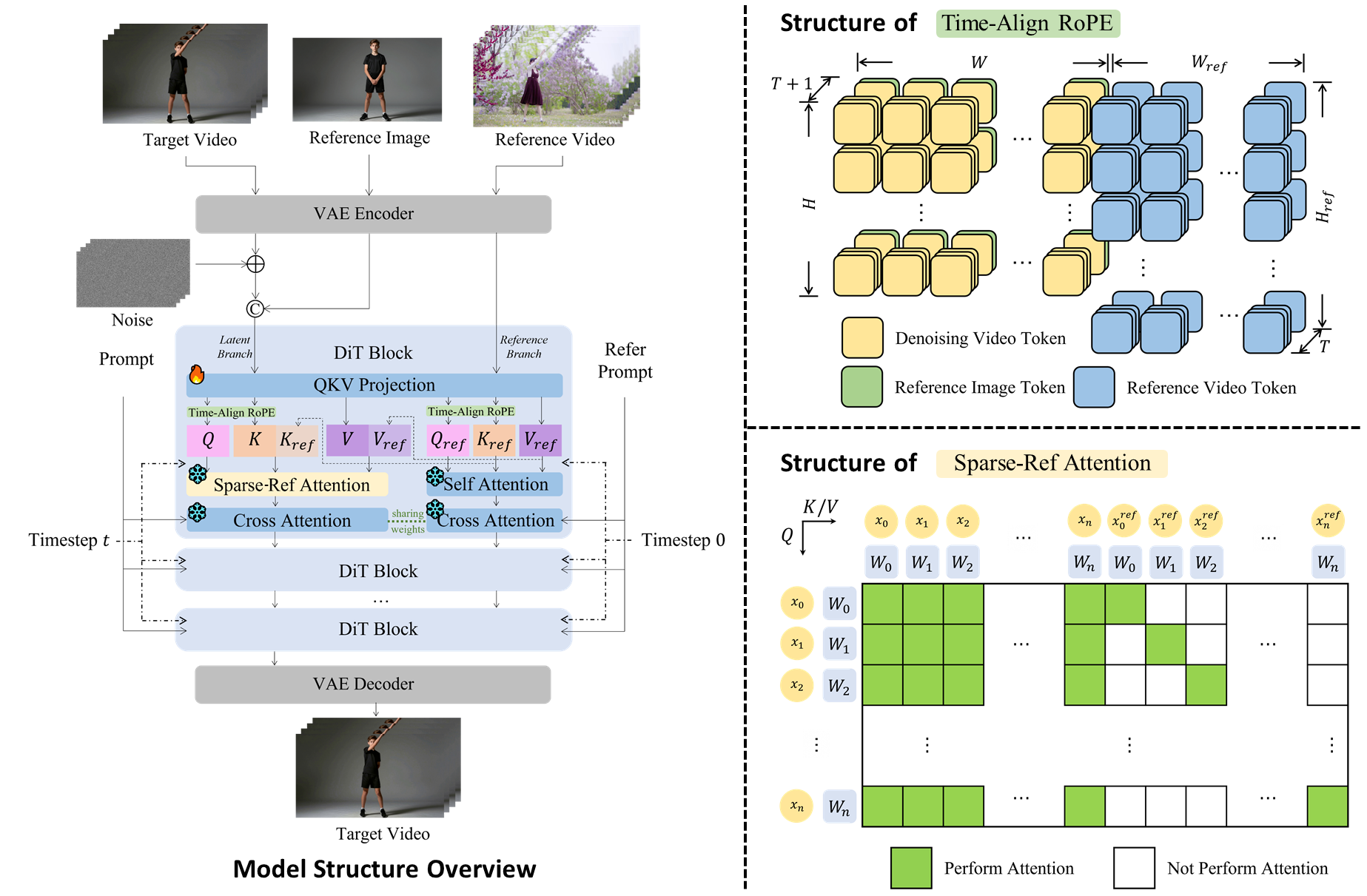
Wan-Animate-2 uses the reference image and driving video directly; it does not require a skeleton map as the main motion input.
SCAIL-2 also supports end-to-end motion transfer from raw video, but it exposes more spatial control. Its unified interface uses reference and control masks to determine which character is visible, animated, or replaced. Those masks are required even in Animation Mode. A separate pose-driven path remains available, so “skeleton-free” describes the default end-to-end option—not the removal of every control signal.
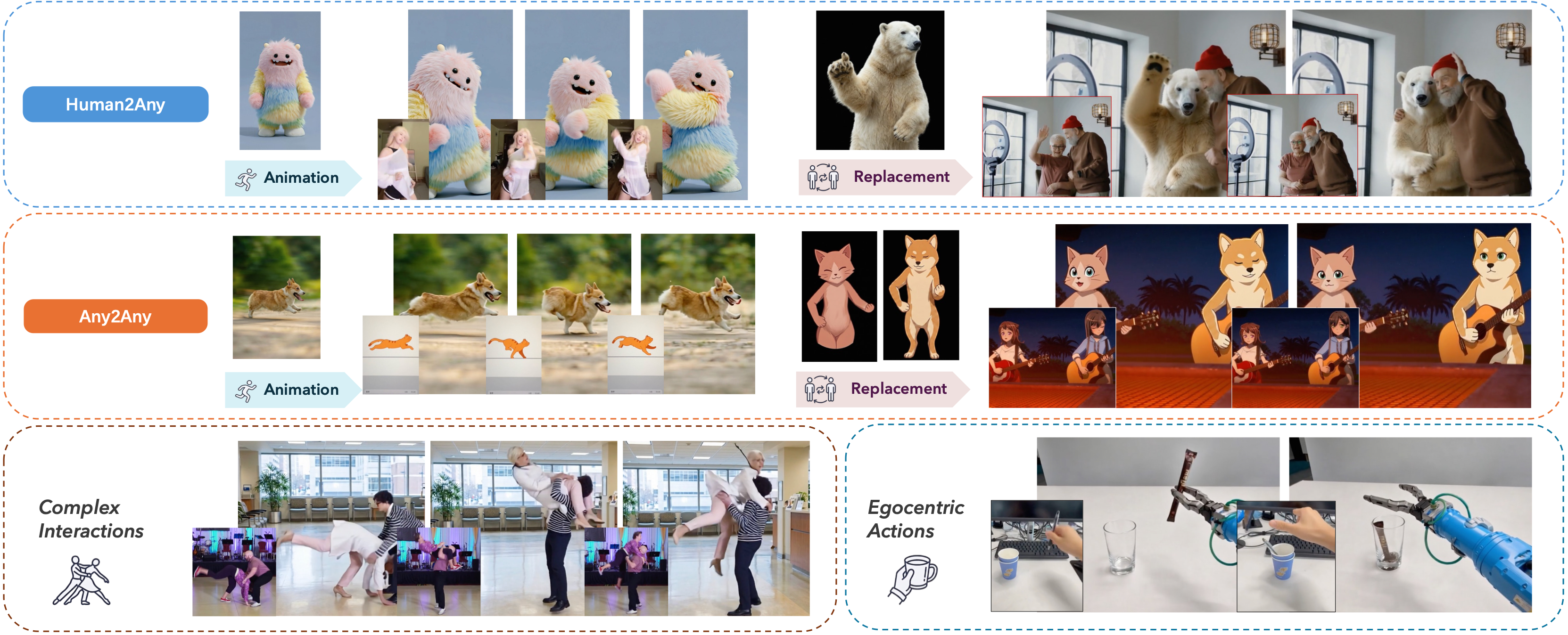
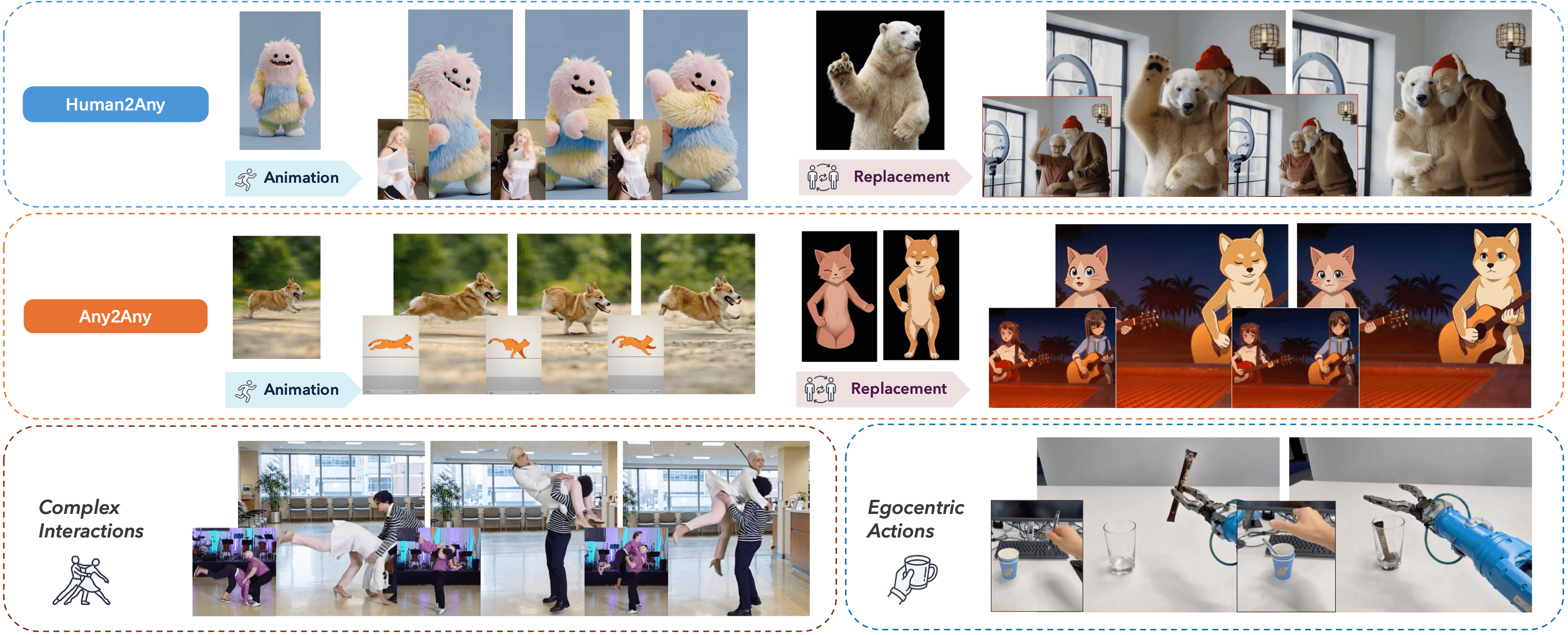
SCAIL-2 spans animation and replacement across human, animal, stylized, multi-person, and first-person inputs.
Head-to-Head — Expression, Fidelity, and Motion Quality
| Test area | Wan Animate 2 | SCAIL-2 |
|---|---|---|
| Motion input | Raw driving video | Raw driving video, with optional pose-driven control |
| Character control | One reference character and text prompts | Reference image(s), masks, and control video |
| Facial performance | Strong when the driver face is clear and large enough | Strong when the face remains visible and masks are stable |
| Viewpoint control | Explicit text-guided viewpoint changes | Primarily follows the control video and spatial masks |
| Identity fidelity | Direct reference attention | Reference conditioning plus masked subject separation |
| Setup risk | Prompt or reference mismatch | Mask leakage, overlap, or incorrect subject assignment |
Do not judge either model from a single showcase clip. Use the same reference, driver, duration, resolution, and crop. Inspect eyes, mouth shape, hands, clothing texture, silhouette edges, and the frame immediately after an occlusion. For facial “life,” choose a driver with visible eyes and mouth, then check whether micro-expressions survive without changing identity. For full-body fidelity, include turns, crossed limbs, and fast hand motion.
You can prepare a strong source still with an Image to Video workflow, then keep that exact image fixed across both tests.
Multi-Character Scenes — Where SCAIL-2 Has the Real Edge
SCAIL-2 has the clearest practical advantage when a shot contains several characters. Its multi-reference workflow can assign separate reference images to different masked regions, which makes subject ownership explicit. That matters in dance duos, conversations, team shots, and replacement scenes where one person should change while another remains intact.
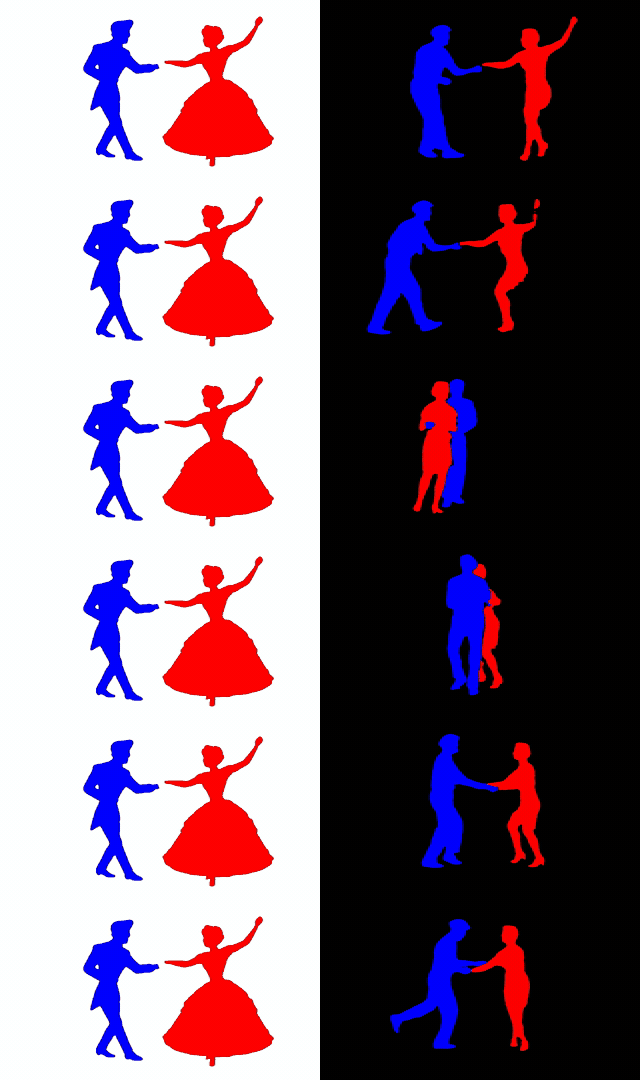
Multiple reference characters can be combined in one controlled scene instead of being merged into a single identity condition.
The trade-off is preparation. Masks must remain temporally stable, subjects should not overlap for long periods, and each reference should be visually distinct. Start with a short clip, verify left/right subject assignment, then extend the run. If your task depends on following an existing performance rather than inventing motion from a still, the Reference to Video scene page shows the same input logic in a hosted workflow.
Wan-Animate-2 remains a better fit for a single hero character, especially when you want quick iteration with a clean driver video. For two or more independently controlled subjects, SCAIL-2 offers the more deliberate control surface.
ComfyUI Setup — Inputs, Nodes, and Workflow Complexity
For Wan-Animate-2, prepare one full-body reference image, one raw driver video, and concise prompts for appearance and background. Match the reference crop to the driver framing, keep the face readable, and begin with a short segment. Current workflows do not need the older chain of OpenPose, face crops, SAM2 masks, or WanVideoAnimateEmbeds nodes.
For SCAIL-2, prepare the reference image, reference mask, driving or control video, and control mask. End-to-end preprocessing can use the raw driver while segmentation generates masks; pose-driven preprocessing is still available when you need explicit pose control. Multi-reference scenes add one reference-and-mask pair per subject, so graph complexity grows with the cast.
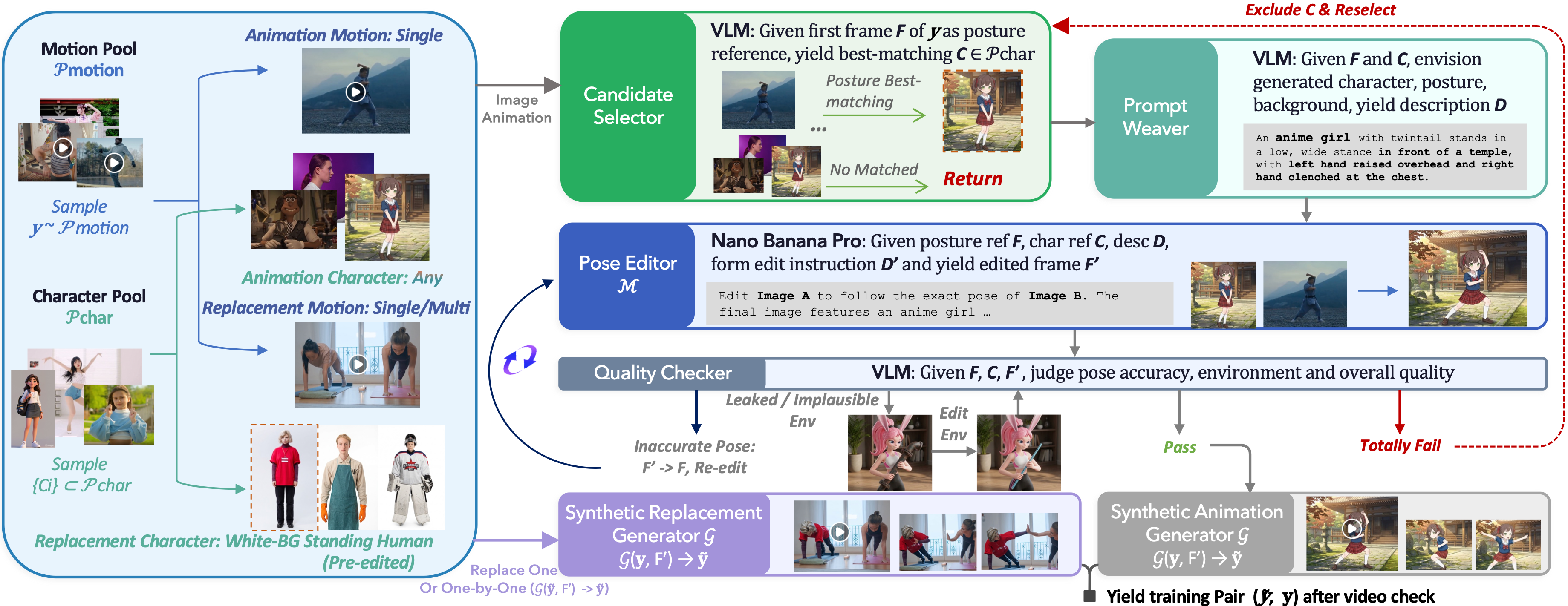
The SCAIL-2 pipeline illustrates why its control range is broad: animation, replacement, multi-character motion, and quality filtering are treated as one system.
In both workflows, test low frame counts first, keep seeds fixed, and change one variable at a time. Save the reference crop, driver trim, prompts, masks, and model version with every comparison; otherwise a quality difference may come from preprocessing rather than the model.
Which One to Use — Decision Guide by Use Case
Choose Wan-Animate-2 when you have one reference character, one clear driver, and want the shortest path from inputs to animation. It is especially practical for solo dance, presenter motion, stylized avatars, and experiments where prompt-controlled background or viewpoint matters.
Choose SCAIL-2 when you need multi-reference casting, selective replacement, non-human transfer, complex interactions, or the option to switch between raw-video and pose-driven control. Expect to spend more time preparing and validating masks.
| Use case | Better starting point |
|---|---|
| One character, fastest setup | Wan-Animate-2 |
| Two or more distinct characters | SCAIL-2 |
| Selectively replace one performer | SCAIL-2 |
| Text-guided viewpoint change | Wan-Animate-2 |
| Optional explicit pose control | SCAIL-2 |
| Hosted generation with no local setup | Seedance |
For a different approach to controlling continuity between endpoints, see MiniMax H3 first-and-last-frame workflows. For open-model trade-offs beyond character transfer, the LTX 2.5 review provides useful context.
Conclusion
Wan-Animate-2 and SCAIL-2 are both modern end-to-end character-animation systems, so the current decision is not literally skeleton versus no skeleton. Use Wan-Animate-2 for a clean, direct single-character workflow with text-guided scene control. Use SCAIL-2 when masks, multiple references, replacement, or optional pose control justify the extra setup. The fairest test is a fixed reference-and-driver pair, a short clip, and a frame-by-frame review of identity, expression, occlusion recovery, and subject separation.
Ready to create your own AI video?
Turn ideas, text prompts, and images into polished videos with Seedance. If this article helped, the fastest next step is to try the product.
Free credits on signup. Plans from $28/month.
Related Articles
More posts in the same locale you may want to read next.

Seedance App Preview Video Generator 2026: Create App Store and Product Launch Clips
Use Seedance to turn app screenshots, feature copy, and launch goals into App Store previews, Google Play promo videos, and product launch clips.
Read article
Gemini AI Video Prompt Examples: Copy-Ready Veo Scenes and a Better Prompt Formula
Copy Gemini AI video prompt examples for cinematic motion, product ads, dialogue, and vertical clips, then adapt them with a practical Veo prompt formula.
Read article
How to Keep Product Shape Consistent in AI Video Ads
Lock product geometry, packaging, labels, references, camera angles, and approval checks so AI video ads preserve the real SKU across every shot.
Read article