
Vidu Reference to Video Prompts: Formula, Examples and Consistency Fixes

AI Overview
What should a Vidu reference to video prompt include?
Assign every image a role, describe one visible action, name the camera behavior, set the scene and lighting, then state what must remain unchanged. Make each instruction testable in the finished clip.
How many reference images can Vidu use?
Vidu’s current creation pages describe support for one to seven reference images. Use only images that add a distinct identity, object, wardrobe, environment, or style constraint.
How do I keep a character consistent in Vidu?
Use clear, compatible views and repeat a short identity lock covering face, hair, outfit, silhouette, and signature props. Reduce competing subjects, ambiguous pronouns, and unnecessary camera changes.
Can Seedance Agent manage a multi-reference workflow?
Yes. Seedance Agent can turn a brief and references into a reviewable shot plan, keep constraints attached to each shot, and rerun only the output that fails continuity or motion review.
What Vidu Reference to Video Prompts Must Control
Treat each image as a production asset
People searching for Vidu reference to video prompts need a prompt that tells the model why each uploaded image exists. Vidu’s current workflow accepts references for characters, objects, and scenes, while its creation pages describe support for one to seven images. Seven weak references are not automatically better than three clear ones.
Before writing, give every image a private label: Character A, Character B, Product, Location, Wardrobe, or Style. Then decide whether the image is a hard continuity anchor or a loose visual influence. A front portrait may lock facial identity; a full-body view can protect silhouette and clothes; a location image establishes architecture and light. If two images contradict one another, the prompt cannot reliably repair the conflict.
The reference-to-video workspace is the most direct place to organize this kind of task. If you only have one source still, the image-to-video workspace provides a simpler baseline before adding more constraints.

A finished reference-guided concept created for this guide. The woman, mustard raincoat, one-black-ear greyhound, cobalt suitcase, wet platform, and silver train are the continuity anchors.
Define success before you generate
Write a five-item acceptance check beside the prompt: same woman, dog markings, coat, suitcase geometry, and coastal station. Motion and framing can change; those anchors cannot. This turns “it feels wrong” into a precise revision such as “restore the dog’s black right ear and keep the tan suitcase strap.”
The Five-Part Prompt Formula
1. Reference roles and continuity anchors
Start with a compact cast list: “Image 1 is the woman’s face and bob haircut; Image 2 is her mustard raincoat; Image 3 is the white greyhound with one black ear; Image 4 is the cobalt suitcase with a tan strap.” Avoid ambiguous pronouns when two possible subjects are visible.
2. One action with a readable beginning and end
Describe a single action that can fit the requested duration: “The train stops, the woman kneels to clip the leash, then stands as the doors open.” That is more controllable than asking for arrival, boarding, conversation, a camera orbit, and departure in one short clip. Give the action an ending pose so the last second does not dissolve into random movement.
3. Camera, scene, light, and lock line
Name the shot size and one camera move: “medium-wide eye-level shot, slow push in.” End with a lock line: “Preserve facial identity, dog markings, coat color, suitcase shape, station architecture, and screen direction; no duplicate limbs, replacement props, text, or logo.”

A second finished frame changes action and camera distance while retaining the selected character, animal, wardrobe, luggage, and location anchors.
Copy-and-Paste Vidu Reference to Video Prompts
Character, animal, and location prompt
“Use Reference 1 for the woman’s face, short black bob, and proportions; Reference 2 for the mustard raincoat, black boots, and backpack; Reference 3 for the slim white greyhound with one black right ear; Reference 4 for the cobalt hard-shell suitcase with one tan vertical strap; and Reference 5 for the wet coastal train platform. A silver train glides in from right to left. The woman kneels, clips the brown leash to the dog’s collar, looks toward the opening door, and stands. Medium-wide eye-level shot with a slow push in, soft morning light after rain, realistic motion. Preserve every named anchor, the woman’s two hands, the dog’s anatomy, and screen direction. No new people in the foreground, no text, no logo.”
If the result struggles, remove a nonessential wardrobe or background image before adding more prose.
Product geometry prompt
“Use Reference 1 as the exact product: matte coral-orange insulated bottle, black loop cap, narrow silver collar, pale cream multi-line wave band, unchanged proportions. Use Reference 2 for the wet basalt waterfall environment. A hiker’s hand reaches in and lifts the bottle as water splashes around the base. Low close camera, subtle forward movement, crisp product with a softly blurred waterfall, cool dawn mist and warm rim light. Preserve cap shape, collar width, wave placement, surface finish, and color through every frame. No label text, logo, dents, duplicate bottle, warped fingers, or color shift.”
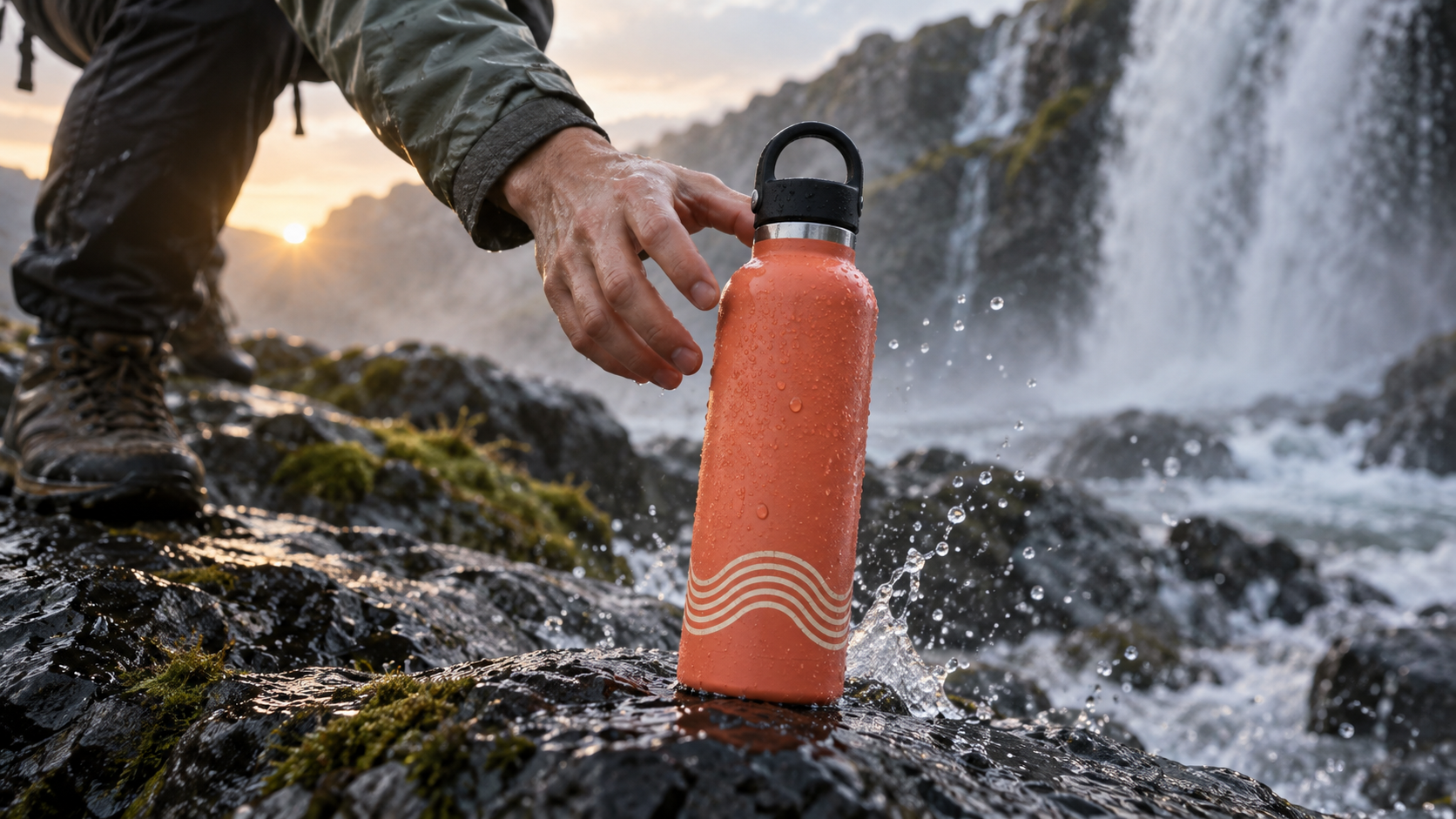
A finished product shot makes geometry, color, cap construction, hand contact, and environmental motion easy to inspect.
Two-character interaction prompt
“Reference 1 is Character A, a chef in a charcoal apron. Reference 2 is Character B, a cyclist in a cobalt jacket. Reference 3 is the small open kitchen with green tiles. Character A slides a ceramic bowl across the counter; Character B catches it with both hands and smiles. Locked medium two-shot, one gentle rack focus from the bowl to Character B, warm window light. Keep both faces, hairstyles, outfits, relative height, bowl pattern, counter layout, and left-right positions consistent. No face swap, extra fingers, changing clothes, dialogue text, or camera cut.”
For more examples of how a reference system differs from a one-shot generator, see the Vidu alternatives guide. It helps separate access and product choice from the prompt design problem addressed here.
Choose and Label Reference Images
Use complementary views, not near-duplicates
A useful character set includes one face view, one three-quarter view, and one full-body outfit view. A product set can use a hero angle, side view, and hand-contact view. For a location, choose one wide image plus a detail that should survive closer shots.
Crop background clutter, but keep details needed for scale. Avoid heavy beauty filters, extreme distortion, occluded hands, unreadable product edges, and interface chrome. Give saved references stable names such as MAYA_YELLOW_COAT or CORAL_BOTTLE_V1.
Match the prompt to the frame
If the source is a tight portrait, do not demand a fast full-body spin with an unseen outfit. Start near the reference framing, approve identity and geometry, then expand camera distance or motion one variable at a time. This reveals which change caused drift.
An existing Seedance editorial output, not an official Vidu benchmark. Review the subject’s face, clothing, foot contact, background traffic, and final pose while the camera and crowd move.
Fix Identity, Product, and Scene Drift
Repair identity before adding style
If a face changes at distance, bring the camera closer, reduce head rotation, add a stronger three-quarter reference, and shorten the action. Repeat only the highest-value facial anchors. If clothes change, name the exact garment, color, material, and silhouette once in the cast list and again in the lock line. If two characters merge, give them fixed left-right positions and distinct actions.
Product drift needs geometric language rather than mood words. Specify cap type, handle, proportions, label placement, material, and color. Ask for one contact event, such as lifting or setting down, and keep the product large enough to read. The environment consistency guide offers a useful inspection method for architecture, props, light direction, and spatial continuity across changed compositions.
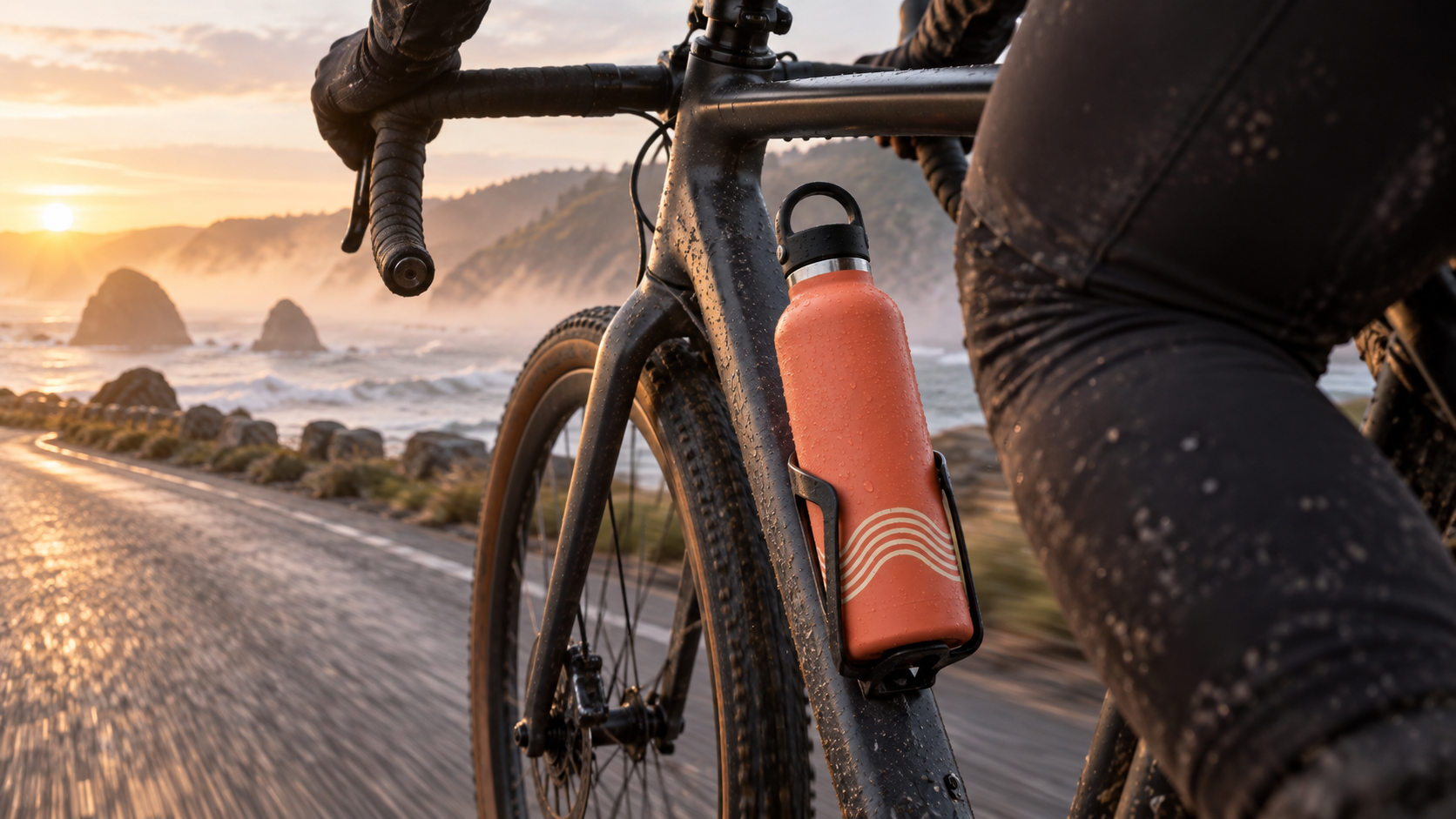
A changed environment and moving camera put the same cap, collar, wave band, color, and proportions under a harder continuity test.
Separate reference failure from motion failure
Pause the output at the first clear frame. If identity or geometry is already wrong, repair references and prompt roles. If the opening is correct but later frames drift, reduce action complexity, motion amplitude, camera travel, or duration. If everything remains recognizable but the clip feels flat, then improve timing, performance, and camera energy. Changing all three layers at once destroys the diagnostic value of the next generation.
A distinct existing Seedance output for reviewing hands, instrument geometry, performance timing, camera distance, and the complete moving result.
Scale Reference Shots with Seedance Agent
Turn prompt fragments into a controlled shot plan
The hard part of multi-reference production is rarely the first prompt. It is keeping reference roles, accepted frames, aspect ratio, camera direction, approvals, and rerun notes aligned across a sequence. A pasted prompt can describe one shot; it does not automatically preserve why a reference was chosen or which constraint failed in shot four.
Seedance Agent begins with the brief and source assets, proposes a script and shot plan for review, then keeps each reference attached to the shot where it matters. You can approve the plan before paid generation, compare finished outputs, and rerun only the weak section instead of rebuilding the whole sequence. The multi-model AI video workflow explains how this handoff works when different shots benefit from different models.
Use the right route for the job
Use Vidu directly when you want to test its current Reference to Video model, learn how its settings respond, or make one controlled clip. Use Seedance Agent when the deliverable has multiple shots, stakeholders, versions, or deadlines and the production record matters as much as the prompt. Keep the same reference labels and acceptance checks in either route so an approved asset can move between tools without losing its meaning.
Conclusion
Strong Vidu reference to video prompts work like compact production instructions: assign every image a role, limit the action, name one camera move, describe the scene, and repeat the continuity anchors that must survive. Begin with the fewest compatible references, test near the source framing, and diagnose identity, geometry, motion, and environment separately before spending another generation. When the idea becomes a multi-shot deliverable with approvals and selective reruns, start with Seedance Agent and carry the same reference labels and acceptance checks into one managed workflow.
Ready to try it yourself?
Put the steps from this guide into practice with Seedance and turn prompts or images into polished videos in minutes.
Free credits on signup. Plans from $28/month.
Related Articles
More posts in the same locale you may want to read next.

Seedance App Preview Video Generator 2026: Create App Store and Product Launch Clips
Use Seedance to turn app screenshots, feature copy, and launch goals into App Store previews, Google Play promo videos, and product launch clips.
Read article
How to Make a Talking AI Avatar You Can Reuse
Make a talking AI avatar with Seedance: design one consistent character, give it a voice, and make it speak in a talking photo or a full Seedance 2.5 scene, episode after episode.
Read article
Best AI Video-to-Video Models in 2026
The best AI video-to-video models in 2026 for editing footage you already shot: Higgsfield Genjutsu, Seedance 2.x, Runway Aleph, Luma Modify and Kling Omni compared.
Read article