
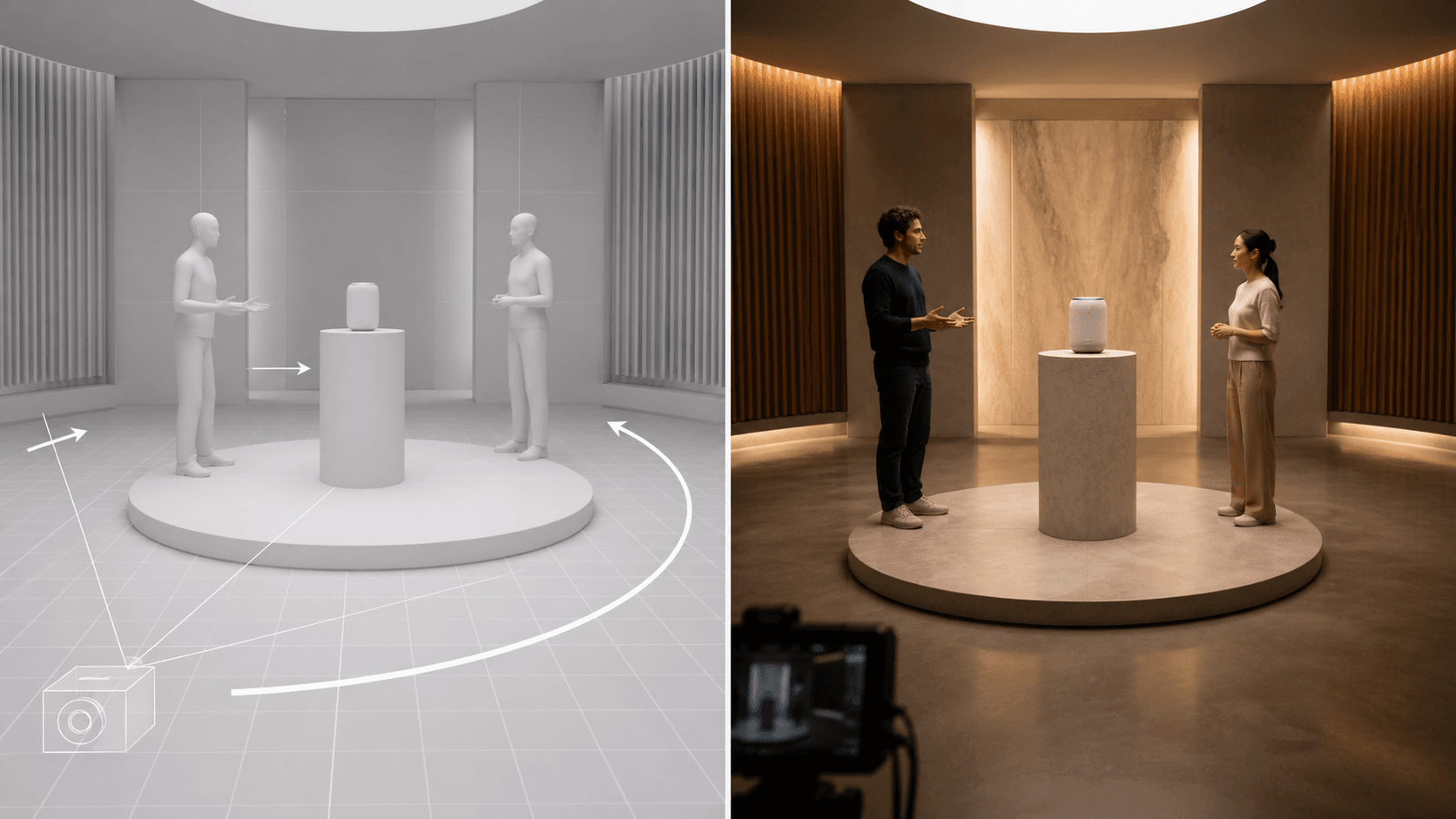
AI Overview
What is the Seedance 2.5 white model?
A white model is a textureless 3D or pose-based reference that defines subject placement, camera position, motion paths, and scene depth before generation. It tells Seedance 2.5 how a shot is staged without locking its final appearance.
Why use a white model reference instead of just writing a prompt?
Text explains intent, while a white model makes spatial relationships visible. It is especially useful when a camera path, several characters, or a precise product reveal must follow an approved layout.
Can I use the white model reference in Seedance 2.5 on seedance.tv?
Yes. Add the blockout as an image or video reference in a supported Seedance 2.5 reference workflow, then describe how its composition and motion should guide the final shot.
What types of videos benefit most from white model reference?
Product reveals, multi-character dialogue, choreographed music videos, action scenes, and cinematic previs benefit most. These jobs depend on blocking and camera logic, not appearance alone.
What Is the White Model in Seedance 2.5
A Seedance 2.5 white model is a simplified spatial plan for a shot: an untextured clay render, low-detail 3D scene, mannequin pose sequence, or stick-figure layout. It shows where everything goes and how it moves, not final skin, wardrobe, materials, or color.
That makes it different from a normal image reference. Character images define appearance, style images define visual language, and motion clips carry timing. The white model defines composition, blocking, camera angle, travel direction, and depth.
White-model control lets a director approve a difficult shot's geometry before spending time on its final look. Seedance can then interpret the blockout with appearance, material, video, and audio references.
How White Model Reference Works in Seedance 2.5
Think of the white model as the shot's spatial contract. Seedance reads the relative scale and position of subjects, their facing direction, major pose changes, foreground and background layers, and the camera's location or route. Your prompt explains which parts of that contract must remain exact and which parts may be redesigned.
Input Format and Preparation
Use a clean still for one approved composition or a short clip when the camera or subject follows a path. Match the target aspect ratio, keep essential subjects inside frame, show the floor or horizon, and avoid textures that could be mistaken for final styling.
Pair White Model with Appearance References
Seedance 2.5 supports up to 30 image, 10 video, and 10 audio references per generation. Treat the 50-input capacity as a ceiling. Start with the white model, then add only the character, product, style, motion, and audio references with unique jobs.
Use Reference to Video when the blockout or motion guide is the main instruction. For a single approved opening composition, Image to Video may be the simpler route.
How to Create a White Model Reference
You do not need a polished 3D pipeline. Choose the lightest method that makes the spatial idea unambiguous.
Method 1: Export a Simple 3D Blockout
In a 3D package, use neutral materials, basic set geometry, and mannequins posed at the action's start and end. Place the intended camera and export a still or playblast. Include floor contact and major occluders; omit decorative props.
Method 2: Build a Pose Sequence
A pose estimator can convert key performance frames into skeleton diagrams. Keep three to five meaningful poses—anticipation, action, contact, recovery, and final hold—using one crop and clear time labels.
Method 3: Draw a Stick-Figure Layout
For the fastest previs, draw figures over a perspective grid. Mark camera, subject labels, facing direction, eyelines, entrances, exits, and travel arrows. Clarity matters more than polish.
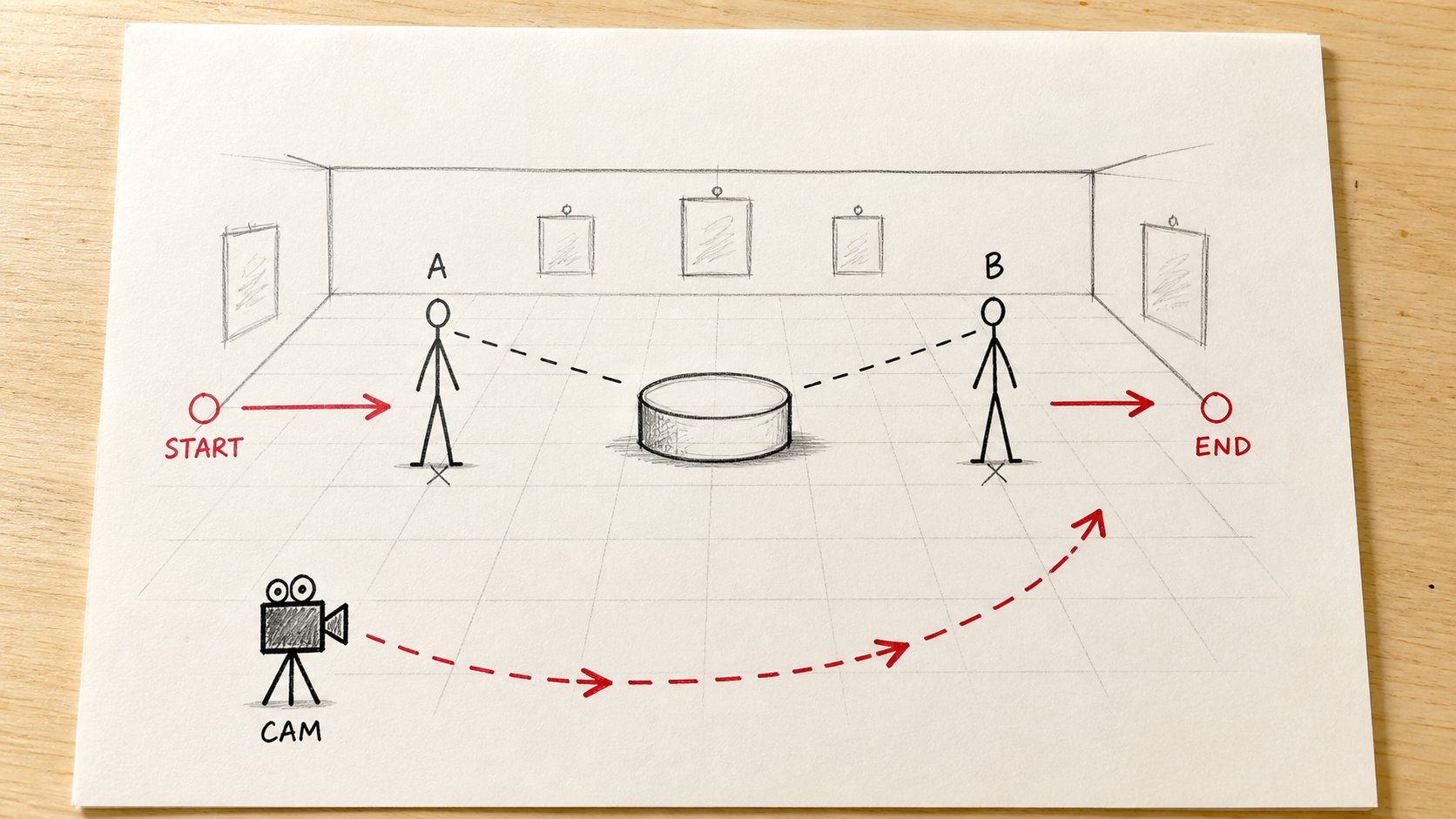
A useful stick-figure reference makes subject positions, travel direction, eyelines, and the camera route obvious before generation.
Prompt Template for White Model Reference
Use the white-model reference for exact subject positions, relative scale, floor contact, camera height, lens direction, and the clockwise camera path. Use the character and product references only for appearance. Preserve the center pedestal and both eyelines. Replace the gray blockout with a realistic warm gallery, natural skin, accurate product materials, and cinematic lighting. One continuous shot, no added people, no position swaps.
The prompt assigns one job to each reference instead of asking every asset to control everything. The Seedance video prompt guide has more reusable camera and preservation language.
Spatial Blocking with White Model Reference
Spatial blocking defines positions, depth order, crossings, and safe camera travel. It is the foundation of readable multi-character direction.
Build the Blocking Pass
- Place the main subject and the story-critical object.
- Add secondary characters with clear left/right relationships and eyelines.
- Mark foreground, middle-ground, and background depth.
- Draw the camera start, end, and travel curve.
- Test entrances, exits, occlusion, and the final composition.
- Export the cleanest view and write a prompt that protects those decisions.
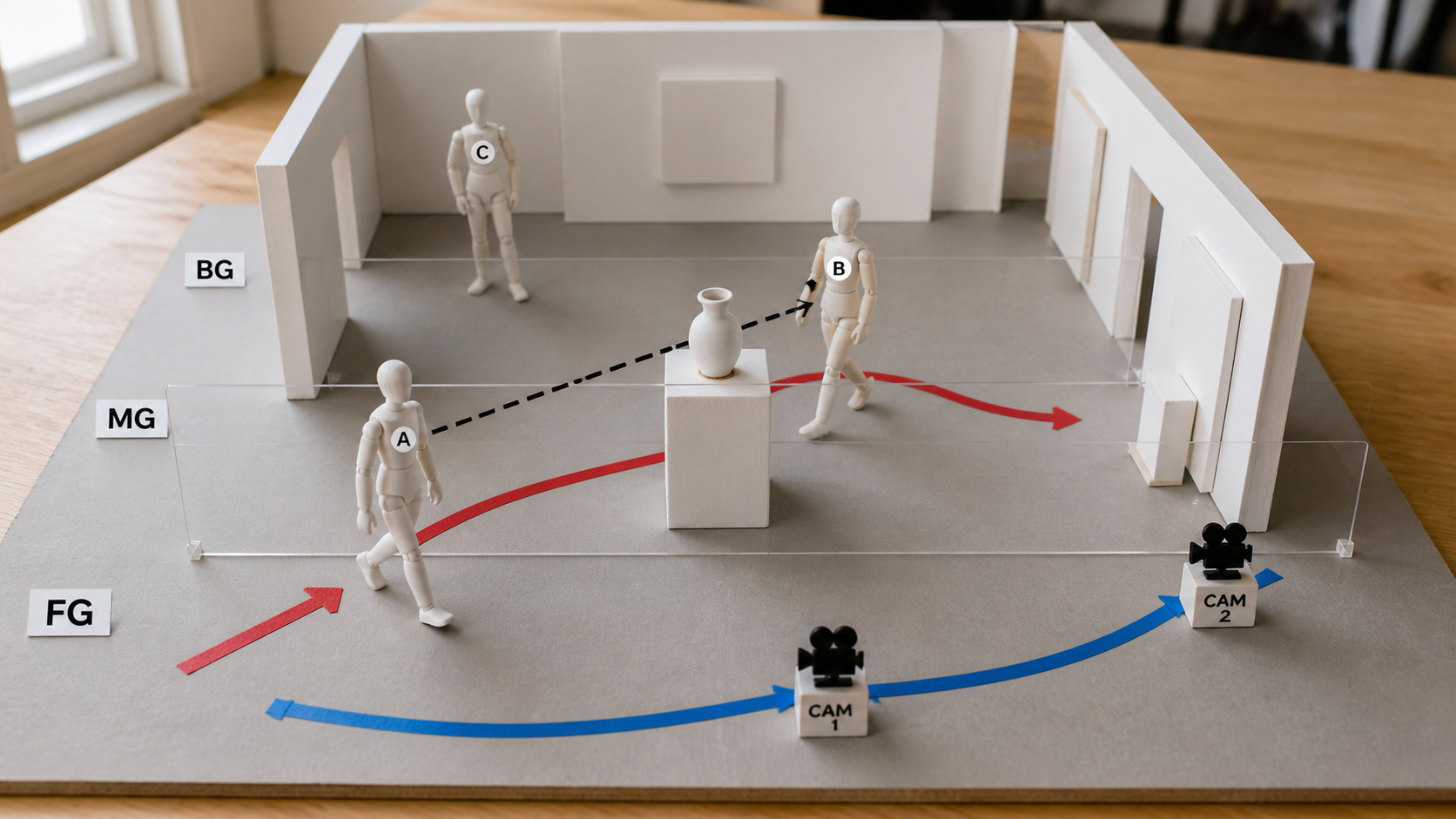
Depth layers, subject crossings, eyelines, and the camera route are easier to review when they are visible in one physical blocking plan.
Block Multi-Character Scenes
Label each figure by role and keep their silhouettes separate. Specify who faces whom, which side of frame each person owns, and whether a crossing happens in front of or behind another subject. Avoid placing two action arrows through the same space at the same time. If the shot is still difficult, split it into two controlled beats and use the handoff-frame method in the Seedance storyboard-to-video guide.
Action Planning with White Model Reference
Blocking controls position; action planning controls change. Build an arc with anticipation, execution, and resolution. Define a walk's destination, a fight's contact points, or a reveal's camera target and final hold.
Match Action to Audio
Audio references provide rhythm, dialogue cadence, or impact points. Mark beats in the prompt: “0–3s approach,” “3–5s turn,” “5–8s reveal,” and “8–10s hold.” Avoid stacking several major changes into one second.
Use a finished performance like this as a review target: character spacing, movement arcs, occlusion, and the final group pose should all read clearly.
Calibrate Complexity
A white model that is too simple leaves depth ambiguous; one that is too detailed creates conflicts. Keep geometry affecting composition, contact, occlusion, or camera safety. Test a short draft before final quality.
Best Use Cases for Seedance 2.5 White Model
Ecommerce Product Reveals
Block the pedestal, product scale, presenter distance, hand approach, camera orbit, and final packshot. Pair the white model with an approved product image so the blockout controls motion while the image protects geometry, color, and label placement.
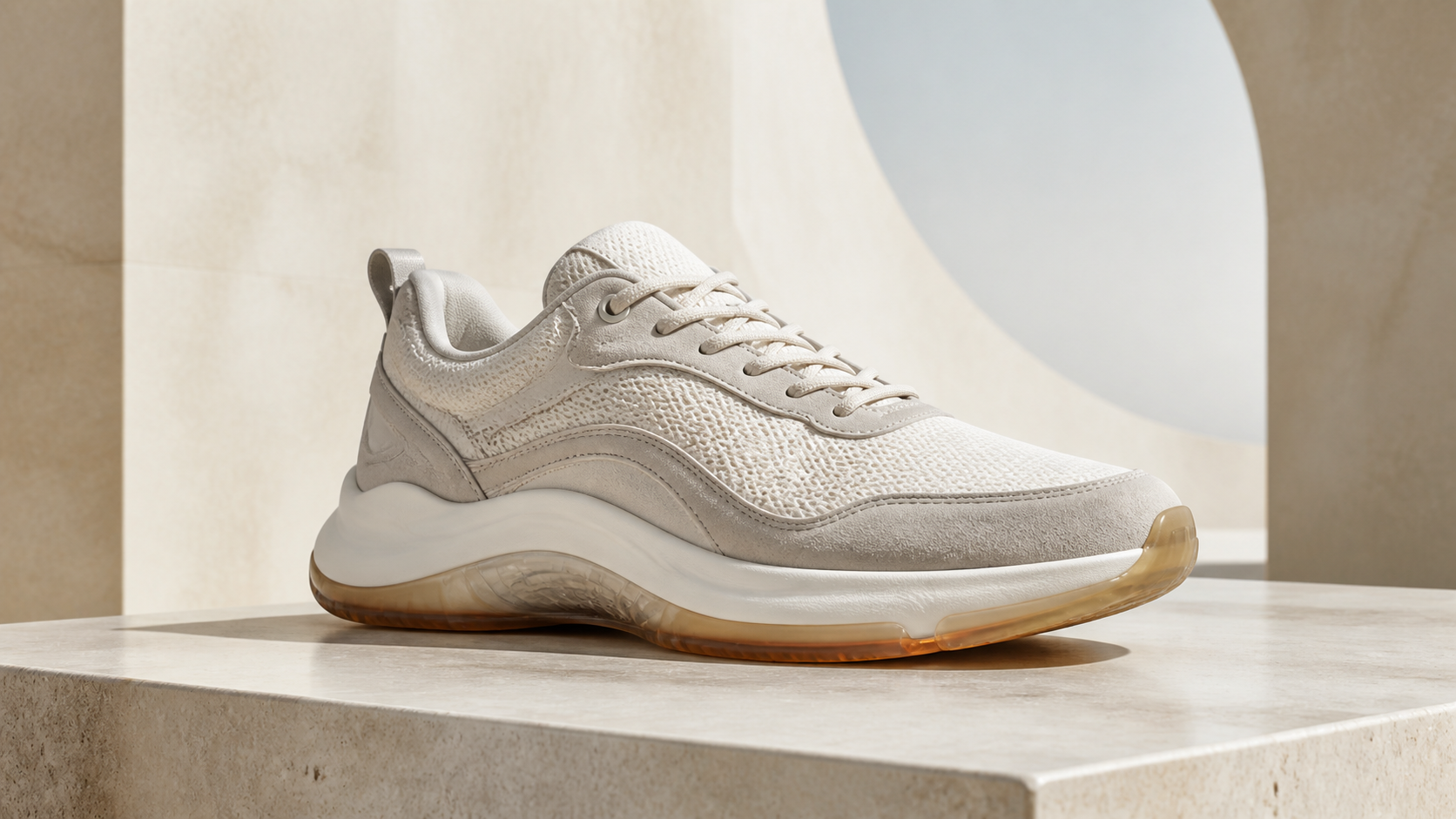
Product shots become easier to approve when the camera route and hero position are defined before materials and lighting are added.
Multi-Character Dialogue
Use white-model figures to maintain screen direction, eyelines, shot balance, and entrances. Mark who speaks, who reacts, and when the camera changes attention. Keep the action restrained while dialogue is active.
Music Videos and Choreography
Map performer spacing, dance directions, camera sweeps, and the final pose to musical sections. A motion reference can provide exact cadence while the white model preserves stage geography. See the Seedance 2.5 music-video workflow for full-song planning.
Film and Advertising Previs
Test a difficult one-take, reveal, group entrance, or set transition before production. The result becomes a review artifact for the whole team.
White Model Reference vs. Other Reference Types in Seedance 2.5
| Reference type | Primary job | Best for | Does not reliably define |
|---|---|---|---|
| White model | Spatial layout, poses, camera path, depth | Blocking, previs, multi-character staging | Final identity, materials, color |
| Character reference | Face, body, wardrobe, identity | Recurring performers and branded characters | Exact camera route or scene geography |
| Motion reference | Timing, gesture, choreography, camera cadence | Walks, dance, action, product movement | Final styling unless restated |
| Style reference | Palette, texture, lighting, visual language | Art direction and campaign consistency | Subject position or action timing |
Recommended Reference Stacks
Use white model alone for a quick blocking test. Add a character or product reference when identity matters. Add motion when timing is too specific for arrows and poses. Add style last, once the staging works. This hierarchy prevents a beautiful reference from overpowering the scene's spatial logic.
Seedance 2.5 White Model Tips and Common Mistakes
Tips That Improve Control
- Preserve camera metadata in the reference notes: aspect ratio, approximate field of view, height, tilt, and start/end position.
- Draw directional arrows and number each major pose or subject.
- Keep subject names identical across file labels and prompt references.
- State which asset controls blocking, identity, motion, materials, and audio.
- Generate a short blocking test before the full-quality version.
- Compare the result against the layout, not only against whether it looks attractive.
Common Mistakes and Fixes
Texture in the white model: busy materials may be interpreted as style. Replace them with uniform clay shading. Floating contact: feet and products need visible ground relationships; add a floor plane and contact points. Contradictory arrows: simplify to one dominant action per time range. Unlabeled figures: name every role and repeat those names in the prompt. Too many references: remove assets without a unique job. No final hold: reserve a stable end pose so the shot can cut cleanly.
Conclusion
Seedance 2.5 white-model reference solves a specific production problem: you know the intended shot, but text alone cannot express its spatial logic. Build the lightest useful blockout, protect camera and subject relationships, assign every extra reference one job, and test blocking before quality. That workflow turns spatial planning and action design into controllable inputs for product ads, dialogue, music videos, and cinematic previs. Try your first white-model-guided Seedance shot →
Start generating for free - no credit card required
Create videos with free signup credits, then scale with affordable plans whenever you need more generations.
Free credits on signup. Plans from $28/month.
Related Articles
More posts in the same locale you may want to read next.

Seedance App Preview Video Generator 2026: Create App Store and Product Launch Clips
Use Seedance to turn app screenshots, feature copy, and launch goals into App Store previews, Google Play promo videos, and product launch clips.
Read article
AI Halloween Costume Transformation Video Guide
Turn one photo into a Halloween costume transformation video with AI: vampire, witch, zombie, and skeleton glow-ups, with prompts and step-by-step tips.
Read article
AI Halloween Dance Video: Skeleton & Zombie Dances
Make a viral AI Halloween dance video: dancing skeletons, zombie dance-offs, witches, and costume dance trends. Step-by-step with prompts and motion control.
Read article