
Seedance 2.5 Timeline Video Prompt: How to Plan and Write Multi-Shot AI Videos
AI Overview
What is a timeline video prompt in Seedance 2.5?
A timeline video prompt divides one generation into timed beats. Each beat assigns one subject action, one camera move, and one continuity anchor so Seedance 2.5 receives a sequence instead of one crowded description.
How long can a single Seedance 2.5 generation be?
Seedance 2.5 routes can support 4–30 seconds, while some interfaces or modes may expose a shorter ceiling. Check the live duration control before writing your beat sheet.
How do I write a Seedance 2.5 multi-shot prompt without losing subject consistency?
Repeat the same subject anchor at the opening of every beat, then preserve wardrobe, lighting, screen direction, and the object in hand. Change action and camera deliberately, not the identity description.
How many beats should a Seedance 2.5 timeline prompt have?
Use three beats for 15 seconds and four or five beats for 30 seconds. Give each beat 5–10 seconds and reserve the final beat for a result, hold, reveal, or CTA.
What Is a Timeline Video Prompt and Why Seedance 2.5 Needs One
A timeline prompt is a director's beat sheet written inside the generation prompt. Instead of asking for a character to enter, run, discover an object, react, and deliver a final pose all at once, you assign those actions to specific time ranges.
The useful formula is beat = subject + action + camera + anchor. The time marker tells the model when a change should happen; the action gives the beat one job; the camera defines how the viewer sees it; and the anchor carries identity and spatial continuity into the next range.
Long unstructured prompts can delay later actions or change the subject at a cut. A beat sheet reduces that ambiguity in narratives, product demonstrations, social ads, and music sequences.
Start with a clear visual idea before adding timecodes. The Seedance video prompt guide explains shot size, movement, lighting, and preservation language; timeline planning organizes those ingredients across duration.
Seedance 2.5 Duration Limits — What You Can Actually Generate
The current Seedance workflow on seedance.tv can expose integer durations from 4 to 30 seconds. Availability still depends on the selected route, mode, account, and input type, so treat the live duration selector as authoritative.
For a 30-second deliverable, choose one continuous generation when the idea belongs in one scene. Use two 15-second clips when you need a midpoint review or want to rerun the second half independently.
| Delivery plan | Best for | Timeline approach | Main risk |
|---|---|---|---|
| One 30s generation | Continuous narrative, camera journey, performance | Four or five beats in one prompt | Drift accumulates if anchors are weak |
| Two 15s clips | Ads, modular stories, approval workflows | Two three-beat prompts joined by one bridge frame | A visible seam if the midpoint changes |
| One 4–10s test | Hook, product move, reference validation | One focused beat | Too short for a complete story |
The 4-Beat Timeline Framework for 30-Second Videos
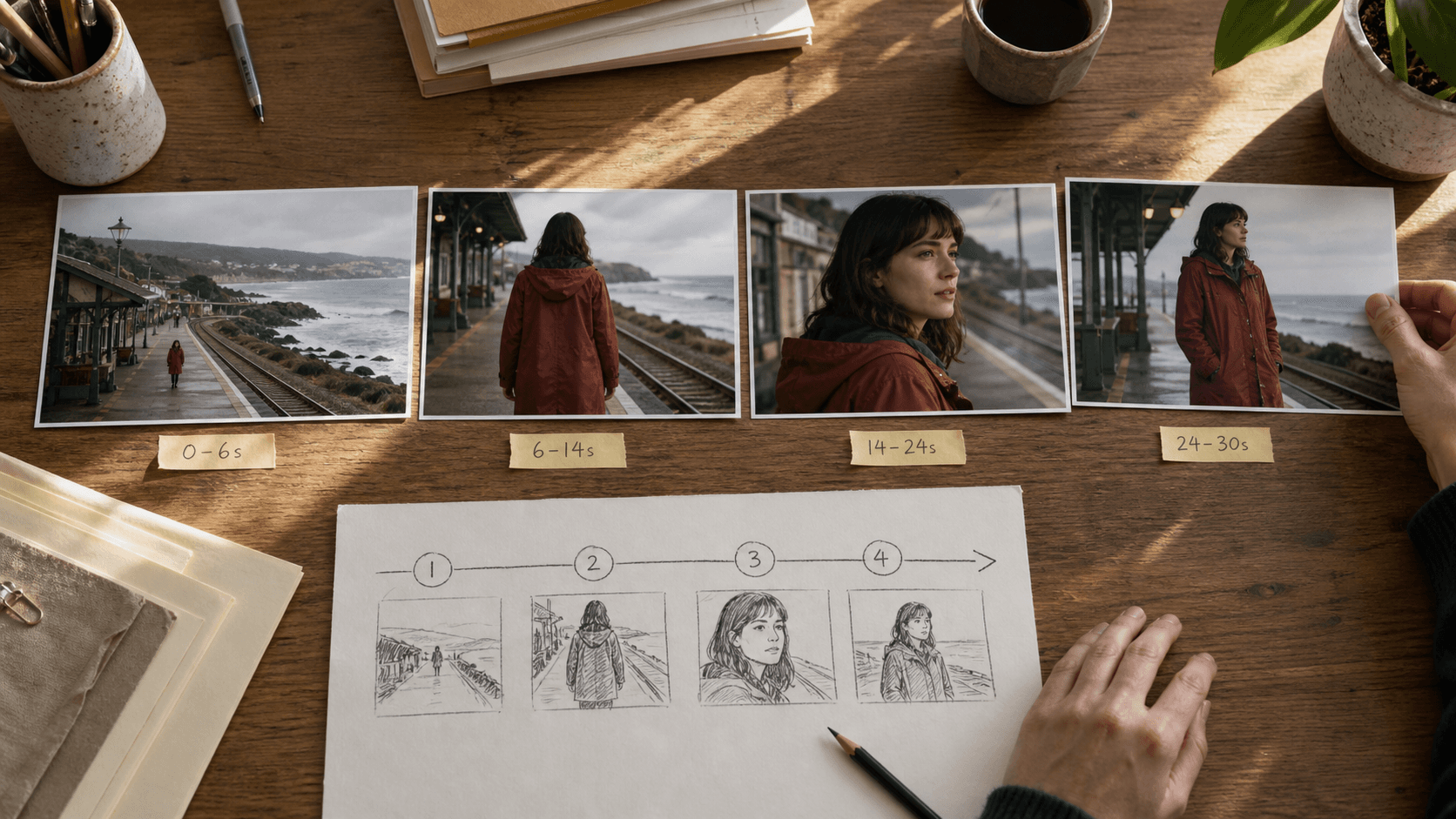
Use four beats when the story has one setup, one main action, one development, and one readable finish.
| Beat | Time | Job | Direction |
|---|---|---|---|
| 1 | 0–6s | Hook / establish | Show subject, location, and starting state |
| 2 | 6–14s | Action / tension | Begin the main movement; introduce one change |
| 3 | 14–24s | Development | Reveal consequence, detail, or transformation |
| 4 | 24–30s | Resolution / hold | Settle camera and protect the final frame |
Each interval has one action and a clear handoff to the next.
[0s–6s] Same woman in a rust-red raincoat waits alone on a coastal platform; static wide shot, train line visible behind her.
[6s–14s] Same woman in the rust-red raincoat walks toward camera; slow backward tracking, ocean remains screen right.
[14s–24s] Same woman pauses as a train approaches; gentle push-in, wind lifts the coat hem, cool morning light unchanged.
[24s–30s] Same woman turns toward the arriving train; camera settles into a medium profile and holds the final two seconds.
A full-length result is easier to judge when every transition can be traced back to a named beat.
How to Write Each Beat — Prompt Structure Breakdown
Write each beat in the same order so important constraints are not buried.
- Time marker: use one format everywhere, such as
[6s–14s]. - Subject anchor: repeat the exact identity phrase from the previous beat.
- Action: lead with one visible verb—walks, opens, turns, pours, reveals.
- Camera: choose one instruction—static wide, pan left, slow push-in, orbit.
- Environment: keep only the details needed for continuity or story.
Cinematic beat: [8s–16s] Same courier in a yellow rain shell crosses the flooded street, holding the silver case in her left hand; camera tracks parallel, neon reflections remain behind her.
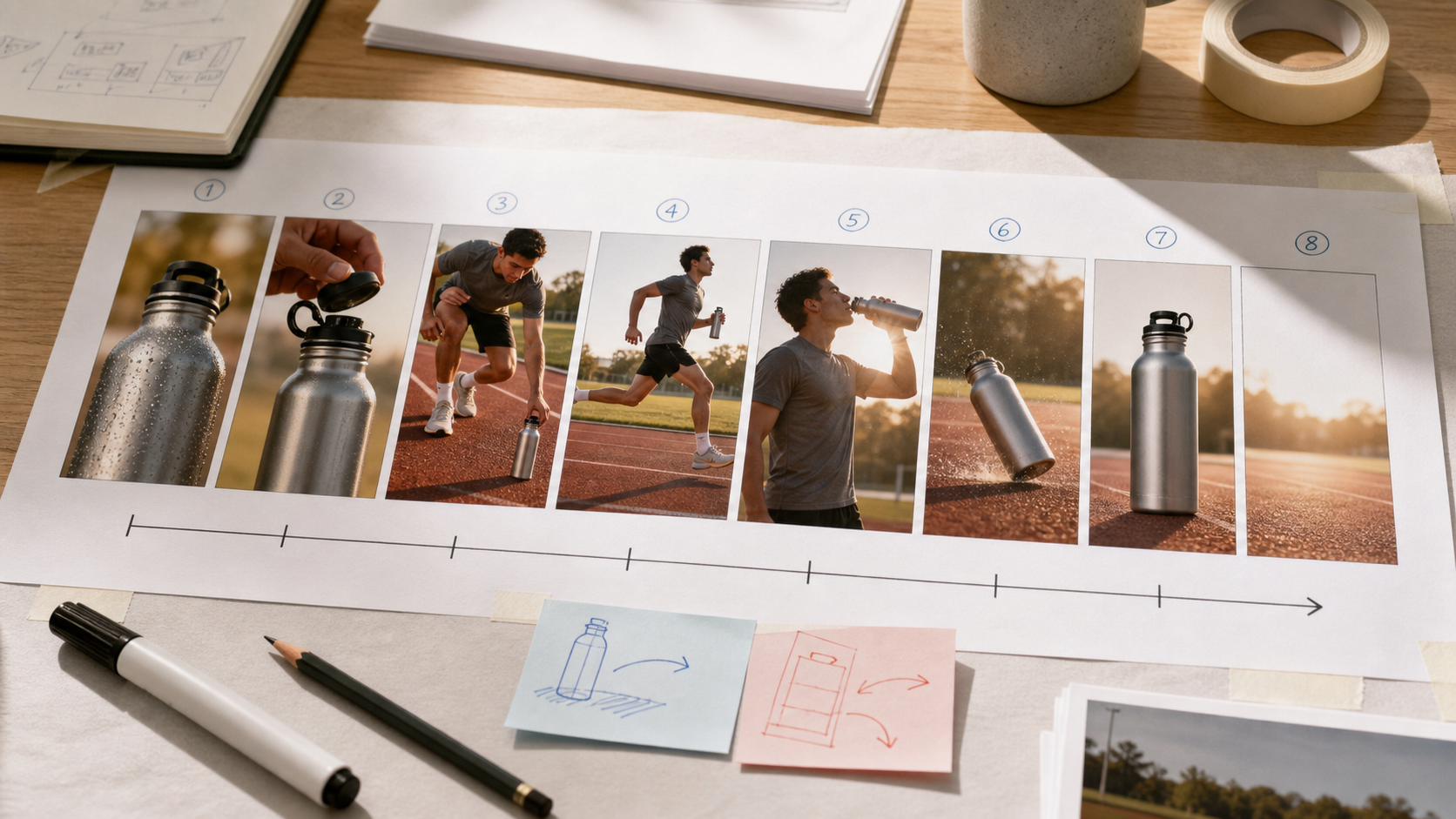
Product-ad beat: [12s–20s] Same unbranded amber bottle stays centered as condensation gathers; camera makes one slow clockwise arc, label and black cap remain unchanged, warm window light continues from frame left.
Use visible verbs instead of mood language: replace “the scene becomes exciting” with “the camera accelerates into a low tracking shot.” Test the first beat with text to video before the full sequence.
Multi-Shot Consistency — How to Keep Your Subject the Same Across Beats
Continuity comes from repetition, not from adding a new description at every cut. Build one anchor phrase containing the minimum identity details that must survive: role, wardrobe color, hair, hero prop, and facing direction. Copy it verbatim into every beat.
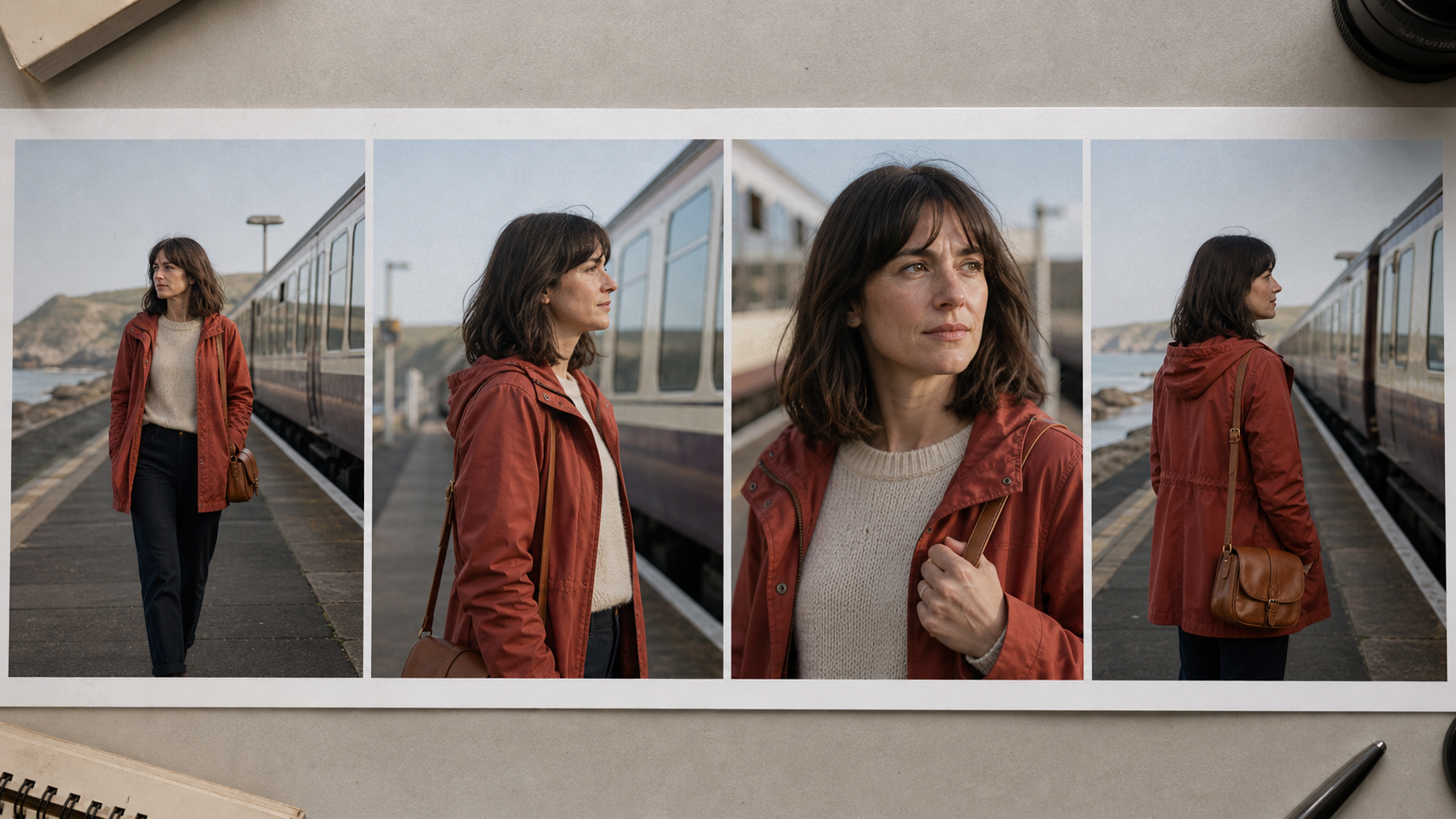
A continuity contact sheet makes identity, wardrobe, props, screen direction, and lighting easy to compare before generation.
The finished 15-second sequence turns the contact sheet into a continuous coastal-platform story instead of a slideshow of extracted frames.
Keep lighting and screen direction stable. Do not change “rust-red coat” to “dark orange jacket”; near-synonyms can become visual redesigns.
Use a reference image when the first frame needs a precise face, product, or set. The Seedance 2.5 white-model guide is useful when positions and camera paths matter more than texture, while image to video can lock a polished starting frame.
15-Second Timeline Prompts — 3-Beat Structure for Web Users
Use a simple 0–5s / 5–10s / 10–15s structure when you need a compact social clip or when the selected workflow is capped at 15 seconds.
- 0–5s — Hook: show the subject and one immediate change.
- 5–10s — Proof: demonstrate the main action or benefit.
- 10–15s — Result: reveal the outcome and hold long enough to edit.
For two connected clips, end clip one on a stable pose, clear camera angle, and simple background. Use that final frame as clip two's reference and repeat the action state in its opening beat. Avoid motion blur or a fast transformation at the seam.
5 Ready-to-Use Seedance 2.5 Timeline Prompt Templates
Copy a template, replace the bracketed anchors, and keep each beat focused.
1. Character narrative · 30s · 16:9
[0–6s] [character anchor] enters [location], static wide. [6–14s] Same [anchor] discovers [object], slow tracking. [14–24s] Same [anchor] reacts and moves toward [destination], gentle push-in. [24–30s] Same [anchor] reaches [result], camera settles and holds 2s.
2. Product showcase · 15s · 1:1 or 9:16
[0–5s] [product anchor] centered, one light sweep. [5–10s] Same [product] rotates slowly as [feature] appears. [10–15s] Same [product] returns to clean front packshot, hold final 2s.
3. Cinematic landscape B-roll · 30s · 16:9
[0–8s] Establish [landscape], slow aerial drift. [8–18s] Follow [moving subject] toward [landmark], same weather and direction. [18–26s] Pass close to foreground detail, reveal destination. [26–30s] Wide resolution, motion slows to a hold.
4. TikTok vertical hook · 15s · 9:16
[0–4s] [subject anchor] faces camera and reveals [problem], centered close-up. [4–10s] Same [anchor] demonstrates [action], camera tilts down then returns. [10–15s] Same [anchor] shows [result], clean upper-frame space, hold 1.5s.
5. Brand film · 30s · 16:9
[0–6s] [brand-world subject] begins [ritual], tactile macro. [6–14s] Same subject moves through [environment], lateral track. [14–24s] Product and human action meet, slow orbit. [24–30s] Resolve on unbranded hero frame, restrained camera, hold 2s.
The Seedance 2.5 spec-ad workflow shows how to connect a creative brief, references, shot timing, and review notes around a commercial template.
Common Timeline Prompt Mistakes and How to Fix Them
Beats longer than 10 seconds. Drift grows because one interval carries too much movement. Split it at the most visible change in action or camera.
No repeated anchor. “The woman” is too weak after a cut. Repeat “same woman, blunt black bob, rust-red raincoat, canvas shoulder bag” at every beat opening.
Three actions in one beat. If the prompt says runs, jumps, opens a door, and turns, the model may complete only the first. Keep one dominant verb and move the rest forward.
Inconsistent time markers. Mixing 0–5s, next, and then weakens sequence order. Use bracketed start and end times throughout.
No final resolution. Motion continues until the last frame and creates an awkward edit. Reserve the last 1.5–2 seconds for a stable pose, packshot, reaction, or clean environmental hold.
Review failures by beat rather than rewriting everything. If identity breaks at 14 seconds, strengthen the third beat's anchor and transition; if the ending rushes, shorten the prior action and give the final interval more time.
Conclusion
A Seedance 2.5 timeline video prompt translates a director's plan into timed instructions the model can execute: one job per beat, one repeated subject anchor, and one consistent time-marker format. Use three beats for a focused 15-second clip or four to five for a 30-second story, protect the transition state, and reserve time for a deliberate ending. This structure makes multi-shot results easier to generate, diagnose, rerun, and edit than one long paragraph of actions.
Ready to try it yourself?
Put the steps from this guide into practice with Seedance and turn prompts or images into polished videos in minutes.
Free credits on signup. Plans from $28/month.
Related Articles
More posts in the same locale you may want to read next.

Seedance App Preview Video Generator 2026: Create App Store and Product Launch Clips
Use Seedance to turn app screenshots, feature copy, and launch goals into App Store previews, Google Play promo videos, and product launch clips.
Read article
AI Halloween Costume Transformation Video Guide
Turn one photo into a Halloween costume transformation video with AI: vampire, witch, zombie, and skeleton glow-ups, with prompts and step-by-step tips.
Read article
AI Halloween Dance Video: Skeleton & Zombie Dances
Make a viral AI Halloween dance video: dancing skeletons, zombie dance-offs, witches, and costume dance trends. Step-by-step with prompts and motion control.
Read article