
How to Make a Spec Ad with Seedance 2.5: Brief, Prompt, and 30-Second Workflow
AI Overview
What is a spec ad and why use Seedance 2.5 to make one?
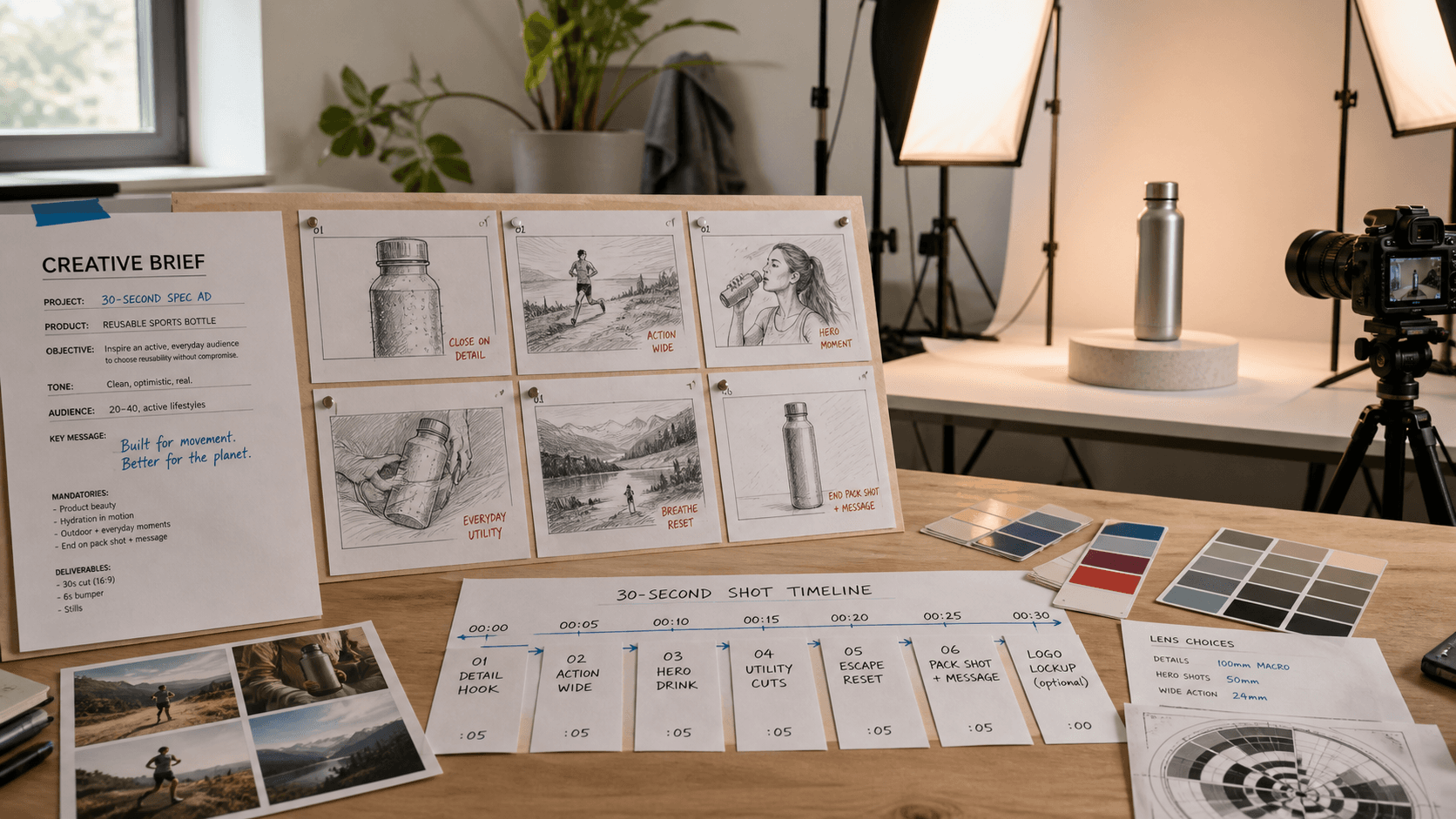
A spec ad is an unsolicited concept commercial made to demonstrate an idea or pitch a brand. Seedance 2.5 turns a brief, references, camera direction, and audio cues into a polished 30-second spot without a production crew.
Can Seedance 2.5 generate a complete 30-second spec commercial?
Yes. Seedance 2.5 supports clips up to 30 seconds with controlled camera movement, audio, and multimodal references. A structured timeline can carry the hook, product scene, and closing packshot through one generation.
What do I need to start a Seedance 2.5 spec ad?
Prepare a one-page brief, one to three strong product or style references, and a prompt that defines the subject, scene, camera, timing, audio, and final frame. You can test the concept without filming equipment or paid media.
Is it legal to make a spec ad for a real brand using AI?
Spec work is commonly used in portfolios, but it must not imply endorsement. Label it “spec” or “concept,” avoid unverified claims, and respect trademarks and source-asset rights.
What Is a Spec Ad and Why Seedance 2.5 Changes the Math
A spec ad is a self-initiated commercial made before a brand hires you. For a freelancer, creative director, filmmaker, or agency applicant, it is a cold-start calling card: proof that you can turn positioning into an idea, direct a product, and finish a coherent spot.
Traditional spec work often demands a crew, location, actors, sound, and several days of post-production. Seedance 2.5 combines long-form generation, audio direction, camera control, and mixed references, letting you test the creative logic before investing in a full shoot.
The workflow suits advertising creatives building a portfolio, DTC marketers testing campaign directions, creators pitching branded work, and junior agency teams rehearsing a brief. The objective is to demonstrate a commercial idea, not merely an attractive AI clip.
Choose Your Brand and Write the Creative Brief
Choose a category you understand well enough to make specific decisions. Knowledge of its customer, product ritual, tone, and objections matters more than fandom. Direction becomes easier when you can explain the audience problem in one sentence.
Copyable Creative Brief Template
Brand: [name + category]
Product: [specific product or feature]
Target audience: [one-sentence description]
Tone: [cinematic / punchy / emotional / playful]
Campaign hook: [single message the viewer should remember]
CTA: [what the viewer should do next]
Deliverable: 30-second 16:9 spec concept with audio
Every line should affect the screen. “Quiet confidence” requires restrained camera, performance, sound, and rhythm. Show the campaign hook through action rather than adding an unsupported claim as on-screen copy.
Label the Work Correctly
Add “Unofficial spec concept” to the caption or case study. Do not copy protected campaign copy, present the work as commissioned, or distribute it as an official ad. Review assets, likenesses, music, and claims with the Seedance 2.5 commercial-use guide.
Gather Your References — What Seedance 2.5 Needs
Give each reference one job. A product image protects shape, material, label placement, and color. A style image defines lighting, palette, set design, or lens character. A motion reference demonstrates a camera route, gesture, reveal, or transition. Contradictory references create conflicts the model cannot resolve.
Use Image to Video for one approved opening frame. Use Reference to Video when several assets guide identity, movement, environment, and audio together. Three purposeful assets usually beat a crowded board with repeated ideas.
Treat the 50-reference allowance as a ceiling, not a target. Reserve most slots for unique visual evidence: a few product angles, one lighting direction, one motion example, and only the audio needed for timing. Remove any asset whose role you cannot name.
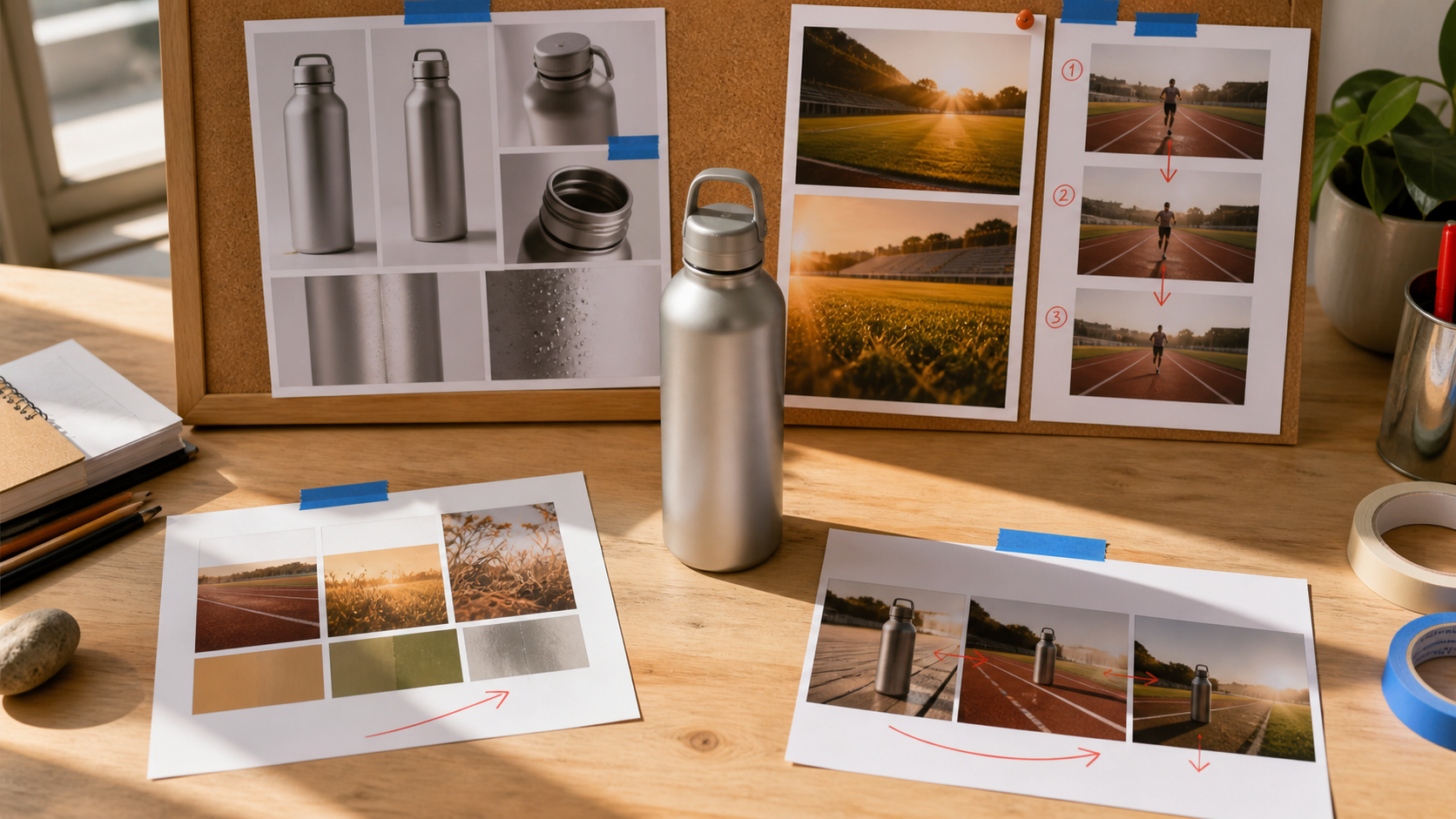
Give every reference a visible job: protect the product, establish the visual world, or demonstrate the motion the finished commercial needs.
When to Add a White Model
Use a white-model reference for several people, a precise orbit, foreground crossings, or an exact final composition. The Seedance 2.5 white-model guide explains subjects, depth, eyelines, entrances, and camera paths.
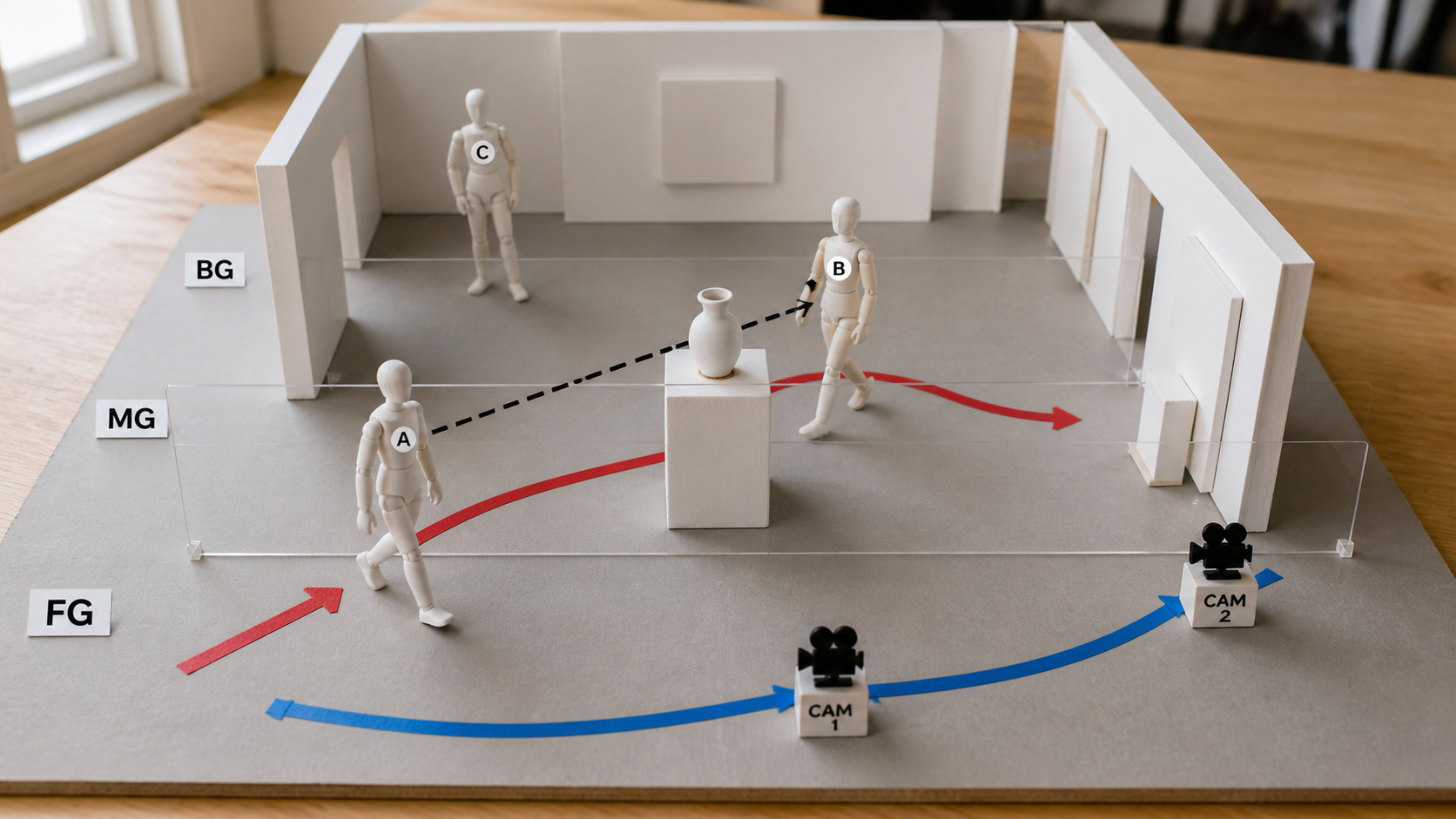
Use blocking only for spatial decisions; let product and style references control the finished appearance.
Write the Spec Ad Prompt for Seedance 2.5
Build the prompt as subject + scene + camera movement + style and tone + audio direction + output intent. Then add timing and preservation rules. The Seedance video prompt guide has reusable camera language.
Automotive Spec Ad Prompt
Unofficial spec concept for the unbranded electric coupe in Image 1. Dawn on an empty
coastal road. 0–4s: low wheel detail as the car begins moving, quiet motor whine. 4–14s:
stable side tracking through two bends. 14–23s: camera rises into a wide cliffside reveal
as percussion builds. 23–30s: car stops; slow push to a three-quarter packshot, wind and
one final bass note. Premium, controlled, no traffic, logo changes, or text; hold 2s.
This 15-second final edit keeps the section with the clearest vehicle orientation and continuous front-three-quarter motion; it is generated video, not a storyboard export.
Sports Drink Spec Ad Prompt
Unofficial spec commercial for the aluminum sports bottle in Image 1. Bright training
field. 0–3s: condensation macro and cap click. 3–10s: runner enters and lifts the bottle.
10–20s: lateral tracking through one sprint, breath and footsteps on beat. 20–26s: bottle
lands upright as sunlight crosses the metal. 26–30s: locked hero frame with room for a
later CTA. Preserve bottle geometry and object count; no invented label or extra people.
Common Prompt Errors
“Make it cinematic” is too abstract; name the shot, speed, lighting, and sound. A prompt without time ranges hides priority. Avoid transforming the product, actor, environment, camera, and style simultaneously; assign one visible job to each beat.
This finished product spot is a closer benchmark for spec work: inspect the product shape, shot progression, action-linked sound, and space left for the final message.
Generate, Review, and Iterate
First-Pass Review Checklist
Watch for the idea, product accuracy, camera continuity, and sound. Confirm that the opening earns attention, each shot serves the brief, the product remains recognizable, audio accents match visible action, and the final frame can hold a CTA. Record the first failed beat rather than writing “make it better.”
Change the reference responsible: the product image for geometry drift, motion clip for a weak camera path, or timing for a rushed close. One-variable revisions reveal the real fix.
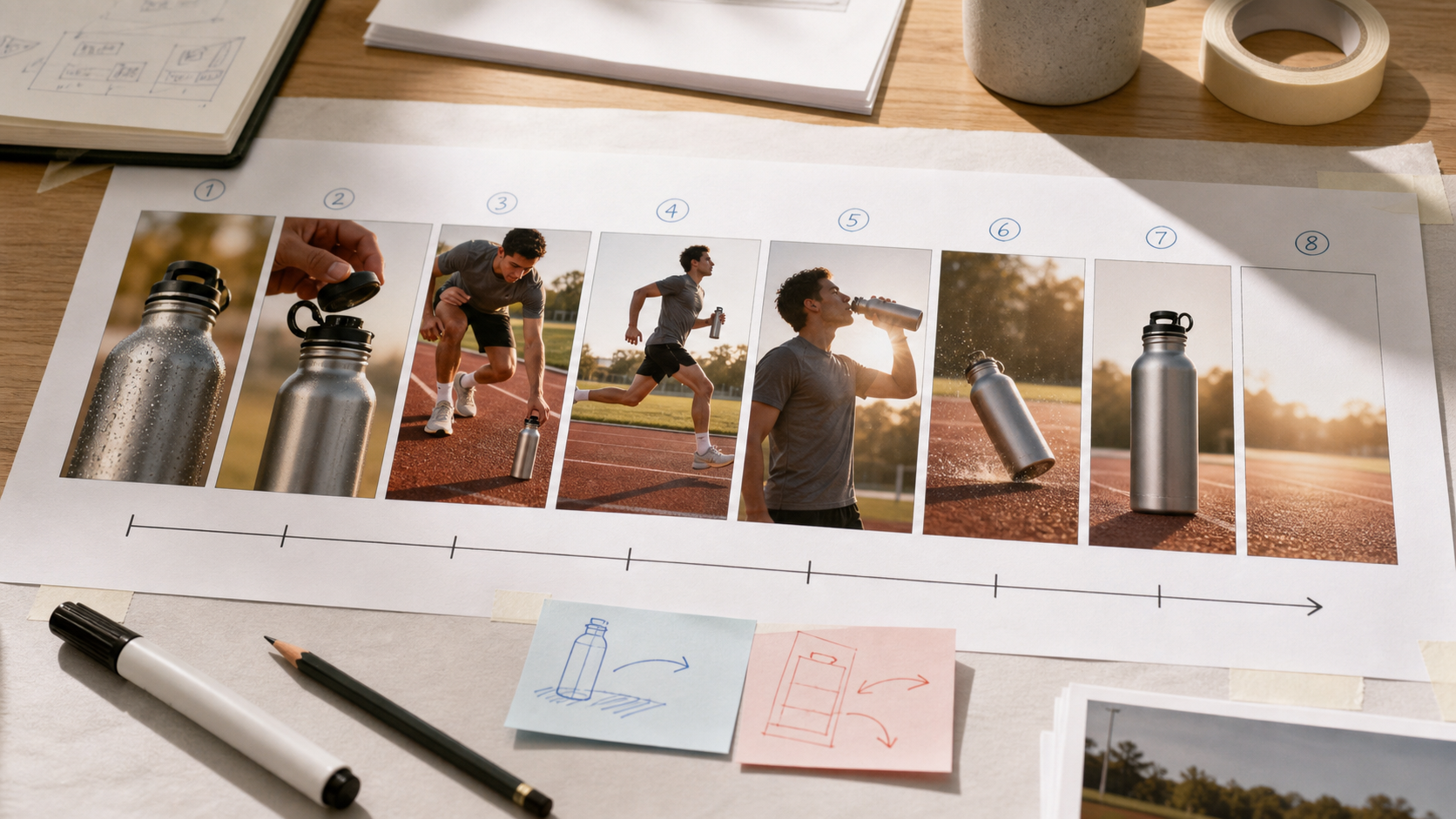
Review the commercial as a sequence: each beat should advance the brief while product geometry, wardrobe, light direction, and screen direction remain consistent.
Fast Tests, Final Quality, and Credits
Prove the hook at the lowest practical duration and resolution, then expand the approved structure. Current pricing depends on duration, resolution, audio, and video-reference length: a five-second 480p text-to-video test with audio is quoted at 43 credits, while a five-second 720p image-led test without audio is 98 credits. Treat the pre-generation estimate as authoritative because promotions can change.
A short product-motion test isolates the variables that matter before committing credits to the complete 30-second structure.
Queue time varies with duration, quality, and demand. Plan one short diagnostic pass, one corrected structure pass, and one final render rather than promising a fixed number of minutes to a client.
Spec Ad Structures That Work in 30 Seconds
Problem → Solution → Product Reveal
Use 0–6 seconds for a visible friction, 6–20 seconds for the product in action, 20–26 seconds for the payoff, and 26–30 seconds for the packshot. This works for DTC products because the value is demonstrated before the closing claim.
Cinematic Open → Brand Moment → Emotional Close
Use an atmospheric opening, reveal the product or service by 8 seconds, develop one memorable movement through 24 seconds, then resolve on an emotional final image. This structure suits automotive, travel, fashion, and lifestyle work.
Hook Statement → Proof → CTA
For SaaS or apps, open with one audience problem, show two or three interface outcomes, and finish with a direct action. Add final text in post-production when exact typography matters; do not spend generation time repeatedly correcting a sentence inside moving footage.
Share and Use Your Spec Ad
Publish where prospective clients can understand the thinking: a professional network, short-form feed, portfolio, or case-study platform. State “spec/concept,” summarize the brief, identify your role, and explain that AI supported production. Show one iteration so viewers can evaluate judgment, not only output.
Frame the pitch as “I explored how this audience problem could become a 30-second concept,” not “I made you an ad.” Keep the clean master, social version, crops, brief, rights notes, and settings together.
Seedance 2.5 Spec Ad vs. Other AI Tools
| Tool | Longest typical clip | Single-shot continuity | Native audio | Reference control | Best spec-ad role |
|---|---|---|---|---|---|
| Seedance 2.5 | Up to 30s | Strong for planned long takes | Yes | Up to 50 mixed references | Complete concept commercial |
| Runway Gen-4 | About 10s | Strong within short shots | Limited by workflow | Smaller reference set | Cinematic shot building and edits |
| Kling 3.0 | About 10s | Strong for short motion | Available on supported routes | Limited | Fast character and product iterations |
| InVideo AI | Timeline-based | Assembled from scenes | TTS and stock audio | Template-led | Script-first assembled explainers |
Seedance 2.5 fits concepts requiring a continuous 30-second arc, synchronized sound, or several references with distinct jobs. Choose shorter-shot workflows for montage-led ads and template editors when text assembly matters more than shot-specific direction.
Conclusion
Seedance 2.5 makes spec ads executable: write the brief, assign reference roles, build a timed prompt, generate a controlled draft, and revise the failed beat. The result should prove strategic and directorial judgment—not merely access to a generator. Create your Seedance 2.5 spec-ad concept →
Ready to try it yourself?
Put the steps from this guide into practice with Seedance and turn prompts or images into polished videos in minutes.
Free credits on signup. Plans from $28/month.
Related Articles
More posts in the same locale you may want to read next.

Seedance App Preview Video Generator 2026: Create App Store and Product Launch Clips
Use Seedance to turn app screenshots, feature copy, and launch goals into App Store previews, Google Play promo videos, and product launch clips.
Read article
AI Halloween Costume Transformation Video Guide
Turn one photo into a Halloween costume transformation video with AI: vampire, witch, zombie, and skeleton glow-ups, with prompts and step-by-step tips.
Read article
AI Halloween Dance Video: Skeleton & Zombie Dances
Make a viral AI Halloween dance video: dancing skeletons, zombie dance-offs, witches, and costume dance trends. Step-by-step with prompts and motion control.
Read article