
Seedance 2.5 Aspect Ratio Guide: 16:9, 9:16, and 1:1 Explained
AI Overview
What aspect ratios does Seedance 2.5 support?
Seedance 2.5 offers three core publishing formats in this workflow: 16:9 landscape, 9:16 vertical, and 1:1 square. Choose the ratio before generation so the model composes the shot for its final canvas.
What's the best Seedance 2.5 aspect ratio for TikTok and Instagram Reels?
Use 9:16 for TikTok, Instagram Reels, and YouTube Shorts. It fills a phone screen vertically and gives faces, products, captions, and upward movement the most useful space.
Can I change the aspect ratio after generating a video in Seedance 2.5?
Not inside the completed generation. You can crop in an editor, but the reliable fix is to select the new ratio and regenerate so framing, camera travel, and subject placement are rebuilt for that canvas.
Does Seedance 2.5 aspect ratio affect video quality?
It affects composition more than the model's underlying quality. A mismatched ratio can crop faces, compress movement, or waste space even when the rendered detail remains clean.
What Aspect Ratios Does Seedance 2.5 Support?
The practical choices are 16:9, 9:16, and 1:1. In Seedance, select the format before generation so the model can plan subject movement, environment, and negative space for the final canvas.
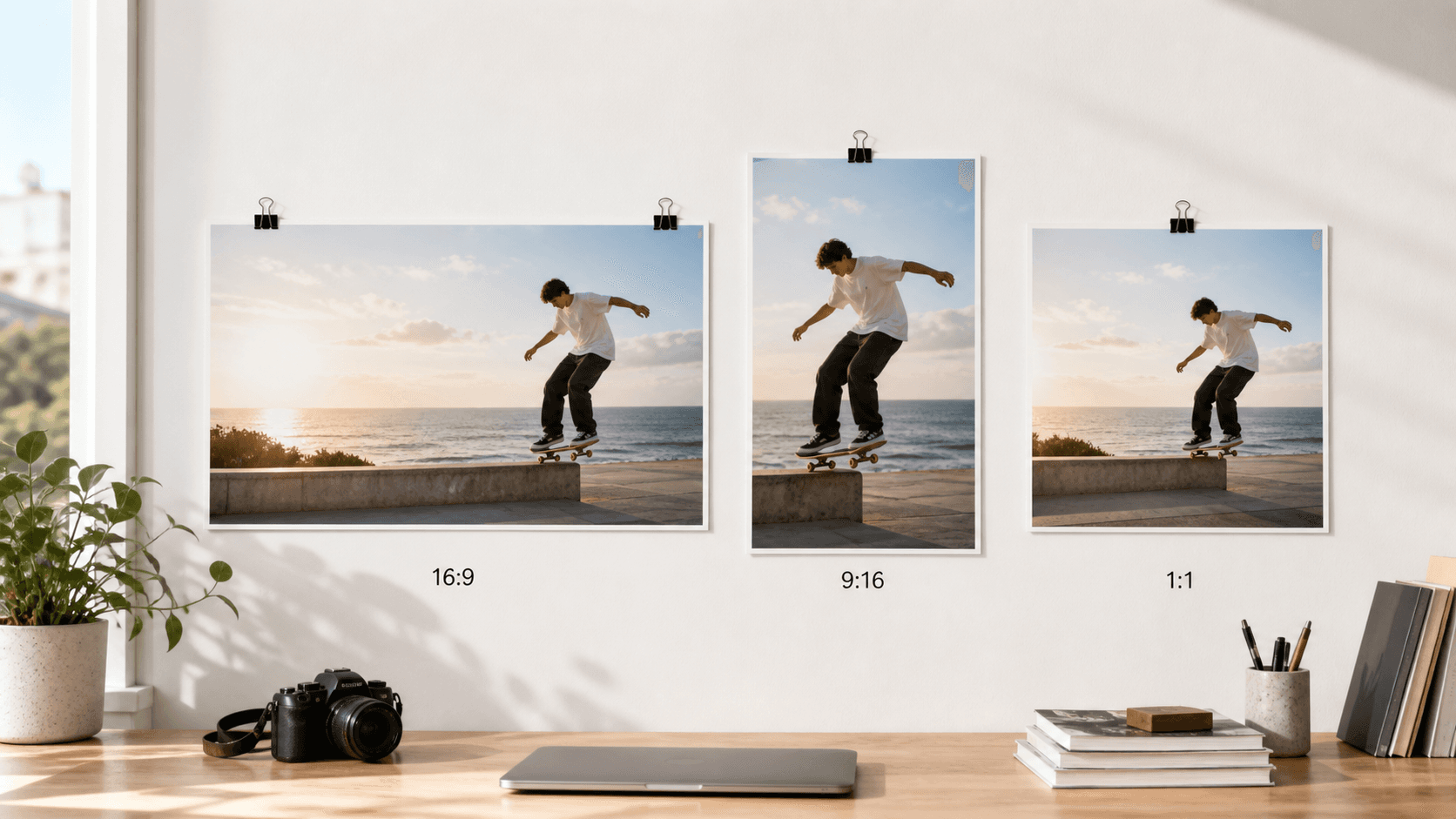
16:9 landscape suits YouTube, websites, film-style sequences, and lateral motion. It provides room for two people, a moving vehicle, a wide location, or text beside a product.
9:16 vertical is built for mobile feeds. It favors one dominant subject, full-height movement, direct-to-camera performance, and clear foreground-to-background depth.
1:1 square works for centered products, feed ads, and simple before-and-after concepts. Fast lateral travel feels cramped because the subject reaches the edge quickly.
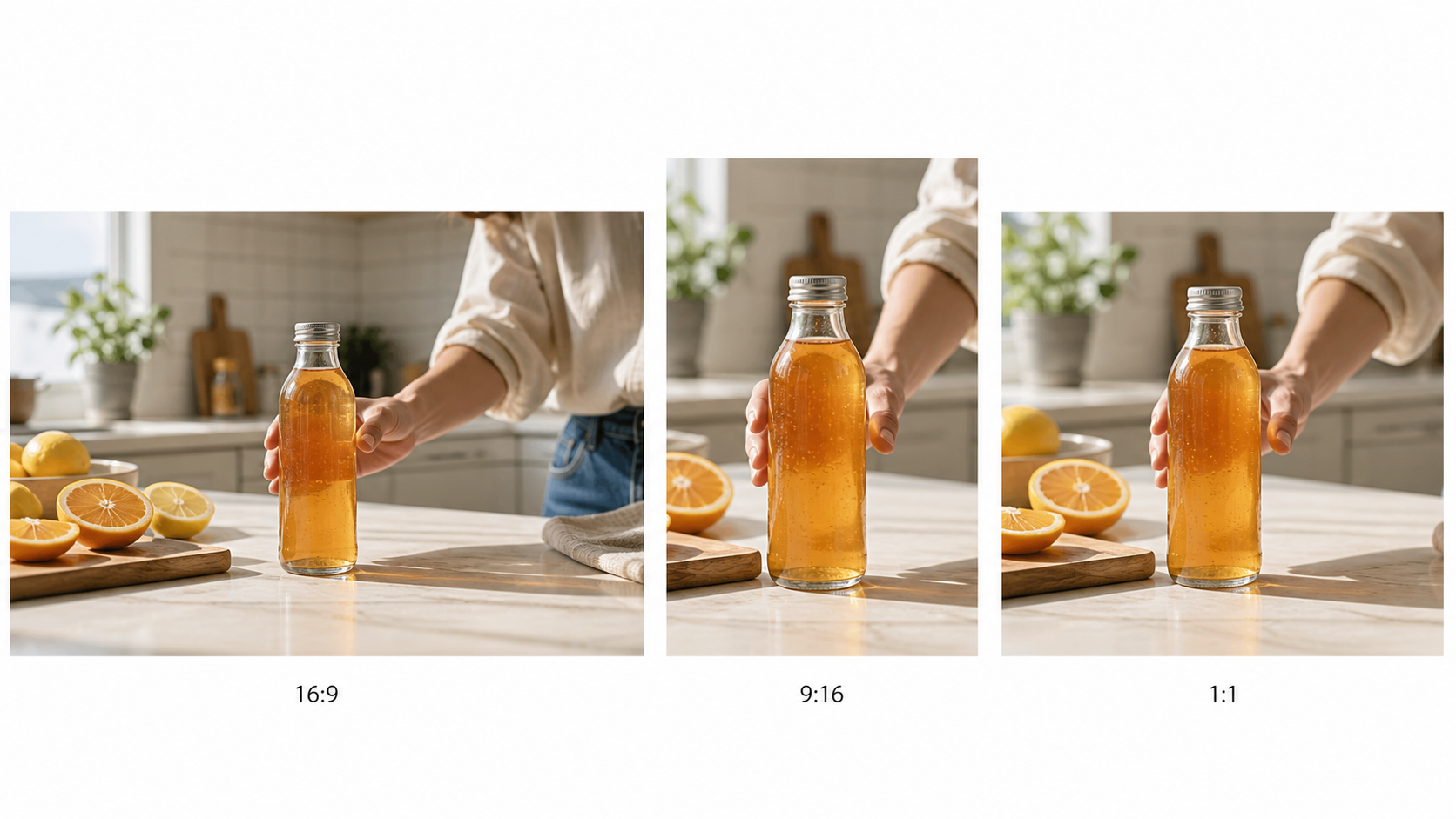
The ratio changes the directing problem: landscape reveals context, vertical concentrates attention, and square keeps the product centered.
This native square composition keeps the product readable throughout the motion without borrowing space from a landscape frame.
Image-led generation follows the source frame closely, so match a vertical upload with image to video. A prompt-only text to video concept offers more freedom to design the canvas from scratch.
Seedance 2.5 Resolution per Aspect Ratio — Full Spec Table
Ratio defines canvas shape; quality defines rendered detail. These are the core 720-class canvases in this guide. Supported Seedance 2.5 routes can reach 30 seconds, while frame delivery is model-managed.
| Aspect ratio | Core canvas | Orientation | Frame-rate control | Practical duration ceiling | Best use |
|---|---|---|---|---|---|
| 16:9 | 1280×720 | Landscape | Model-managed | Up to 30s | YouTube, web, cinematic scenes, demos |
| 9:16 | 720×1280 | Vertical | Model-managed | Up to 30s | TikTok, Reels, Shorts, mobile ads |
| 1:1 | 960×960 | Square | Model-managed | Up to 30s | Feed ads, products, centered subjects |
Provider routes may expose different controls: reference-led modes can preserve the uploaded frame automatically, while editing routes may use an adaptive canvas. Confirm ratio, resolution, duration, and audio in the generation summary.
Resolution cannot rescue poor framing: a detailed landscape crop can still lose hands or products. After composition is approved, use the Seedance 2.5 4K tutorial for upscale and export.
16:9 vs 9:16 — Which Should You Choose?
Choose 16:9 when the setting is part of the story. It supports establishing shots, side-by-side interaction, lateral travel, vehicles, architecture, and room for a later headline.
Choose 9:16 when a performance or product should dominate. Keep one priority near center and replace long tracking with push-ins, tilts, or movement toward camera. Vertical needs different blocking, not a simple side crop.
If the environment explains the idea, start with 16:9; if expression or action explains it, start with 9:16. For both versions, keep one brief but regenerate each ratio with a new composition line.
For landscape, prompt subject on the right third, environment left, slow lateral tracking. For vertical, use full-height subject centered, layered depth, slow push-in, hands and face in safe center. The Seedance video prompt guide adds shot size, speed, and preservation rules.
Best Aspect Ratio for TikTok, Instagram Reels, and YouTube Shorts
Use 9:16 for TikTok, Reels, and Shorts. Keep faces and products away from the extreme top and bottom where controls and captions appear, and preview the export inside the destination app.
Use 16:9 for standard YouTube. It matches the player and cinematic footage; generate a Shorts version separately instead of trusting an automatic crop.
For LinkedIn, X, and mixed feeds, use 1:1 for centered products and compact demonstrations, or 16:9 when location and horizontal movement carry the idea.
| Destination | Recommended ratio | Composition priority |
|---|---|---|
| TikTok | 9:16 | Centered hook, face and hands inside safe area |
| Instagram Reels | 9:16 | Full-height action, caption-safe lower frame |
| YouTube Shorts | 9:16 | Immediate subject clarity and vertical depth |
| Standard YouTube | 16:9 | Environment, lateral action, widescreen pacing |
| LinkedIn / X feed | 1:1 or 16:9 | Product clarity first; context second |
A native 9:16 frame gives the product full-screen presence while preserving useful space above and below for platform overlays.
Best Aspect Ratio for Cinematic and Film-Style AI Video
Use 16:9 for narrative scenes, spec commercials, travel, automotive work, and film-style sequences. Foreground objects can cross, characters can enter, and the camera can pan without immediately meeting the edge.
A real 16:9 result shows why landscape works for scene geography: the viewer reads the subject, environment, and camera direction at the same time.
Prompt for layout, not only mood: cinematic 16:9, low horizon, character entering left, destination visible right, foreground passing close to lens.
Vertical cinema needs vertical staging—architecture, a crane move, or a walk toward camera. Square is strongest for symmetrical, intimate, or product-led ideas.
How to Change Aspect Ratio in Seedance 2.5 (Step-by-Step)
- Open the Seedance generation workspace and choose the model or workflow.
- Select 16:9, 9:16, or 1:1 before generation. For image-led work, confirm that the reference already matches the intended shape.
- Rewrite the composition clause in the prompt. Specify subject placement, travel direction, safe space, and camera movement for the selected canvas.
- Generate a short test, then inspect faces, hands, products, subtitles, and edge crops at the actual delivery size.
- If the framing fails, change the ratio or prompt and regenerate. Do not rely on a post-production crop to invent missing visual information.
Review the first and last frame as well as the middle of the motion. A subject may begin safely centered and then drift outside the crop during a pan or gesture. For campaign work, save the approved ratio beside the prompt name—such as launch-hook-vertical-9x16—so editors do not confuse visually similar drafts during delivery.
A short framing test is cheaper to review than discovering a cropped product after the full shot is rendered.
If you need several deliverables, finish and approve one master concept first. Then regenerate vertical and square variants from the same references, adjusting blocking for each. The Seedance 2.5 spec-ad workflow shows how to keep a brief, reference roles, timing, and review notes consistent across versions.
Common Mistakes When Choosing Aspect Ratio in Seedance 2.5
Publishing 16:9 as a vertical post. A center crop removes faces, hands, and products. Regenerate in 9:16 with centered action and a simpler background.
Using the wrong reference ratio. A wide image paired with vertical output forces invented space or discarded sides. Crop before upload or create a native vertical reference.
Using 1:1 for lateral motion. Cars, runners, and reveals feel cramped. Switch to 16:9, or make the action approach the camera or rotate around a centered product.
Reusing one composition line. Keep the concept, but change blocking: replace “wide side tracking” with “centered push-in” for vertical and balance square around center.
Forgetting safe zones. Platform controls can hide a vertical CTA. Keep copy, faces, and products away from the perimeter, then preview on a phone.
Seedance 2.5 Aspect Ratio vs Competitors (Kling, Runway, Pika)
The real difference is whether a tool composes convincingly for vertical delivery, preserves references, and tests a new canvas without rebuilding the project.
| Tool | Common ratio options | Practical resolution ceiling | Workflow note |
|---|---|---|---|
| Seedance 2.5 | 16:9, 9:16, 1:1 core formats | 720-class core output; square canvas in this guide is 960×960 | Strong long-form and native-audio workflow; compose before generation |
| Kling 2.5 | Landscape, vertical, square on supported modes | Up to 1080p on supported routes | Good motion, but controls vary by model and mode |
| Runway Gen-4 | Landscape, vertical, square, and additional crops | HD-class generation with plan-dependent export options | Flexible canvas presets; short-shot workflow favors editing |
| Pika 2.2 | Landscape, vertical, square, and social presets | Up to 1080p on supported plans | Fast effect-led variants; verify crop behavior per feature |
Controls and plan limits change, so confirm the live selector before rendering. Seedance combines a direct 9:16 path with long clips, audio, and reference control, treating vertical as a first-class composition.
Conclusion
Seedance 2.5 covers the three formats most creators deliver every week: 16:9 for cinematic storytelling and standard YouTube, 9:16 for TikTok, Reels, and Shorts, and 1:1 for centered products and feed ads. Choose the ratio before generation, match the reference frame to that shape, and rewrite the composition clause for the destination. Name and archive each approved format separately. A correct canvas plus intentional blocking usually produces a publish-ready result faster than generating once and trying to crop every platform version afterward.
Ready to try it yourself?
Put the steps from this guide into practice with Seedance and turn prompts or images into polished videos in minutes.
Free credits on signup. Plans from $28/month.
Related Articles
More posts in the same locale you may want to read next.

Seedance App Preview Video Generator 2026: Create App Store and Product Launch Clips
Use Seedance to turn app screenshots, feature copy, and launch goals into App Store previews, Google Play promo videos, and product launch clips.
Read article
AI Halloween Costume Transformation Video Guide
Turn one photo into a Halloween costume transformation video with AI: vampire, witch, zombie, and skeleton glow-ups, with prompts and step-by-step tips.
Read article
AI Halloween Dance Video: Skeleton & Zombie Dances
Make a viral AI Halloween dance video: dancing skeletons, zombie dance-offs, witches, and costume dance trends. Step-by-step with prompts and motion control.
Read article