
AI Overview
Why do faces break at a distance in MiniMax H3?
A distant face occupies too few pixels for stable eyes, lips, and identity. Fast motion, low contrast, head turns, rain, and occlusion make that shortage more visible.
Can a prompt fix a distorted distant face?
A better prompt can prevent some failures, but it cannot recover facial information that is missing from the source. Use a clearer reference or a repair pass when the face is already damaged.
Should I regenerate the video or use a face detailer?
Regenerate when identity, framing, or motion fails across most frames. Use a face detailer when the shot already works and only a small facial region needs controlled repair.
How can Seedance Agent help with distant-face shots?
Seedance Agent can turn one brief into safer framing options, keep identity constraints consistent, and organize the generation-and-review loop before more credits are spent on repair.
Why Distant Faces Break in MiniMax H3
When someone searches MiniMax H3 fix faces at a distance, they usually already have a nearly usable clip. The location, movement, and camera may look right, yet the actor's eyes soften, the mouth changes shape, or the person becomes someone else as the camera pulls back. The practical question is not whether H3 can generate people. It is whether this particular shot should be prevented, regenerated, or repaired.
Too few pixels to preserve identity
A close-up gives the model abundant information for the eyes, nose, lips, jaw, and hairline. In a wide shot, the whole face may be only a few dozen pixels tall while H3 must also resolve the environment, body, wardrobe, movement, and sound. Upscaling the finished frame enlarges that uncertainty; it does not automatically reconstruct the correct person.
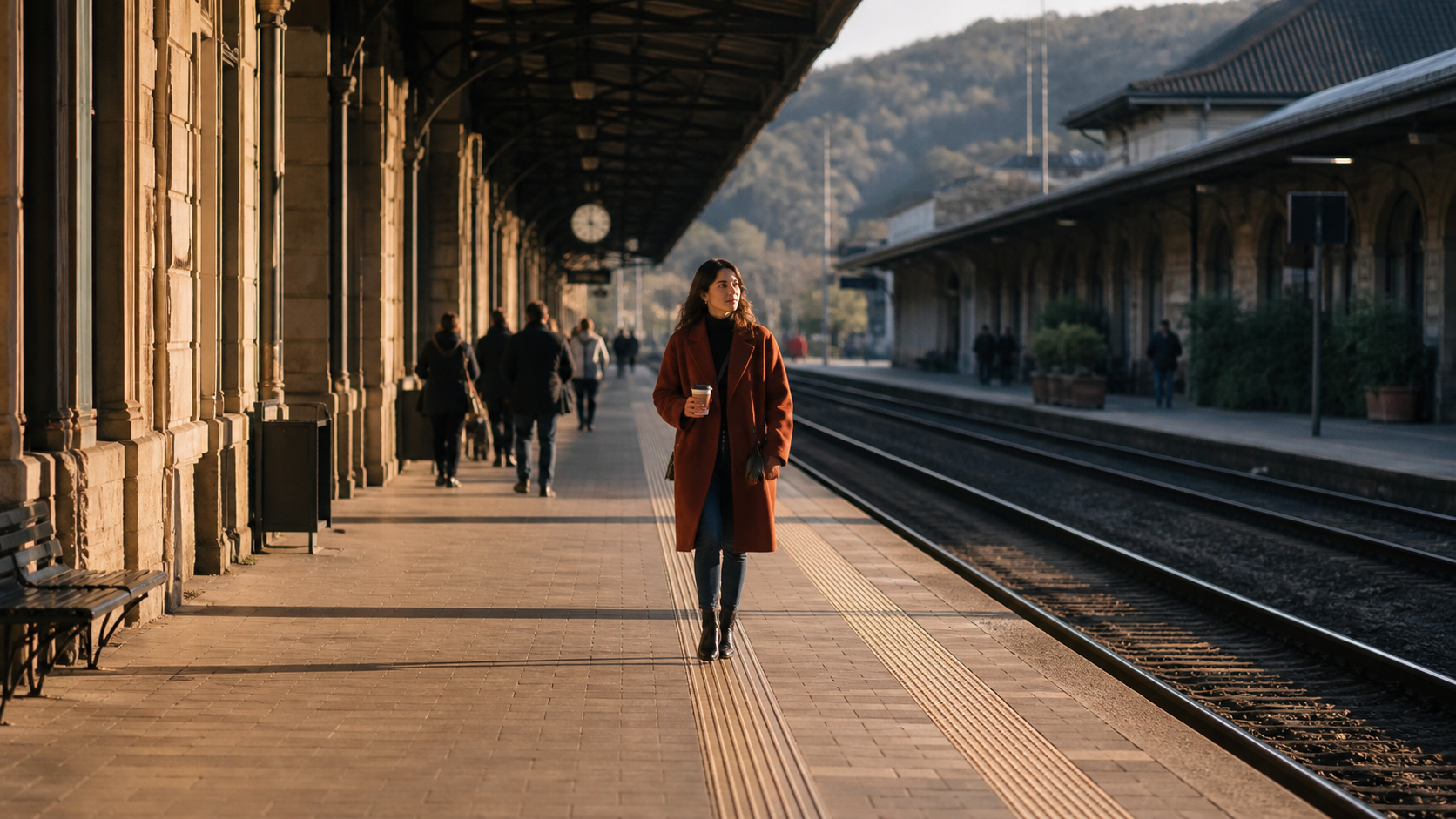
Actual output-style wide-shot benchmark. Inspect the face at normal playback size, not only in a paused 400% crop; the actor should remain recognizable while the station, coat, hands, and walking posture also hold together.
Motion, angle, and occlusion compound the problem
Distance is rarely the only variable. A fast head turn removes familiar landmarks; hair, hands, backlight, motion blur, and compression can hide the little detail that survived generation.
Treat those conditions as a difficulty stack. A static frontal medium-wide shot in soft daylight is easier than a distant profile running through rain at night. Establish identity with the easier version first, then add one difficult variable at a time. The same controlled progression is useful when you need the location to remain stable; the MiniMax H3 environment consistency guide explains how to lock architecture, props, and light separately from the person.
Face distortion and face consistency are different failures
MiniMax H3 face distortion describes malformed features inside one frame. MiniMax H3 face consistency describes identity changing across time or between shots. A detailer may improve malformed features but replace the face with a clean stranger, so name the failure before choosing the fix.
Diagnose the Failure Before You Fix It
Review the full clip at normal speed, then inspect the opening, fastest movement, profile or occlusion, and final frame. Record what fails, when it begins, and whether it recovers.
Use four diagnostic questions
| What you see | Most likely cause | First action |
|---|---|---|
| The face is wrong from the first frame | Weak or conflicting identity source | Replace or simplify the reference |
| The face is correct until the actor moves | Motion, turn, occlusion, or blur | Reduce one motion variable and regenerate |
| Only the widest part of the shot fails | Insufficient facial pixels | Move to medium-wide or plan a detailer pass |
| The repaired face flickers at the mask edge | Unstable tracking or excessive denoise | Soften the mask and lower repair strength |
If face, body, costume, and movement all drift, regenerate from a cleaner brief. If the shot works and the error is confined to the face, a controlled MiniMax H3 face fix is reasonable.
Define the smallest repair target
Protect everything already approved. Start with the visible facial oval, add a modest feather, and preview the mask through the hardest movement. The goal is continuity, not maximum sharpness.
How to Fix MiniMax H3 Faces at a Distance
Step 1: strengthen the identity source
Use a sharp, evenly lit front or three-quarter portrait with both eyes visible. Avoid beauty filters, extreme expressions, deep shadows, or hidden features. For a full-body clip, add one reference for proportions and wardrobe; do not mix ages or hairstyles.
In a reference-led workflow, assign each asset one job: face identity, outfit, location, or opening composition. The MiniMax H3 reference video guide applies the same role-based logic to movement and camera references.
Step 2: simplify the shot before increasing quality
Run a short baseline with one character, one action, and one camera move. Keep the face unobstructed and three-quarter toward camera during the identity-critical beat. Use readable key light instead of trying to rescue a silhouette.

A useful two-person stress test keeps the main face readable without turning the wide shot into a portrait. Judge identity together with bouquet geometry, hands, clothing, depth, and the surrounding market.
Step 3: crop and upscale only what needs repair
Extract the original frames without changing frame rate. Track a stable crop around the head with padding for hair and movement, then upscale that crop for repair. Avoid aggressive pre-sharpening: halos and edge ringing may be interpreted as facial structure.
Step 4: apply a controlled face detailer pass
A MiniMax H3 face detailer workflow should preserve identity rather than invent an idealized face. Use low-to-medium denoise, a soft mask edge, consistent detector settings, and the same identity reference. Test the hardest few seconds first; if the face becomes younger or simply different, reduce denoise and increase reference influence.
Step 5: composite and review in motion
Return the repaired crop with matching color, grain, sharpness, and motion blur. Inspect hair, ears, and chin, then watch at normal speed. A beautiful paused face still fails if expression, skin tone, or eye direction jumps.
The MiniMax H3 two-stage workflow is useful when you want generation and refinement to remain separate, measurable passes rather than one opaque process.
Prompt Templates for Wide and Moving Shots
Static wide-shot template
Use the referenced woman as the only lead character and preserve her recognizable facial identity, short dark hair, rust-red coat, and body proportions. She stands twelve meters from camera on a bright station platform and slowly looks toward the lens. Static wide shot, soft frontal daylight, face unobstructed and readable. No facial morphing, duplicated features, sudden head turn, heavy motion blur, or extra foreground people.
Moving-character template
Preserve the referenced man's face, hairstyle, mustard rain jacket, and proportions. He runs toward camera at a controlled pace while the camera tracks backward at matching speed. Medium-wide framing; keep his face three-quarter toward camera and evenly lit. Natural background motion blur only. No identity drift, warped mouth, changing eye spacing, cuts, or camera shake.

Movement should be visible in the body, rain, reflections, and background while the lead face stays readable. This is a harder test than a static portrait but safer than combining a sprint, profile turn, whip pan, and occlusion at once.
Keep negative constraints short
Use a short group such as preserve facial identity, readable eyes and mouth, no facial morphing, no duplicated features, no heavy face blur. A catalogue of every artifact competes with the action. For other prompt structures, begin with a controlled image-to-video test.
Use Seedance Agent Before Paying for Another Repair Pass
The cheapest repair is often a safer shot plan. In Seedance Agent, provide the references, damaged key frames, environment, and delivery ratio. Ask for wide, medium-wide, and medium versions that preserve the story beat; a slightly closer crop may remove the technical risk.
Turn the failure into a production brief
Write acceptance criteria before generating again: identity, coat, hair, and age stay fixed; the face remains unobstructed during the key action; and the final frame supports the next edit. The Agent can carry those constraints into every alternative.
Compare regeneration cost with repair cost
Count attempts, tracking, cleanup, compositing, and review—not only credits. Regenerate when framing, identity, and motion are all wrong; repair when composition and performance are already approved.
For a multi-shot project, start with the hardest identity test, approve it, then reuse the same reference roles and wording. The reference-to-video workspace is the better starting point when the same person must appear across several connected shots.
Before-and-After Quality Checklist
Face quality
- Are both eyes, nose, lips, jaw, hairline, age, and skin tone recognizable?
- Does the repaired face match the reference rather than a generic attractive face?
- Does detail remain plausible at the final delivery size?
Temporal stability
- Does identity survive walking, head turns, brief occlusion, and the final frame?
- Are eye direction, expression, and mouth movement continuous?
- Does the repair mask remain attached without pulsing or flickering?
Scene integration
- Do grain, focus, light direction, color, and motion blur match the original shot?
- Are hair, ears, collar, and background untouched outside the repair target?
- Does the whole clip still look like one photographed event rather than a face pasted onto footage?
Approve only after watching at normal speed, muted and with sound. Muted review exposes visual jumps; audio review checks that lips and expression still agree with the scene.
Conclusion
To fix MiniMax H3 faces at a distance, first decide whether the failure comes from missing facial pixels, a weak identity reference, difficult movement, or unstable local repair. Regenerate when the whole shot is wrong; use a restrained face-detailer pass when the composition and performance already work. Build from a clear reference, reduce one risk at a time, repair the smallest region possible, and judge the complete clip instead of a flattering paused frame. When you want to turn the diagnosis into safer framing options and repeatable prompts before spending another round of credits, plan the next version with Seedance Agent →
Ready to try it yourself?
Put the steps from this guide into practice with Seedance and turn prompts or images into polished videos in minutes.
Free credits on signup. Plans from $28/month.
Related Articles
More posts in the same locale you may want to read next.

Seedance App Preview Video Generator 2026: Create App Store and Product Launch Clips
Use Seedance to turn app screenshots, feature copy, and launch goals into App Store previews, Google Play promo videos, and product launch clips.
Read article
Best AI Video-to-Video Models in 2026
The best AI video-to-video models in 2026 for editing footage you already shot: Higgsfield Genjutsu, Seedance 2.x, Runway Aleph, Luma Modify and Kling Omni compared.
Read article
Kling 4.0 vs Seedance 2.5: Full Comparison
Kling 4.0 vs Seedance 2.5 compared by spec: 30-second clips, keyframes vs 50 references, audio, 4K and 10-bit color, editing, and which model fits which job.
Read article