

AI Overview
Can you use Seedance 2.0 on Runway?
Yes. Seedance 2.0 is available in Runway for Standard, Pro, Unlimited/Max and Enterprise users, depending on the current plan lineup and region shown in your account.
How do you access Seedance 2.0 in Runway?
Open a new generation, choose Video, select Seedance 2.0 from the model menu, then pick References, Start and End Frames, or Text to Video.
Is Seedance 2.0 unlimited on Runway?
Eligible legacy Unlimited users can use Explore Mode at a relaxed rate, but 1080p uses credits. Runway is moving Unlimited users toward its newer Max plan.
How much does Seedance 2.0 cost on Runway?
Current listed rates start at 116 credits for a four-second Fast generation and 160 credits for a four-second Pro 1080p generation. Check the generator before rendering.
What Is Seedance 2.0 on Runway?
“Seedance 2.0 on Runway” means the Seedance model is accessed through Runway's interface, billing system, asset library and generation queue. It does not mean that Runway Gen-4.5 has been replaced, and it does not make the two models identical. You are choosing a different model while keeping much of the same surrounding workflow.
A third-party model inside the Runway workspace
This setup lets existing Runway users test Seedance beside other models, keep outputs in one project and compare them under similar conditions.
| Question | Short answer |
|---|---|
| Is Seedance 2.0 a Runway model? | No. It is a third-party model offered inside Runway. |
| Can it use more than text? | Yes. It supports image, video and audio references. |
| Can it create vertical video? | Yes. Available ratios include 9:16 as well as 16:9, 1:1 and others. |
| What is the maximum clip length? | Up to 15 seconds in the current implementation. |
Supported inputs and outputs
Seedance 2.0 supports text-to-video, start-and-end-frame animation, and multi-reference generation. Runway currently documents up to nine images, three videos and three audio references; combined reference video or audio is limited to 15 seconds. Outputs include 480p, 720p and credit-only 1080p.
The model also supports common landscape, square and portrait aspect ratios. Choose the final delivery ratio before you build the prompt, because reframing after generation can alter body position, edge detail and shot composition.
How to Use Seedance 2.0 on Runway
You can reach the model from Runway's generation search or by opening Video and using the model selector. If it does not appear, confirm that your plan is Standard or higher and that the model is available in your account.
Step 1: Choose the right generation mode
Use Text to Video when motion, setting and camera language matter more than exact identity. Use Start and End Frames when the opening and closing composition must be controlled. Use References when a person, product, location, voice or sound needs to remain recognizable across the clip.
For a clean text-first process, prepare the shot in the text-to-video workspace. If a still image already defines the character or composition, the image-to-video workflow gives you a more stable visual anchor.
Step 2: Add only references that have a job
Every input should have one job: identity, wardrobe, location, camera movement or sound. More references do not automatically produce more control; contradictory angles, lighting or wardrobe can reduce stability.

A useful reference test keeps the full subject, prop and environment visible so you can judge identity, hands, motion and spatial consistency in one frame.
Step 3: Write a shot-level prompt
Describe one continuous action, then specify subject, setting, camera, timing, lighting and sound. Avoid packing several unrelated scenes into a single 5–15 second request.
A woman in a mustard raincoat walks through a sunlit train station, pulls a red suitcase, pauses beneath the departure board and looks over her shoulder. Medium-wide tracking shot, natural walking pace, stable facial identity, realistic wheel contact and soft station ambience. No cuts or extra people crossing the foreground.
Step 4: Generate a draft before the final pass
Start with 480p or 720p to evaluate composition, identity and motion. Move to 1080p only after the shot works. Generation commonly takes a few minutes, but queues vary.
Seedance 2.0 Runway Pricing, Credits and Unlimited Access
Runway sells Seedance 2.0 through credits and, for eligible accounts, Explore Mode. The generator shows the final cost before you submit, so treat the published rates below as a planning baseline rather than a lifetime guarantee.
Current Seedance 2.0 credit rates
| Mode | Current listed cost | Best use |
|---|---|---|
| Seedance 2.0 Fast | 116 credits per 4 seconds | Rapid creative tests and lower-cost iteration |
| Seedance 2.0 Pro 1080p | 160 credits per 4 seconds | Approved shots that need final-resolution detail |
Longer clips and settings change the total. Test the shortest viable duration first, then extend only the version worth keeping.
Explore Mode versus Credits Mode
Explore Mode can let eligible legacy Unlimited users create at 480p or 720p without spending credits, but it runs at a relaxed rate. That means queue position, concurrency and completion time can fluctuate. Credits Mode supports 480p, 720p and 1080p and is the better choice when a client deadline matters.
“Unlimited” therefore does not mean unlimited 1080p output at guaranteed speed. Runway has also announced a transition from the legacy Unlimited plan to Max, with eligible accounts receiving temporary terms during the change. The exact cutoff and benefits can depend on account history, so verify the plan shown in Billing. Our Runway Unlimited ending guide tracks the practical implications for high-volume creators.
Seedance 2.0 vs Runway Gen-4.5
The useful question is which model produces a usable shot faster for your references, motion and format. Seedance emphasizes multimodal control; Gen-4.5 is Runway's native model.
Test both models with the same brief
Keep prompt, ratio, duration, source frames and criteria constant. Render at least two attempts per model, then compare the best usable result. Check identity, hands, prop contact, geometry, camera stability, timing and the final frame.
This actual Seedance 2.0 output is useful for checking flame motion, lantern geometry, camera stability and cool-to-warm lighting continuity across the full clip.

A same-prompt test should include delicate hand-object contact, textured materials and natural depth—details that expose temporal errors quickly.
When Seedance 2.0 is the better fit
Choose Seedance when several references must work together, or for narrative beats where consistent staging matters most.
Choose Gen-4.5 when you want a native Runway model, simpler handoff to Runway-specific controls or a second interpretation of the same prompt. For a wider view of Seedance quality and limitations, read the Seedance 2.0 complete review.
Best Settings and Prompt Workflows
The most cost-effective workflow separates creative uncertainty from technical quality. First settle the idea and framing, then solve identity and motion, and only then pay for the final resolution.
Text-to-video workflow
Use one subject, setting, principal action and camera move. Specify visible physics such as foot contact or object weight. Keep negative clauses short so they do not compete with the action.

Use a full-frame motion test like this to inspect wheel geometry, limb position, surface contact and whether the environment reacts naturally to the subject.
Multi-reference workflow
Label references by function: “Image 1 for identity, Image 2 for wardrobe, Video 1 for camera pace, Audio 1 for ambience.” If results mix clothing or faces, remove the least essential reference first.
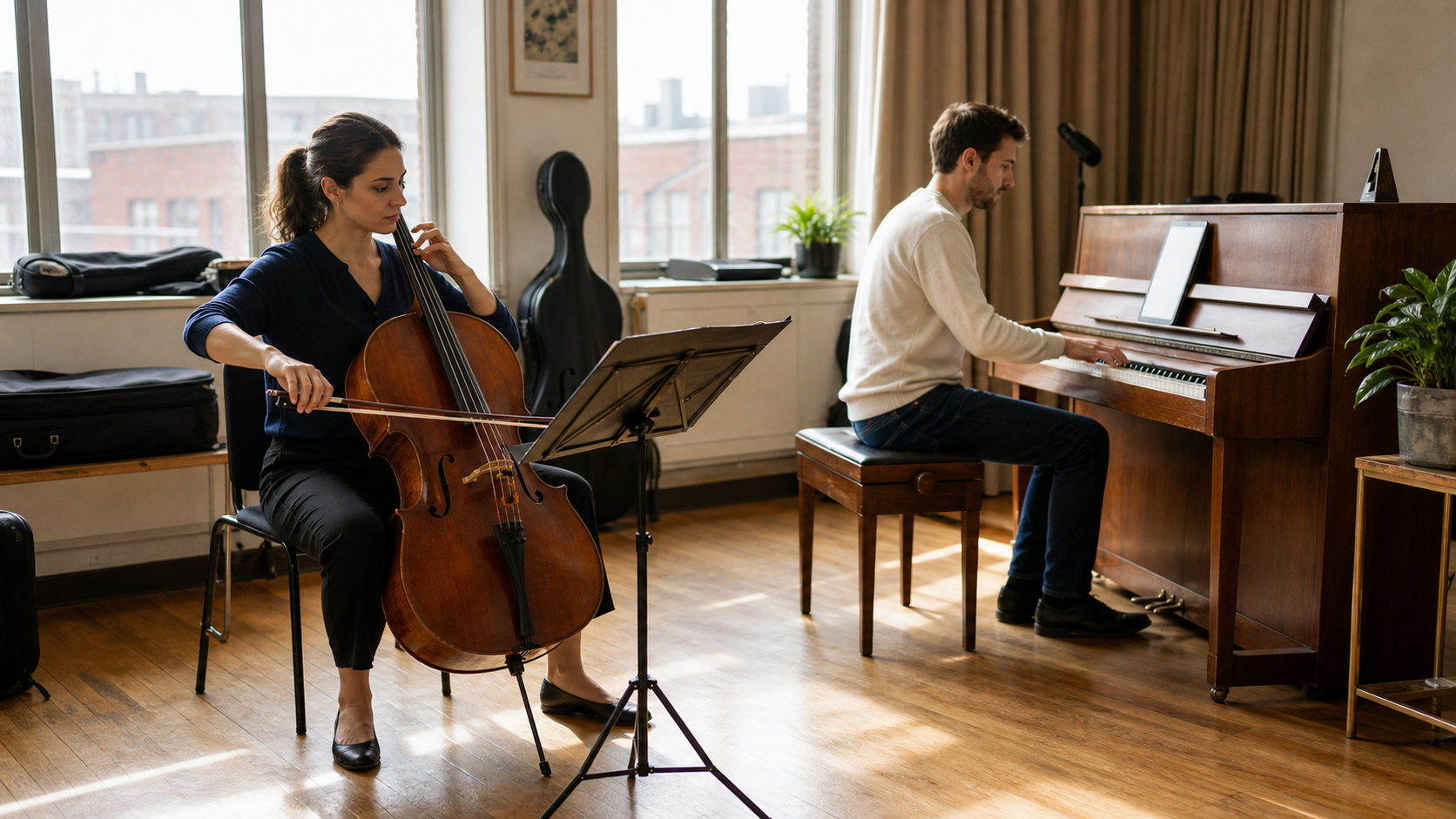
For multi-reference evaluation, keep every person, instrument and point of contact visible; this makes identity drift and geometry errors easier to detect.
Start-and-end-frame workflow
Make both frames physically compatible. Preserve eyeline, body orientation and scene geometry, then ask for one readable transition.

An effective end frame preserves a clear travel path, subject scale and scene geometry, giving the model one physically plausible transition to solve.
Draft-to-final checklist
Review the clip at normal speed and frame by frame. Check the opening, moving hands and faces, prop contact, camera continuity and final frame. The fastest AI video generator comparison explains why “fast” means time to an acceptable take.
Watch this actual generated result from start to finish: inspect product shape, camera timing, physical sound cues and whether the closing frame stays clean enough for an edit.
If a request is blocked, simplify the language and replace questionable source media. Repeatedly submitting the same blocked material rarely helps, because moderation is applied by the model provider.
Is Runway the Right Place to Use Seedance 2.0?
Runway is a sensible choice when your team already works there, wants one shared asset library or needs to benchmark Seedance beside Gen-4.5. It is less compelling if your only goal is the lowest possible cost per second or if relaxed Explore Mode queues conflict with fixed delivery times.
Use this decision checklist
Runway is likely a good fit if you already pay for Standard or higher, value multimodal references, can draft at 480p or 720p, and want model comparisons inside one workspace. Reconsider the workflow if you need guaranteed unlimited 1080p generation, immediate high concurrency or a model-specific control that the Runway integration does not expose.
Before committing a production batch, run one representative shot from each difficult category: face motion, hand-object interaction, rapid camera movement, spoken audio and a vertical composition. Estimate cost from the number of usable takes, not the number of submitted generations.
Conclusion
Seedance 2.0 on Runway is most valuable as a multimodal option inside an established production workspace: use References for identity and environment control, draft at 480p or 720p, reserve credit-based 1080p for approved shots, and compare it with Gen-4.5 under the same prompt and inputs. Explore Mode can reduce iteration cost for eligible accounts, but it is relaxed-rate access rather than guaranteed unlimited final output. When you are ready to build your first controlled shot, start creating with Seedance.
Start generating for free - no credit card required
Create videos with free signup credits, then scale with affordable plans whenever you need more generations.
Free credits on signup. Plans from $28/month.
Related Articles
More posts in the same locale you may want to read next.

Seedance App Preview Video Generator 2026: Create App Store and Product Launch Clips
Use Seedance to turn app screenshots, feature copy, and launch goals into App Store previews, Google Play promo videos, and product launch clips.
Read article
Best AI Video-to-Video Models in 2026
The best AI video-to-video models in 2026 for editing footage you already shot: Higgsfield Genjutsu, Seedance 2.x, Runway Aleph, Luma Modify and Kling Omni compared.
Read article
Kling 4.0 vs Seedance 2.5: Full Comparison
Kling 4.0 vs Seedance 2.5 compared by spec: 30-second clips, keyframes vs 50 references, audio, 4K and 10-bit color, editing, and which model fits which job.
Read article