
MiniMax H3 90s Anime Workflow: Keep the Hand-Drawn Look in Motion

AI Overview
What does a MiniMax H3 90s anime workflow mean?
It means a 1990s-inspired look, not a ninety-second clip. Use consistent illustrated references, then animate short scenes with painted backgrounds.
Which H3 mode should I use for anime references?
Use Ref2VA for separate character, prop and setting references. Choose FL2VA when a composed first or last frame should anchor the shot.
Do I need a 15 fps export for the retro look?
No. H3 documents 24 fps output. Held poses and selective movement create retro rhythm; a low-frame-rate prompt does not set the export frame rate.
Can I build the project without a local ComfyUI setup?
Yes. Seedance Agent provides a hosted route for developing and reviewing the project. Check your selected model's reference options before generating.
Define the 90s Look Before Generating Motion
A convincing MiniMax H3 90s anime workflow begins with art direction, not a long list of nostalgic adjectives. Decide what the viewer should recognize: inked contours, simple character shading, painted locations and purposeful pauses. A grain overlay cannot repair a scene whose buildings look like a modern game environment.
The search intent is practical: people want prompts, reference choices and a repeatable route to a moving anime scene. Community examples of H3 anime include short skating sequences and longer edited music videos. Those examples show creative possibilities, not a universal preset or a promise that every local configuration produces the same result.
Write a small visual contract
Choose three non-negotiable traits and keep them in every shot description. For our original courier example, use flat two-tone character shading, gouache-like coastal backgrounds and slightly irregular ink lines. Specify warm ochre clothing against a mint bridge, with the same afternoon light throughout.
Avoid contradictory directions such as photorealistic skin, glossy volumetric lighting and traditional flat cels in the same brief. Start with one reference that already expresses the finish. Judge that image before asking the video model to interpret movement, camera travel and a story simultaneously.
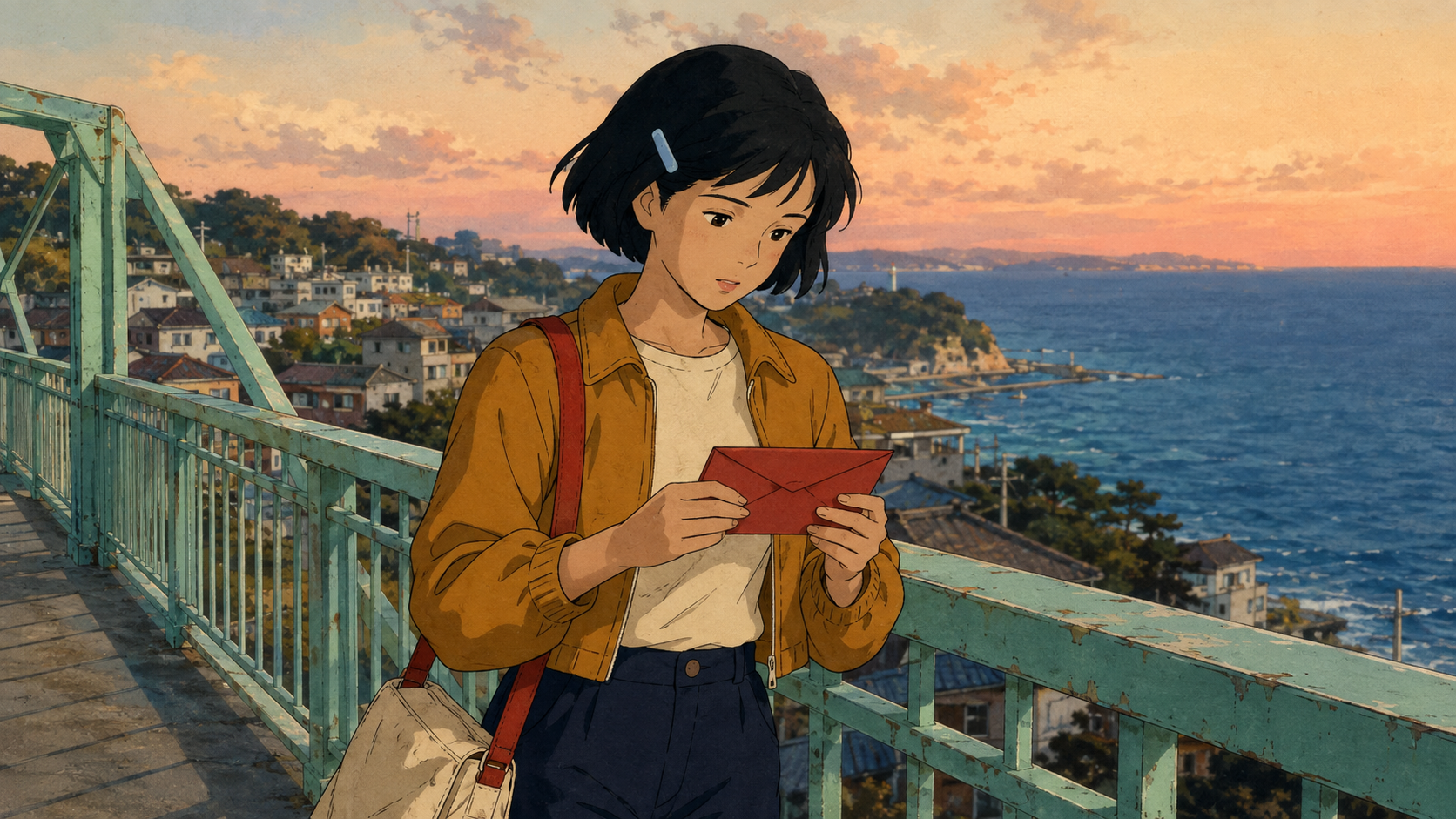
Newly generated art-direction example, not a claimed H3 render. The hair clip, jacket, satchel and envelope give you concrete continuity details to inspect.
Prepare References and Choose Ref2VA or FL2VA
Build a compact reference set that answers different questions. The character image defines identity and costume. A location image establishes geography. A prop image clarifies an object that matters to the action. Adding more images helps only when their roles are unambiguous and their designs agree.
MiniMax's official documentation distinguishes FL2VA, which accepts optional first and last frames, from Ref2VA, which accepts multimodal references. This matters more than finding a workflow whose name contains “anime.” A graph built around a starting composition is not interchangeable with one designed to interpret separate reference subjects.
Give each reference one clear role
For the courier, approve the bob haircut, left-side hair clip, ochre jacket and red bag strap first. Keep the red envelope visually distinct from the satchel. Use a location reference where the bridge, distant lighthouse and station entrance are readable, rather than a beautiful crop that hides the route.
If you need help choosing the input family, the MiniMax H3 Ref2V versus FL2VA guide covers that decision separately. Keep this project focused on preserving a hand-drawn finish through motion, not rebuilding a general model comparison.
Validate one short clip before installing extras
In ComfyUI, begin with a compatible H3 template, its documented model files and a known-working decoder path. Confirm one simple reference-driven shot completes before adding community multishot tools or style adapters. A missing node is an environment problem; changing the art prompt will not solve it.
If searching for a MiniMax H3 anime LoRA, verify the specific adapter's model compatibility and examples before using it. Do not assume an anime adapter is mandatory, or that a filename alone proves compatibility. Keep the baseline clip so you can compare what actually changed.
Write a Three-Shot Anime Prompt You Can Evaluate
An effective MiniMax H3 anime prompt describes what changes over time and what must stay fixed. Make the subject's action easy to read before adding camera complexity. The following is an original planning example, not an imported workflow file or a claim that exact cuts will always be obeyed.
Separate story beats from technical controls
Use this direction with your approved references: “Create an original coastal courier scene in hand-inked 2D cel animation. Preserve the courier's black bob, pale-blue hair clip, ochre jacket and red satchel strap. Keep the bridge and town hand-painted. The sealed red envelope remains intact. Use held reaction poses with selective hair and clothing movement; avoid glossy 3D surfaces, changing costume details and unreadable hand actions.”
Then supply the shot plan below. Treat durations as a proposed twelve-second edit: generate within the duration controls your chosen interface actually supports, or render the beats separately and trim them afterward.
| Beat | Proposed edit window | Action and camera | Continuity check |
|---|---|---|---|
| Establish | 0–4 seconds | Wide lateral view as the courier crosses the bridge | Lighthouse and travel direction remain clear |
| Detail | 4–8 seconds | Medium view as she checks the envelope while slowing | Hair clip, strap and envelope stay unchanged |
| Resolve | 8–12 seconds | Steady station view as she hands over the envelope | One readable transfer, no duplicated object |
One action per beat gives a failed render a useful diagnosis. If the envelope teleports, simplify the handoff. If the camera crosses to the wrong side, restate screen direction. Do not add running, jumping, spinning, talking and an orbit to the same four-second request.
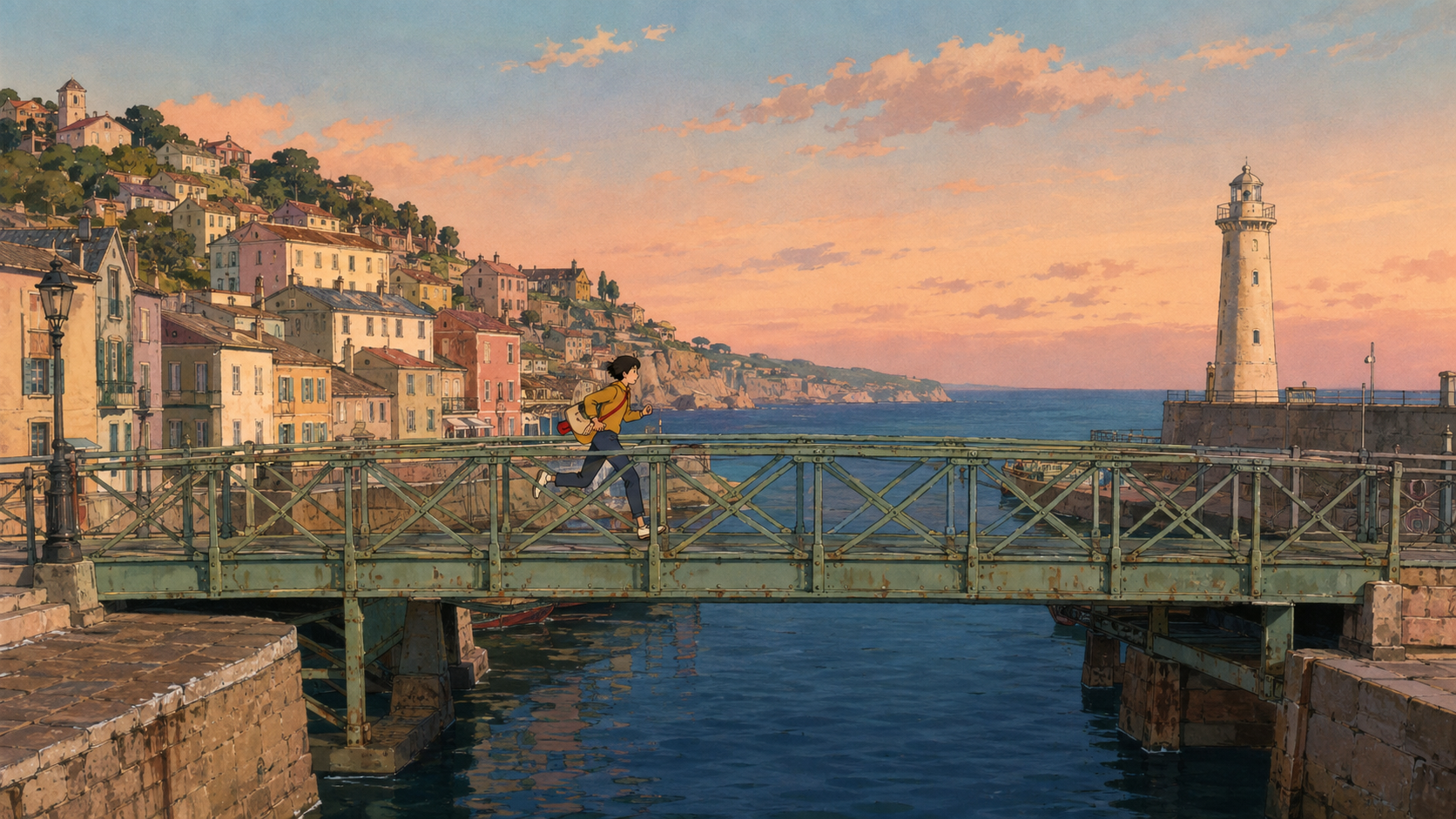
Newly generated location example. Use distinctive landmarks to test whether a later composition still belongs to the same painted world.
Keep Cel Timing Without Breaking Playback or Audio
“90s” describes a broad visual era, not one fixed frame rate. MiniMax documents 24 fps output for H3. A prompt asking for restrained in-betweens may influence perceived motion, but it does not establish the encoded file's frame rate or guarantee an animator's exposure pattern.
Judge rhythm separately from frame count
Look for a readable anticipation, action and settle. A held face can coexist with moving hair, a drifting cloud or a background pan. Freezing every element can look like a slideshow; interpolating every movement can remove the deliberate rhythm you wanted.
Keep a clean master before experimenting with frame dropping or interpolation. Watch the result at normal speed, especially during camera movement. The best frame rate for AI video guide explains delivery choices without treating a higher number as an automatic quality improvement.
This existing Seedance showcase has a more dimensional, glossy finish than our target cel style. Compare its moving hair and background with the painted examples above: smooth motion alone does not establish a 90s look. It is not an H3 benchmark or the courier sequence.
Keep sound instructions simple during the first visual test: footsteps, coastal ambience and no dialogue. Add authorized music after the sequence works, or test a supported audio-reference path separately. Check transitions for abrupt ambience changes and preserve the audio when trimming a shot.
Repair Style Drift and Continuity Before Upscaling
Evaluate each accepted clip against the same small checklist. Can you recognize the character without reading the prompt? Does the prop retain its shape? Are the background and light consistent? Does the movement communicate the intended beat? A sharper export cannot fix a different character or an impossible handoff.
Change one cause at a time
If a painted bridge becomes glossy, remove conflicting realism language and strengthen the location reference. If costume details change, simplify accessories and reuse the approved character image. If movement breaks, reduce the action and camera demands before increasing detail instructions.
Compare revisions side by side at matched playback size. Retain the version number, input references and settings with each accepted clip. For sequences that must continue across shots, the MiniMax H3 resumable multishot workflow addresses recovery and partial reruns; do not regenerate an entire sequence because one insert failed.

Newly generated finished-scene illustration. In a moving version, inspect the envelope transfer and costume details throughout the action, not only at the beginning and end.
Move From a Good Test to a Publishable Seedance Project
A local setup is useful when you need direct control over models, references and rendering details. A hosted route is useful when your bottleneck is coordinating the brief, reviewing shots and getting an approved result. These are different production choices, not evidence that either route guarantees better anime.
Bring the visual contract and three-shot brief into Seedance Agent. Ask for a focused first test, review the proposed direction and current generation cost, then expand only after the output meets your criteria. Check which reference types and model options are available in the live interface; do not assume a hosted tool exposes every custom ComfyUI node.
For vertical publishing, plan the composition around the delivery frame from the beginning. The AI YouTube Shorts maker is a relevant next step for a short original scene. Keep the character's face, hands and important prop inside the crop, and review the final download on a phone before publishing.
Conclusion
A reliable MiniMax H3 90s anime workflow locks the illustrated design first, chooses the appropriate reference mode and gives each shot one readable action. Protect painted backgrounds, evaluate animation rhythm at normal playback speed and repair continuity before polishing resolution. Start with a small accepted scene, retain its references and expand deliberately into an edited sequence. When you want to turn that direction into a hosted production project, start with Seedance Agent.
Ready to try it yourself?
Put the steps from this guide into practice with Seedance and turn prompts or images into polished videos in minutes.
Free credits on signup. Plans from $28/month.
Related Articles
More posts in the same locale you may want to read next.

Seedance App Preview Video Generator 2026: Create App Store and Product Launch Clips
Use Seedance to turn app screenshots, feature copy, and launch goals into App Store previews, Google Play promo videos, and product launch clips.
Read article
Best AI Video-to-Video Models in 2026
The best AI video-to-video models in 2026 for editing footage you already shot: Higgsfield Genjutsu, Seedance 2.x, Runway Aleph, Luma Modify and Kling Omni compared.
Read article
Kling 4.0 vs Seedance 2.5: Full Comparison
Kling 4.0 vs Seedance 2.5 compared by spec: 30-second clips, keyframes vs 50 references, audio, 4K and 10-bit color, editing, and which model fits which job.
Read article