
Best HeyGen Alternatives in 2026: Free, Open-Source, Avatar, and API Options

AI Overview
What is the best HeyGen alternative?
The best option depends on the video you need. Choose an avatar platform for presenter-led content, an API-first tool for automation, or Seedance when the story needs cinematic action, locations, and product shots beyond a talking head.
Is there a free alternative to HeyGen?
Several tools offer free credits or limited exports, but limits often include watermarks, short durations, or slower queues. Test one complete production cycle—not just one attractive sample—before deciding.
Which HeyGen alternative has the most realistic AI avatars?
Realism varies by face, language, framing, and script. Compare the same close-up passage in every tool, then inspect teeth, mouth shapes, eye movement, gestures, and identity stability.
Can a HeyGen alternative support video translation and API automation?
Yes, but translation, dubbing, avatar generation, and API access may sit on different plans. Verify language quality, webhook behavior, rate limits, and export rights against your actual workflow.
HeyGen Alternatives: Quick Decision Table
People searching for HeyGen alternatives rarely want a longer directory. They want to know which category will finish a specific job with fewer revisions. Use this table to build a shortlist before opening free trials.
| Your production goal | Best-fit alternative type | Test first | Main trade-off |
|---|---|---|---|
| Presenter-led training or onboarding | Enterprise avatar platform | Voice clarity, templates, review controls | Less freedom outside presenter scenes |
| Personalized outreach at scale | API-first avatar platform | Webhooks, variables, throughput | More setup and engineering ownership |
| Product ads and creator-style clips | AI UGC platform | Hands, product continuity, hook variety | Results may feel templated |
| Cinematic product or story scenes | Generative video platform such as Seedance | Motion, camera control, visual continuity | Presenter workflows need a separate layer |
| Fast social editing and repurposing | Editor-centered video suite | Captions, timeline, brand presets | Avatar realism may be secondary |
| Maximum data control | Open-source or local workflow | Hardware load, licenses, maintenance | Highest technical overhead |
The important comparison is not “Which platform has the most features?” It is “Which one produces an approved video for my audience with the fewest retries?” If your brief includes places, action, product inserts, or atmosphere, start with a cinematic generator rather than forcing every shot into an avatar template.
Match the Alternative to the Video You Need
Avatar-led sales, training, and explainer videos
For a presenter reading a controlled script, prioritize believable delivery, pronunciation dictionaries, slide or screen integration, brand templates, and reviewer access. The winning tool should keep the same face, voice, framing, and pace across a series—not only produce one convincing demo clip.
AI UGC ads and product marketing
UGC buyers need more than a speaking avatar. The creator must hold the right product, keep its color and shape consistent, demonstrate it with plausible hands, and deliver several hooks without changing identity. A useful trial therefore includes a direct-to-camera hook, a product close-up, and an action shot.
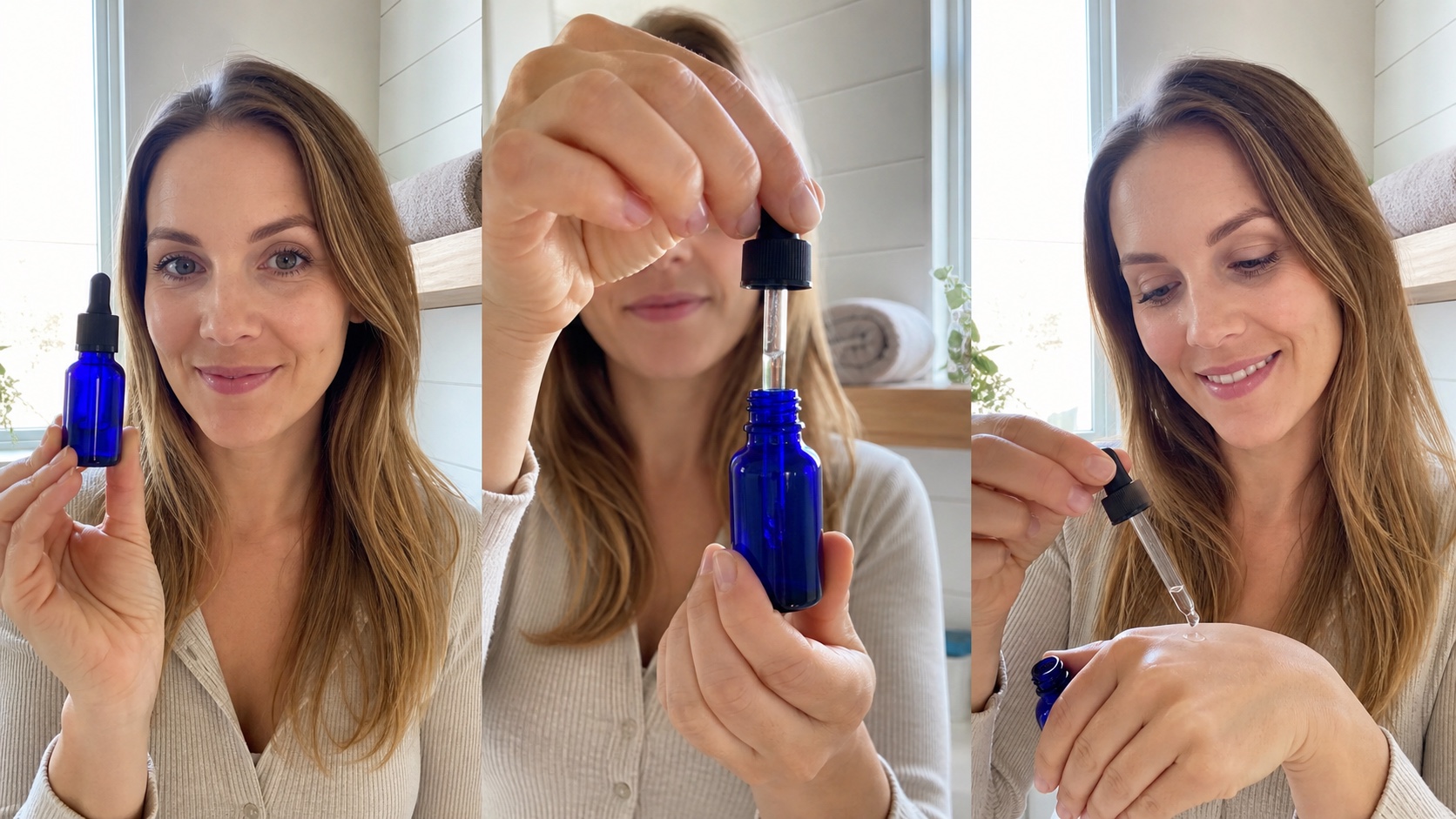
A practical UGC benchmark follows one creator and one unbranded product from hook to hand detail to demonstration.
Cinematic text-to-video and image-to-video
If the concept depends on a moving camera, weather, locations, physical action, or a product story without a presenter, compare generative video systems instead of avatar libraries. Use text to video to explore a shot from a written brief, or image to video when the first frame, product appearance, or art direction is already approved.
Automated and personalized video at scale
For sales outreach, support updates, catalog videos, or localized campaigns, API reliability becomes part of video quality. Confirm that the platform can accept variables, create jobs asynchronously, report failures, return stable asset URLs, and preserve voice and avatar settings across hundreds of renders.
Best HeyGen Alternatives by Use Case
Seedance: Best for cinematic scenes beyond talking avatars
Seedance is the strongest fit when the limitation is not the presenter but the scene around them. It can turn a prompt or reference image into moving product stories, establishing shots, lifestyle sequences, and action-led creative. That makes it complementary to avatar production and, for many campaign briefs, a more relevant alternative than another talking-head tool.

A non-avatar alternative should be judged on complete visual storytelling: location, material detail, continuity, and camera-ready composition.
Synthesia or Colossyan: Best for enterprise training
These platforms belong on the shortlist when the buyer needs structured learning content, repeatable presenters, corporate templates, collaboration, and governance. Test how quickly a non-designer can update one paragraph, replace a slide, request approval, and publish a corrected version without rebuilding the entire video.
D-ID or Tavus: Best for APIs and personalized avatars
API-centered teams should investigate these options when each viewer receives a customized name, offer, account status, or script. The proof is operational: create a small batch, intentionally send one invalid request, inspect the error response, retry safely, and confirm that callbacks map to the correct customer record.
Creatify or JoggAI: Best for AI UGC advertising
For paid social, the core question is whether the platform can turn product information into multiple credible hooks and demonstrations. Evaluate product fidelity, natural gestures, hook diversity, editability, and the time required to produce five genuinely different concepts—not five scripts inside the same visual template.
VEED or Descript: Best for editor-centered workflows
Choose an editor-centered suite when existing footage, captions, screen recordings, podcasts, and quick team revisions matter more than synthetic presenters. These tools can reduce handoffs between generation and editing, although teams that need cinematic B-roll may still pair them with a generative model. A multi-model AI video workflow explains how to route each shot to the right system instead of demanding that one product do everything.
Free and Open-Source HeyGen Alternatives
What a free plan actually lets you export
A free alternative is useful only if it answers the risky questions. Can it render your language? Does it allow a clean export? Is the queue fast enough for iteration? Are commercial rights clear? A plan with many minutes but an unusable watermark may be less valuable than a smaller trial that produces one publishable clip.
When an open-source alternative makes sense
Open-source workflows appeal to teams that need data residency, custom faces or voices, internal integrations, or predictable infrastructure control. They are not automatically cheaper. You own GPU capacity, model setup, dependency updates, moderation, storage, monitoring, and the engineering time required to keep outputs reproducible.
The choice is partly architectural. Review local vs cloud AI video generators if sensitive footage, hardware constraints, or burst demand will decide the deployment model.
Free-tier decision checklist
Before upgrading, generate the same 20–30 second script in every candidate. Export at the resolution you will publish, test the required language, check usage rights, record queue time, and count every rerender. Keep the output files; a side-by-side review is more reliable than memory or a polished vendor gallery.
Test AI Avatar, Lip-Sync, Translation, and API Quality
Run the same presenter script across every tool
Use a script with names, numbers, a short pause, one emotional change, and a difficult phrase. Keep the avatar age, camera distance, background, voice style, and resolution as similar as possible. This turns a subjective impression into a repeatable benchmark.

Judge lip-sync frame by frame: the same face should survive changing phonemes, a head turn, and a natural gesture.
Inspect avatar realism and lip-sync
Review the face at normal speed and frame by frame. Watch lip closure on consonants, teeth and tongue rendering, blinking, gaze, jaw motion, neck edges, and hands entering the frame. A result that looks impressive as a thumbnail may fail once enlarged or viewed for thirty seconds.
Test multilingual translation and voice consistency
Translate one clip into two languages you can verify with native speakers. Check meaning, timing, names, numbers, lip alignment, and whether the voice still feels like the same person. When sound matters beyond speech, compare the workflow with an AI video generator with native audio so ambience and dialogue are evaluated together.
Audit the API workflow
Do not stop at a successful request. Test authentication, validation errors, duplicate submissions, status polling, webhooks, cancellation, download expiry, concurrency, and logging. Measure total time from data input to approved asset, including human review and failed renders. That is the throughput your business can actually rely on.
HeyGen Alternatives Pricing and Final Selection Checklist
Calculate cost per approved minute
Headline plan prices hide the real comparison. Divide total monthly spend by minutes that pass review, then add failed generations, translation, premium avatars or voices, stock assets, storage, API access, and editor time. The lowest sticker price can become the most expensive workflow when it needs repeated fixes.
Include the hidden switching cost
Switching means rebuilding templates, pronunciation rules, brand assets, consent records, prompts, integrations, and review habits. Export what you can before committing, document settings, and keep source scripts and media outside the platform. A staged pilot reduces the chance that one missing feature appears after the migration.
Final selection checklist
Choose the candidate that wins your own evidence set: one presenter video, one translated version, one product demonstration, and one API or batch job. Score quality, consistency, speed, control, commercial rights, collaboration, and cost per approved minute. Give extra weight to the failure that would damage your audience’s trust, not to the feature that looks best in a demo.
Conclusion
The best HeyGen alternative is the one that matches the video you are actually trying to ship. Use avatar-first platforms for repeatable presenters, UGC tools for creator-style product ads, API platforms for personalization, and open-source systems when control justifies the engineering load. When your brief needs cinematic motion, locations, product detail, or a story beyond a talking head, create the first shot with Seedance and judge the result with the same approved-output benchmark.
Ready to create your own AI video?
Turn ideas, text prompts, and images into polished videos with Seedance. If this article helped, the fastest next step is to try the product.
Free credits on signup. Plans from $28/month.
Related Articles
More posts in the same locale you may want to read next.

Seedance App Preview Video Generator 2026: Create App Store and Product Launch Clips
Use Seedance to turn app screenshots, feature copy, and launch goals into App Store previews, Google Play promo videos, and product launch clips.
Read article
Best AI Video-to-Video Models in 2026
The best AI video-to-video models in 2026 for editing footage you already shot: Higgsfield Genjutsu, Seedance 2.x, Runway Aleph, Luma Modify and Kling Omni compared.
Read article
Kling 4.0 vs Seedance 2.5: Full Comparison
Kling 4.0 vs Seedance 2.5 compared by spec: 30-second clips, keyframes vs 50 references, audio, 4K and 10-bit color, editing, and which model fits which job.
Read article