
GPT Image 2.5 vs Nano Banana 2: Which Image Model Should You Use?
AI Overview
Is GPT Image 2.5 better than Nano Banana 2?
Neither wins every job. GPT Image 2.5 is compelling for focused conversational edits and creative iteration, while Nano Banana 2 stands out for Search-grounded generation, broad reference input, output-size choice, and high-volume workflows.
What is Nano Banana 2's official model name?
Nano Banana 2 is Google's Gemini 3.1 Flash Image. It accepts text, image, video, and PDF inputs, and Google positions it as the efficient, low-latency counterpart to its Pro image model.
Which model is better for editing an existing image?
Test both with the same locked source and one-change instruction. Approve the model that changes only the requested region while preserving identity, crop, lighting, product shape, and small background details across several turns.
Can either model generate a finished video?
No. Both are image models. Approve the strongest frame, then send it through an image-to-video workflow when you need camera movement, subject motion, timing, or audio.
GPT Image 2.5 vs Nano Banana 2 at a Glance
| Decision factor | GPT Image 2.5 | Nano Banana 2 |
|---|---|---|
| Best starting point | Conversational creation and contained edits | Fast, high-volume generation with broad context |
| Official model family | Flare and Sunburst | Gemini 3.1 Flash Image |
| Reference workflow | Stronger reference fidelity is a launch focus | Official guide lists up to 10 object and 4 character references |
| Factual grounding | Verify externally before approval | Supports Google web and image Search grounding |
| Output options | Vary by product surface and API settings | 0.5K, 1K, 2K, and 4K plus wide aspect-ratio range |
| Video output | No | No |
Choose GPT Image 2.5 first when the work begins as a creative conversation: establish a frame, comment on a detail, preserve the rest, and keep refining. Choose Nano Banana 2 first when the job depends on fresh real-world context, multiple source references, unusual canvas ratios, 4K delivery, or a large batch whose latency matters. These are starting recommendations, not universal winners.
The split inside GPT Image 2.5 also matters. OpenAI positions Flare as the faster everyday option and Sunburst for premium precision. A fair comparison should therefore name the exact model variant, quality, dimensions, references, and number of editing turns. “GPT versus Gemini” without those settings is not reproducible.
What the Official Specs Actually Change
OpenAI's September 8 release focuses on sharper detail, natural lighting and texture, stronger reference fidelity, focused edits, and more reliable multi-turn editing. It also reports up to 50% lower latency than Images 2.0. Those improvements target the costly middle of creative work: the moment after a good concept exists but the art director asks for a new coat, cleaner package, wider crop, or corrected prop without losing the approved face and composition.
Google describes Nano Banana 2 as Gemini 3.1 Flash Image and emphasizes high fidelity at Flash speed. Its documentation lists output at 0.5K, 1K, 2K, and 4K, new very wide or tall aspect ratios, improved international text, optional thinking, and Search grounding using both web and image results. It can also accept video or PDF context, which is useful when a thumbnail, poster, or campaign still must inherit information from a longer source.
Pricing is harder to compare honestly than a single dollar figure suggests. OpenAI meters image workflows by input and output tokens; Google publishes per-output and API pricing that varies by resolution and mode. A lower generation price can still be expensive if a team needs seven retries. Track the cost of an approved deliverable, including failed runs, human review, export repair, and any later video regeneration.
Run These Five Tests Before You Choose
The fairest model comparison uses the same brief, same input files, same aspect ratio, and a fixed maximum of three revisions. Save every result rather than selecting only the best-looking sample. Score each prompt from zero to two on instruction compliance, subject fidelity, geometry, text accuracy, unwanted change, and readiness for the next production step.
1. Identity across shot sizes
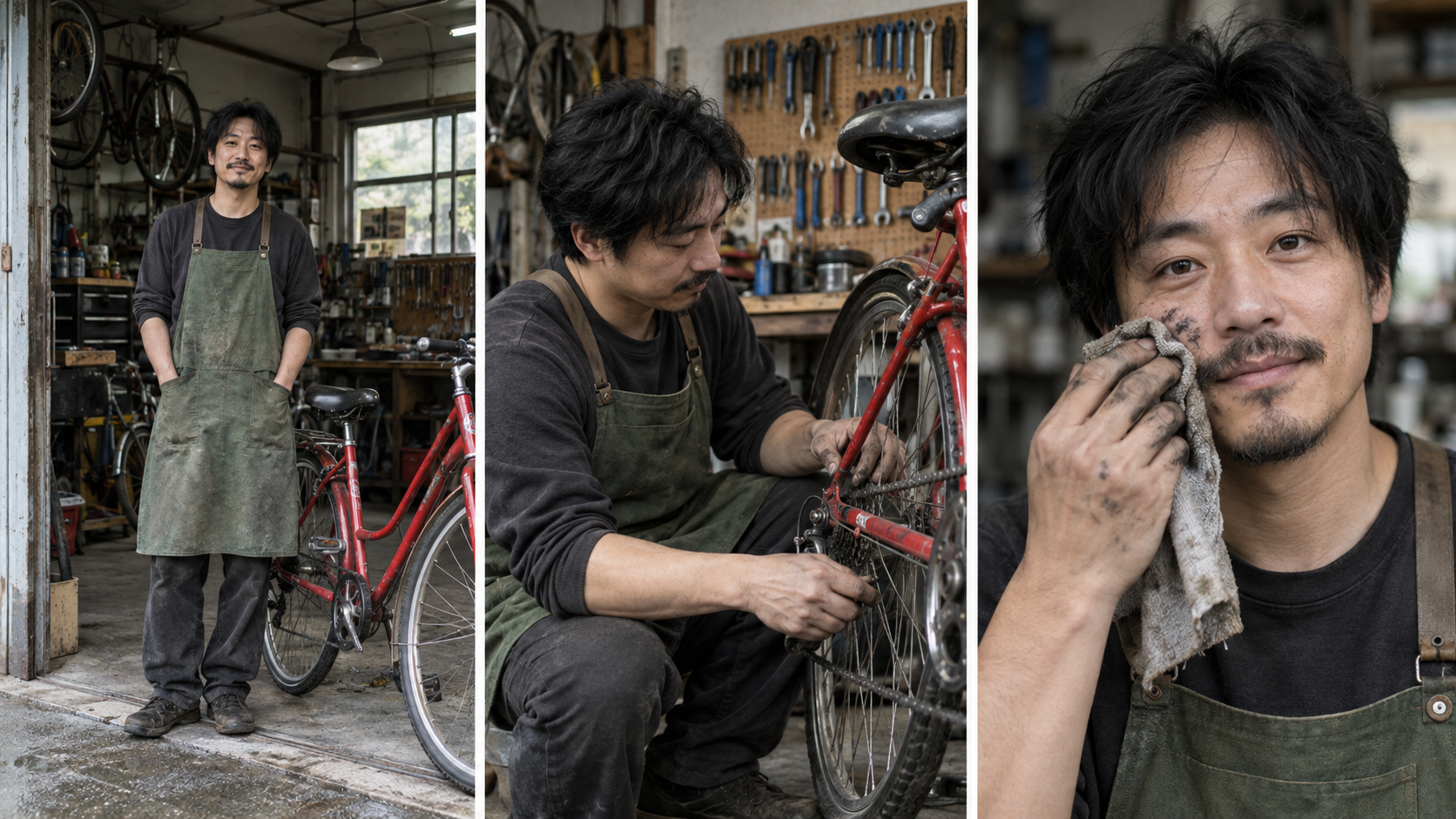
Inspect the face, haircut, apron, workshop, bicycle, hands, and grease details across all three compositions.
Use one fictional person reference and request a wide environmental portrait, a medium action shot, and a close expression. Do not score only facial resemblance. Clothing seams, age, hairline, body proportions, tool placement, and the surrounding space must remain recognizable. This test maps directly to storyboards and multi-shot source frames.
2. Product text and rigid geometry
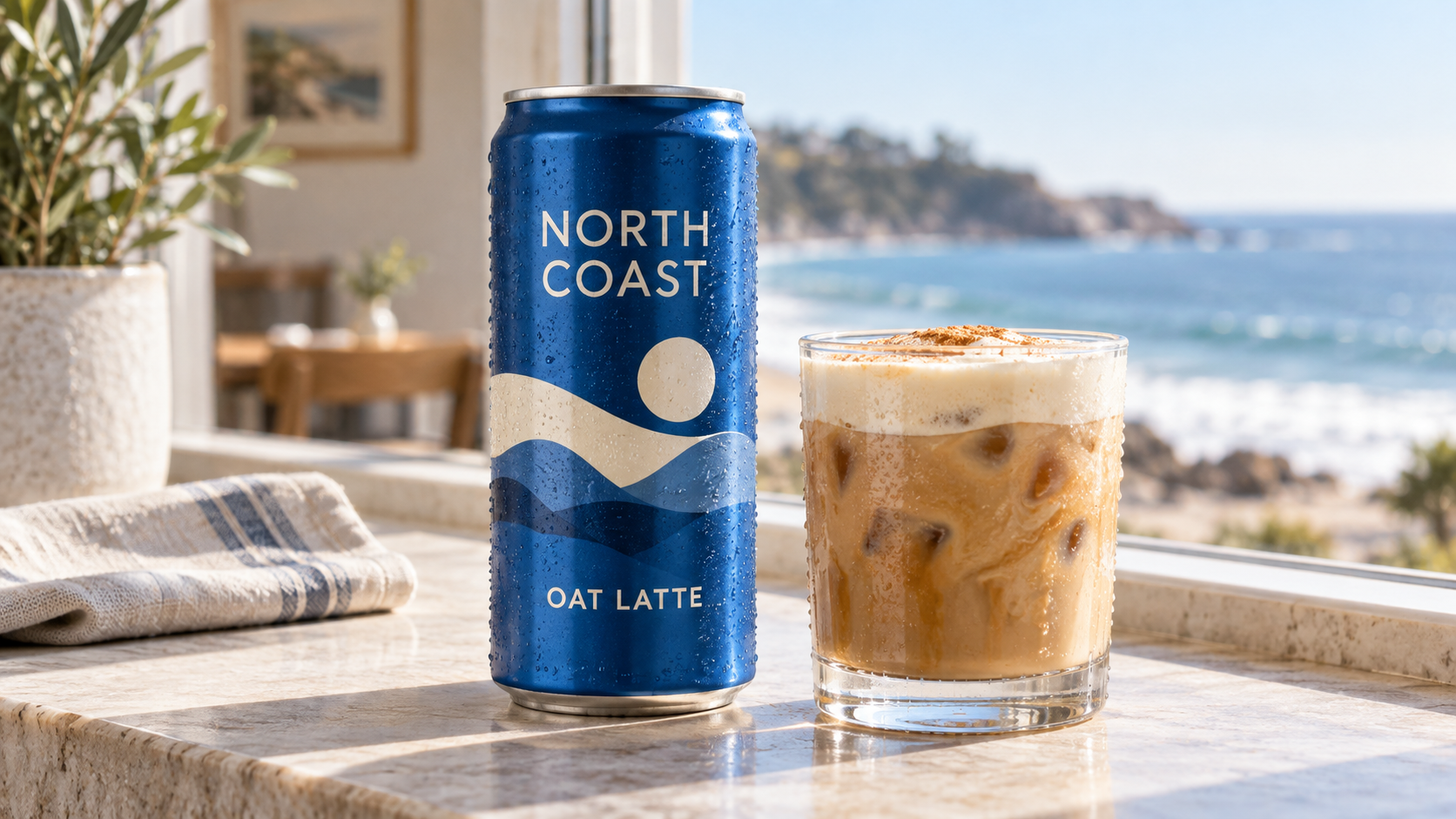
Zoom in on the two required phrases, can rim, cylinder, condensation, glass refraction, and contact shadows.
Ask for a fictional package with two exact text lines, a reflective container, and one transparent object. Count misspellings, repeated letters, warped edges, impossible reflections, and extra microcopy. Then change only the background. A beautiful first image fails if the label breaks during revision.
3. Local edit containment
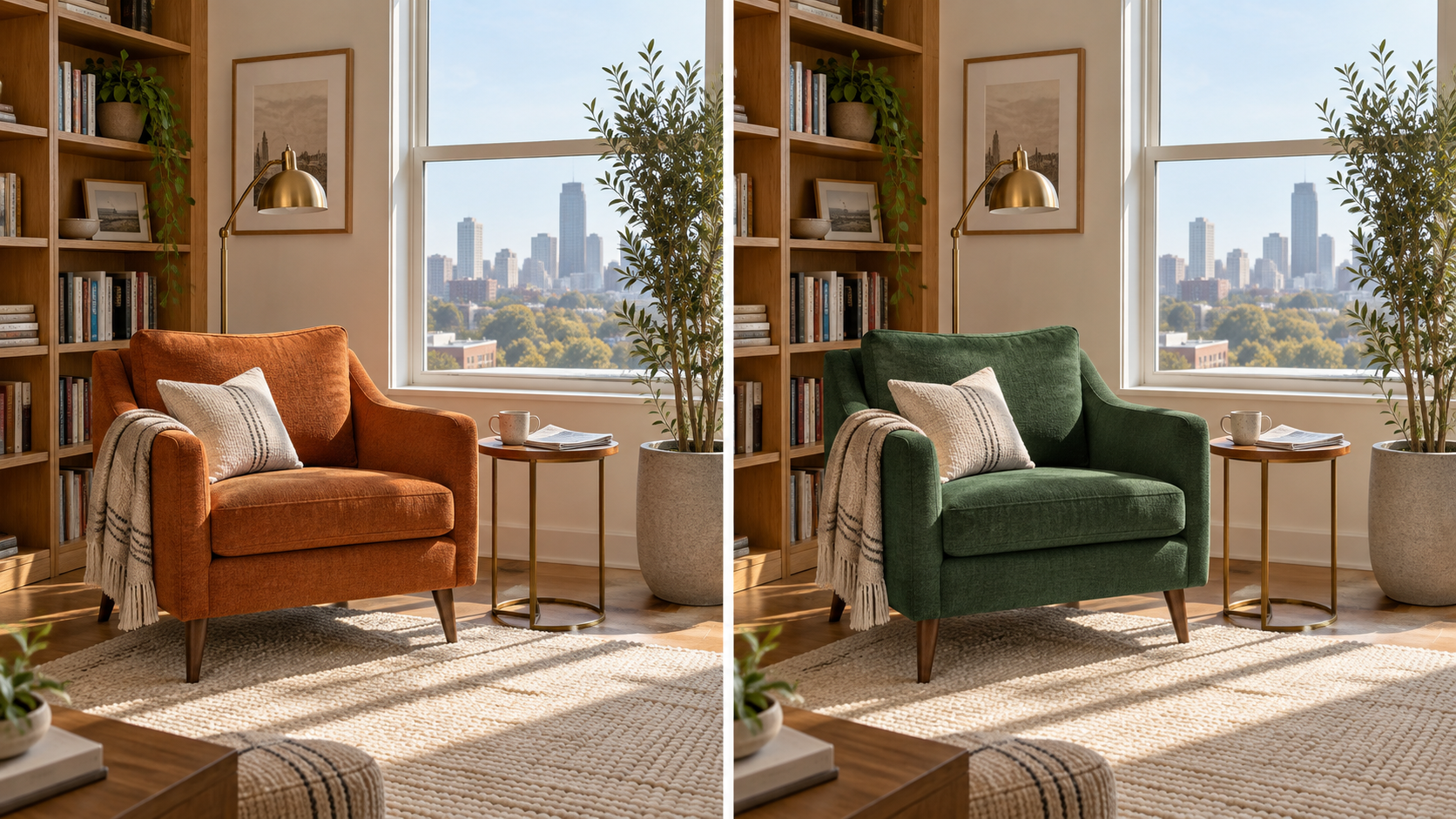
Only the chair color should change; compare the crop, books, plant, shadows, cup, newspaper, and skyline.
Upload a detailed interior and request one material or color change. Overlay the before and after images at 50 percent opacity. Any doubled edge reveals drift immediately. Continue with two more edits, saving a checkpoint each time. This exposes whether conversational memory preserves approved details or gradually redesigns the entire scene.
4. Grounded factual visual
Request a visual tied to current, verifiable information, such as today's weather in a named city. Nano Banana 2 can use Google Search grounding, but the result still requires source verification. For GPT Image 2.5, provide the verified facts directly in the prompt. Score correct facts separately from visual quality so an attractive but wrong graphic cannot win.
5. Production handoff
Use the final frame as an animation source. Inspect foreground separation, limb visibility, rigid-object edges, depth layers, and room for the intended motion. A still can be gorgeous yet fail in video because the pose is tangled or the camera intent is ambiguous. Test the same approved frame with one simple action in the prompted image-to-video guide.
Where Both Models Still Need Review
Neither model makes final approval automatic. Small package copy can look correct while hiding a wrong character. Fingers, jewelry, repeated patterns, transparent edges, reflections, and contact shadows can fail after an otherwise successful edit. Grounded generation can retrieve useful context but still needs a human to verify dates, numbers, rights, and whether the visual implies more than the source supports.
Review at delivery size and at 200 percent zoom. Compare every revision with the last approved checkpoint, not only with the original input. For commercial work, keep editable type and legal copy outside the generated raster whenever accuracy is mandatory. Also confirm that you have permission to use every person, product, location, style reference, and source file supplied to either model.
Which Model Fits Your Job
For rapid concepting and art-direction conversations, start with GPT Image 2.5 Flare. Escalate a valuable frame to Sunburst when a late-stage edit must be precise and the cost of drift exceeds the cost of a slower pass. OpenAI's launch emphasis makes this path especially relevant for teams that review by comments and repeatedly change one element.
For localized ads, research-aware visuals, multi-reference compositions, uncommon aspect ratios, or 4K output, start with Nano Banana 2. Its published input breadth and Search-grounding options reduce manual context assembly. Still verify copy, rights, claims, and factual content. Grounding helps retrieve context; it does not transfer editorial responsibility to the model.
For character campaigns and product systems, run the five tests instead of adopting a permanent winner. A fashion team may value likeness and fabric more than factual grounding. An ecommerce team may prioritize label geometry and batch cost. An editorial team may prefer a model that respects revision comments. Store the winning prompt, negative constraints, references, and acceptance notes as a reusable recipe in your multi-model workflow.
Turn the Winning Image into a Seedance Production
Once a still passes review, translate visual approval into motion instructions. Separate the subject beat from the camera beat: “The mechanic spins the rear wheel once; the camera makes a slow 10 percent push-in.” Lock what must not move, such as face, label, bicycle frame, background tools, or chair geometry. Keep the first video attempt simple enough that failure has one diagnosable cause.
For one shot, upload the approved source through Seedance and choose the delivery ratio before generation. For a campaign with several images, Seedance Agent can organize the brief, references, shot list, approvals, and partial reruns. That allows GPT Image 2.5 and Nano Banana 2 to serve as upstream visual specialists while one production layer keeps naming, continuity, and review decisions coherent.
The practical conversion is not “replace one model with another.” It is to assign each model the part it handles best, approve checkpoints, and rerun only the failed step. Browse Seedance video effects only after the core motion works; effects should support the concept rather than hide weak source geometry.
Conclusion
GPT Image 2.5 is the stronger first choice for conversational creative work where focused edits and preserving approved details drive the decision. Nano Banana 2 is the stronger first choice for Search-grounded context, broad reference input, production-size options, unusual ratios, and high-volume generation. Neither should win because of one viral sample. Run the same five tests, count revisions, inspect full-size files, and measure approved deliverables per dollar. When the winning frame needs motion, bring it into Seedance and build the finished video.
Ready to try it yourself?
Put the steps from this guide into practice with Seedance and turn prompts or images into polished videos in minutes.
Free credits on signup. Plans from $28/month.
Related Articles
More posts in the same locale you may want to read next.

Seedance App Preview Video Generator 2026: Create App Store and Product Launch Clips
Use Seedance to turn app screenshots, feature copy, and launch goals into App Store previews, Google Play promo videos, and product launch clips.
Read article
How to Make a Talking AI Avatar You Can Reuse
Make a talking AI avatar with Seedance: design one consistent character, give it a voice, and make it speak in a talking photo or a full Seedance 2.5 scene, episode after episode.
Read article
Best AI Video-to-Video Models in 2026
The best AI video-to-video models in 2026 for editing footage you already shot: Higgsfield Genjutsu, Seedance 2.x, Runway Aleph, Luma Modify and Kling Omni compared.
Read article