
Best AI Ecommerce Tools in 2026: Boost Sales, Cut Costs, and Grow Faster

AI Overview
What are the best AI ecommerce tools in 2026?
Best by workflow: Seedance for video, Photoroom for photos, Shopify Magic or Jasper for copy, Gorgias for support, and Klaviyo or Nosto for personalization.
What can ecommerce businesses automate with AI today?
AI can automate content drafts, image edits, product-video concepts, support triage, segmentation, and recommendations. Keep humans responsible for facts, pricing, claims, and final approval.
What is the best AI tool for ecommerce product videos?
Seedance is the best choice for controllable product video. Use Creatify for URL-to-ad automation and Runway for developer-led media pipelines.
Are free AI ecommerce tools enough?
Free tools are enough to test one real SKU, not run a growing catalog. Upgrade only when a tool consistently reduces time, handoffs, or repetitive work.
The Best AI Ecommerce Tools at a Glance
| Tool | Best for | Why it stands out | Watch for |
|---|---|---|---|
| Seedance | Product videos and creative testing | Text, image, and reference-led video workflows in one browser workspace | Review product identity and add exact text in editing |
| Creatify | URL-to-ad automation | Turns a product page into scripts and assembled ad variations | Less shot-level control than a dedicated video generator |
| Runway | Developer and enterprise media workflows | Product-ad recipes plus image, video, and audio APIs | Can be more platform than a small store needs |
| Photoroom | Product photos at catalog scale | Backgrounds, staging, cleanup, templates, batch workflows, and API access | Inspect logos, materials, colors, and fine product details |
| Shopify Magic | Store-native AI assistance | Product copy, media editing, themes, segments, and Sidekick inside Shopify | Best fit for merchants already committed to Shopify |
| Jasper | On-brand product copy | Brand Voice, Style Guide, Knowledge Base, and catalog-scale Grid workflows | Needs accurate source data and an approval process |
| Gorgias AI Agent | Ecommerce customer support | Can answer questions and act on order, return, and inventory context | Current automation coverage is deepest on Shopify |
| Klaviyo | Lifecycle marketing and customer context | Combines real-time customer data, messaging, service, and recommendations | Value depends on data quality and consent setup |
| Nosto | Onsite personalization and merchandising | AI-assisted segments, search, recommendations, and audience experiences | Requires enough traffic and catalog structure to learn from |

Original editorial artwork: one product moves through five practical AI-assisted ecommerce workflows. The goal is a connected production system, not a pile of unrelated subscriptions.
What Are AI Ecommerce Tools—and Why Do They Matter in 2026?
AI ecommerce tools create product content, personalize shopping, analyze performance, and automate support. Their real value comes from connecting reliable product data to focused tools and repeatable workflows, with human review protecting accuracy and brand control.
How AI Is Changing Ecommerce Operations
AI ecommerce is moving from isolated generation to connected workflows, where verified catalog data powers reviewed copy, imagery, video, and channel variants from one approved source. As context-aware tools such as Shopify Magic, Jasper, and Gorgias connect more store data, outputs become more relevant—but clear review and governance become more important.

Original AI-generated editorial image: one approved product moves through photography, video, catalog publishing, and team review in a connected ecommerce workflow.
What You Can Automate With AI Tools Today
Use AI for repeatable work with clear inputs and review rules—such as drafting catalog copy, preparing product images, creating short video concepts, answering routine support questions, personalizing campaigns, and summarizing store performance. Keep final approval with people whenever accuracy or trust is at stake, especially for product claims, safety information, pricing, inventory, returns, and imagery that may alter the real item.
Best AI Tools for Ecommerce Product Videos
Product video is the most visible part of an AI ecommerce stack, but different tools start from different inputs.
1. Seedance—Best for Controllable Product Shots
Seedance turns an approved visual direction into controlled product motion without a new studio shoot. Use Text to Video for concepts, Image to Video to preserve product identity, Reference to Video for added guidance, or the dedicated Product Ads workspace to build and refine ecommerce variations in one place.
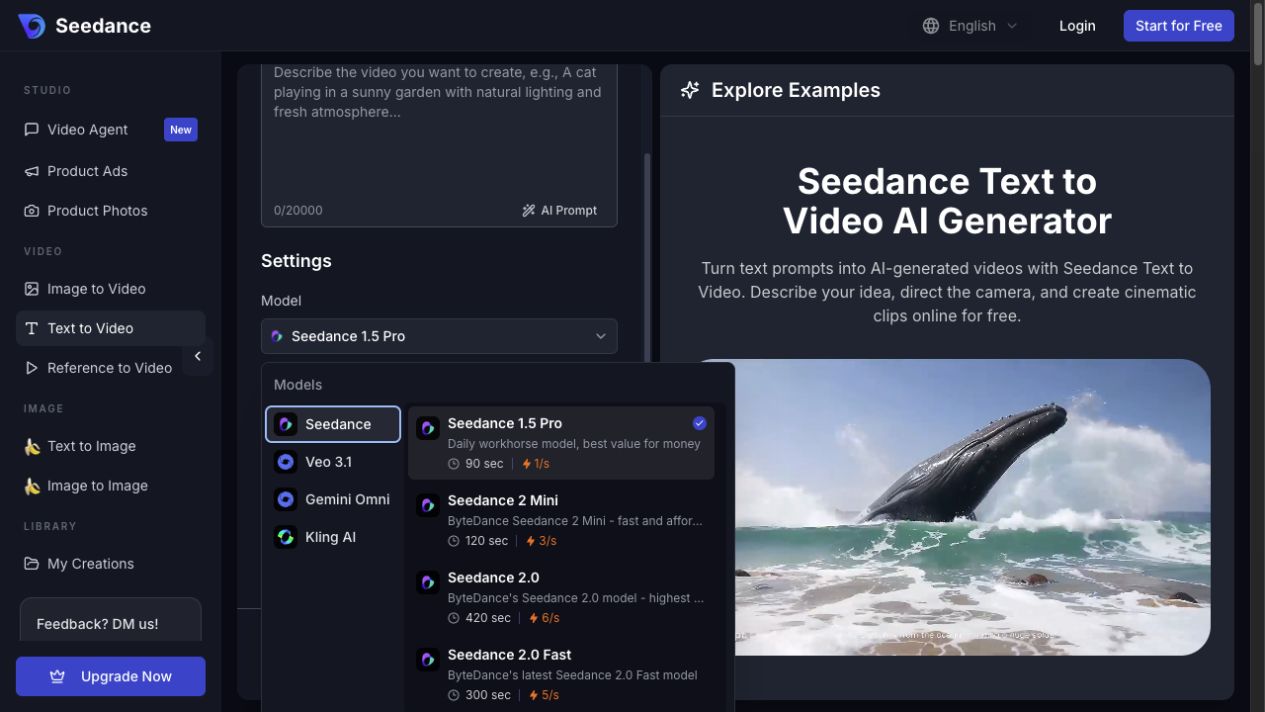
Actual Seedance workspace. Choose the model and generation path around the input you have, then review the visible settings before submitting.
2. Creatify—Best for Turning a Product URL Into an Ad
Creatify AI Video Ads turns a product URL or uploaded assets into assembled ads with scripts, avatars, and fast variations. Choose it when speed matters most; choose Seedance when product motion, camera behavior, or a specific visual concept needs tighter control.
3. Runway—Best for Developer-Led Media Pipelines
Runway's Product Ad recipe combines product images, style references, information, and a concept for social or ecommerce video. Its APIs suit engineering-backed media pipelines, while smaller merchants may reach value faster with a focused browser workflow.
How to Create Product Videos With AI in Minutes
- Start with one approved product image and one clear job for the clip.
- Specify one action and one camera move.
- Generate a few controlled variations while holding the product and audience constant.
- Reject changes to shape, color, material, label area, or function.
- Add exact copy in editing and export for the intended placement.
For a complete short-form workflow, use the Seedance TikTok ad video guide. For model selection, compare the best AI video generation models in 2026.
Why Product Videos Drive More Conversions Than Images Alone
Product video adds motion, scale, sequence, texture, and use context that a static packshot cannot, helping shoppers understand how an item works, fits, and feels in seconds. Use images for precise inspection and video for action or context; the strongest product pages combine both.
Best AI Ecommerce Tools by Category
AI Tools for Product Photography and Visuals
Use Photoroom for catalog-scale cleanup, staging, templates, batch editing, and APIs; use Shopify Magic for store-native media edits; and use Product Photos when you want to create scenes and move approved imagery directly into Image to Video. In every case, inspect logos, materials, colors, and fine product details.

Actual product-reference asset used in a Seedance workflow. Keep the real packshot as the identity anchor and treat generated staging as a reviewable creative layer.
AI Tools for Copywriting and Product Descriptions
Use Shopify Magic for store-native drafts and Jasper when a larger catalog needs Brand Voice, style rules, knowledge assets, and repeatable multi-channel workflows. Ground either tool in verified materials, dimensions, compatibility, ingredients, warranties, and approved claims: AI may transform product facts, but it should not invent them.
AI Tools for Customer Service and Support
Gorgias AI Agent combines policies, help content, store data, and inventory to handle routine order, return, discount, and upsell workflows; its compatibility documentation shows the deepest coverage on Shopify. Smaller Shopify teams can start with Shopify Inbox and Shopify Magic, but disputes, safety issues, policy exceptions, payment problems, and suspected fraud should always escalate to a person.
AI Tools for Personalization and Recommendations
Use Klaviyo to connect first-party customer data with lifecycle messaging across email, SMS, service, and recommendations; use Nosto for onsite search, merchandising, product discovery, and audience segments. Both depend on accurate identity, consent, catalog, and event data—personalization cannot fix unreliable inputs.
How to Use Seedance for Ecommerce Products—Step by Step
Upload Your Product and Set Your Goal
- Open Product Ads for a guided workflow or Image to Video for one shot.
- Upload an approved product image and choose one audience, placement, and objective.
- Describe the product anchor, action, camera move, lighting, background, and final frame.
- Add constraints that protect shape, materials, labels, and claims.
Example prompt: Create a 9:16 product-video shot from this approved skincare bottle image. Begin on a clean bathroom shelf at dawn. Condensation forms on the mirror while the bottle remains centered and unchanged. Use one slow push-in, soft natural light, and a premium but realistic DTC style. End on a stable hero frame with empty space in the upper third for an editor-added headline. Preserve the bottle shape, cap, proportions, and blank label area. No extra products, no hands, no generated text, no logo, no watermark.
Generate, Review, and Export Your Ecommerce Video
Generate a few variations and change only the hook or camera move. Review the full clip for identity drift, warped packaging, implausible motion, unreadable labels, jump cuts, and an unstable final frame.
Generated from the approved skincare image and prompt above with Seedance 2.0 at 9:16, 720p, and five seconds, then framed for this article without cropping.
Approve the visual, add exact copy and disclosures in editing, then save the prompt, source, settings, and final export together.
How to Choose the Right AI Tools for Your Ecommerce Business
Questions to Ask Before Picking an AI Tool
Use one real product and score each candidate against the complete task:
| Question | What to measure |
|---|---|
| Does it fit our inputs and preserve product truth? | URLs, catalog data, packshots, references, claims, colors, labels, prices, and policies |
| Can people review and govern it? | Drafts, approvals, permissions, data use, consent, retention, and escalation |
| Does it connect to the current stack? | Store, helpdesk, CRM, PIM, DAM, analytics, API, and exports |
| What is the real unit cost? | Subscription, credits, attempts, setup, review time, and rework |
| Does it improve a business metric? | Time to publish, acceptance rate, response time, conversion, or repeat purchase |
Run the test with a fixed attempt budget. Count minutes, clicks, generations, corrections, and handoffs until the asset or answer is genuinely ready to use.
Free vs. Paid: What's Worth the Budget?
Use free access to test one real workflow with an approved input, a clear output standard, a reviewer, and a measurable result. Pay only when a tool reliably removes a costly step, creates valuable variations, or shortens recurring work without adding heavy correction; for Seedance, validate one SKU first, then check the live credit estimate and pricing before increasing duration, resolution, or variation count.
Real Results: What Ecommerce Brands Are Doing With AI Tools
Product Teams Moving Faster With AI Video
With an approved packshot, a small launch team can use Product Photos to explore settings, animate the selected visual in Image to Video, test several hooks, and add verified copy in editing—all within the same day and with product review intact. The approved visual system can then be reused across product pages, marketplaces, social posts, and paid ads without a new shoot for every placement.

Seedance ecommerce use-case visual: a creative team reviews multiple product-video variants before choosing the final campaign direction.
DTC Brands Cutting Production Costs With AI
A DTC team can keep the real product record and packshot as ground truth, use Photoroom or Product Photos for reviewed scene variants, Seedance for motion concepts, and Shopify Magic or Jasper for copy from the same verified facts. This can reduce reshoots and repetitive production, but not art direction, merchandising judgment, empathy, or approval.

Seedance small-business use-case visual: a merchant captures product content on-site without a full production crew.
Common Mistakes When Using AI for Ecommerce
Over-Automating Without a Human Review Step
AI errors can look credible and reach customers at scale. Assign an owner to every automated stage so product details, pricing, claims, support escalations, and campaigns receive human review; automation should clarify responsibility, not replace it.
Using Generic AI Output Without Brand Customization
Generic prompts create interchangeable content. Provide approved facts, audience context, brand examples, forbidden claims, visual references, and channel rules, then reuse templates and review checklists. Improve the system by tracking which inputs consistently produce usable, on-brand work.
Conclusion
Choose specialist AI tools connected to reliable commerce data, using Seedance for product video and focused platforms for imagery, copy, support, and personalization. Start with one bottleneck and one SKU in Product Ads, keep human review, and scale only after the workflow is repeatable.
Ready to try it yourself?
Put the steps from this guide into practice with Seedance and turn prompts or images into polished videos in minutes.
Free credits on signup. Plans from $28/month.
Related Articles
More posts in the same locale you may want to read next.

Seedance App Preview Video Generator 2026: Create App Store and Product Launch Clips
Use Seedance to turn app screenshots, feature copy, and launch goals into App Store previews, Google Play promo videos, and product launch clips.
Read article
How to Make a Talking AI Avatar You Can Reuse
Make a talking AI avatar with Seedance: design one consistent character, give it a voice, and make it speak in a talking photo or a full Seedance 2.5 scene, episode after episode.
Read article
Best AI Video-to-Video Models in 2026
The best AI video-to-video models in 2026 for editing footage you already shot: Higgsfield Genjutsu, Seedance 2.x, Runway Aleph, Luma Modify and Kling Omni compared.
Read article