
AI Video Agent vs AI Video Generator: What's the Difference in 2026?
AI Overview
What is the difference between an AI video agent and an AI video generator?
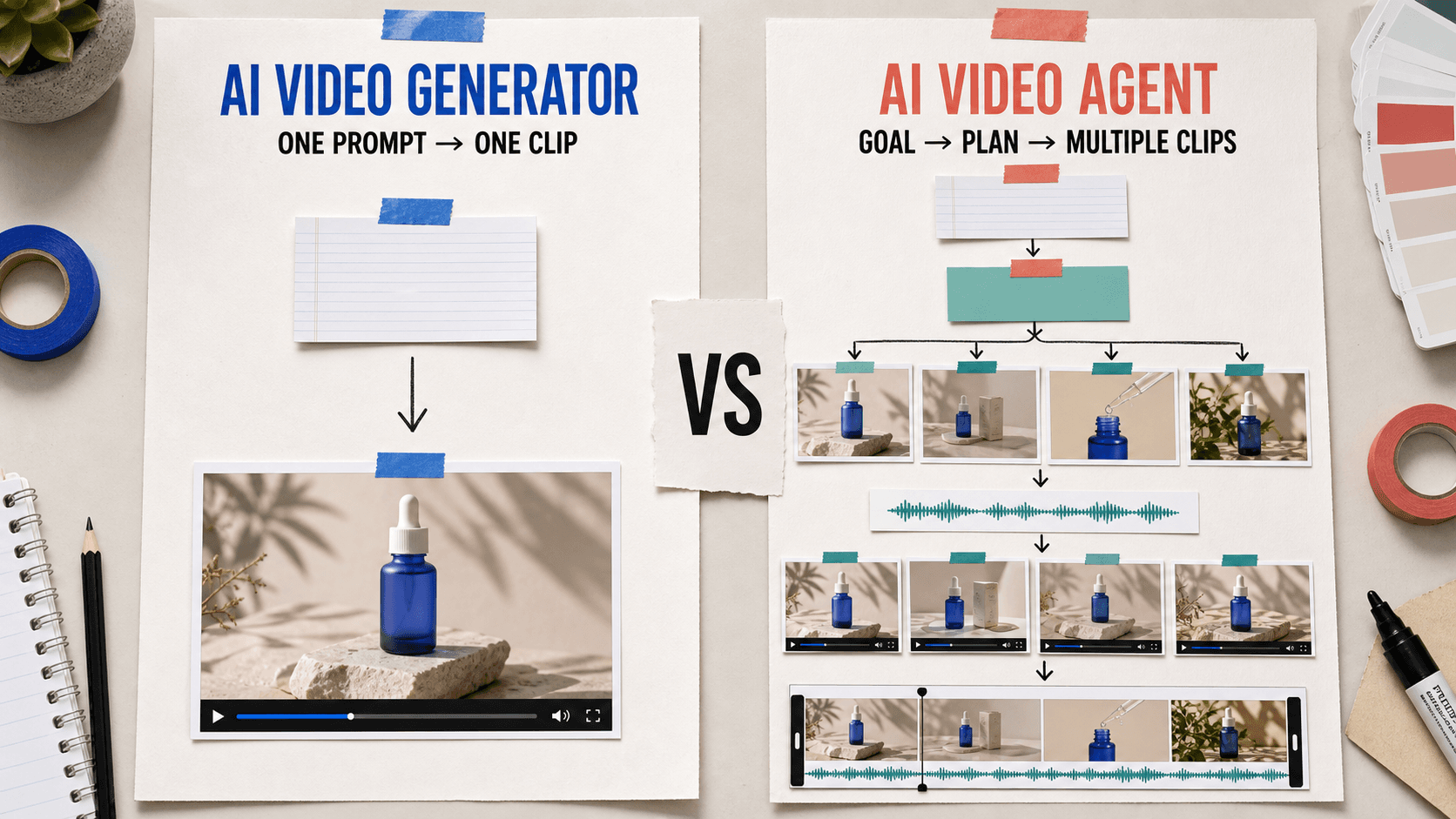
An AI video generator turns one prompt or image into a clip. An AI video agent plans and runs a multi-step workflow, makes decisions between steps, and iterates toward a larger goal.
Is Seedance an AI video agent or an AI video generator?
Seedance is both: its generation models create high-quality clips, while Seedance Agent can organize planning, references, generation, review, and assembly into one guided workflow.
Which is better for content creators: an AI video agent or generator?
Use a generator for a quick, carefully controlled clip. Use an agent when recurring campaigns, batch variants, or multi-shot work would otherwise require the same manual handoffs every week.
Are AI video agents more expensive than AI video generators?
Not necessarily. Seedance Agent lets you plan and confirm the script before spending; paid generation begins only after approval, so cost depends more on outputs and rerolls than on the agent label.
What Is an AI Video Generator?
An AI video generator is a model-centered tool: provide text, an image, or a set of references; choose settings such as duration and aspect ratio; then request a clip. The interaction is intentionally direct. Each click starts one generation, and the creator evaluates the result before deciding whether to rewrite the prompt, change a reference, or generate again.
This structure is excellent for a defined shot. A creator who already knows the subject, action, camera move, lighting, and delivery ratio can work quickly in Text to Video. A product team with a polished first frame can use Image to Video to add controlled motion without inventing an entire campaign workflow.
The generator's strengths are output quality, simple controls, and precise attention to a single clip. The artist decides what to ask for, when to reroll, and which result is worth keeping. Seedance, Kling, Runway, and Pika all expose versions of this pattern.
Its limit appears when the deliverable becomes larger than one clip. A generator does not automatically decide that a 30-second concept needs four shots, keep a product reference attached to each shot, name the files, compare variants, or assemble the approved takes. The user becomes the workflow engine—copying prompts, tracking versions, and repeating settings manually.

A generator is strongest when the job is already reduced to one clear shot with one measurable creative risk.
What Is an AI Video Agent?
An AI video agent is a workflow-centered system. Instead of asking only for a clip, the user states a production goal such as “create five vertical product ads from this packshot” or “turn this story into a three-shot sequence.” The agent translates that goal into tasks, selects relevant tools, carries references and constraints forward, and presents decisions or paid actions for approval.
In practice, an agent may move through brief analysis, script options, storyboard beats, reference preparation, generation plans, clip creation, voice or subtitle work, assembly, and revision. It is not merely a longer prompt box. The useful difference is state: the system can remember which package image is the source of truth, which variant was accepted, which step failed, and what should happen next.
The human still directs the work. An effective agent exposes assumptions, quotes generation cost before a paid call, and lets the creator revise a plan instead of silently spending through rerolls. Final footage still needs review for identity, text, timing, audio, and brand compliance.
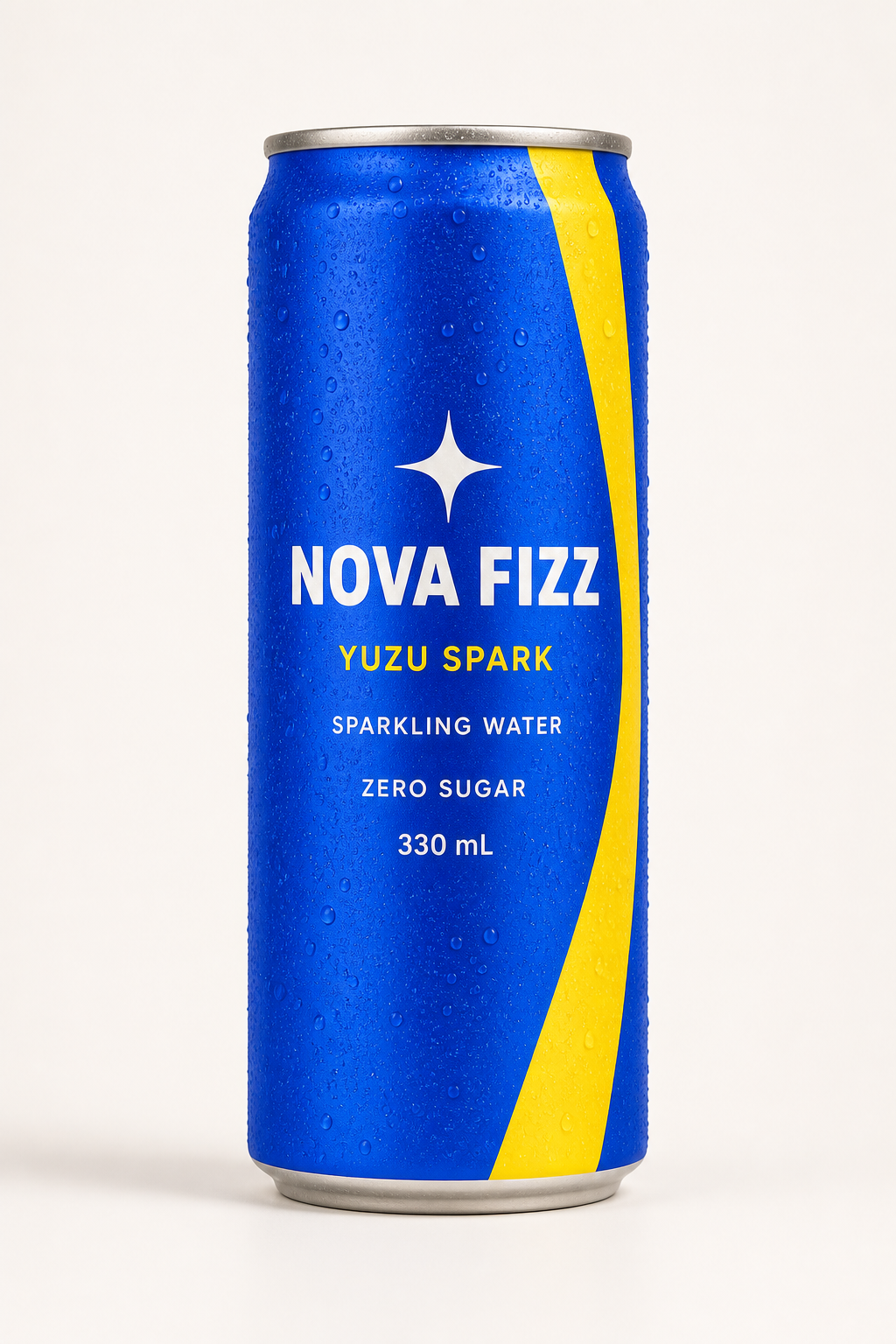
| Product reference · identity source | Brand board · art-direction source |
|---|---|
 |
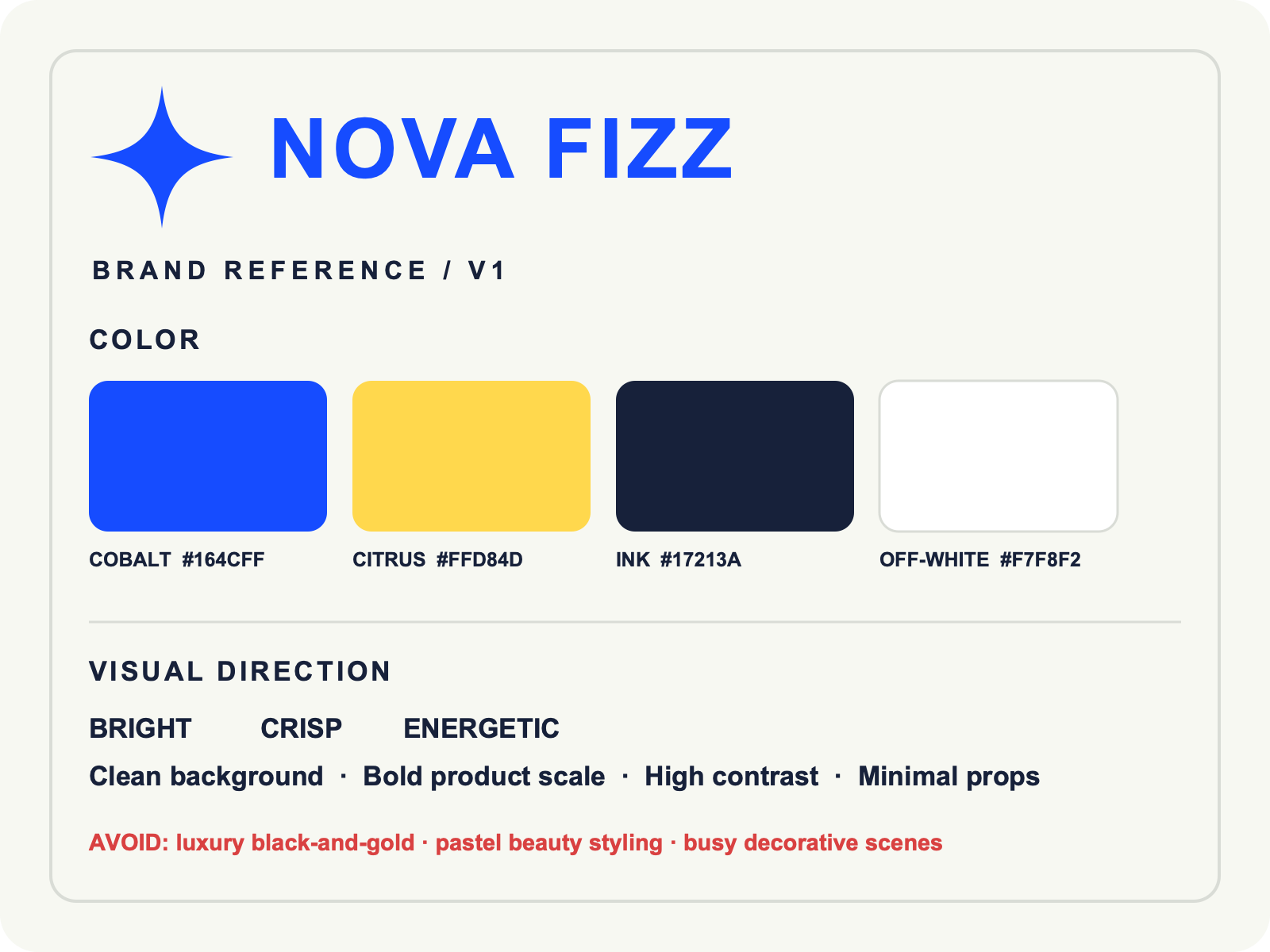 |
An agent can assign different jobs to several inputs instead of forcing every asset into one undifferentiated prompt.
Introducing Seedance Agent — Generator Quality Meets Agent Automation
Seedance combines a growing set of video-generation routes with Seedance Agent, a production workspace built for goals that require more than one isolated output. Tell the Agent what must be delivered, attach the source materials, and it can turn the brief into an approval-ready plan rather than asking you to operate every generation step from scratch.
For a request such as “make five TikTok product videos,” the Agent can identify the product anchor, propose distinct hooks, define shot-level prompts, preserve shared brand locks, prepare variants, and keep the accepted media organized for assembly. A multi-shot story can be divided into timed beats; a product campaign can hold package identity constant while testing the background, camera move, or CTA treatment. Our controlled Video Agent brand-kit test shows why that hierarchy matters in a real output review.
Seedance Agent uses high-quality image and video tools, then adds planning, continuity, version tracking, approval gates, and composition around them. Planning is free; paid generations begin only after the user approves the quoted action. This keeps experimentation visible and prevents uncontrolled credit spend.
A real Agent workflow connects source assets, generation decisions, and an inspectable final clip.
AI Video Agent vs Generator — Head-to-Head Comparison
The easiest way to compare the two is to separate rendering a shot from managing a production task. A generator is the better instrument when every important decision has already been made. An agent becomes useful when those decisions must be planned, repeated, evaluated, and carried across several outputs.
| Dimension | AI Video Generator | AI Video Agent |
|---|---|---|
| Starting input | Prompt, image, or references for one clip | Goal, assets, constraints, and desired deliverables |
| Planning | User defines the shot before generation | System proposes tasks, shots, and dependencies |
| Execution | One manual generation at a time | Coordinates several tools and steps with approvals |
| Iteration | User rewrites and reruns each attempt | Tracks accepted results and revises the relevant step |
| Output scope | One clip or one variation | Batch variants, multi-shot sequences, or assembled deliverables |
| Consistency | Depends on the user's repeated prompt and references | Carries identity and style anchors across the workflow |
| Human role | Shot designer and workflow manager | Creative director, approver, and final reviewer |
| Best fit | Fast exploration or a hero shot | Recurring production and multi-asset campaigns |
| Cost behavior | Pay or spend credits per generation | Planning can be free; generation cost appears at approval |
Neither category guarantees better pixels. A strong generator can outperform an agent on a carefully art-directed hero shot. The comparison is about orchestration: who remembers the brief, sequences the work, and decides what changes after each result.
When Should You Use an AI Video Generator?
Choose a generator when the job is narrow, visual, and easy to judge in isolation. Typical examples include a six-second social hook, a single product orbit, an establishing shot, a background loop, a camera-movement test, or one image that needs subtle animation. These tasks benefit from direct control and quick feedback.
A generator is also the right laboratory for a new visual language. Before building a campaign, test the subject, lens, lighting, and motion in one clip. Keep the prompt compact: one subject, one action, one camera job, one environment, and one exclusion list.

A focused generator benchmark keeps the brief easy to judge: one subject, one turntable orbit, and one visual risk at a time.
Use a generator when you want to personally select every reference and setting, when the shot is unusual enough that a preset workflow would add friction, or when the remaining work will be finished in another editor. It is often the fastest route for experienced creators who already have a storyboard and only need a particular missing shot.
When Should You Use an AI Video Agent?
Choose an agent when the production contains repeated structure. Weekly social calendars, localized ads, ecommerce product variants, multi-scene explainers, recurring character content, and campaigns delivered in several aspect ratios all create coordination work that a single prompt cannot solve.
An agent is especially helpful when inputs have different authority. The product packshot may control geometry, a logo file may control spelling, a brand board may control color, and a voice sample may control delivery. The system keeps those roles explicit, then builds later steps from accepted assets.
It also helps teams collaborate. A marketer can approve the concept, a designer can review identity locks, and an editor can inspect the assembled sequence without reconstructing the history from filenames. For longer sequences, the Seedance timeline prompt guide provides a useful pattern: give each time range one action and one camera job.
How to Choose the Right Tool for Your Workflow
Start with the deliverable, not the category name. Write down the number of clips, total duration, output ratios, reference assets, required audio, review stages, and the details that must never change. Then count the handoffs. If one person can define and judge the shot in a few minutes, a generator is probably sufficient. If the brief becomes a spreadsheet of scenes, variants, owners, and statuses, an agent can remove meaningful overhead.
Use this practical test:
- Count outputs. One or two independent shots favor a generator; a coordinated batch favors an agent.
- Count dependencies. If shot B depends on an approved frame, voice, or character from shot A, use an agent-led plan.
- Identify the expensive mistake. For a hero shot it may be visual quality; for a campaign it may be inconsistent packaging across twenty clips.
- Decide where humans approve. Keep concept, paid generation, and final delivery as visible gates.
- Measure approved cost. Compare total credits, rerolls, editing time, and coordination—not just the price of one run.
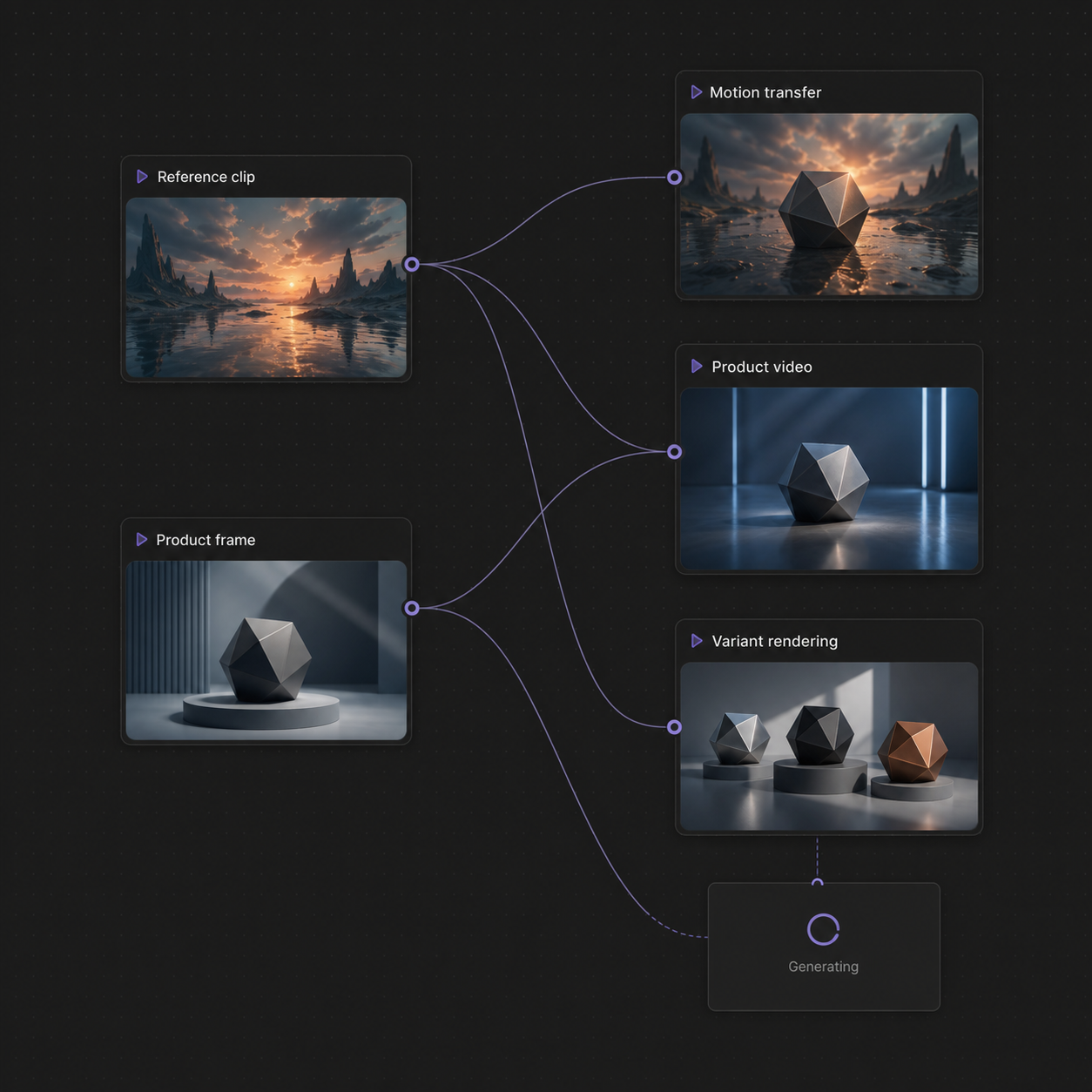
This privacy-safe Seedance canvas shows the same workflow logic with fictional assets: inputs stay connected to each generation branch, so creators can compare outputs without exposing real project material.
Many teams need both. Use the agent to structure the campaign and maintain state, then enter a focused generator loop for the shot that needs hands-on art direction. They are layers in one production stack, not mutually exclusive subscriptions.
Conclusion
An AI video generator is a focused creative tool: it turns a prompt or image into one clip and gives the user direct shot-level control. An AI video agent is a production partner: it decomposes a larger goal, carries references and decisions across steps, coordinates approved generation, and keeps variants or sequences organized. Choose the generator for a clear standalone shot, choose the agent for repeatable multi-step work, and combine both when quality and production scale matter equally.
Ready to create your own AI video?
Turn ideas, text prompts, and images into polished videos with Seedance. If this article helped, the fastest next step is to try the product.
Free credits on signup. Plans from $28/month.
Related Articles
More posts in the same locale you may want to read next.

Seedance App Preview Video Generator 2026: Create App Store and Product Launch Clips
Use Seedance to turn app screenshots, feature copy, and launch goals into App Store previews, Google Play promo videos, and product launch clips.
Read article
Kling 4.0 vs Seedance 2.5: Full Comparison
Kling 4.0 vs Seedance 2.5 compared by spec: 30-second clips, keyframes vs 50 references, audio, 4K and 10-bit color, editing, and which model fits which job.
Read article
Kling 4.0 Keyframes & Omni Reference Guide
Learn how Kling 4.0 uses up to 10 keyframes and 15 Omni Reference assets in one 30-second video, with 3 worked plans, common mistakes, and Seedance 2.5 tips.
Read article