
How to Create Product Videos with Seedance 2.5: The Complete Guide (2026)
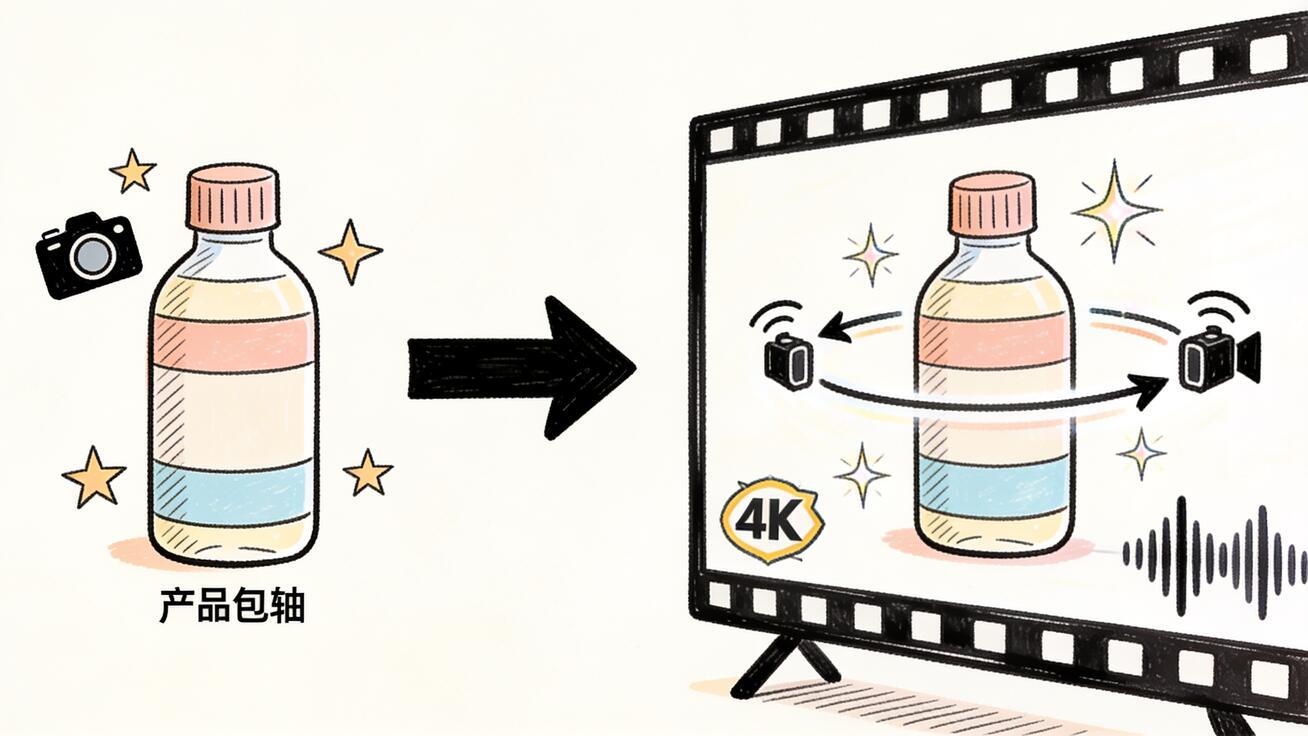
Creating product videos with Seedance 2.5 means going from a packshot or a text brief to a finished 4K clip with native audio — without a film crew, a studio, or hours of post-production. The model generates the footage, the camera movement, and the ambient sound in a single pass. This guide covers the complete workflow: what types of product video Seedance 2.5 can generate, how to write prompts that produce usable commercial content, image-to-video and text-to-video approaches, export specs, and the QA checks that separate publish-ready content from something that needs a regeneration.
Quick Answer: Product Video Workflow in Seedance 2.5
- Choose your input: start from a product image (image-to-video) or generate entirely from a text description (text-to-video)
- Write a commercial-style prompt: subject (the product), action (how it moves), camera (shot and movement), lighting (studio or environmental), and audio (clean ambient or silent)
- Generate — Seedance 2.5 returns up to 30 seconds of 4K footage with audio
- QA: check label/logo accuracy, lighting consistency, and that the product looks right throughout the full clip
- Export for your platform (16:9 for desktop, 9:16 for social)
The image-to-video approach is usually better for products where branding accuracy matters. The text-to-video approach is better when you're generating concept footage before the final product asset exists.
Why AI-Generated Product Video Works in 2026
Traditional product video production requires a photographer or videographer, a studio or location, lighting equipment, a video editor, and often a day of shooting for a single product. Total cost: $500–$5,000 per product, per video format.
Seedance 2.5 changes the economics: you upload your product image and write a prompt. The model generates a cinematic product clip in minutes. For e-commerce brands with 50–500 SKUs, and marketing teams producing seasonal content across product lines, this represents a fundamental change in production capacity.
The quality ceiling has also improved substantially. Seedance 2.5 produces product videos at 4K resolution with accurate physical simulation — surfaces reflect light correctly, materials move with appropriate physics, and studio lighting behaves like real studio lighting. For most e-commerce and social media use cases, AI-generated product video is now indistinguishable from conventionally filmed content.
Image-to-Video: Animating Your Product Packshot
Image-to-video is the most common starting point for product video because your product image already exists. Your packshot, render, or lifestyle photo becomes the first frame of the video, and Seedance 2.5 animates it.
What works best as a source image:
- Clean packshots against white or neutral backgrounds
- Product renders with accurate textures and materials
- Lifestyle photos showing the product in an environment
- 3D render exports from your product design software
What to avoid:
- Low-resolution images (under 800px wide)
- Heavily JPEG-compressed files with visible artifacts
- Cluttered compositions where the product competes with too many background elements
- Images where the camera has already cropped the product tightly — leave room for camera movement
Image-to-Video Prompt Template for Products
[Product movement or the most prominent visual action] + [Camera movement and speed] + [Lighting description] + [Audio: clean ambient or silent]
Example (cosmetics packshot):
The bottle rotates 45 degrees counterclockwise to reveal the side label, then pauses. Smooth orbit movement from front to three-quarter profile over 10 seconds, then holds. Clean studio lighting with soft white fill and one subtle highlight on the glass. Near-silent ambient, faint room tone only.
Example (electronics packshot):
The laptop opens slowly from closed position to full open, screen illuminating. Camera starts at a 45-degree overhead angle and slowly tilts to eye-level as the screen lights up. Dark studio environment with screen as primary light source, soft reflector fill from below. Subtle electronic hum, faint click as screen activates.
Example (food/beverage packshot):
Condensation forms on the cold glass bottle as it sits on a wet slate surface. Camera holds in a macro close-up, then very slowly tilts up to reveal the full bottle. Moody cool lighting from above, dramatic side shadows. Ambient refrigerator hum, subtle dripping water sound.
Text-to-Video: Generating Concept Product Footage
Text-to-video is the right approach when your product asset doesn't exist yet, when you're producing category-level content rather than specific product shots, or when you need footage of the product in a scene that's impractical to film.
Strong text-to-video product scenarios:
- A product in an aspirational environment (a coffee mug on a cabin countertop)
- Multiple products arranged in a flat lay or scene setup
- A product being used in a lifestyle context
- Category-level content before final product images exist
- Seasonal or contextual variations (same product category in different environments)
Text-to-Video Prompt Template for Products
[Product description with specific visual attributes] + [Scene setting and environment] + [Camera movement] + [Lighting and atmosphere] + [Audio]
Example (skincare product in environment):
A matte white ceramic serum bottle sits on a marble bathroom shelf surrounded by small plants and soft morning light. Camera starts in a medium wide shot and very slowly pushes in to a medium close-up. Soft natural light from the left, diffused and warm. Clean bathroom ambient, quiet, distant running water.
Example (tech product lifestyle):
A sleek matte black over-ear headphone sits on a wooden desk next to a closed notebook and a small plant. A hand reaches in from the left and picks up the headphone. Camera holds in a medium static shot. Warm desk lamp light from the right, natural ambient fill. Subtle room tone, the faint sound of the headphone being picked up.
Example (athletic gear in motion):
A pair of white running shoes sits on dew-covered grass in the early morning. Camera starts wide, then slowly tracks forward and descends to ground level, ending in a close-up of the shoes. Morning golden hour light, long shadows, mist on the grass. Quiet morning outdoor sounds, distant birds.
Specific Use Cases and Prompt Examples
E-Commerce Product Listings
For e-commerce, the standard format is a clean 15-second rotational product shot that shows the product from multiple angles. This is the format that replaces the static images on product detail pages.
Prompt:
[Product type] centered on a clean white pedestal. The product rotates 360 degrees counterclockwise over 15 seconds. Studio three-point lighting: key light from the front-left, fill light from the front-right, subtle rim light from behind. Ultra-clean commercial product photography. Near-silent.
Social Media Product Reels
For Instagram Reels and TikTok, the format is 9:16 vertical, 15–30 seconds, with audio included. The content should feel organic and discovery-oriented, not like a traditional commercial.
Prompt:
[Product] placed casually on a colorful textured surface (e.g., a linen tablecloth or a concrete surface with scattered botanicals). Camera starts in a loose medium shot and slowly pushes in to a detail close-up. Natural lifestyle lighting, slightly warm. Upbeat ambient background music, natural surface sounds.
Brand Campaign Hero Video
For hero video on a landing page or campaign, you want more cinematic quality: stronger lighting, more deliberate camera work, longer duration.
Prompt:
[Product] in a premium lifestyle environment. Camera begins on a tight detail close-up, then slowly pulls back to reveal the full product in its context over 20 seconds. High-end commercial lighting — dramatic side-key light, deep shadows. Cinematic sound design: subtle atmospheric score, product ambient.
Seasonal and Campaign Variations
One of the production advantages of AI-generated product video is the ability to produce multiple environmental variations of the same product quickly.
Base prompt structure:
[Same product description] in [different seasonal environment: winter cabin, spring outdoor market, summer beach, fall harvest]. Camera [same movement for consistency across variations]. [Environment-appropriate lighting]. [Environment-appropriate audio].
Running the same core product prompt with different environment variables produces a set of seasonal variations in a consistent visual style.
QA Checklist for Product Videos
Before publishing any AI-generated product video, run through these checks:
Brand accuracy:
- [ ] Label text is legible and accurate (if text is visible in close-ups)
- [ ] Logo placement is correct
- [ ] Product color matches brand standards
- [ ] No accidental warping or distortion of brand marks
Product visual quality:
- [ ] Material rendering looks accurate (glass should look like glass, matte should look matte)
- [ ] Product shape is consistent from frame to frame — check the beginning, middle, and end
- [ ] No phantom elements appearing or disappearing during the clip
Camera and motion:
- [ ] Camera movement is smooth (no jitter or jumps unless intentional)
- [ ] No unintended camera blur or shake
- [ ] The product remains in frame for the full clip duration
Lighting:
- [ ] Lighting is consistent — no sudden shifts unless intentional
- [ ] Reflections and shadows behave correctly
- [ ] The product is properly exposed — not blown out or in shadow
Audio:
- [ ] Audio matches the visual environment
- [ ] No abrupt audio cuts or unexpected sounds
- [ ] For silent product videos, the audio track is clean
If any item fails, regenerate with a more specific prompt addressing the failure point.
Seedance 2.5 Product Video Output Specifications
| Parameter | Value |
|---|---|
| Maximum clip length | 30 seconds |
| Output resolution | 4K (native) |
| Supported aspect ratios | 16:9, 9:16, 1:1 |
| Audio | Native generation (or specify "near-silent") |
| File format | MP4 |
| Best frame rate | Cinematic 24fps or smooth 30fps |
FAQ: Product Videos with Seedance 2.5
Can Seedance 2.5 accurately render my product's logo or text on packaging? It depends on the complexity of the text and how prominently it features in the clip. For text-heavy labels viewed at close range, AI generation can introduce errors or blur. For clips where the product label is in the background or mid-distance, results are usually accurate. Test with a close-up variant and check the label before publishing.
What's the best image resolution for image-to-video product shoots? Provide your highest available resolution source image. A minimum of 1024×1024 pixels is recommended; the model works well up to the full resolution of a standard product photo. Upscaling a small image before generation does not improve results.
Can I generate 360-degree product rotation videos? Yes. Use "360-degree orbit" or "full rotation counterclockwise/clockwise" in your camera direction. Results vary by product complexity — clean geometric products (bottles, cans, boxes) rotate reliably; products with asymmetric details or fine surface text may have minor inconsistencies at the back of the rotation.
How do I export Seedance product videos for Shopify or an e-commerce platform? Seedance exports standard MP4. Download the clip, and if needed, transcode to the platform's preferred spec using a free tool like HandBrake or Cloudconvert. Most e-commerce platforms accept MP4 at up to 1080p.
Conclusion
Creating product videos with Seedance 2.5 is now a viable production workflow for brands, agencies, and solo creators who need commercial-quality footage without conventional filming costs. The combination of 30-second clips, 4K output, native audio, and image-to-video support makes it capable enough for real marketing production, not just demos.
Start with your best existing product packshot, write a structured prompt focused on camera movement and lighting, and generate two to three variants. The QA checklist above will tell you which take is publish-ready. Try the full workflow at Seedance Image-to-Video or Seedance Text-to-Video, and see the Seedance 2.5 prompt guide for more copy-ready prompt templates.
Comparing Seedance 2.5 to Conventional Product Video Production
For context on what AI-generated product video replaces:
| Production method | Time | Cost (est.) | Scalability |
|---|---|---|---|
| Conventional studio shoot (1 product) | 1–2 days | $500–$5,000 | Low |
| Conventional studio shoot (product line) | Multiple days | $5,000–$50,000+ | Low |
| Seedance 2.5 (1 product, 1 variant) | 20–30 minutes | ~$1–5 in compute | High |
| Seedance 2.5 (product line, multiple variants) | Hours | ~$20–100 | Very high |
The cost differential is most visible in catalog-scale production. A brand with 100 SKUs that needs product video for each — intro clips, social variants, seasonal variations — would traditionally need weeks of shooting and tens of thousands of dollars. With Seedance 2.5, the same scope is achievable in days.
Where conventional production still wins: Products with complex features that need to be demonstrated in use (power tools, medical devices, complex software), products where brand accuracy on fine print is critical (pharmaceutical packaging), and high-profile campaign hero videos where the difference between AI-generated and conventionally filmed footage matters to the creative brief.
For the vast majority of e-commerce product video needs — listing clips, social content, email campaign assets, landing page video — Seedance 2.5 is production-ready.
Internal Links
- Seedance Text-to-Video — the primary entry point for generating product footage from a text description
- Seedance Image-to-Video — animate an existing product photo into a video clip
- Seedance 2.5 model page — full capabilities and access status
- Seedance 2.5 Image-to-Video Guide — detailed guide to animating product packshots
- Seedance 2.5 Text-to-Video Guide — complete text-to-video workflow including camera motion vocabulary
- Seedance 2.5 Prompt Guide — copy-ready prompt library for all video types
Platform-Specific Export Guides
Shopify and e-commerce listings: Export as MP4, 16:9 ratio, maximum 100MB. A 15-second 4K clip will typically be 30–80MB. If needed, transcode to 1080p to reduce file size without losing visible quality on a product listing page. Add autoplay on hover in your theme settings for the best conversion impact.
Instagram Reels: Export as MP4, 9:16 ratio, maximum 15–30 seconds. Reels with native audio — which Seedance 2.5 provides — perform better than muted clips. The generated ambient sound gives the clip an authentic, non-commercial feel that fits the Reels format.
TikTok: 9:16 ratio, 15–60 seconds. Seedance 2.5's native audio is a major advantage here. Sound-on is the default TikTok experience. Product clips with genuine ambient sound — café noise, street sound, studio environment — feel authentic rather than promotional, which is exactly what performs on TikTok for product discovery.
YouTube Shorts and YouTube: For Shorts, use 9:16 at 15–30 seconds. For standard YouTube product videos, 16:9 at any length from 15 seconds to 2+ minutes (for which you'd stitch multiple Seedance clips in an editor with voiceover and product information). Seedance 2.5's 30-second maximum per clip means a 2-minute YouTube product explainer would need 4–5 clips assembled.
Email campaign thumbnails: Generate a 6–10 second looping clip for email campaign thumbnail animations. Short, product-forward, and optionally near-silent (many email clients don't autoplay with sound). The product should be centered and identifiable within the first frame.
After Publishing: Tracking the Impact
Product video's SEO impact is measurable. After publishing AI-generated product clips to your pages:
- Monitor bounce rate on product pages before and after adding video (Google Analytics 4)
- Track time-on-page — product pages with video typically see 2× longer average session duration
- Watch conversion rate changes over a 2–4 week window
- For social content, track saves and shares rather than just views — product Reels that get saved indicate purchase intent
These metrics tell you whether the AI-generated product video is moving business outcomes, not just producing content volume. The same data then guides which product categories benefit most from video and where to continue production.
Using References for Product Consistency
Seedance 2.5 supports up to 50 reference images, which is particularly useful for product video when you need a product to appear correctly in multiple clips across a campaign. If you're generating 10 product clips as part of a launch campaign, you can attach the product reference image to each generation to keep the product's appearance consistent.
This is most valuable for:
- Products with distinctive colors that must match brand standards
- Products with visible logos or text that need to remain accurate
- Character-based products (toys, mascot-branded goods) where the design must be stable
- Campaigns where multiple clips will appear side by side and visual consistency matters
Add the product packshot as a reference image, and include "maintain product design consistency as shown in reference image" in your prompt. This helps the model anchor the product's visual identity while generating the environmental and motion elements around it.
Common Mistakes in AI Product Video Generation
Describing the product in the prompt when using image-to-video. In I2V mode, the model already sees the product. Your prompt should direct motion, camera, and audio — not re-describe what's in the image. "Rotate the product" is better than "a matte black coffee grinder rotates." The model knows it's a coffee grinder; your job is telling it what to do.
Asking for too many actions in one clip. "The product spins, then a hand picks it up, then it's placed in a gift box, then text appears" is five actions in one prompt. The model will attempt them in sequence and often produce rushed or incoherent transitions. Separate these into individual clips and assemble them in an editor.
Not specifying lighting. Product video without lighting direction often defaults to something generic. "Clean studio lighting with white fill" takes three seconds to type and produces more consistent and on-brand output than leaving lighting to the model's inference.
Using very short clips when 30 seconds is available. A 6-second product clip generated by Seedance 2.5 often feels rushed. The model has 30 seconds available; use it for slow, deliberate camera movement that makes the product look premium. Trim in post if you need a shorter final cut.
Ready to try it yourself?
Put the steps from this guide into practice with Seedance and turn prompts or images into polished videos in minutes.
Free credits on signup. Plans from $28/month.
Related Articles
More posts in the same locale you may want to read next.

Seedance App Preview Video Generator 2026: Create App Store and Product Launch Clips
Use Seedance to turn app screenshots, feature copy, and launch goals into App Store previews, Google Play promo videos, and product launch clips.
Read article
Gemini AI Video Prompt Examples: Copy-Ready Veo Scenes and a Better Prompt Formula
Copy Gemini AI video prompt examples for cinematic motion, product ads, dialogue, and vertical clips, then adapt them with a practical Veo prompt formula.
Read article
How to Keep Product Shape Consistent in AI Video Ads
Lock product geometry, packaging, labels, references, camera angles, and approval checks so AI video ads preserve the real SKU across every shot.
Read article