
Seedance vs Atlabs AI Video Generator 2026: Multi-Model Workflow vs Native Seedance

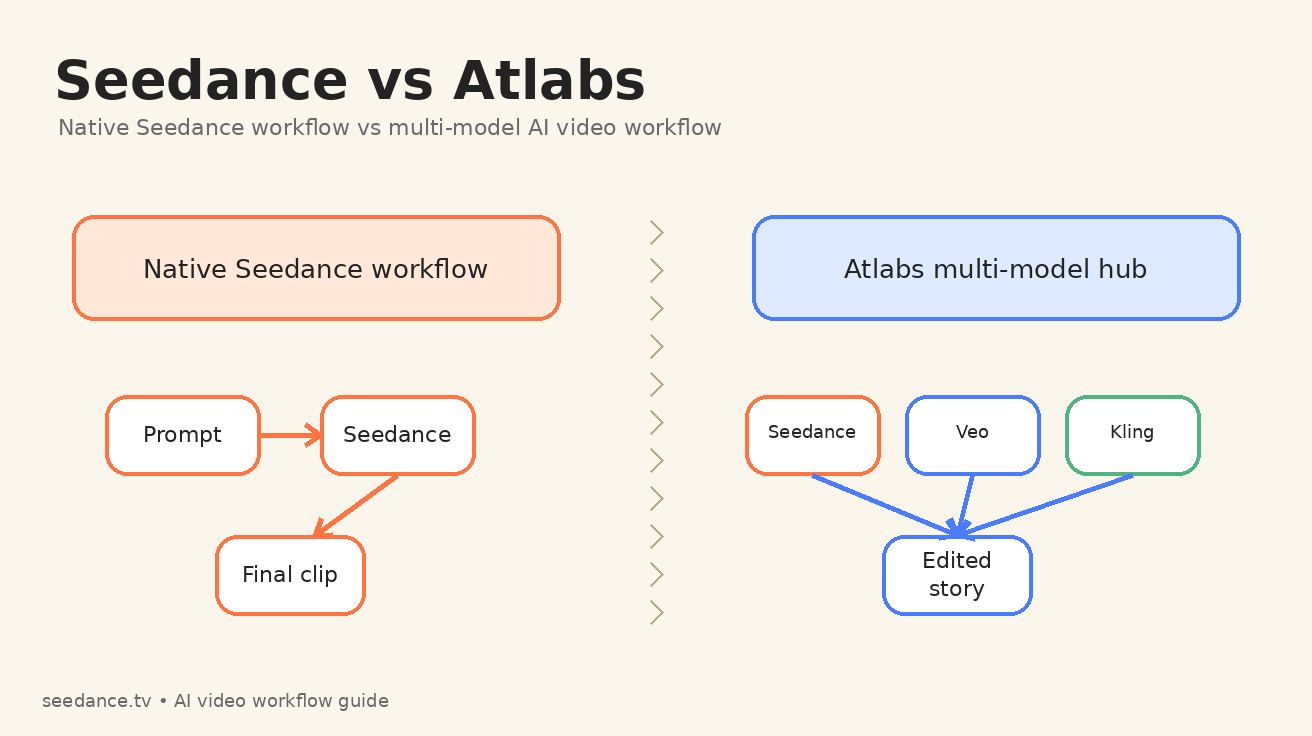
If you are comparing Seedance vs Atlabs in 2026, you are not really comparing two identical video models. You are comparing two ways to run an AI video production workflow. Seedance is the native, focused path: write a prompt, upload a reference if needed, generate with Seedance, then refine around Seedance's motion behavior. Atlabs is a broader creative suite that gives creators access to many models, including Seedance, Veo, Kling, image tools, voiceovers, captions, storyboarding, and editing features inside one workspace.
That difference matters. A creator searching for Atlabs Seedance usually wants to know whether they should run Seedance inside a multi-model hub or go directly to a native Seedance workflow. The answer depends on the job. If your priority is fast cinematic motion, clean prompt iteration, and fewer handoffs, the native Seedance workflow is usually the simpler choice. If your priority is a longer campaign where one scene needs Seedance, another scene needs a different model, and the final deliverable needs localization, captions, or broader editing controls, a multi-model AI video workflow can make sense.
This guide breaks down Seedance vs Atlabs from a practical production perspective. It focuses on what happens after the marketing claims: how prompts move through the system, how consistent characters survive across shots, how much control you keep, where costs and complexity appear, and which workflow is best for different creator types.
Quick verdict: choose the workflow, not the logo
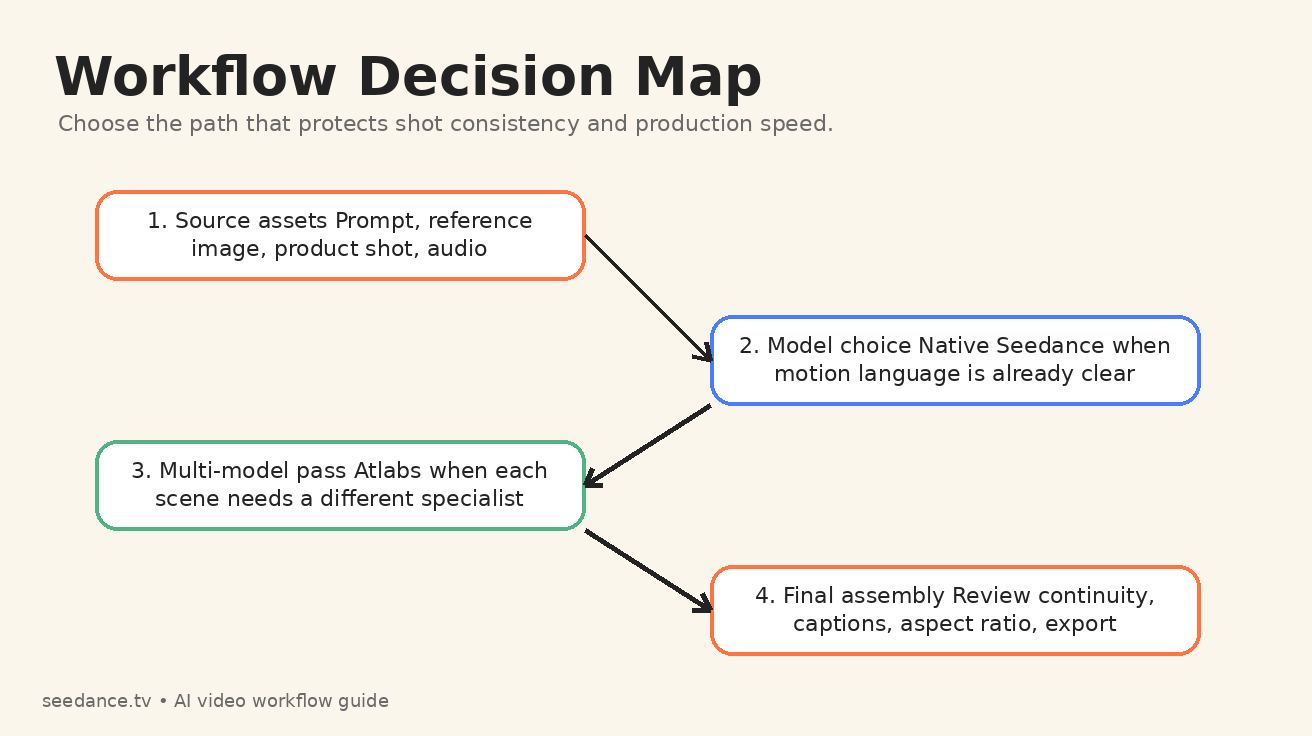
For most Seedance-first creators, the best default is simple: start with Seedance when the visual idea depends on Seedance's motion style, multi-shot pacing, image-to-video control, or a fast test-and-refine loop. Use Atlabs when you need a studio layer around the generation process, especially if you are mixing multiple AI models, planning a storyboard, adding voiceovers, localizing a video, or building a repeatable brand content pipeline.
Here is the short version:
| Use case | Better starting point | Why |
|---|---|---|
| Fast text-to-video concept tests | Seedance | Fewer decisions, faster prompt iteration, direct focus on the native Seedance output. |
| Image-to-video product clips | Seedance | A clear reference image plus a focused motion prompt is often enough. |
| Multi-scene brand campaign | Atlabs | A hub workflow can combine model choice, storyboarding, captions, and editing. |
| Creator learning Seedance prompting | Seedance | You learn how Seedance responds without another interface layer. |
| Agency producing many formats | Atlabs | Multiple models and export tools can reduce app switching. |
| Cinematic short with tight visual continuity | Seedance first, Atlabs only if needed | Start by proving the native Seedance look, then add other tools only for gaps. |
The key is not that one option is universally better. The key is that a native Seedance workflow and a multi-model AI video workflow optimize for different types of friction.
What Seedance is best at in a native workflow
Seedance is strongest when the creative problem is mainly about getting a shot to move correctly. That sounds simple, but it is the heart of AI video production. A beautiful script or storyboard does not matter if the model cannot preserve a face, move the camera in the requested direction, or keep the subject from melting during the action.
A native Seedance workflow keeps your attention on four core inputs:
- The scene you want.
- The reference image or first frame, if you have one.
- The motion you want Seedance to apply.
- The quality constraints you want Seedance to avoid.
That makes Seedance especially useful for creators who already know what they want on screen. For example, a product marketer may upload a clean product still and prompt a slow macro push-in with background light movement. A filmmaker may describe a two-shot cinematic moment with a dolly move and a specific emotional beat. A social creator may generate a short vertical hook from a single prompt and quickly compare three variations.
The native path also helps you learn. Every generation teaches you something about Seedance prompt behavior. You see how words such as "orbit," "handheld," "macro," "tracking shot," "smooth pan," "dramatic backlight," or "maintain exact character appearance" affect the result. When you add a multi-model workspace too early, it can be harder to know whether a result came from the underlying model, the interface defaults, the storyboard layer, or a later editing pass.
If your goal is to master Seedance, start with the native Seedance workflow. Use the dedicated Text to Video workflow when you are testing prompt language, and use Image to Video when visual continuity matters more than pure imagination. For teams building around the latest Seedance capabilities, the Seedance 2.0 page is also the best internal reference point for the platform's current direction.
What Atlabs adds around Seedance
Atlabs is positioned as a larger AI video creation suite. Its public model hub describes access to many image, video, and editing models in one platform, including Seedance, Veo, Kling, Hailuo, Wan, Runway-style references, image editing models, lip-sync, and related creative tools. Its homepage also emphasizes consistent characters, voiceovers, localization, captions, visual styles, and editing control.
That means Atlabs is not just another button for Seedance. It is a studio layer around multiple generation and post-production steps. The value of that layer depends on whether you actually need it.
For a solo creator making one short Seedance clip, a large suite can feel like extra navigation. But for an agency producing a month of social ads, the same suite can be useful because the team may need to move from script to storyboard, generate assets, test multiple models, localize voiceovers, add subtitles, reframe for different aspect ratios, and export deliverables for several channels.
The practical benefit of Atlabs is optionality. If Seedance produces the best hero shot but another model produces a better talking-head clip, Atlabs can make that switching behavior easier. If you are making a video where the first scene is a cinematic product reveal, the second scene is a character speaking, and the third scene needs an illustrated cutaway, a hub workflow may reduce the number of separate tools you need to open.
The tradeoff is complexity. More tools mean more settings, more credit logic, more places where quality can drift, and more responsibility to keep your creative direction consistent. Atlabs can be powerful, but it will not automatically make a weak Seedance prompt strong. You still need clear shot design.
Seedance vs Atlabs: the production differences that matter
1. Prompt control
Native Seedance keeps prompt control close to the model. That is helpful when the prompt itself is the main creative instrument. You can test one camera move, one subject, one continuity instruction, and one negative constraint, then immediately adjust the next generation.
Atlabs can add structure around prompting through storyboarding, style selection, model choice, or creative suite defaults. That structure is useful for teams that want repeatable outputs. It can also help beginners who do not know where to start. But if you are trying to isolate exactly how Seedance responds to a phrase, a native workflow is cleaner.
Best practice: draft prompts in Seedance language first, even if you later run them inside Atlabs. A good Seedance prompt should specify subject, scene, camera motion, timing, lighting, continuity, and failure constraints. Do not rely on the interface to guess those details for you.
2. Model selection
Seedance gives you one focused path. Atlabs gives you a model menu. The menu is useful when you know why you are switching models. It is less useful when you are switching because you are frustrated and hoping a different button will fix an unclear brief.
Use Seedance when the desired result depends on cinematic movement, image-to-video transformation, or a coherent short scene. Use Atlabs when the project truly benefits from comparing Seedance with other models in the same workspace. A music video, for example, may use Seedance for atmospheric motion, another model for a stylized insert, a voice or audio tool for performance, and caption tools for distribution.
3. Continuity and character consistency
Continuity is where workflow discipline matters more than platform branding. Native Seedance can be strong when you give it a clear reference image and explicit continuity language. You should describe what must remain unchanged: face shape, clothing, hairstyle, prop, logo placement, lighting direction, and camera relationship.
Atlabs may help teams organize character consistency across a broader project, especially if the production includes multiple scenes and formats. But the more models you combine, the more you must police continuity yourself. A character that looks stable in a Seedance shot may drift when another model interprets the same reference differently.
For Seedance-first work, start by building a reliable reference image, then generate the most important shots in native Seedance before adding any external model passes.
4. Editing and finishing
Native Seedance is best for generation-first work. You create the core clip, download, then finish wherever your editing stack lives. This is clean and fast for creators who already use CapCut, Premiere Pro, DaVinci Resolve, or another editor.
Atlabs is better when finishing features are part of the reason you opened the tool. Captions, voiceovers, localization, reframing, background music, and storyboard-style editing can reduce tool switching. If your deliverable is not just a clip but a finished campaign asset, the finishing layer can matter as much as the generation model.
5. Learning curve
Seedance has a narrower learning curve because the main question is: what prompt produces the shot I want? Atlabs has a wider learning curve because the question becomes: which model, which storyboard structure, which style, which voice, which editing path, and which export path should I use?
That does not make Atlabs harder in a bad way. It means Atlabs behaves more like a production suite. Suites reward process. Native model workflows reward iteration.
Native Seedance workflow: a practical playbook
A strong native Seedance workflow is built around prompt iteration. Do not start by asking for a finished masterpiece. Start by proving the shot.
Use this sequence:
- Write a one-sentence creative brief.
- Convert the brief into a shot prompt.
- Add camera movement and duration.
- Add continuity locks.
- Add negative constraints.
- Generate three variations.
- Keep the best motion, then refine only one variable at a time.
For example, instead of writing:
Make a cool product ad for a smart bottle.
Write:
Cinematic product macro shot of a matte black smart water bottle on a wet stone surface, morning side light, camera slowly pushes in from left to right, condensation beads roll down the bottle, background stays softly blurred, maintain exact logo placement, no warped text, no extra labels, no hand entering frame, 5 seconds, 16:9.
That prompt gives Seedance enough direction to act like a camera operator instead of a mood board generator. It names the subject, setting, motion, lighting, continuity requirement, and failure modes.
For image-to-video, make the prompt even more motion-focused. Seedance can see the image. You do not need to spend half the prompt redescribing every visible object. Tell it how to move the camera, what should animate, what should stay fixed, and what would make the output unacceptable.
Atlabs multi-model workflow: when it earns its place
A multi-model workflow is worth using when the project has multiple production jobs, not just one generation job. Atlabs becomes more attractive when your video requires several of these steps:
- Script or concept development.
- Storyboard planning.
- Multiple visual styles.
- Model comparison across Seedance, Veo, Kling, or others.
- Voiceover or lip-sync.
- Captions and subtitles.
- Localization for different markets.
- Aspect-ratio reframing.
- Team review and repeatable export settings.
In that scenario, the question is not only whether Seedance can generate the best individual clip. The question is whether the total workflow is faster when everything sits in one suite.
For agencies, Atlabs can be useful because clients rarely ask for one raw AI video clip. They ask for a finished ad, a localized variant, a vertical version, a square version, a version with captions, and a version with a different opening hook. A hub workflow can reduce switching costs across those deliverables.
For individual Seedance creators, however, the same workflow can be overbuilt. If your goal is to create one cinematic short or one image-to-video post, native Seedance usually keeps you closer to the output and farther from unnecessary configuration.
The best hybrid workflow: Seedance first, Atlabs second
The strongest workflow for many teams is not Seedance only or Atlabs only. It is Seedance first, Atlabs second.
Start in Seedance when the core creative risk is motion quality. Generate the hero shot, character reference, product movement, or cinematic scene directly. Once you have a clip that proves the visual direction, move into a broader suite only if the project needs additional production layers.
This protects you from a common AI video mistake: building a large workflow around a weak first generation. If the hero shot does not work, no amount of captioning, reframing, or voiceover polish will save the final asset. The first job is to make the shot believable. Seedance is well suited to that job.
After the Seedance shot works, Atlabs can help with surrounding tasks: alternate models for secondary scenes, voice, captions, localization, or layout. The hybrid workflow gives you the simplicity of native generation and the flexibility of a multi-model suite.
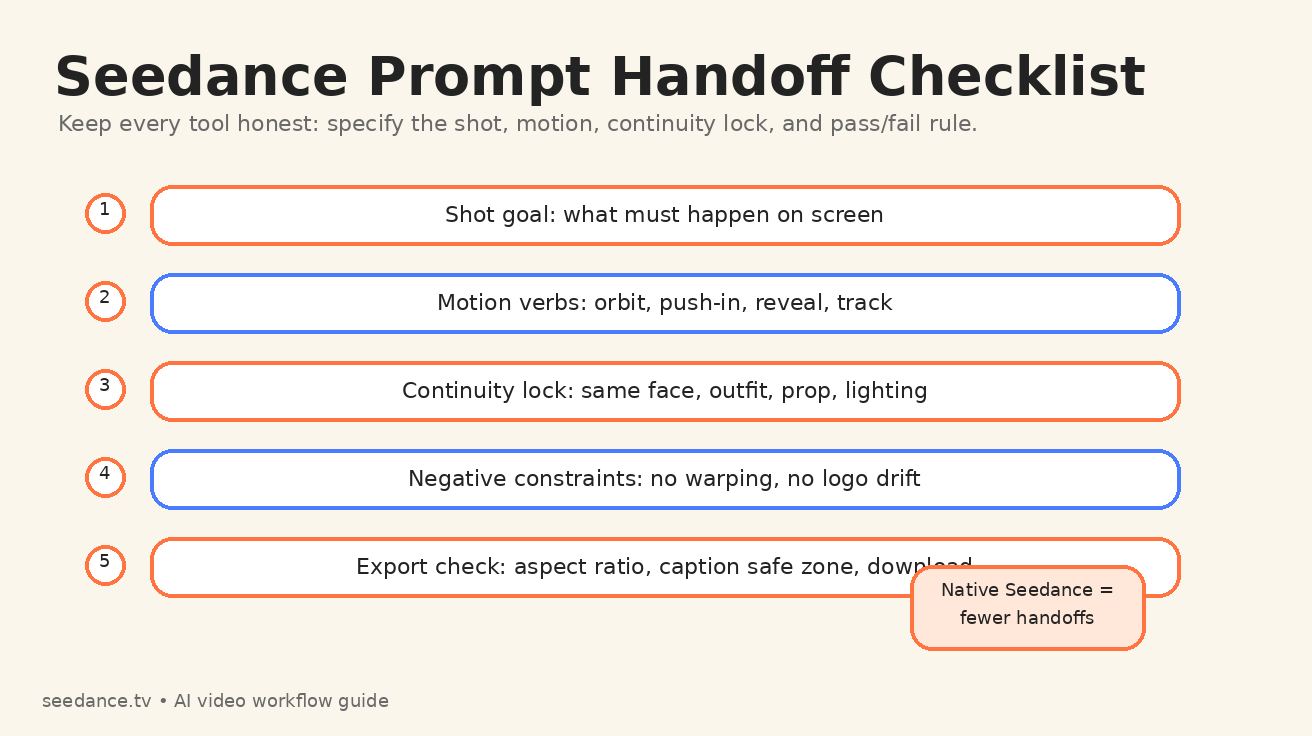
A good handoff checklist looks like this:
- Save the exact Seedance prompt that produced the approved look.
- Save the reference image or first frame.
- Write down the continuity locks that matter.
- Export a clean version before adding captions or overlays.
- If another model is used, compare faces, logos, hands, text, lighting, and motion style against the Seedance version.
- Keep one source of truth for the final brand style.
Common mistakes when comparing Seedance vs Atlabs
Mistake 1: comparing model output to suite output
Seedance is a model-centered workflow. Atlabs is a suite-centered workflow. If you compare one raw Seedance clip against a fully edited Atlabs deliverable with captions, music, and voiceover, you are not comparing like with like. Separate generation quality from finishing quality.
Mistake 2: switching models before fixing the prompt
Many failed generations are prompt problems, not model problems. Before moving from Seedance to another model, improve the prompt. Add a clearer camera verb. Remove conflicting style words. Lock the reference. Add negative constraints. Test a shorter shot.
Mistake 3: mixing too many models in one short video
A multi-model AI video workflow can become visually noisy if every scene has a different model signature. Use multiple models for clear reasons. Otherwise, the audience may feel inconsistency even if they cannot name it.
Mistake 4: ignoring export requirements until the end
A video meant for TikTok, YouTube Shorts, an app store preview, and a website hero section may need different framing. If those deliverables matter, plan aspect ratio and safe zones early. Atlabs-style suite workflows can help here, but Seedance prompts should still be written with the final format in mind.
Which workflow should you choose?
Choose native Seedance if you are a creator, marketer, or filmmaker who wants direct control over Seedance generation and does not need a heavy suite around the clip. It is the better starting point for prompt learning, cinematic tests, image-to-video animation, product motion, and fast iteration.
Choose Atlabs if you are building a broader production system. It is more relevant for teams that need multiple models, storyboards, captions, voiceovers, localization, editing controls, or repeatable brand outputs. Atlabs is not only a Seedance access point; it is a workflow layer.
Choose a hybrid workflow if the project is important. Prove the key shot in Seedance first. Then bring in a multi-model suite only for the parts that Seedance does not need to own: voice, subtitles, alternate aspect ratios, secondary model passes, or team finishing.
The final recommendation is simple: do not let the tool menu decide the workflow. Let the creative bottleneck decide. If the bottleneck is motion, use Seedance. If the bottleneck is production coordination, use Atlabs. If both matter, start with Seedance and expand only when the project earns the complexity.
FAQ
Is Atlabs the same as Seedance?
No. Seedance is the AI video generation workflow focused on creating clips from prompts and references. Atlabs is a broader AI video suite that can include access to Seedance alongside other models and editing tools.
Can I use Seedance inside Atlabs?
Atlabs publicly lists Seedance among the models available in its model hub. That makes Atlabs a possible access path for creators who want Seedance inside a larger multi-model workflow.
Is native Seedance better than Atlabs for beginners?
Native Seedance is usually better for beginners who specifically want to learn Seedance prompting because it keeps the feedback loop simple. Atlabs can be easier for beginners who want templates, storyboarding, voiceovers, and finishing tools in one place.
What is a multi-model AI video workflow?
A multi-model AI video workflow uses different AI models or tools for different parts of production. For example, you might use Seedance for a cinematic product shot, another model for a stylized insert, a voice tool for narration, and a caption tool for final export.
What is the safest Seedance vs Atlabs workflow for professional work?
The safest workflow is to create the most important motion shots in native Seedance first, save the prompt and reference assets, then use Atlabs or another suite only when you need extra production layers such as captions, localization, multi-model comparison, or team editing.
Ready to create your own AI video?
Turn ideas, text prompts, and images into polished videos with Seedance. If this article helped, the fastest next step is to try the product.
Free credits on signup. Plans from $20/month.
Related Articles
More posts in the same locale you may want to read next.

Seedance App Preview Video Generator 2026: Create App Store and Product Launch Clips
Use Seedance to turn app screenshots, feature copy, and launch goals into App Store previews, Google Play promo videos, and product launch clips.
Read article
Magic Hour Video Restyle Tutorial: Stable Video-to-Video Style Transfer
Learn Magic Hour Video-to-Video restyling from source trim and Art Style selection to prompt writing, full-motion review and flicker fixes.
Read article
Gemini Omni Voice Reference Tutorial for Consistent Avatar Videos
Learn the documented Gemini Omni personal-avatar voice workflow, from enrollment and @username prompts to timing, review and multi-shot consistency.
Read article