
Seedance Product Demo Video Generator 2026: Landing Page to Launch Clip Workflow
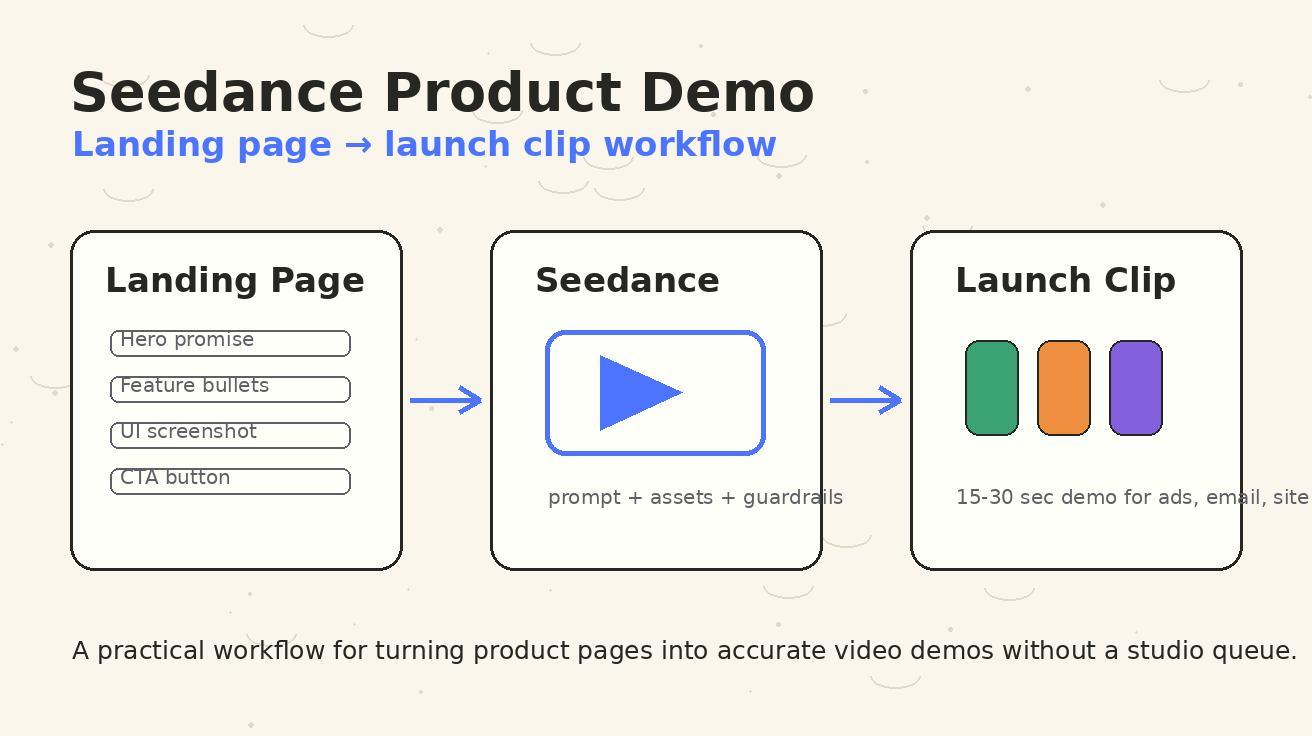
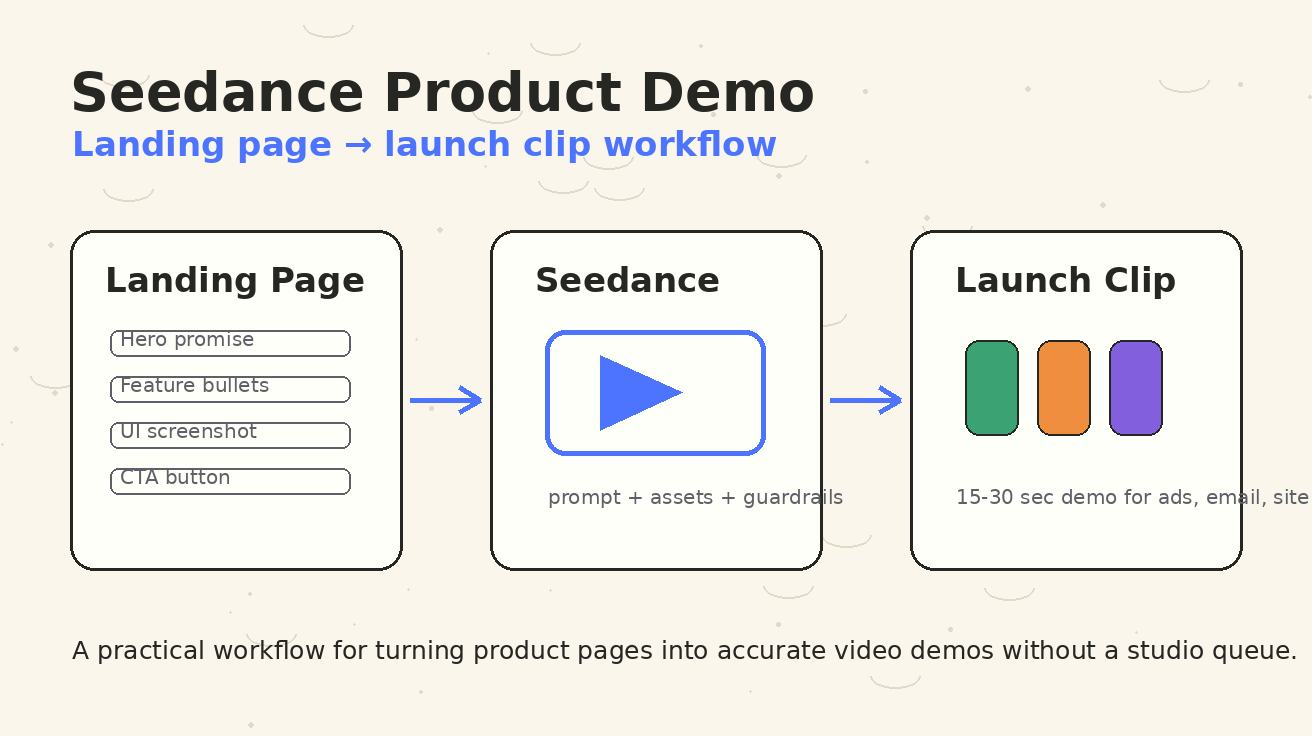
A product demo video should make a buyer understand one thing quickly: how the product moves them from a painful current state to a better outcome. That sounds simple, but many product teams still get stuck between a polished landing page and a usable launch clip. The page already has the message, screenshots, feature bullets, proof points, and call to action. The video team, however, usually needs a separate brief, new motion design, voiceover planning, edit rounds, brand review, and a final export queue. By the time the clip is ready, the campaign has already changed.
Seedance solves that gap when the workflow is designed correctly. Instead of treating AI video as a generic visual generator, use Seedance as a product demo system: extract the useful assets from the landing page, convert them into a tight demo narrative, guide motion with accurate prompts, generate controlled variations, and launch the best version on the page, in email, and across paid or organic channels. The target keyword for this guide is seedance product demo, but the practical goal is bigger: help marketers, founders, product managers, and growth teams turn an existing page into a clear launch video without inventing unsupported claims or waiting weeks for a studio pipeline.
This guide explains the full 2026 workflow for a Seedance product demo video generator process. It covers asset selection, page-to-script mapping, screenshot preparation, prompt structure, scene sequencing, internal review, landing page placement, analytics, and scaling. It is written specifically for Seedance users and for teams evaluating Seedance for product marketing. If you are new to the core generation modes, keep these product pages open while you work: Seedance text-to-video, Seedance image-to-video, and the Seedance 2.0 model overview.
Why product demo videos need a Seedance-specific workflow
A normal AI video prompt can produce attractive motion, but a product demo video has stricter requirements. It has to preserve product truth. It has to show a believable user journey. It has to respect interface details. It has to avoid claiming that a feature exists if the landing page only says it is coming soon. It has to give a viewer enough context to click, sign up, book a demo, or continue reading.
That is why the best Seedance product demo workflow begins with the landing page rather than with a blank prompt. Your landing page is already a strategy document. It contains the promise your team has approved, the user segment you are targeting, the proof points you are willing to defend, the screenshots that match the current product, and the conversion action you actually want. Seedance can turn those static pieces into motion, but the page should provide the guardrails.
The mistake is to ask for a broad prompt like, “Create a futuristic SaaS product demo video.” That may look cinematic, yet it usually drifts away from the product. A better Seedance prompt says which screen appears first, what the cursor or camera should emphasize, which user problem opens the clip, which feature sequence matters, which benefit is allowed, how the brand should feel, and what the final call to action says. The more the prompt is anchored in real page assets, the more useful the output becomes.
Seedance is especially helpful for product demo videos because it can create motion from still assets. A static dashboard screenshot can become a guided walkthrough. A landing page hero can become a kinetic opening. A list of feature cards can become a paced sequence. A customer quote can become a proof scene. A pricing or signup CTA can become the final frame. With the right inputs, Seedance helps teams generate multiple launch-ready variations while keeping production speed high.
The landing page to launch clip model
Think of the workflow as a translation layer. You are translating a page designed for scrolling into a clip designed for watching. The page can include many sections, but the video needs a small number of scenes. The page can repeat the value proposition in different places, but the video needs one opening hook. The page can explain features in paragraphs, but the video needs visual beats. The page can let the buyer inspect details, but the video needs to move with intention.
A practical Seedance product demo clip usually follows this six-part structure:
- Problem frame: Name the friction the target user already feels.
- Product reveal: Show the product interface or Seedance-generated product motion.
- Core action: Demonstrate the primary workflow, not every feature.
- Outcome frame: Show the business or creative result the user gets.
- Proof or confidence frame: Add a screenshot, metric, review, or visual cue that builds trust.
- Call to action: End with the exact next step from the landing page.
For a 15-second clip, each part may be only two or three seconds. For a 30-second launch demo, you can expand the core action and proof frames. For a 45-second explainer, add one supporting feature or a before-and-after sequence. In Seedance, this structure should appear directly in the prompt. Do not rely on the model to infer your funnel strategy from a vague description.
The launch clip does not need to replace the landing page. It should make the page easier to understand. On a product page, the video can sit near the hero as a fast preview. In paid social, it can become the first touch. In email, it can summarize the launch. In sales follow-up, it can remind a prospect what the product does. The same Seedance workflow can create versions for each placement.
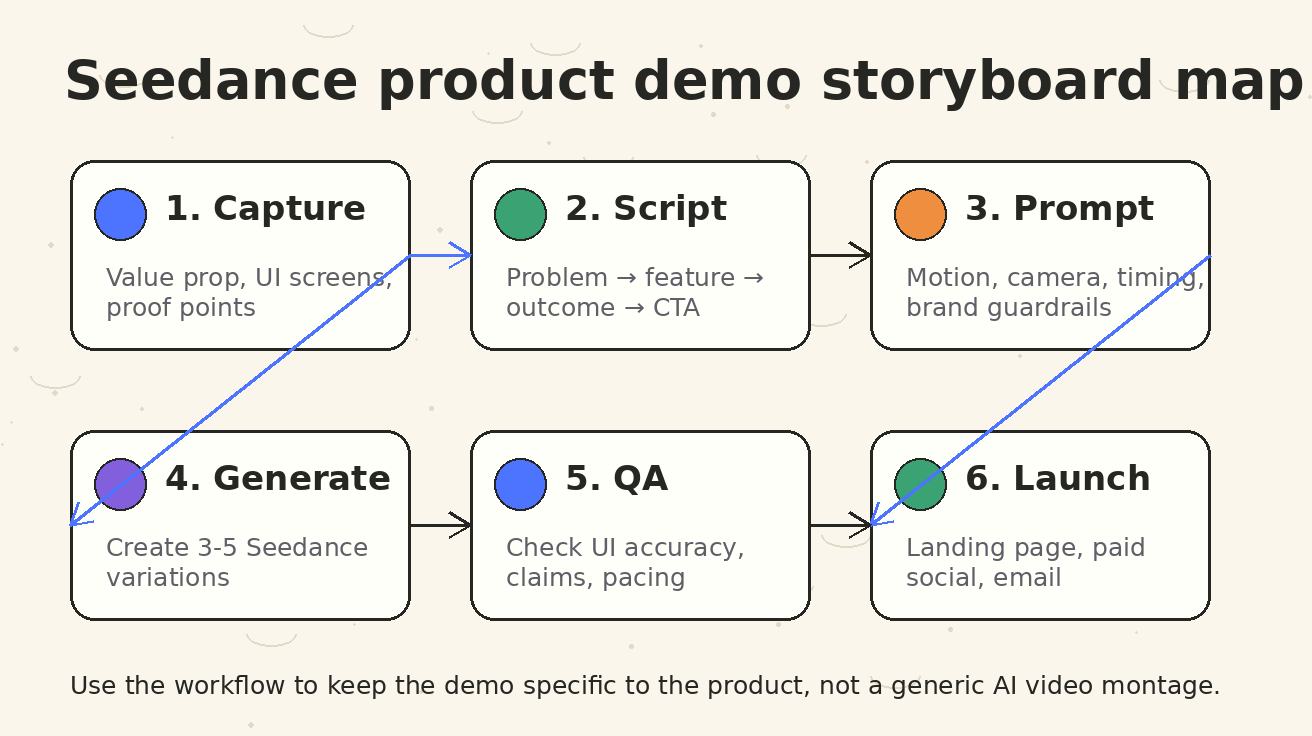
Step 1: Audit the landing page before writing any prompt
Start by reading the landing page like a video producer, not like a copywriter. Highlight the message that must survive the transition into video. The best candidates are usually the headline, the subheadline, the top three benefits, the strongest product screenshot, the most concrete proof point, and the CTA. If the page has many features, choose the one that most clearly demonstrates value in motion.
Create a small asset sheet with five columns: page section, source text, visual asset, demo role, and risk note. The risk note is important. Product demo videos are easy to overstate. If a feature bullet says “automate reporting,” the video should not show a fully autonomous agent making decisions unless the product actually does that. If a screenshot includes sample customer data, replace it with safe demo data. If a proof point is limited to one market, keep the context visible.
For Seedance, prepare visual inputs in a clean sequence. Capture screenshots at a consistent aspect ratio. Remove browser clutter unless the browser frame is part of the story. Use current UI, not an old mockup. If you are showing a mobile app, capture the mobile frame and plan a vertical version. If you are showing a desktop SaaS workflow, keep the cursor path simple. Seedance can add motion, but it should not have to guess what the interface means.
This audit also tells you whether the landing page is ready for video. If the page has a vague promise, no clear user, no real screenshot, and no CTA, the video will become vague too. Fix the message first. A Seedance product demo is most powerful when the page already knows what it is selling.
Step 2: Choose one demo angle, not five
Most product pages contain multiple angles: speed, quality, automation, collaboration, affordability, security, integrations, and ease of use. A short demo video cannot carry all of them. Choose the angle that matches the campaign. For a new feature launch, the angle may be “show the feature in action.” For a paid acquisition ad, it may be “replace a slow manual task.” For a homepage hero, it may be “understand the product in ten seconds.” For a sales enablement clip, it may be “prove the workflow is real.”
For a seedance product demo workflow, the angle should be written as a one-sentence creative brief:
Show how a marketer turns a landing page and three product screenshots into a polished launch clip using Seedance, then ends with a clear signup CTA.
That brief is specific. It names the user, the input assets, the transformation, the output, and the CTA. It gives Seedance a path. It also helps reviewers decide whether the generated clip is on strategy. If a variation looks beautiful but does not show the transformation, reject it. If it shows generic people in a futuristic office instead of the product workflow, reject it. If it creates a feature the product does not support, reject it.
The discipline of one angle makes the clip stronger. You can always create more variations later: one for speed, one for accuracy, one for social proof, one for integrations. The first launch clip should do one job extremely clearly.
Step 3: Convert page copy into a video script
A landing page is usually written for scanning. A video script is written for time. Convert the page into a compact sequence of visual and text beats. You do not need a long voiceover. Many product demo clips perform better with short captions because they can be watched silently on social feeds and landing pages.
Use this script pattern for a 20 to 30 second Seedance product demo:
| Time | Scene | Visual | Caption |
|---|---|---|---|
| 0-3s | Problem | Landing page or messy planning board | “Your launch page has the story. Your campaign still needs motion.” |
| 3-8s | Input | Page headline, screenshots, feature cards | “Bring the approved message and product screens into Seedance.” |
| 8-15s | Demo | UI screenshot animates through the key workflow | “Turn the core workflow into a clear product demo sequence.” |
| 15-22s | Output | Polished clips in multiple placements | “Generate versions for your site, email, and paid social.” |
| 22-30s | CTA | Final product frame and button | “Create your product demo with Seedance.” |
The captions should use words from the page, but they should be shorter than the page. Remove internal jargon. Replace long feature names with outcome language. Keep every caption readable in one glance. If you plan to use the clip in a hero section, assume the viewer is distracted. The video should not require sound or deep concentration to make sense.
When you use Seedance, include the script in the prompt as scene directions rather than as a paragraph. Scene-by-scene prompts produce more controllable output than a single dense description. They also make review easier because you can see which scene failed.
Step 4: Prepare Seedance image inputs
A product demo video often depends on image-to-video quality. For Seedance, choose inputs that make motion obvious without creating ambiguity. The best image inputs are clean UI screenshots, hero graphics, product result examples, workflow diagrams, and brand-safe illustrations. Avoid tiny text, crowded dashboards, low-resolution exports, and screenshots with private data.
Before uploading or referencing an image in the workflow, crop it to the same visual focus you want in the clip. If the feature is a timeline editor, crop around the editor. If the feature is a dashboard insight, crop around the insight card. If the feature is a product page transformation, include the page and the resulting clip frame side by side. Seedance can animate transitions, but it needs a clear center of attention.
For landing page demos, create three prepared assets:
- Hero asset: The top page message or a simplified version of it.
- Interface asset: The product screenshot or workflow screen that proves the product is real.
- Result asset: The launch clip, output gallery, preview frame, or final CTA.
These assets map cleanly to the opening, middle, and ending scenes. They also give you enough material to create vertical and horizontal cuts. If you are using Seedance image-to-video, start with the interface asset because that is where accuracy matters most. If you are using Seedance text-to-video, start with the script and use page assets as reference material for the visual direction.
Step 5: Write prompts that protect product truth
A strong Seedance product demo prompt has four layers: objective, scene sequence, motion guidance, and guardrails. The objective tells Seedance what the clip is for. The sequence describes the story. The motion guidance explains camera, pacing, transitions, and emphasis. The guardrails prevent unwanted invention.
Here is a reusable Seedance prompt framework:
Create a polished product demo launch clip for Seedance.
Goal: turn an approved landing page and product screenshots into a short video that explains the core workflow clearly.
Audience: product marketers and founders evaluating a faster way to create demo videos.
Format: 16:9 horizontal, 25 seconds, silent-friendly captions, clean SaaS launch style.

Scene 1: show the landing page headline and product promise as the starting point.
Scene 2: show three product screenshots being organized into a simple storyboard.
Scene 3: animate the main interface screenshot with a slow cursor path and subtle zoom toward the primary feature.
Scene 4: show the generated launch clip appearing in placements: website hero, email thumbnail, paid social ad.
Scene 5: end on a clean CTA: “Create your product demo with Seedance.”

Motion: smooth camera moves, light parallax, readable captions, no chaotic transitions, no fake UI elements.
Guardrails: preserve the actual product screenshots, do not invent unsupported features, do not add fake customer logos, do not show confidential data, keep brand colors clean and modern.
This prompt is intentionally more structured than a normal creative prompt. It tells Seedance what to emphasize and what not to do. You can adapt the scene sequence for different products, but keep the guardrails. Guardrails are not a creative burden; they are what make the output usable by a real marketing team.
If you need a more cinematic version, add style direction after the guardrails. If you need a more literal software walkthrough, add cursor and interface details. If you need a social ad, shorten the sequence and put the problem frame first. If you need a homepage hero video, reduce text and make the product reveal faster.
Step 6: Generate variations for different placements
Do not generate only one version. A landing page hero, a LinkedIn post, a YouTube Short, and an email thumbnail all have different constraints. Seedance can help you create a controlled set of variations from the same strategy. The key is to vary format and opening hook while keeping the product truth and CTA consistent.
Create at least three launch variations:
- Hero version: Horizontal 16:9, calm pacing, minimal captions, designed to sit above or near the fold.
- Social version: Faster opening, stronger problem statement, captions visible on mobile, shorter runtime.
- Email version: Clear first frame, bold result, CTA visible early, no dependence on audio.
For each version, keep a short review note. What asset did it use? What angle did it test? What CTA did it end with? Which landing page section should it support? This note helps your team avoid random creative sprawl. It also helps you learn which Seedance prompt patterns produce clips that convert.
If the first generation is close but not perfect, revise the prompt instead of accepting a vague output. For example, if the product screen moves too fast, say “hold each interface scene for at least four seconds.” If text is hard to read, say “use large, high-contrast captions with no more than seven words per frame.” If the UI changes too much, say “preserve screenshot layout and animate only camera movement, cursor motion, and highlight boxes.” Small prompt edits often fix the exact production problem.
Step 7: Review the demo like a buyer and a compliance editor
Before launch, watch the Seedance output twice. First, watch it like a buyer. Can you understand the product without reading the full page? Does the opening hook match a real problem? Is the workflow obvious? Is the result desirable? Do you know what to do next?
Second, watch it like a compliance editor. Does every claim match the landing page? Are screenshots current? Are customer names, metrics, and logos approved? Does the clip imply integrations that are not live? Does the UI include private information? Is any caption misleading? If the video shows a before-and-after result, can the product actually create that result under normal use?
Seedance can move quickly, but launch speed is only valuable if the clip can survive review. A short QA checklist catches most issues before publishing.
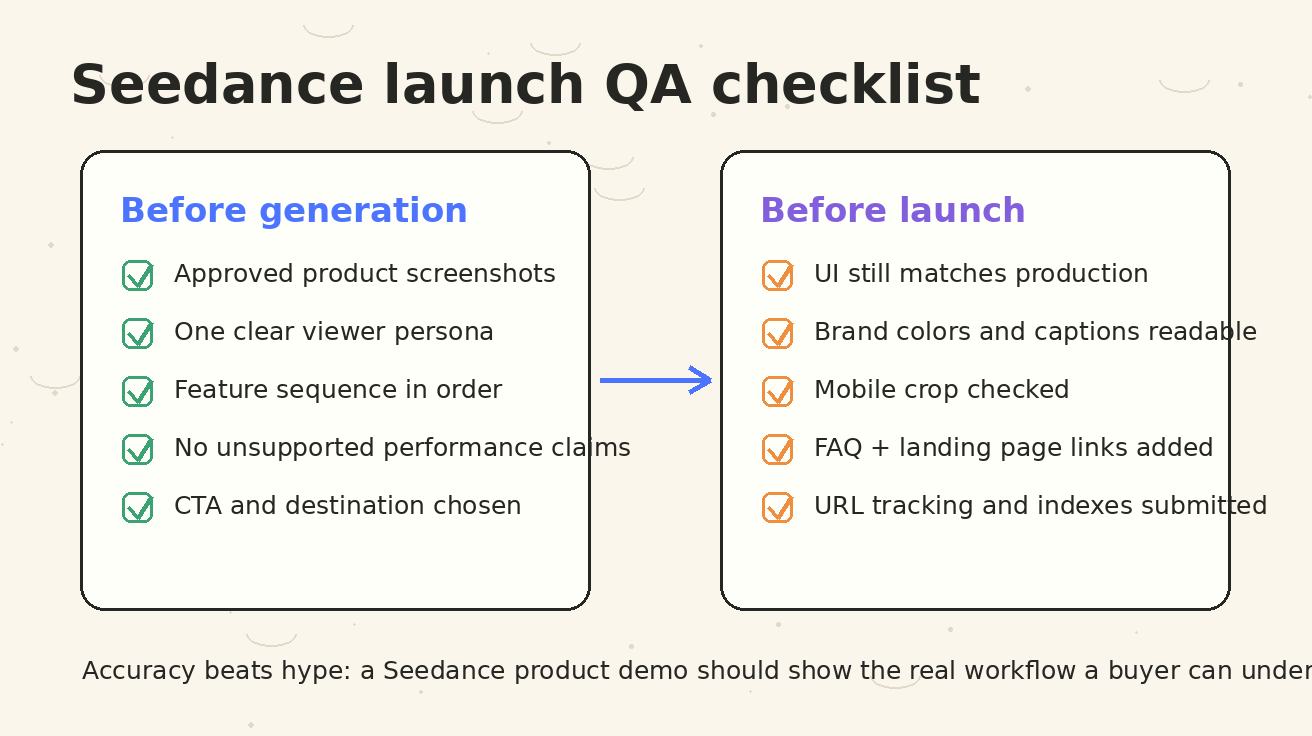
Use the checklist image above as a production habit. Accuracy beats hype. A precise product demo may feel less dramatic than an exaggerated AI montage, but it will perform better with serious buyers because it builds trust.
Step 8: Place the video where it improves conversion
Once the product demo is approved, place it deliberately. On the landing page, the video should support the section where it answers the most important question. If visitors do not understand the product quickly, place the demo near the hero. If visitors understand the product but doubt the workflow, place it near the feature section. If visitors need proof, place it near testimonials, examples, or case studies. If the demo is designed for paid traffic, match the ad headline to the page section where the viewer lands.
A Seedance product demo video can support several placements:
- Homepage hero preview
- Feature page explainer
- Product launch blog post
- Email launch announcement
- LinkedIn and X launch posts
- YouTube Shorts or vertical social cut
- Retargeting ad creative
- Sales follow-up sequence
- Help center onboarding article
For internal links, connect the blog article or launch page to the right Seedance workflow pages. A tutorial that starts from text prompts should link to Seedance text-to-video. A tutorial that starts from screenshots should link to Seedance image-to-video. A deeper model explanation should link to Seedance 2.0. These links help users choose the correct path and help search engines understand the relationship between educational content and product pages.
Step 9: Measure the launch clip, not just the page
Publishing the video is not the end of the workflow. Measure whether it improves the campaign. On the landing page, compare engagement before and after adding the demo. Watch scroll depth, CTA clicks, trial starts, demo requests, and time on page. For paid social, compare thumb-stop rate, video completion, click-through rate, and downstream conversion. For email, compare click rate on the thumbnail or linked CTA. For sales, ask whether prospects reference the video in replies.
Do not judge the Seedance product demo only by views. A video can get many views and still fail if the wrong audience watches it or if it attracts curiosity without intent. For product marketing, the better question is whether the clip reduces confusion and moves qualified users to the next step. If the page already converts well, the video should clarify faster. If the page has high bounce, the video should help users understand why they should stay. If paid ads get clicks but poor activation, the video may need to set expectations more accurately.
Keep a prompt log beside the metrics. Record the prompt, input assets, placement, runtime, aspect ratio, and performance result. Over time, you will learn which Seedance prompt patterns work for your category. For example, SaaS workflow demos may perform best with slower camera moves and large captions, while ecommerce product demos may benefit from faster before-and-after pacing. The log becomes a repeatable creative system.
Common mistakes to avoid
The first mistake is making the clip too generic. If the video could describe any software product, it is not a product demo. It should include your real workflow, real screenshots, real language, and real CTA.
The second mistake is trying to show every feature. A product demo video is not a full documentation page. It should show the most important action and invite the user to continue. If you need to explain five features, create a series of Seedance clips rather than one crowded clip.
The third mistake is hiding the product behind cinematic visuals. A beautiful abstract animation can support brand perception, but a product demo has to show the product. Use motion to guide attention, not to distract from the interface.
The fourth mistake is ignoring silent viewing. Many users will watch without audio. Captions, UI highlights, and clear scene structure matter. If the clip only works with voiceover, it will underperform in many placements.
The fifth mistake is skipping production QA. AI-generated motion can accidentally alter UI details, invent buttons, or make captions too small. Review every launch version before it goes live.
A complete Seedance product demo workflow template
Use this template when your team needs a repeatable process:
- Pick one landing page and one campaign goal.
- Extract the headline, subheadline, top benefit, proof point, product screenshot, and CTA.
- Define one demo angle in a single sentence.
- Write a 5-scene script with captions under seven words each.
- Prepare three clean image inputs: hero, interface, and result.
- Write a Seedance prompt with objective, scene sequence, motion guidance, and guardrails.
- Generate three placement variations: hero, social, and email.
- Review for buyer clarity and product accuracy.
- Publish the strongest version on the page and distribute the others.
- Track engagement, conversions, and prompt notes.
This template works because it turns content that already exists into motion assets. Your landing page becomes the source of truth. Seedance becomes the production engine. Your review process keeps the output accurate. Your analytics tell you what to improve.
When to use text-to-video versus image-to-video
Use Seedance text-to-video when the product is simple, the page has no strong screenshots, or the clip is more conceptual. Text-to-video is useful for problem framing, abstract value stories, campaign teasers, and broad launch announcements. It gives you more creative flexibility, but it also needs more guardrails.
Use Seedance image-to-video when interface accuracy matters. If the product demo depends on a dashboard, editor, builder, mobile screen, feature card, or before-and-after result, image-to-video gives Seedance a stronger anchor. The input image tells the model what must remain recognizable. You can then ask for motion around the screen rather than inventing a new screen.
Many launch workflows use both. Start with image-to-video for the product scenes, then use text-to-video for transition or opening scenes. Combine the outputs in your editing workflow if needed. The point is not to choose a single mode forever. The point is to choose the mode that protects the story and the product.
FAQ
What is a Seedance product demo video generator workflow?
A Seedance product demo video generator workflow is a repeatable process for turning landing page copy, product screenshots, feature bullets, and calls to action into short demo clips. The workflow uses Seedance prompts, image inputs, motion guidance, and review guardrails so the final video explains the real product rather than producing a generic AI montage.
Can Seedance create a product demo from only a landing page?
Seedance can help turn landing page assets into a product demo, but the best results come from a structured input set. Use the page headline, value proposition, product screenshots, proof points, and CTA as source material. If the page has no current screenshots or clear feature sequence, prepare those assets before generation.
How long should a Seedance product demo video be?
For launch campaigns, 15 to 30 seconds is usually enough. A 15-second version works well for social and retargeting. A 25 to 30 second version works well for landing pages and email. Longer explainers can work for sales or onboarding, but they should still focus on one primary workflow.
Should I use Seedance text-to-video or image-to-video for product demos?
Use text-to-video for concept scenes, hooks, and broad launch storytelling. Use image-to-video when you need to preserve screenshots, dashboards, mobile screens, or product UI. Many teams combine both: image-to-video for accurate product scenes and text-to-video for opening or transition scenes.
How do I keep an AI product demo accurate?
Anchor the prompt in approved landing page copy and current screenshots. Add explicit guardrails such as “do not invent features,” “preserve UI layout,” “no fake customer logos,” and “use only approved claims.” Then review the output like a buyer and a compliance editor before launch.
Where should I publish a Seedance product demo clip?
Publish the clip where it removes the most friction: the landing page hero, a feature section, a launch blog post, email announcements, paid social, retargeting ads, or sales follow-up. Match each version to the placement. A hero clip can be calmer, while a social clip should open faster and use stronger captions.
Final takeaway
A landing page already contains the raw material for a strong product demo: message, proof, screenshots, and CTA. Seedance helps turn that material into motion when you use a disciplined workflow. Start with the page, choose one demo angle, write a scene-by-scene prompt, prepare clean inputs, generate placement-specific variations, and review the final clip for clarity and accuracy.
The best seedance product demo is not the flashiest video. It is the one that helps a real buyer understand the product faster and take the next step with more confidence. If your team already has a page but still needs launch creative, Seedance gives you a practical path from static story to usable video asset.
<script type="application/ld+json"> { "@context": "https://schema.org", "@type": "FAQPage", "mainEntity": [ { "@type": "Question", "name": "What is a Seedance product demo video generator workflow?", "acceptedAnswer": { "@type": "Answer", "text": "A Seedance product demo video generator workflow is a repeatable process for turning landing page copy, product screenshots, feature bullets, and calls to action into short demo clips. It uses Seedance prompts, image inputs, motion guidance, and review guardrails so the final video explains the real product rather than producing a generic AI montage." } }, { "@type": "Question", "name": "Can Seedance create a product demo from only a landing page?", "acceptedAnswer": { "@type": "Answer", "text": "Seedance can help turn landing page assets into a product demo, but the best results come from a structured input set: page headline, value proposition, product screenshots, proof points, and CTA. If the page has no current screenshots or clear feature sequence, prepare those assets before generation." } }, { "@type": "Question", "name": "How long should a Seedance product demo video be?", "acceptedAnswer": { "@type": "Answer", "text": "For launch campaigns, 15 to 30 seconds is usually enough. A 15-second version works well for social and retargeting, while a 25 to 30 second version works well for landing pages and email. Longer explainers can work for sales or onboarding when they stay focused on one primary workflow." } }, { "@type": "Question", "name": "Should I use Seedance text-to-video or image-to-video for product demos?", "acceptedAnswer": { "@type": "Answer", "text": "Use text-to-video for concept scenes, hooks, and broad launch storytelling. Use image-to-video when you need to preserve screenshots, dashboards, mobile screens, or product UI. Many teams combine both modes in one launch workflow." } }, { "@type": "Question", "name": "How do I keep an AI product demo accurate?", "acceptedAnswer": { "@type": "Answer", "text": "Anchor the prompt in approved landing page copy and current screenshots. Add guardrails such as do not invent features, preserve UI layout, no fake customer logos, and use only approved claims. Review the output for buyer clarity and compliance before launch." } }, { "@type": "Question", "name": "Where should I publish a Seedance product demo clip?", "acceptedAnswer": { "@type": "Answer", "text": "Publish the clip where it removes the most friction: the landing page hero, a feature section, a launch blog post, email announcements, paid social, retargeting ads, or sales follow-up. Match each version to the placement and viewing context." } } ] } </script>
Ready to create your own AI video?
Turn ideas, text prompts, and images into polished videos with Seedance. If this article helped, the fastest next step is to try the product.
Free credits on signup. Plans from $28/month.
Related Articles
More posts in the same locale you may want to read next.

Seedance App Preview Video Generator 2026: Create App Store and Product Launch Clips
Use Seedance to turn app screenshots, feature copy, and launch goals into App Store previews, Google Play promo videos, and product launch clips.
Read article
How to Keep Product Shape Consistent in AI Video Ads
Lock product geometry, packaging, labels, references, camera angles, and approval checks so AI video ads preserve the real SKU across every shot.
Read article
How to Make AI Video Follow a Multi-Step Action
Plan atomic actions, state transitions, timing, continuity, and shot handoffs so an AI video completes a sequence in the intended order.
Read article