
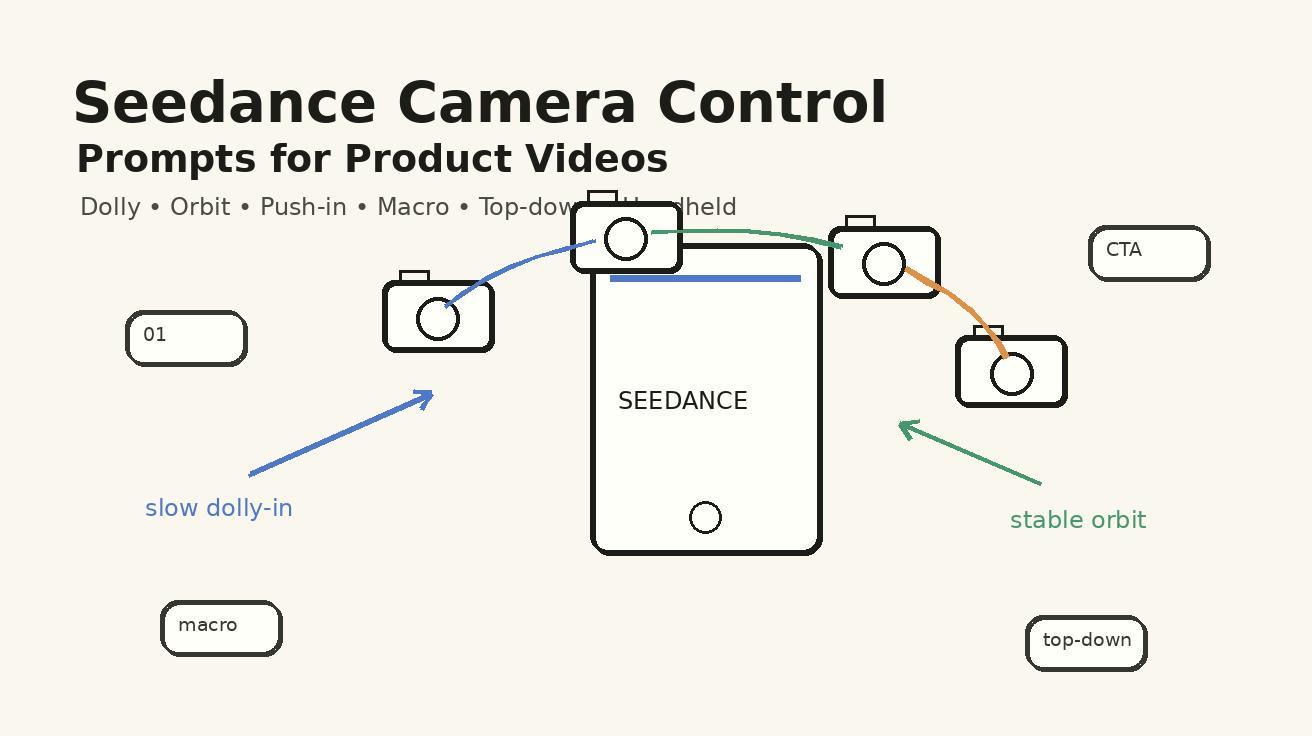
If your Seedance product video looks beautiful but does not sell the product, the problem is usually not image quality. The problem is direction. A product clip needs a camera plan: where the viewer starts, what detail they notice, how the motion reveals value, and when the final frame makes the offer clear. That is why Seedance camera control prompts matter in 2026. They turn a generic AI video request into a directed product shot.
This guide is written for marketers, ecommerce teams, founders, creative agencies, and growth teams using Seedance to create product videos faster. You will learn practical Seedance product video prompts for dolly shots, orbit moves, push-ins, macro details, top-down demos, handheld lifestyle clips, and multi-shot workflows. You will also learn how to troubleshoot unstable camera movement, protect product identity, compare Seedance with generic AI video tools, and build a reusable prompt system for paid ads, landing pages, app previews, and social product launches.
Seedance is especially useful here because product videos are rarely about one pretty frame. A good product clip needs the product to remain stable while the camera moves with intent. It may need a clean pack shot, a macro texture shot, an over-the-shoulder app demo, a top-down unboxing view, or a slow reveal that makes the product feel premium. Seedance can support those creative goals when the prompt describes camera movement as a production instruction, not as decoration.
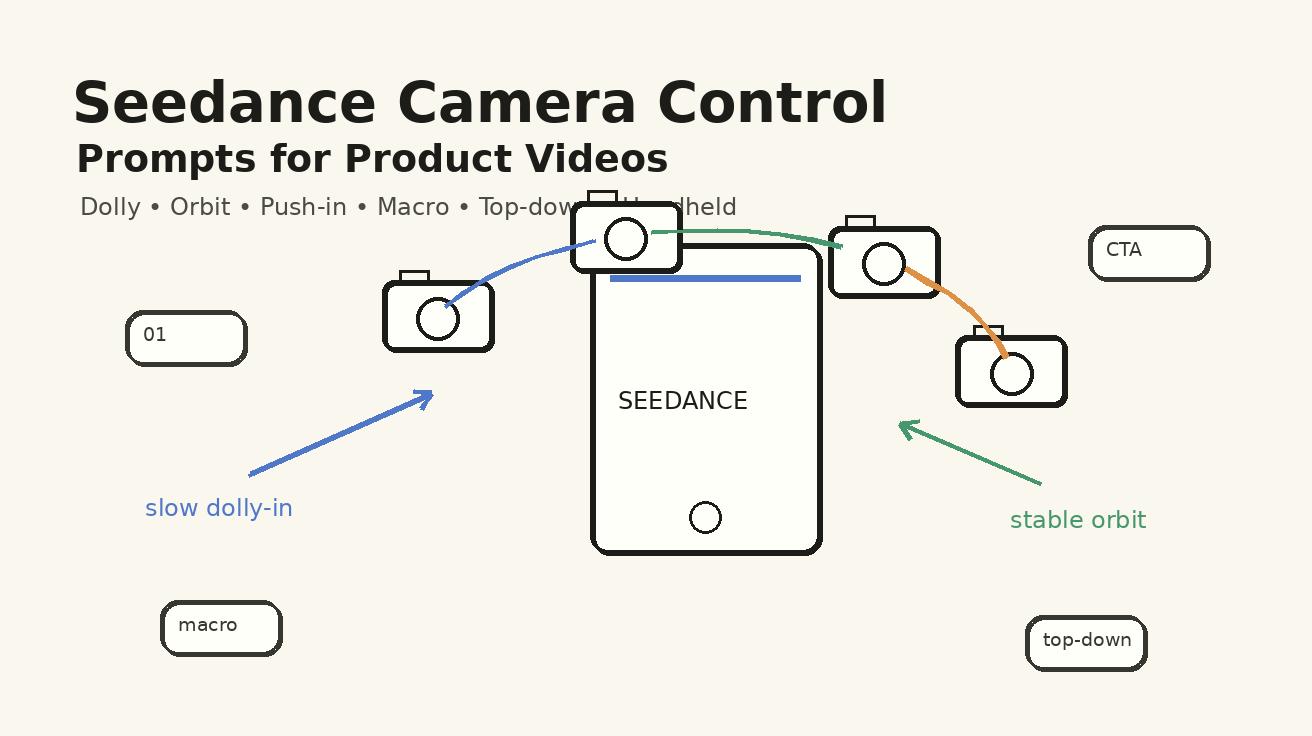
Quick answer: what are Seedance camera control prompts?
Seedance camera control prompts are structured instructions that tell Seedance how the camera should move around a product while preserving the product, scene, and message. Instead of prompting “make a cool product video,” you specify the shot type, lens feel, camera path, subject lock, background, lighting, motion speed, and final frame.
A useful Seedance camera control prompt usually includes seven parts:
- Product anchor: what must stay consistent, such as a matte black smartwatch, a glass skincare bottle, a white SaaS dashboard, or a ceramic coffee grinder.
- Shot purpose: why the camera moves, such as reveal the design, explain a feature, show scale, highlight texture, or create lifestyle energy.
- Camera move: dolly in, orbit, push-in, macro focus shift, top-down pan, handheld follow, locked-off demo, or crane-like reveal.
- Composition: hero product centered, rule of thirds, close-up detail, clean negative space for captions, or product on desk with hands entering frame.
- Motion discipline: smooth, slow, controlled, no sudden jumps, no random zooms, no scene cuts unless requested.
- Continuity anchors: same product shape, same brand colors, same label position, same lighting, same surface, same hand model, same UI state.
- Negative constraints: no extra logos, no fake readable claims, no distorted hands, no warped product, no floating props, no text artifacts.
For Seedance, the best camera prompts read like a short director note. They do not overload the model with random cinematic language. They define exactly what the viewer should understand by the end of the clip.
Why camera direction matters in Seedance product videos
Product videos have a different job from cinematic mood clips. They must make an object, app, service, or offer easier to trust. A viewer should know what the product is, why it matters, and what action to take next. Random camera movement creates friction because the viewer spends attention decoding the shot instead of understanding the value.
Seedance can create visually polished motion, but product teams need repeatability. A camera prompt helps repeat the same brand grammar across multiple clips. Your hero product reveal can always begin with a slow dolly. Feature explanations can use top-down or over-the-shoulder angles. Texture and material claims can use macro details. Lifestyle ads can use gentle handheld movement. This gives your videos a recognizable style instead of a folder full of unrelated experiments.
Camera direction also protects conversion assets. If a clip is for a product page, the product must remain visible. If the clip is for a paid social ad, the opening second must communicate the category quickly. If the clip is for an app preview, the interface should stay legible enough to explain the workflow, even if exact UI text is added later in editing. Seedance prompts should therefore prioritize clarity before spectacle.
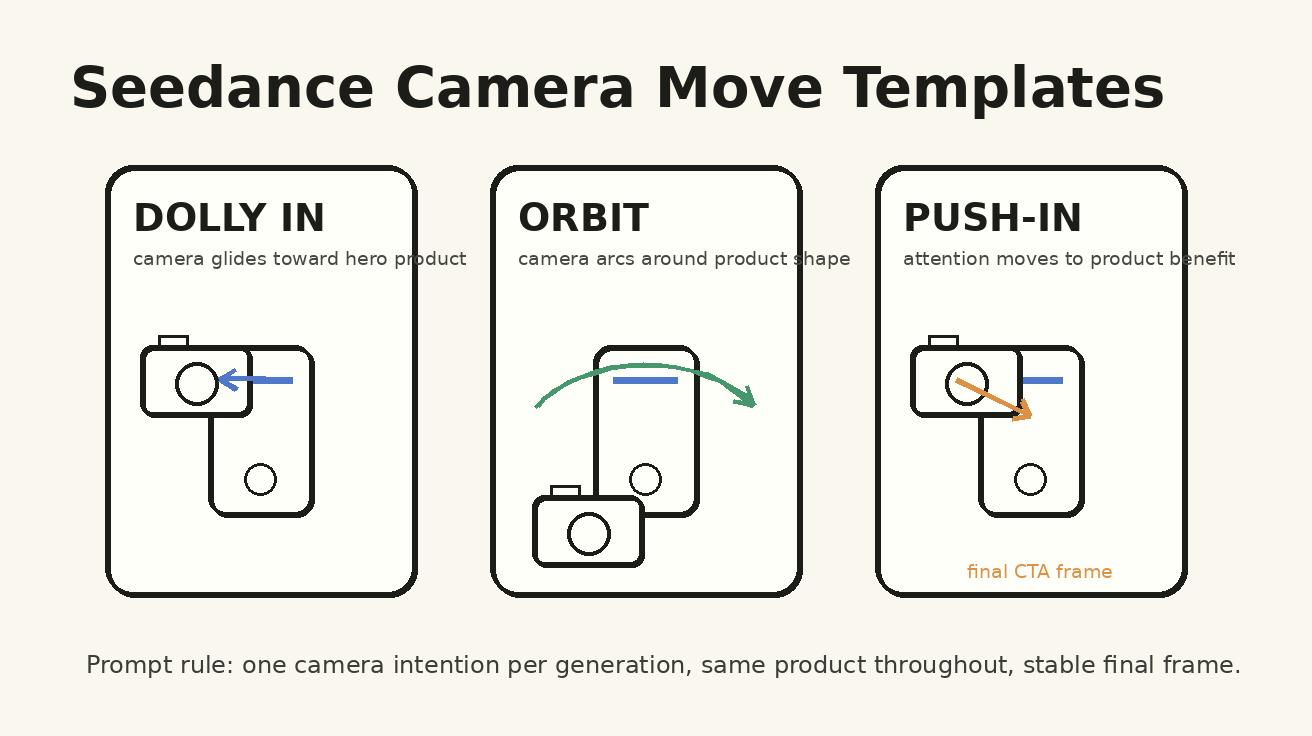
The most reliable approach is to choose one camera intention per generation. Do not ask for dolly, orbit, macro, handheld, fast zoom, and dramatic crane movement in the same five-second video. Use Seedance to generate clean building blocks, then assemble them into a sequence.
The Seedance product video prompt formula
Use this formula whenever you need a product clip that feels directed:
Create a Seedance product video for [product/category]. The goal is to [business goal]. Keep [product anchor] consistent throughout the clip. Camera move: [specific move] from [starting composition] to [ending composition]. Lighting: [lighting]. Background: [background]. Motion should be [speed and discipline]. The final frame should show [desired final frame]. Avoid [negative constraints].
Here is the same formula filled in for an ecommerce product:
Create a Seedance product video for a minimalist stainless steel water bottle. The goal is to make the bottle feel premium and durable for a launch ad. Keep the same brushed metal bottle, black cap, and small vertical logo position consistent throughout the clip. Camera move: slow dolly-in from a medium desk shot to a close hero angle on the bottle. Lighting: soft morning window light with gentle reflections. Background: clean kitchen counter with blurred plants. Motion should be smooth, slow, and stable, with no sudden zooms or scene jumps. The final frame should show the full bottle centered with negative space on the right for a caption. Avoid extra logos, fake text, warped bottle shape, duplicate bottles, and distorted hands.
For Seedance, this prompt is stronger than “cinematic product ad” because it defines the camera path and the business goal. The model receives a clear visual task: move closer, preserve the object, end on a usable frame.
Camera move 1: dolly shot for premium product reveals
A dolly shot moves the camera physically toward, away from, or beside the product. In AI video prompting, “dolly” is useful because it suggests controlled travel rather than a random digital zoom. Use it when you want a product to feel premium, tactile, or important.
Best use cases: luxury packaging, skincare bottles, watches, headphones, kitchen tools, creator gear, product launch hero videos, landing page headers.
Seedance dolly prompt template:
Create a Seedance product video showing [product] as a premium hero object. Start with a medium shot of [product] on [surface], then perform a slow controlled dolly-in toward the front of the product. Keep the product shape, label placement, color, and lighting consistent. Use soft reflections, shallow depth of field, and clean negative space for a headline. The camera should glide smoothly, not zoom digitally. End on a stable close hero frame where the product fills about 60% of the frame. Avoid duplicate products, warped labels, fake readable claims, aggressive camera shake, and sudden cuts.
Example for a SaaS launch screen:
Create a Seedance product video for a SaaS analytics dashboard on a laptop. Start with a clean desk scene, then use a slow dolly-in toward the screen as the dashboard becomes the center of attention. Keep the laptop, screen layout, desk, and lighting consistent. The motion should feel like a premium product reveal, with no random zooms and no invented readable metrics. End on a stable close shot of the dashboard with room above the laptop for a caption.
Dolly shots work well when the product is already visually clear. If Seedance starts too far away, the product may lose identity. If the dolly is too fast, the clip feels like a transition instead of a reveal. Add words like “slow,” “controlled,” “stable,” and “end on a usable hero frame.”
Camera move 2: orbit shot for showing shape and dimensionality
An orbit shot moves around the product, usually in a partial circle. It is excellent when the product has physical form: shoes, devices, packaging, furniture, appliances, accessories, or industrial design. The camera shows the viewer that the product exists in space.
Best use cases: 3D product hero clips, design reveal ads, ecommerce PDP videos, premium hardware, packaging, before-and-after product comparisons.
Seedance orbit prompt template:
Create a Seedance product video featuring [product] on [surface/background]. Camera move: a smooth 120-degree orbit around the product from front-left to front-right, keeping the product centered and stable. Maintain the same product dimensions, material, logo location, and lighting throughout the orbit. Use realistic parallax in the background and subtle reflections on the product. The orbit should be slow and elegant, not spinning. End with the product facing camera in a clean hero angle. Avoid changing product color, adding extra logos, melting edges, duplicate objects, and fast rotating motion.
Example for a beauty product:
Create a Seedance product video for a frosted glass vitamin C serum bottle with a white dropper cap. Place it on a cream marble surface with soft bathroom light. Camera move: smooth 120-degree orbit around the bottle, starting front-left and ending front-center. Keep the amber liquid, label area, cap shape, and glass reflections consistent. The movement should reveal the bottle shape and premium texture, not spin like a 3D turntable. End with the bottle centered and stable for a product title overlay.
Orbit prompts need strong product anchors. If the label, shape, or color is important, repeat those details. For real branded products, use approved reference images and Seedance image-to-video workflows instead of asking the model to invent the product from text.
Camera move 3: push-in for conversion-focused product benefits
A push-in is similar to a dolly-in, but its purpose is often emotional or persuasive. The camera moves closer as the benefit becomes clearer. Use it when a product solves a problem and you want the viewer to feel progress.
Best use cases: app previews, dashboard features, productivity products, transformation claims, before-and-after sequences, offer reveals.
Seedance push-in prompt template:
Create a Seedance product video for [product/service]. Start with [problem context], then use a gentle push-in toward [feature/result] as the scene becomes clearer and more confident. Keep [main object/interface/person] consistent. The push-in should guide attention to [benefit], with smooth motion and no camera wobble. Use [lighting/style]. End on a clear result frame that can support a CTA overlay. Avoid random text, exaggerated claims, scene jumps, distorted screens, and unreadable UI artifacts.
Example for an app preview:
Create a Seedance product video for a small business owner using Seedance to create a product launch clip. Start with a laptop on a clean desk, showing a simple video generation workspace. Use a gentle push-in toward the preview area as the generated product video appears. Keep the same laptop, desk, hands, and warm studio lighting consistent. The motion should feel focused and helpful, not dramatic. End on a clear result frame with negative space for the caption “Launch faster.” Avoid fake readable UI text, changing laptop shape, distorted fingers, and random scene cuts.
Push-ins are strong for marketing because they create a sense of focus. The viewer feels pulled toward the value. In Seedance, make sure the final frame is specified; otherwise the model may keep moving until the object becomes too close or distorted.
Camera move 4: macro shot for details, texture, and proof
A macro shot brings the camera very close to a small detail. For product videos, macro shots can show materials, craftsmanship, texture, ingredients, interface micro-interactions, packaging details, or tactile proof. They are powerful because they make the product feel real.
Best use cases: skincare texture, fabric weave, food detail, watch dial, headphone material, phone camera bump, keyboard keys, packaging seal, app micro-interactions.
Seedance macro prompt template:
Create a Seedance macro product video focusing on [specific detail]. Camera move: extreme close-up with a slow focus pull from [foreground detail] to [main detail]. Keep the product material, color, and surface texture consistent. Use realistic macro depth of field, soft highlights, and controlled hand or object movement. The camera should not reveal unrelated objects. End on the detail clearly in focus. Avoid melting textures, changing product shape, fake readable labels, excessive blur, and random particles.
Example for a coffee grinder:
Create a Seedance macro product video for a matte black manual coffee grinder. Focus on the ridged metal dial and the hand adjusting the grind setting. Camera move: extreme close-up with a slow focus pull from the fingertips to the engraved adjustment ring. Keep the same black metal texture, cylindrical shape, and warm kitchen light consistent. End with the dial sharply in focus. Avoid extra fingers, warped metal, unreadable fake numbers, and sudden camera jumps.
Macro shots often need restraint. Do not ask for too many details in the same clip. One surface, one motion, one proof point. If you need exact text on a label, create the video without text and add the label or caption in post-production.
Camera move 5: top-down shot for demos, unboxing, and workflows
Top-down camera control is practical for product teams because it explains process. It works for unboxing, tutorials, recipes, setup steps, desk workflows, product kits, and app-planning scenes. It also gives editors clean space for captions.
Best use cases: unboxing videos, physical product kits, creator desk scenes, recipe products, stationery, cosmetics, onboarding workflows, tutorial intros.
Seedance top-down prompt template:
Create a Seedance top-down product video of [product/workflow] on [surface]. Camera angle: overhead 90-degree view, stable and clean. Camera move: slow top-down pan from [starting object] to [ending object], keeping all items aligned and readable as shapes, not fake text. Hands may enter frame only to [specific action]. Keep product colors, layout, and lighting consistent. End with a neat final arrangement and empty space for captions. Avoid extra hands, object duplication, messy layout changes, fake labels, and sudden perspective shifts.
Example for a product kit:
Create a Seedance top-down product video for a home fitness recovery kit. Show a massage ball, resistance band, small towel, and compact guide card arranged on a light wood table. Camera move: slow top-down pan from left to right while one pair of hands neatly places the massage ball in the center. Keep the same objects, colors, and table surface consistent. End with the full kit organized in a grid and negative space at the bottom for a CTA. Avoid duplicate hands, changing object sizes, fake readable text, and rotating perspective.
Top-down shots are also useful for Seedance content teams. You can plan the product story visually before generation: what enters the frame, what leaves, what remains, and where captions will sit. This makes AI video less random and more like a reusable production template.
Camera move 6: handheld shot for lifestyle product energy
Handheld does not mean shaky chaos. In product marketing, handheld movement can create human energy, realism, and social-native rhythm. Use it when the product should feel used in real life rather than displayed in a studio.
Best use cases: fitness products, travel accessories, food and beverage, creator tools, mobile apps, retail experiences, lifestyle ads, social UGC-style product clips.
Seedance handheld prompt template:
Create a Seedance lifestyle product video for [product] in [real-world setting]. Camera move: gentle handheld follow shot from [start] to [end], with natural micro-movements but no aggressive shake. Keep the same product, person, outfit, location, and lighting consistent. The product should remain visible and in focus during the movement. The style should feel authentic and social-native, not chaotic. End on a clear moment where the product benefit is visible. Avoid blurry product identity, distorted hands, random background changes, extra logos, and fast whip pans.
Example for a travel product:
Create a Seedance lifestyle product video for a compact travel organizer at an airport lounge. Camera move: gentle handheld follow shot as a traveler opens a backpack and pulls out the organizer. Keep the same navy organizer, traveler outfit, lounge seat, and morning airport light consistent. The product should remain visible in the center third of the frame. End with the organizer open on the table, neatly showing cables and passport slots. Avoid chaotic shake, changing bag color, extra hands, and fake readable brand text.
Handheld clips are useful for ads because they feel less polished and more native to social feeds. However, always define “gentle handheld” and “product remains visible.” Without those constraints, the model may create motion that looks energetic but hides the product.
Build a full Seedance product video workflow
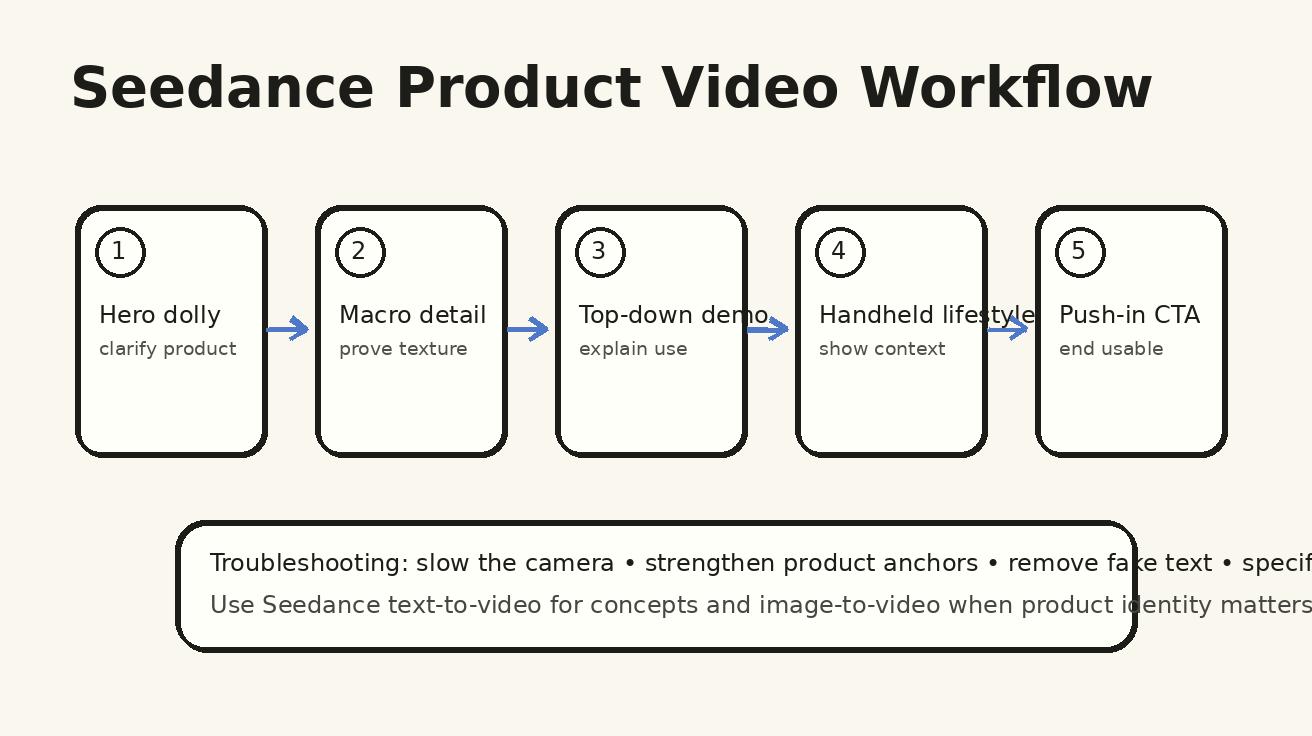
The strongest Seedance product video generator workflow is modular. Generate clips by camera role, not by trying to make one prompt do everything. A five-shot product ad might use this structure:
| Shot | Seedance camera move | Marketing purpose | Prompt focus |
|---|---|---|---|
| 1 | Slow dolly-in | Establish premium product | Hero object and brand mood |
| 2 | Macro focus pull | Prove texture or detail | Material, surface, mechanism |
| 3 | Top-down demo | Explain use | Hands, steps, clean layout |
| 4 | Handheld lifestyle | Show real-world context | Person, setting, benefit |
| 5 | Push-in result frame | Drive CTA | Outcome, offer, negative space |
Start with the most important shot. For ecommerce, that is usually the hero product or macro proof. For SaaS, it may be the interface result frame. For creator tools, it may be the before-and-after transformation. Once the anchor clip works, generate the supporting camera moves.
Use Seedance text-to-video when the product can be safely conceptual, such as a fictional wellness bottle, generic desk setup, or abstract app workflow. Use Seedance image-to-video when product identity matters. If you have approved product photography, packaging renders, or screenshots, use them as references so Seedance has a stronger visual anchor.
For Seedance 2.0 workflows, camera prompting becomes even more useful because you can think in sequences: what the first frame communicates, how the product is revealed, and whether the final frame can be used as a thumbnail or ad end card. Connect the article workflow with your production pages: test fast ideas in Seedance text-to-video at /text-to-video, preserve visual identity with /image-to-video, and use the deeper Seedance product workflow at /seedance-2-0 when you need more control.
Prompt templates by product category
Ecommerce product launch
Create a Seedance product launch video for a [product]. Start with a clean studio hero shot on [surface]. Camera move: slow dolly-in, then hold on the product as soft light reveals the material. Keep product shape, color, packaging, and label area consistent. Use a premium ecommerce style with negative space for captions. End on a stable front hero frame. Avoid fake text, duplicate products, warped packaging, and fast camera motion.
App or SaaS product video
Create a Seedance product video for a [type of app] used by [audience]. Start over the shoulder at a laptop, then push in toward the main dashboard preview. Keep the laptop, hands, desk, and interface layout consistent. Do not invent readable metrics or legal claims. The camera movement should guide attention to the result area. End on a clean screen-focused frame with space for an editor-added headline.
Beauty or skincare product video
Create a Seedance product video for a [beauty product] on a bathroom counter. Camera move: smooth orbit from front-left to front-center, followed by a subtle macro focus on the texture of the product. Keep the bottle, cap, glass reflections, label area, and soft morning light consistent. The mood should feel clean, premium, and calm. Avoid fake ingredient claims, unreadable label text, warped bottle shape, and duplicate reflections.
Food and beverage product video
Create a Seedance product video for [food or beverage]. Camera move: top-down pan across the ingredients, then a gentle push-in to the final plated product. Keep colors natural and appetizing, with realistic steam or condensation only if appropriate. The camera should be stable and clear for social captions. End on a hero frame of the finished product. Avoid unrealistic texture, messy hands, random objects, and exaggerated particles.
Hardware or gadget product video
Create a Seedance product video for a [device]. Camera move: controlled 120-degree orbit around the device to show its dimensions, then end on a front hero angle. Keep buttons, ports, screen shape, material, and color consistent. Use soft studio lighting and subtle reflections. The product should look functional and realistic. Avoid changing device geometry, fake readable UI text, extra logos, and fast spinning.
Troubleshooting Seedance camera moves
Camera control improves when the prompt removes ambiguity. If Seedance output still feels unstable, diagnose the failure by camera role.
Problem: the camera moves too fast
Add speed and duration language: “slow controlled movement,” “gentle five-second dolly,” “no fast zoom,” “hold the final frame for one second.” Fast movement often appears when the prompt says “dynamic,” “epic,” or “high-energy.” For product videos, replace those with “deliberate,” “premium,” “clear,” or “conversion-focused.”
Problem: the product changes shape
Strengthen the product anchor. Repeat the stable details: color, material, logo area, silhouette, cap shape, screen shape, button placement, and surface. Use image-to-video with an approved reference when identity matters. Add “same product throughout the full clip” and “do not change the product design during the camera move.”
Problem: Seedance invents text or claims
Do not ask for exact readable labels, pricing, health claims, or legal claims inside the generated video. Instead, prompt for “blank label area,” “clean screen layout without readable text,” or “space for editor-added caption.” Add text later in your editing tool. This keeps the Seedance clip cleaner and reduces compliance risk.
Problem: hands look distorted
Make hand actions simple. One pair of hands, one action, one camera angle. Use “hands enter frame only to place the product,” “natural fingers,” “no extra hands,” and “avoid distorted fingers.” Top-down shots are often safer for hand demos than dramatic close-up handheld shots.
Problem: the shot is pretty but not useful
Specify the final frame. A production-ready product video needs an ending that can support a CTA, title overlay, or product page embed. Add “end on a stable hero frame,” “leave negative space on the right,” or “final frame shows the full product centered.” This makes the output easier to use.
Seedance vs generic AI video tools for product camera control
Generic AI video tools can produce impressive motion, but many product teams struggle because the output is treated as a visual experiment rather than a production asset. The difference with a Seedance workflow is the way you can structure the prompt around product intent: camera move, stable subject, final frame, and reusable production roles.
| Need | Generic AI video prompt | Seedance product camera prompt |
|---|---|---|
| Premium reveal | “Cinematic product ad” | “Slow dolly-in from medium desk shot to stable hero frame, same product throughout” |
| Product shape | “Show the device in 3D” | “Smooth 120-degree orbit, product centered, same dimensions and material” |
| Detail proof | “Close-up macro shot” | “Macro focus pull from texture to feature, end with detail in focus” |
| Tutorial clarity | “Hands using product” | “Top-down 90-degree view, one pair of hands, one action, final arranged layout” |
| Social realism | “UGC style video” | “Gentle handheld follow, product remains visible, natural micro-movement, no chaotic shake” |
The advantage is not magic wording. It is operational discipline. A generic prompt asks the model to decide what matters. A Seedance product prompt tells the model what the marketing asset must achieve. This is why the same product can look more consistent across a campaign when every prompt follows the same camera grammar.
Seedance is also useful because teams can combine text-to-video ideation with image-to-video control. Start broad when exploring concepts. Then use approved references for the product, app screen, packaging, or hero image once the camera plan is chosen. That hybrid workflow is often faster than trying to fix a random clip after generation.
A reusable Seedance prompt library for product teams
Create a shared prompt library with one template per camera move. Each template should have placeholders for product, surface, lighting, camera movement, final frame, and negative constraints. This prevents every marketer from starting from a blank page.
A simple library might include:
- Hero dolly prompt for landing page headers.
- Orbit prompt for ecommerce product detail pages.
- Macro proof prompt for material and feature claims.
- Top-down demo prompt for tutorials and setup videos.
- Handheld lifestyle prompt for social ads.
- Push-in result prompt for app previews and CTA endings.
For each template, save three versions: conservative, balanced, and energetic. Conservative prompts prioritize stability. Balanced prompts add a little more motion. Energetic prompts are for social feeds where motion can be faster. This gives your team range while keeping the Seedance output aligned with brand needs.
Also save failed prompts. A failed Seedance output is useful if you record why it failed: product changed, camera moved too fast, hands distorted, text artifacts appeared, final frame was unusable, or background distracted from the product. Over time, your negative constraints become sharper.
Review checklist before using a Seedance product video
Before publishing or sending the clip to ads, review it like a production asset:
- Is the product identifiable in the first second?
- Does the camera move support the product message?
- Does the product remain consistent across the clip?
- Is the final frame usable for a title, CTA, or thumbnail?
- Are there any fake claims, fake labels, warped logos, or unreadable UI artifacts?
- Are hands, reflections, and product edges acceptable?
- Is the background helping the product or competing with it?
- Does the clip match the platform: product page, landing page, TikTok, Reels, Shorts, or paid ad?
If the clip fails the checklist, do not keep adding more style words. Rewrite the camera instruction. Most product video failures are direction failures, not style failures.
FAQ: Seedance camera control prompts
What is the best Seedance camera move for product videos?
The best starting move is usually a slow dolly-in because it makes the product feel important while keeping the shot clear. For physical products, add orbit shots to show shape and macro shots to show details. For apps and SaaS, use push-ins and over-the-shoulder shots to guide attention to the result.
How do I stop Seedance from changing the product during a camera move?
Use stronger continuity anchors. Describe the same product shape, material, color, logo area, surface, and lighting. Add “keep the same product throughout the full clip” and avoid asking for too many camera changes in one generation. For real products, use Seedance image-to-video with approved reference images.
Should I use text-to-video or image-to-video for Seedance product clips?
Use Seedance text-to-video for concept exploration, fictional products, mood tests, and early creative directions. Use Seedance image-to-video when product identity matters, such as real packaging, app screens, ecommerce assets, or brand-approved hero images.
Can Seedance create exact readable product labels or UI text?
For production work, it is safer not to rely on generated readable text. Prompt for clean label areas, simple interface layouts, and space for captions, then add exact text in editing. This reduces hallucinated claims and makes the final asset easier to approve.
How long should a Seedance product video prompt be?
A strong prompt can be short if it is structured. Include product anchor, camera move, composition, motion speed, final frame, and negative constraints. A focused 80-word prompt is often better than a 300-word prompt with conflicting camera instructions.
What is the biggest mistake in Seedance product video prompting?
The biggest mistake is asking for a “cinematic product video” without defining the camera purpose. Choose one camera role per clip: reveal, explain, prove, demonstrate, humanize, or close. Then write the Seedance prompt around that role.
Final takeaway
Seedance product videos become more useful when you stop treating camera movement as decoration. A dolly shot can create premium focus. An orbit can explain shape. A macro shot can prove texture. A top-down view can teach a workflow. A handheld clip can make the product feel real. A push-in can turn attention into action.
The best Seedance camera moves are simple, intentional, and repeatable. Build your prompt library around product anchors, camera roles, continuity rules, and final-frame requirements. Then use Seedance as a product video generator with a director’s mindset: one clear shot, one clear movement, one clear reason for the viewer to care.
<script type="application/ld+json"> { "@context": "https://schema.org", "@type": "FAQPage", "mainEntity": [ {"@type":"Question","name":"What is the best Seedance camera move for product videos?","acceptedAnswer":{"@type":"Answer","text":"A slow dolly-in is usually the best starting move because it makes the product feel important while keeping the shot clear. Orbit, macro, top-down, handheld and push-in shots are useful for specific product video goals."}}, {"@type":"Question","name":"How do I stop Seedance from changing the product during a camera move?","acceptedAnswer":{"@type":"Answer","text":"Use stronger continuity anchors for product shape, material, color, label area, surface and lighting. For real products, use Seedance image-to-video with approved reference images."}}, {"@type":"Question","name":"Should I use text-to-video or image-to-video for Seedance product clips?","acceptedAnswer":{"@type":"Answer","text":"Use text-to-video for concept exploration and image-to-video when product identity matters, such as real packaging, app screens, ecommerce assets or brand-approved hero images."}}, {"@type":"Question","name":"Can Seedance create exact readable product labels or UI text?","acceptedAnswer":{"@type":"Answer","text":"For production work, add exact text in editing rather than relying on generated readable text. Prompt Seedance for clean label areas, simple interface layouts and caption space."}}, {"@type":"Question","name":"How long should a Seedance product video prompt be?","acceptedAnswer":{"@type":"Answer","text":"A focused prompt with product anchor, camera move, composition, motion speed, final frame and negative constraints is usually enough. Clear structure matters more than length."}}, {"@type":"Question","name":"What is the biggest mistake in Seedance product video prompting?","acceptedAnswer":{"@type":"Answer","text":"The biggest mistake is asking for a cinematic product video without defining the camera purpose. Choose one camera role per clip, then write the prompt around that role."}} ] } </script>
Ready to create your own AI video?
Turn ideas, text prompts, and images into polished videos with Seedance. If this article helped, the fastest next step is to try the product.
Free credits on signup. Plans from $20/month.
Related Articles
More posts in the same locale you may want to read next.

Seedance App Preview Video Generator 2026: Create App Store and Product Launch Clips
Use Seedance to turn app screenshots, feature copy, and launch goals into App Store previews, Google Play promo videos, and product launch clips.
Read article
FramePack 6GB VRAM Setup Guide: Install, Test, and Tune Safely
Install FramePack on a 6GB NVIDIA GPU, run a clean sanity check, tune TeaCache safely, and diagnose CUDA out-of-memory errors without guesswork.
Read article
Google Vids Slides to Video: Convert a Deck into a Publishable Video
Convert Google Slides into Google Vids scenes, use speaker notes and optional Gemini narration, replace static slides with motion, and export a publishable work video.
Read article