
Seedance for Airbnb Host Videos 2026: Turn Listing Photos into Guest Clips
Airbnb and short-term rental guests do not book from amenities alone. They book when they can picture the first thirty seconds of arrival: the street view, the door, the light inside the room, the clean bed, the coffee corner, the balcony, and the route from one useful space to the next. Static listing photos can show each asset, but they often fail to explain flow. A guest may see a bedroom, a kitchen, and a patio without understanding whether the place feels calm, cramped, bright, private, or easy to navigate.
Seedance is useful for hosts because it can turn existing listing photos into short, controlled video clips that explain that flow without a camera crew. The goal is not to invent a better room than the one you actually rent. The goal is to use AI video generation to make the real strengths of the property easier to understand. A well-planned Seedance workflow can produce arrival clips, room-to-room motion, detail shots, amenity previews, neighborhood-style atmosphere, and social cuts for Instagram Reels, TikTok, YouTube Shorts, direct booking pages, or pre-arrival guest messages.
This guide focuses on a safe, practical workflow for Airbnb hosts, property managers, and short-term rental marketers in 2026. It explains when Seedance makes sense, what photos to use, how to write accurate prompts, how to avoid hallucinated amenities, how to build a complete listing video system, and how to verify every clip before publishing. If you are new to Seedance, start with the core tools on the Seedance site: text-to-video, image-to-video, and the Seedance 2.0 model page.
Why Airbnb hosts need a different AI video workflow
A short-term rental video is not the same as a product ad, a music visual, or a cinematic travel montage. Guests are not only asking, "Does it look beautiful?" They are asking whether the listing is accurate, whether check-in will feel simple, whether the bed looks comfortable, whether the kitchen is actually usable, whether the bathroom looks clean, whether the workspace fits a laptop, and whether the outdoor area matches the promise in the photos.
That makes the Seedance prompt strategy very different. Instead of asking for exaggerated camera moves, dramatic transformations, or fantasy décor, the prompt should protect reality. The best Airbnb clips use restrained motion: a slow push through the doorway, a gentle pan across the bed, a tilt from the coffee setup to the window, a smooth move from the dining table toward the kitchen, or a close detail of towels, keys, guidebook, and welcome note. These movements help a guest understand scale and sequence while keeping the property honest.
The second difference is trust. In e-commerce, a short video may focus on benefits and conversion language. In hospitality, overpromising can create refunds, complaints, and poor reviews. If a clip invents an ocean view, changes furniture, expands the room, adds a hot tub, removes a staircase, or makes a narrow hallway look like a hotel lobby, the video may perform well as creative but fail as a booking asset. For Airbnb hosts, the highest-value Seedance workflow is not "make the place look expensive." It is "make the real place easier to understand and more reassuring."
Best use cases for Seedance Airbnb videos
Seedance is strongest when the source photos already show the property clearly. Use it to create small, useful clips from those photos, then combine them into a listing video or social sequence. The following use cases are usually safer and more valuable than asking for one long, fully generated tour.
1. Arrival and first impression clips
The arrival clip answers a simple question: what will the guest see first? Use a photo of the entry, front door, porch, lobby, driveway, or exterior sign. Prompt Seedance to create a slow, stable approach with no invented people, vehicles, weather changes, or new objects. The clip can be used in a pre-arrival message, a host guide, or the opening shot of a social video.
A good arrival clip reduces anxiety. It helps guests recognize the entrance, understand the vibe, and feel that the host has prepared the stay carefully. Keep the movement short and calm. Do not use a drone-style move unless the source photo actually supports it.
2. Room flow clips
Room flow is where image-to-video helps most. A photo of a living room can become a slow pan from sofa to dining area. A bedroom photo can become a gentle push toward the bed and bedside lighting. A kitchen photo can become a short motion from counter to appliances. These clips make the listing feel easier to evaluate because guests can imagine moving through the space.
For each room, create one clip with one movement. Do not ask Seedance to move through multiple rooms from a single still photo. That increases the risk of invented layout. If you need a full tour, generate separate clips from separate photos and edit them together.
3. Amenity proof clips
Amenities convert when they feel specific. A listing may say it has coffee, laundry, workspace, parking, blackout curtains, a crib, a balcony, or a grill. A short Seedance clip can make those amenities visible without needing a new shoot. Use close-up photos and prompt very clearly: keep all labels, positions, materials, and object counts unchanged.
For hosts, amenity clips also help reduce repetitive guest questions. A video that shows the coffee station, workspace, and check-in shelf can make the listing feel organized. The key is accuracy. If the coffee machine is not always available, do not feature it. If the workspace is a small table, do not make it look like a dedicated office.
4. Seasonal refresh clips
Many hosts have evergreen listing photos but need fresh marketing for different seasons. Seedance can create subtle seasonal edits when they do not misrepresent the stay: warm morning light, rainy window atmosphere, cozy evening lamp glow, or a clean summer patio mood. Be careful with changes that imply amenities not included. Adding holiday decorations is only safe if the guest will actually see them during that booking window.
Seasonal clips are useful for social posts, email, and direct booking pages. They should supplement the official listing, not replace accurate listing photos.
5. House-rule explanation clips
Some of the best host videos are not glamorous. They explain practical details: where to leave shoes, how to use the smart lock, where towels are stored, where trash goes, how to find the parking spot, or how to fold the sofa bed. Seedance can help animate still images of those details into short guide clips. This is valuable because it improves guest experience after booking, not just before booking.
Seedance Airbnb video planning table
| Clip type | Best source photo | Recommended motion | Safe prompt focus | Avoid |
|---|---|---|---|---|
| Arrival | Exterior, door, lobby, driveway | Slow approach or gentle push-in | Recognizable entrance, calm check-in feeling | New signs, new landscaping, fake weather |
| Living room | Wide room photo | Slow pan or dolly-in | Seating, natural light, layout clarity | Enlarged room, extra furniture, fake fireplace |
| Bedroom | Bed and lighting photo | Gentle push-in, slight parallax | Clean bedding, calm sleep mood | Changing bed size, adding windows, luxury claims |
| Kitchen | Counter and appliances | Small pan across counters | Usability, clean surfaces, real appliances | Invented appliances, changed cabinet layout |
| Workspace | Desk/table photo | Close push or tilt | Laptop-friendly setup, chair, outlet | Bigger desk, multiple monitors, fake office |
| Balcony/patio | Outdoor photo | Slow reveal, stable camera | Seating, view, privacy, light | Fake ocean/mountain/city view |
| House guide | Smart lock, parking, towels | Simple detail motion | Instruction clarity | People using items incorrectly |
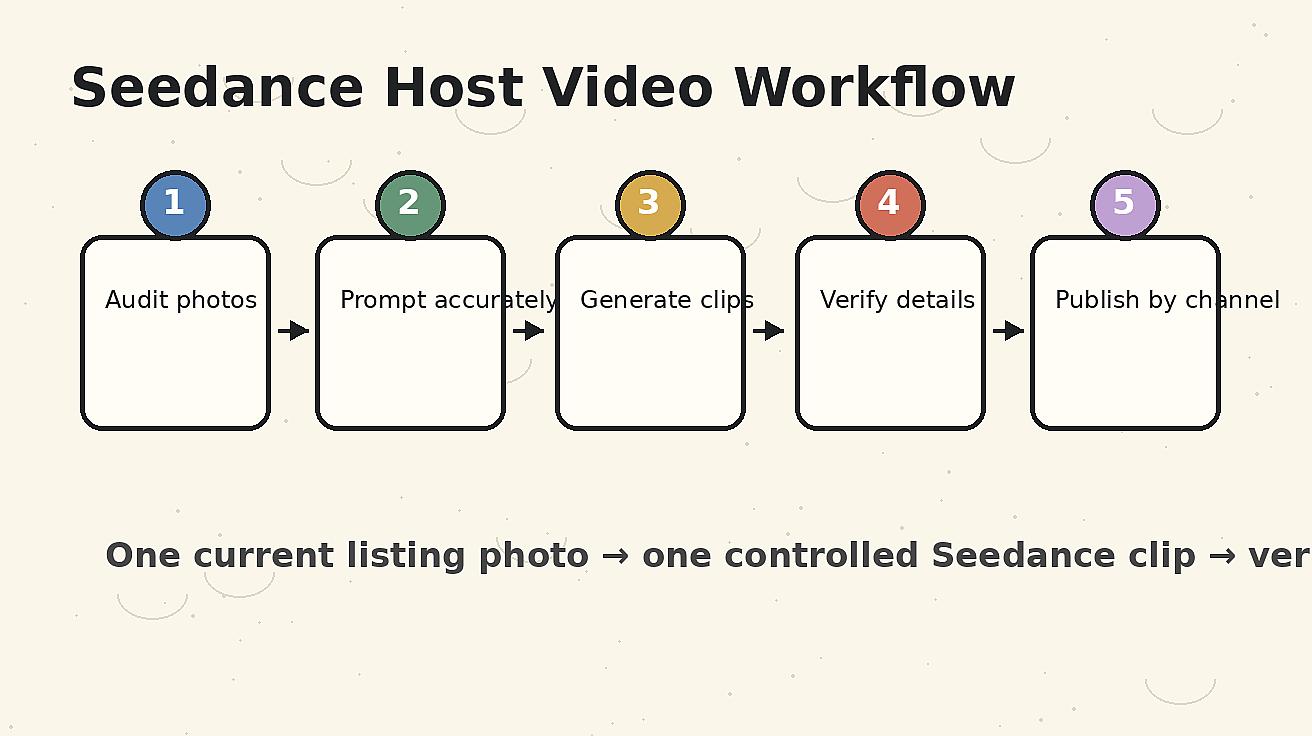
Step-by-step workflow: from listing photos to Seedance video assets
Step 1: Audit the existing listing photos
Before opening Seedance, review the listing photos like a guest. Which images explain the stay well? Which images are attractive but confusing? Which amenities are mentioned in copy but not shown clearly? Which parts of the guest journey create questions? The best AI video plan starts from those gaps.
Create a simple shot list with five to eight clips. For a small apartment, you may only need arrival, living room, bedroom, kitchen, bathroom detail, workspace, and balcony. For a larger vacation home, you might add driveway, pool, outdoor dining, kids room, laundry, game room, and neighborhood access. Do not try to cover everything in one video. Guests prefer a clear sequence of short clips over a confusing long montage.
Step 2: Choose only accurate source images
Image-to-video quality depends heavily on the source image. Use bright, high-resolution, current photos. Avoid old images that show outdated furniture, missing amenities, or staging that no longer exists. If a photo contains mirrors, windows, glass doors, or small text, inspect the generated clip carefully because those areas can distort during motion.
For each photo, decide what must remain unchanged. Examples: number of beds, bed size, stair location, appliance type, balcony railing, sofa shape, door color, wall art, table size, and window view. Put those constraints into the prompt. Seedance should enhance motion, not rewrite the property.
Step 3: Write prompts around guest intent
The fastest way to get useful Seedance output is to write prompts that describe what the guest should understand. Instead of "luxury cinematic Airbnb video," write "slow stable push-in from the doorway into the actual studio apartment, preserving the existing bed, sofa, table, window, and wall art; calm morning light; realistic short-term rental listing video; no people; no new furniture; no layout changes."
Intent-based prompts keep the creative direction connected to booking decisions. A guest does not need a fantasy fly-through. They need to know that the room is clean, navigable, and exactly what the listing promised.
Step 4: Generate separate clips by room or detail
Use one source photo for one clip. Keep most clips between five and ten seconds before editing. For social platforms, a final video of fifteen to thirty seconds is often enough. For a direct booking page, you can create a longer tour, but the source clips should still remain modular.
Generate several variations for the most important clip, usually the first impression or hero room. Do not over-generate every detail. Your time is better spent selecting accurate clips and editing them in a clear order.
Step 5: Verify every output before publishing
Verification is not optional for hospitality content. Check the generated clip against the real property. Look for changed windows, extra doors, widened rooms, altered appliances, fake views, impossible lighting, invented decor, changed bed sizes, distorted bathroom fixtures, and missing safety details. If the clip creates a promise the host cannot fulfill, do not use it.
A useful rule: if a guest could reasonably complain that the video misled them, regenerate or cut the clip. Seedance gives you speed, but the host remains responsible for accuracy.
Prompt templates for Seedance Airbnb host videos
Use these templates as starting points. Replace bracketed details with the real property information. Keep negative constraints in the prompt because they are part of the creative brief, not an afterthought.
Listing hero clip prompt
Use the provided photo of [room name] as the exact reference. Create a slow, stable, realistic camera push-in for a short-term rental listing video. Preserve the real layout, furniture, window placement, wall art, floor material, bed/sofa/table size, and visible amenities. Show clean natural light and a calm guest-ready mood. No people, no pets, no new furniture, no changed view, no added luxury objects, no exaggerated room size, no text overlay.
Arrival clip prompt
Use the provided exterior or entry photo as the exact reference. Create a calm arrival shot for an Airbnb guest, with a slow approach toward the real entrance. Preserve the door, path, sign, building shape, lighting, and surrounding objects. Make the shot feel clear and welcoming, not cinematic fantasy. No new cars, no people, no weather change, no new landscaping, no altered address or signage.
Amenity proof prompt
Use the provided amenity photo as the exact reference. Create a short close-detail video that clearly shows [amenity: coffee station / workspace / laundry / parking guide / towels / kitchen tools]. Preserve all real objects, quantities, labels, colors, and positions. Use subtle motion only, like a gentle tilt or push-in. No invented appliances, no extra products, no changed text, no hands, no people.
Pre-arrival guide prompt
Use the provided practical detail photo as the exact reference. Create a simple instructional clip for confirmed guests showing [smart lock / parking spot / towel shelf / trash area / house manual]. Keep the camera stable and the information easy to understand. Preserve the real object and environment. No text overlay unless provided separately in editing, no changed labels, no added objects, no people.
How to edit Seedance clips into a booking-friendly sequence
The order of clips matters. A common mistake is to start with the most beautiful detail instead of the guest journey. A better order is arrival, hero room, sleep area, kitchen or dining, bathroom cleanliness, strongest amenity, outdoor space, and closing CTA. This mirrors the way guests evaluate the stay.
For Airbnb-style social content, use quick captions such as "easy self check-in," "bright queen bedroom," "real workspace," "walkable coffee nearby," or "private balcony." Keep captions factual. Avoid unverifiable claims such as "best stay in town" or "luxury hotel quality" unless your brand positioning and guest experience support it.
Music should support calm confidence, not overwhelm the property. Fast edits can work for entertainment content, but a rental listing video should feel stable. Guests need time to read the room.
Accuracy rules for Airbnb and direct booking use
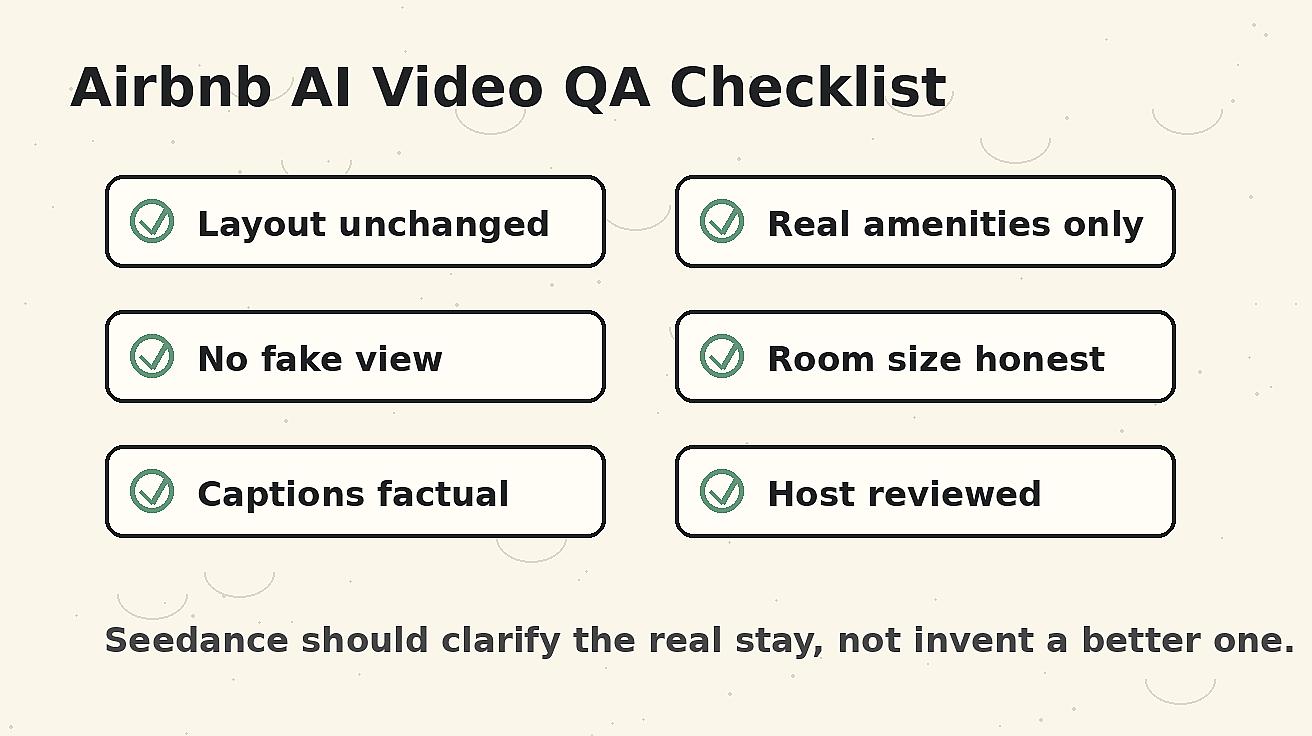
Seedance can make a property look more fluid and inviting, but the host should set strict accuracy rules. Use the following checklist before publishing any clip:
- The room size does not look materially larger than reality.
- The number and size of beds are unchanged.
- Windows, doors, stairs, railings, and paths stay in the correct place.
- The view is not changed or upgraded.
- Appliances and amenities shown are actually available to guests.
- Safety-related details are not removed or hidden.
- Décor and furniture match the current property setup.
- No people appear unless you have a clear reason and rights to use them.
- No logos, addresses, or sensitive location details are accidentally exposed.
- The clip does not imply an amenity, service, or neighborhood feature that is not included.
This is especially important for multi-property managers. A clip created from one unit should not be reused for another unit unless the layouts and amenities are truly identical. Guests notice differences, and review quality matters more than short-term click-through.
Airbnb listing video vs social video vs guest guide video
One Seedance workflow can support three different video products, but each needs a different structure.
Listing video
The listing video should be accurate, calm, and comprehensive. Its job is to improve confidence. Use the best five to eight clips and keep the order logical. Do not hide weaknesses with aggressive editing. If the bedroom is compact, show it honestly while highlighting why it works: clean layout, storage, natural light, or a comfortable bed.
Social video
The social version can be more emotional. It may focus on a weekend mood, a work-from-anywhere setup, a cozy rainy stay, or a kitchen-to-balcony breakfast sequence. Even here, the property should remain accurate. Social video can create desire, but it should not create false expectations.
Guest guide video
The guest guide version is practical. It can show check-in, parking, Wi-Fi card, kitchen basics, thermostat, laundry, trash, or checkout steps. These clips may not win the most public views, but they can reduce confusion and improve guest experience. For hosts with frequent questions, guide videos may be the highest-ROI use of Seedance.
Common mistakes to avoid
The first mistake is asking Seedance to create a full walkthrough from one photo. That often forces the model to invent rooms or hallways. Instead, build the video from separate verified clips.
The second mistake is using prompts that are too promotional. Words like "luxury," "five-star," "ultra-premium," and "dream villa" can push the output away from the real listing. Use words like accurate, clean, calm, stable, realistic, guest-ready, and preserve.
The third mistake is ignoring small distortions. A warped faucet, changed stove, fake balcony view, or distorted door may seem minor in a social clip, but it can reduce trust in a rental context. Hospitality content is detail-sensitive.
The fourth mistake is publishing without platform fit. A vertical Reel needs different pacing than a horizontal direct booking page video. Generate or crop with the final placement in mind.
The fifth mistake is failing to update videos when the property changes. If you replace furniture, repaint, remove an amenity, change bedding, or update outdoor seating, regenerate the affected clips. AI video should remain part of your listing maintenance workflow.
Recommended production system for hosts
For a single property, create a core library of ten Seedance clips: arrival, living room, bedroom, kitchen, bathroom, workspace, outdoor space, best amenity, neighborhood atmosphere, and house guide detail. From that library, export three edited videos: a thirty-second booking overview, a fifteen-second social hook, and a practical guest guide.
For a property manager with multiple units, create a repeatable naming system. Store source photo, prompt, output clip, verification notes, and final usage. Mark whether each clip is approved for listing, social, pre-arrival, or internal use only. This prevents teams from accidentally posting an unverified variation.
For agencies serving hosts, include a verification handoff. Send the host a checklist and ask them to confirm that the clip matches the current property. Do not rely only on the editor’s judgment, especially if the editor has never visited the property.
How Seedance fits into the broader host marketing stack
Seedance is not a replacement for good listing photos, accurate copy, or responsive guest communication. It is a way to turn existing visual assets into clearer motion assets. The best host stack usually looks like this: professional or high-quality phone photos, accurate listing copy, Seedance image-to-video clips, simple editing, factual captions, and ongoing updates as the property changes.
For SEO and direct booking pages, embed the video near the room description or hero section, not only at the bottom. For social, create a version that opens with the strongest transformation: "From listing photos to a guest-ready video tour with Seedance." For pre-arrival, keep the tone helpful and instructional.
Final checklist before publishing
Before a Seedance Airbnb host video goes live, confirm the following:
- Every clip was generated from a current, accurate source photo.
- The prompt asked Seedance to preserve layout, furniture, amenities, and view.
- The final edit shows the guest journey in a logical order.
- Captions are factual and do not add unsupported claims.
- The video format matches the placement: vertical for Reels/Shorts, horizontal or responsive for direct booking pages.
- The host or manager has reviewed the clip against the real property.
- The video is updated if the property changes.
Seedance works best for Airbnb hosts when it is treated as a trust tool. It can make the stay easier to understand, make amenities more visible, and help guests feel prepared before they book. The winning workflow is not maximum fantasy. It is controlled, accurate motion that turns existing listing photos into a clearer guest story.
FAQ: Seedance Airbnb host videos
Can I use Seedance to create Airbnb listing videos from photos?
Yes. Seedance can turn current listing photos into short image-to-video clips for rooms, amenities, arrival shots, and guest guide details. Use one source photo per clip and verify that the output matches the real property before publishing.
What should Airbnb hosts avoid when using AI video?
Avoid fake views, larger-looking rooms, invented amenities, changed furniture, added luxury objects, or anything that could mislead guests. For hospitality, accuracy is more valuable than dramatic visuals.
How long should a Seedance Airbnb video be?
For social platforms, fifteen to thirty seconds is usually enough. For a direct booking page, a longer overview can work, but it should still be built from short verified clips arranged in a clear guest-journey order.
Is Seedance better for listing videos or guest guide videos?
It can support both. Listing videos help guests understand the space before booking, while guest guide videos explain check-in, parking, amenities, and house rules after booking. Many hosts benefit from creating both versions from the same clip library.
Do I need professional video footage to use Seedance?
No. High-quality, current listing photos are enough for many useful clips. Better source photos produce better output, so use clear images with accurate lighting, visible layout, and no outdated staging.
How do I keep Seedance Airbnb videos accurate?
Write prompts that explicitly preserve the real layout, furniture, amenities, and view. After generation, compare every clip with the current property and reject anything that changes a meaningful detail.
Ready to create your own AI video?
Turn ideas, text prompts, and images into polished videos with Seedance. If this article helped, the fastest next step is to try the product.
Free credits on signup. Plans from $28/month.
Related Articles
More posts in the same locale you may want to read next.

Seedance App Preview Video Generator 2026: Create App Store and Product Launch Clips
Use Seedance to turn app screenshots, feature copy, and launch goals into App Store previews, Google Play promo videos, and product launch clips.
Read article
PixVerse Lip Sync API Tutorial: Upload, Generate, Poll, and Review
A practical PixVerse lip sync API workflow covering source video IDs, audio upload or TTS, request payloads, asynchronous polling, and quality review.
Read article
OpenArt Consistent Character Video Tutorial: Keep One Person Across Scenes
Build one OpenArt character, prepare reference angles, animate short shots, and review or repair face and wardrobe drift across a video sequence.
Read article