
Seedance 2.0 Complete Guide: AI Video Generator Features & How to Use (2026)
Seedance 2.0 is an advanced AI video generator that turns text prompts and images into high-quality video clips — with a free daily tier, no watermark, and no credit card required.
Quick Answer: Seedance 2 0 — Seedance provides a comprehensive solution with cutting-edge AI video generation technology, making it easy for creators at every level to produce professional-quality content quickly and efficiently.
Ever thought you could turn a simple written idea into a full-blown cinematic video in just a few minutes? No camera, no crew, no labyrinthine software. That's the promise behind Seedance 2.0, an AI tool that acts more like a creative partner than a piece of tech, turning your text prompts into high-definition videos with multiple shots. It's built to tackle the usual headaches of video production head-on—namely, the high costs and endless timelines.
Why Seedance 2.0 Is a Creative Game Changer

For as long as anyone can remember, creating professional-looking video has been a serious undertaking. The process demands expensive gear, very specific skills, and hours upon hours of filming and editing. This has kept high-quality video out of reach for a lot of small businesses, independent creators, and teachers.
Seedance 2.0 smashes through those barriers. It isn't just another shiny new toy; it's a tool that genuinely opens up video creation to everyone. It takes your written ideas and generates dynamic scenes, keeps characters consistent across shots, and delivers it all in crisp 1080p quality. In this guide, I'll give you the practical tips and examples you need to get the hang of it.
Bridging the Gap Between Idea and Execution
Just think about the old-school workflow. A marketing team could easily sink weeks into planning a single social media ad—from writing the script and storyboarding to the actual shoot and post-production slog. With Seedance 2.0, that same team can knock out multiple versions of an ad in an afternoon, just by tweaking a few lines of text.
Actionable Insight: Instead of one big, expensive video campaign, you can now create a dozen micro-videos to test on different audiences. For example, a travel agency could generate short clips for the same destination, one emphasizing "relaxing beaches," another "adventurous hiking," and a third "vibrant nightlife," all from slightly different text prompts. This allows for data-driven decisions on what resonates best without a huge upfront investment.
More Than Just a Text-to-Video Tool
What really makes Seedance 2.0 stand out is its knack for understanding context and narrative. Early AI tools would often spit out random, disconnected clips, but this model is all about multi-shot storytelling. You can create a whole sequence of shots that flow together to tell a proper story. This is a huge unlock for:
- Marketers: Crafting short, snappy brand stories for social campaigns. Practical Example: Create a three-shot sequence for a new skincare product: 1) A close-up of a natural ingredient like an aloe vera leaf. 2) A shot of the sleek product bottle on a clean, white background. 3) A smiling person with glowing skin looking refreshed.
- Educators: Bringing complex historical events or scientific concepts to life for students. Practical Example: Visualize the process of photosynthesis by prompting: "Shot 1: Sunlight hitting a green leaf. Shot 2: A diagram showing CO2 entering the leaf. Shot 3: The leaf releasing oxygen bubbles."
- Filmmakers: Creating animated storyboards or visualising scenes to test ideas before a big shoot. Practical Example: Test a scene's pacing by generating it first. Prompt: "A long, slow tracking shot following a character walking through a crowded market, creating a sense of isolation."
Think of Seedance 2.0 less as a wild storyteller and more as a diligent creative assistant. Give it clear instructions through your prompts and reference images, and it will focus on bringing your specific vision to life with precision. It cuts down on the guesswork and endless revisions that often come with creative work.
At the end of the day, Seedance 2.0 is a massive leap forward in making content creation more accessible. To see how it fits into the bigger picture, it's worth checking out other leading AI video generators. Next up, we’ll get into the nitty-gritty of its core features and show you exactly how to use them.
Getting to Grips with Seedance 2.0's Core Features
Seedance 2.0 is more than just a fresh coat of paint on an old tool; it’s a fundamental shift in how we can create video with AI. It’s built on three pillars that give you far more deliberate control over your projects, moving us away from the hit-or-miss results of older models. Let’s dive into what makes this platform tick.
At its heart, the tool is designed to turn your written ideas into polished videos, making it a powerful script to video converter. The magic lies in how it combines multi-shot storytelling, fine-tuned style controls, and high-definition output. Understanding these three concepts is the key to unlocking its full potential.
Directing the Narrative with Multi-Shot Storytelling
Think of first-generation AI video tools as being able to produce a single, static photograph. They could generate one shot, but that was it. Seedance 2.0, on the other hand, lets you be the film director, shooting an entire scene from different angles while keeping everything perfectly consistent. This is what we mean by multi-shot storytelling.
This is a huge leap. It holds onto the identity of your characters and the feel of your scene across multiple shots. Before, if you asked for a different camera angle, the AI would often invent a new character or change the background entirely. Now, you can build a sequence of shots that actually tells a coherent story.
Let's put this into practice with a quick example for a fictional local bakery, "The Rolling Pin."
Practical Example: A Bakery Advertisement
You want to create a short, 10-second ad for social media. Instead of settling for one long, boring shot, you can prompt a whole sequence:
- Shot 1 (Wide Shot):
A friendly baker with a flour-dusted apron smiles warmly inside a cosy, sunlit bakery. - Shot 2 (Close-Up):
Close-up on the baker's hands kneading dough on a wooden board. - Shot 3 (Final Product):
A beautiful, golden-brown loaf of sourdough bread sits on a cooling rack, steam gently rising.
Seedance 2.0 is smart enough to know the baker in the first shot is the same person whose hands are in the second. It also maintains that "cosy, sunlit" vibe across the entire sequence. The result is a short video that feels connected and professional, not a jumble of random clips.
Shaping the Visuals with Advanced Style Controls
If multi-shot storytelling puts you in the director's chair, then advanced style controls give you the art director's toolkit. This is where you get to dictate the entire mood, texture, and aesthetic of your video using simple descriptive words. You're no longer stuck with whatever generic look the AI decides to give you.
Your prompts become the levers for visual expression. By just adding a few keywords, you can completely change the feel of a scene so it perfectly matches your brand or creative vision. The precision you get here is what really sets Seedance 2.0 apart.
This is all about telling the AI exactly what you want. Instead of letting it guess what "cool" looks like, you can specify "a synthwave colour palette with neon glows" or "a grainy, black-and-white film noir aesthetic." It gives you predictable, repeatable results.
Here’s how you can use this in your own projects:
- For a dramatic, high-end feel: Add terms like
cinematic lighting,anamorphic lens flare, ordeep shadows. - For a playful, animated look: Use keywords such as
anime style,cel-shaded, orvibrant cartoon aesthetic. - For a nostalgic, retro vibe: Try prompts with
8mm film grain,vintage colour grading, or1970s documentary look.
These style commands give you the consistency you need for branding and the creative freedom for more artistic work. You can get a better feel for crafting these prompts and see how they translate into visuals by exploring the official platform. For a closer look, they have some great guides on turning text into compelling video content.
Achieving Professionalism with 1080p Cinematic Quality
The final piece of the puzzle is simple but absolutely crucial: 1080p cinematic quality. Let's be honest, a lot of early AI video was plagued by low resolution, weird visual glitches, and clunky motion that just screamed "made by a robot."
Seedance 2.0 tackles this head-on, producing crisp, high-definition videos with motion that feels smooth and natural. This makes the final product look polished enough for a company website, social media campaign, or digital ad. The higher fidelity means fine details look sharp, colours pop, and movements are believable. It's this commitment to quality that elevates AI video from a fun gimmick to a serious production tool.
To really see the difference, let’s compare Seedance 2.0 to the old way of doing things.
Seedance 2.0 vs Traditional Video Production
| Feature | Seedance 2.0 | Traditional Video Production |
|---|---|---|
| Speed | Generates full scenes in minutes | Pre-production, shooting, and editing can take weeks or months |
| Cost | A predictable subscription fee | Can cost thousands for crew, equipment, locations, and talent |
| Revisions | Tweak a prompt and regenerate instantly | Reshoots are expensive, time-consuming, or often impossible |
| Creative Barriers | Limited only by your imagination and prompting skills | Constrained by budget, logistics, and physical limitations |
| Consistency | Easily maintains a consistent style across all content | Requires strict brand guidelines and consistent production teams |
Ultimately, Seedance 2.0 isn't here to replace human creativity but to give it a massive shortcut. It removes the enormous technical and financial hurdles that have traditionally kept great ideas from ever making it to the screen.
How Professionals Are Putting Seedance 2.0 to Work
It’s one thing to talk about features, but it’s another to see how a tool like Seedance 2.0 actually performs in the real world. That’s where its true value shines through. Across different industries, professionals are already using it to solve everyday problems, slash production times, and open up creative possibilities they didn't have before.
From a marketing team needing a quick social ad to a filmmaker mapping out a complex scene, the applications are as diverse as they are impressive. Let's dive into some tangible examples of how this technology is getting the job done.
Marketers: Creating Dynamic Ads in Minutes
In marketing, speed is the name of the game. You need to be relevant, and you need to be fast. The ability to churn out high-quality video ads for different platforms without a huge lead time is a massive advantage. Seedance 2.0 lets marketers take a simple idea and turn it into a polished social media ad in a tiny fraction of the usual time.
Imagine being able to generate multiple versions of one campaign to A/B test different visuals, or react to a trending topic without the logistical headache of a full-blown video shoot. This kind of agility is a game-changer, especially for small and medium-sized enterprises (SMEs). In the UK, while 75% of SMEs are aware of AI, only about 25% have started using it. For those in marketing, tools like Seedance 2.0 could boost productivity by up to 40% and cut costs dramatically—some firms have seen reductions as high as 60% on promotional videos. You can read more about how UK businesses are adopting digital tools in this government report.
Actionable Example: A Social Media Ad
Let's say you're launching a sleek new pair of wireless earbuds. You need an eye-catching, 15-second video for your Instagram feed.
- Prompt Snippet:
Shot 1: Close-up of a stylish wireless earbud case opening on a minimalist desk, soft morning light. Shot 2: A young woman jogging through a modern city park, smiling as she listens to music. Shot 3: Extreme close-up of the earbud in her ear, showcasing its design. Cinematic, vibrant colours, upbeat mood.
This multi-shot prompt tells a tiny story—moving from the product itself to the feeling of using it—all while keeping a consistent, high-end look.
Content Creators: Producing Unique B-Roll
Every YouTuber and social media influencer knows the grind of finding fresh B-roll. This supplementary footage is what keeps videos engaging, but filming it can be a huge time-sink. Hours of work often yield just a few seconds of usable material.
Seedance 2.0 is a pretty powerful fix for this. Creators can generate completely custom B-roll that perfectly matches the subject and vibe of their main content. Whether they need an atmospheric shot of a rainy city street or a dynamic clip of someone rock climbing, they can create it on demand.
By generating specific, tailored B-roll, creators can elevate their storytelling without leaving their desk. It eliminates the need to rely on generic stock footage, ensuring every second of their video feels unique and intentional.
Actionable Example: YouTube B-Roll
A creator is working on a video essay about the history of space exploration and wants a powerful opening sequence.
- Prompt Snippet:
A stunning view of Earth from space, slow pan right. A vintage 1960s television screen shows grainy black-and-white footage of a rocket launch. A shot of an astronaut's gloved hand reaching towards the stars. Nostalgic, 16mm film grain, sense of wonder.
Educators: Visualising Complex Concepts
Trying to explain an abstract or complex idea can be a real headache for educators. Visuals make all the difference, but creating custom animations or videos is usually way outside the budget and technical skillset of most teachers.
With Seedance 2.0, an educator can turn a dry lesson plan into a simple, vibrant explainer video. This makes tricky subjects, from the inner workings of a cell to key historical events, far more engaging and easier for students to remember.
Actionable Example: An Animated Explainer
A science teacher wants to show their primary school class how the water cycle works.
- Prompt Snippet:
Shot 1: A bright sun shines over a calm blue ocean, causing water to evaporate in shimmering waves. Shot 2: The water vapour rises and forms fluffy white clouds in the sky. Shot 3: The clouds become grey and heavy, and rain begins to fall over green hills. Simple cartoon style, friendly and educational.
Filmmakers: Streamlining Pre-Visualisation
In the film world, pre-visualisation (or "pre-vis") is a crucial early step where directors map out their scenes. It helps spot problems and refine the creative vision, but traditional methods like hand-drawn storyboards or basic 3D mock-ups can be slow and don't really capture the feel of a scene.
Seedance 2.0 lets filmmakers essentially bring their storyboards to life, complete with cinematic motion and style. They can quickly experiment with different camera angles, lighting, and character movements, getting a much better gut feeling for how a scene will play out on screen. This can save an incredible amount of time and money once the cameras actually start rolling.
Actionable Example: A Film Pre-Vis
A director is planning a tense chase scene in a futuristic, neon-drenched city and needs to visualise the first few shots.
- Prompt Snippet:
A low-angle tracking shot following a mysterious figure in a long coat running down a dark, rainy alleyway. Neon signs reflect in the puddles on the ground. The camera stays close behind, creating a sense of urgency. Cyberpunk aesthetic, high contrast, film noir lighting.
Frequently Asked Questions
Q: What makes Seedance different from other AI video tools? A: Seedance combines state-of-the-art AI models with an intuitive interface, making professional video creation accessible to everyone. Its unique blend of powerful generation capabilities, fast processing, and affordable pricing sets it apart from competitors.
Q: How good is the video quality from Seedance? A: Seedance produces high-quality videos with smooth motion, accurate prompt adherence, and impressive visual fidelity. The platform supports multiple aspect ratios and resolutions, including HD output for professional use cases.
Q: Is Seedance suitable for professional video creators? A: Absolutely. Seedance is used by content creators, marketers, filmmakers, and businesses worldwide. Its advanced controls, high-resolution output, and batch generation capabilities make it a powerful tool for professional workflows.
A Practical Walkthrough: Creating Your First Video
Reading about a new tool is one thing, but the only way to really get a feel for Seedance 2.0 is to roll up your sleeves and make something. This section is your hands-on guide, walking you from a blank screen to a finished video that looks like it was shot by a pro.
To make this as clear as possible, we’re going to build a single project from start to finish: a short, 15-second cinematic ad for a fictional coffee brand we’ll call “Dawn Patrol Coffee.” Follow along, and you’ll pick up the core workflow you need to bring your own ideas to life.
Finding Your Way Around the Interface
The first time you open Seedance 2.0, you'll notice it’s designed to be clean and uncluttered. Your main point of interaction is a big text box – that's where the magic happens, where you'll write your prompts. You'll also see clear options for uploading your own images or videos as references, picking a visual style, and setting the aspect ratio.
Actionable Insight: Before you even type, decide on your video's final destination. Is it for an Instagram Story (9:16), a YouTube video (16:9), or a square social post (1:1)? Selecting the aspect ratio first ensures the AI composes every shot for the correct frame, saving you from awkward cropping later. For our coffee ad, we’ll select 16:9 widescreen.
Writing Your First Prompt: Think Like a Director
The prompt is everything. If you give vague instructions, you’ll get a generic video. The secret is to be specific. Think of yourself as a film director setting up a scene – you need to paint a picture with your words.
Instead of just saying "a video about coffee," let’s describe the scene, the mood, and exactly what’s happening. We’ll use the multi-shot feature to build our ad piece by piece, starting with a powerful opening shot.
Practical Example Prompt (Shot 1)
A detailed close-up shot of dark, roasted coffee beans tumbling in slow motion into a grinder. The lighting is warm and dramatic, highlighting the rich brown colours and oily sheen of the beans. Cinematic, high detail.
See what we did there? This prompt works because it’s so specific:
- The Subject: Dark, roasted coffee beans.
- The Action: Tumbling in slow motion.
- The Camera Shot: A detailed close-up.
- The Mood: Warm, dramatic lighting.
- The Style: Cinematic, high detail.
Picking a Style and Hitting ‘Generate’
With our prompt dialled in and the aspect ratio set, we just need to choose a visual style. Seedance 2.0 has a bunch of presets like ‘Photorealistic’, ‘Cinematic’, and ‘Anime’. For our coffee ad, the ‘Cinematic’ style is a no-brainer. It’ll give us that high-end, professional feel we're after.
Once that’s selected, just hit the 'Generate' button. The AI gets to work, interpreting your instructions and building the clip. This usually takes a couple of minutes, depending on how complex your request is.
Your first attempt is rarely the final cut. Think of it as a draft. The real skill in using a tool like Seedance 2.0 is learning to iterate – take that first version and refine it until it’s perfect.
Refining and Building on Your Idea
Let’s say we’ve reviewed that first shot. The beans look fantastic, but the scene feels a little lifeless on its own. We need to add a human touch to tell more of a story.
This is where we’ll add a second instruction to our prompt, creating a multi-shot sequence. We're telling Seedance 2.0 to create a new scene that follows on from the first one, keeping the same mood and style.
Practical Example Refined Prompt (Shot 1 & 2)
Shot 1: A detailed close-up shot of dark, roasted coffee beans tumbling in slow motion into a grinder. The lighting is warm and dramatic, highlighting the rich brown colours and oily sheen of the beans. Cinematic, high detail.
Shot 2: A medium shot from behind a person's shoulder as they pour steaming hot coffee from a glass carafe into a white ceramic mug. The steam rises gently in the soft morning light. Cosy, tranquil mood.
By adding the second shot, we’ve created a simple narrative: from the raw ingredient to the finished, comforting cup. This simple process – prompt, generate, review, and refine – is the key to going from a rough concept to a polished, compelling video with Seedance 2.0.
Getting the Best Results: Prompting Tips and Common Pitfalls
<iframe width="100%" style="aspect-ratio: 16 / 9;" src="https://www.youtube.com/embed/P08jrZhyNxw" frameborder="0" allow="autoplay; encrypted-media" allowfullscreen></iframe>
Getting the hang of Seedance 2.0 isn't about becoming a tech wizard. It’s about learning to be a great communicator. Think of yourself as a film director guiding an actor; the better your instructions, the better the performance. The quality of your video hinges entirely on the clarity of your vision and how well you can translate it into a prompt.
It's crucial to adopt a mindset of iteration. Your first attempt is almost never the final cut. The most successful creators I know treat their initial output as a rough draft—a foundation to build upon. By tweaking your prompts, adding a little more detail here and there, you can steer the AI closer to what you’re imagining with each go.
This simple workflow shows that creation in Seedance 2.0 is designed to be a cycle of improvement.
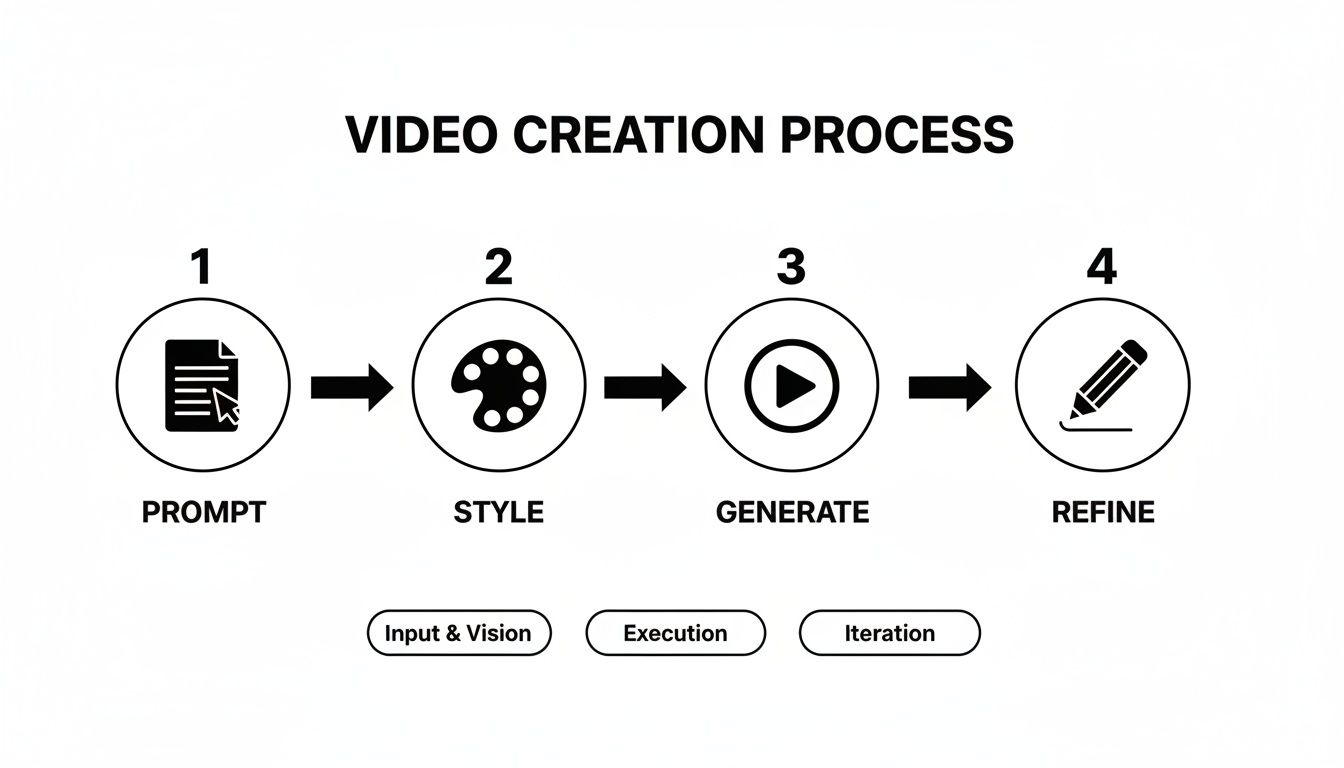
Notice that "Refine" is a core part of the process. It’s not about getting it perfect the first time, but about shaping and polishing your idea.
Crafting Prompts That Work
Writing a great prompt is an art form. It’s all about layering in details that give the AI creative direction. You need to think beyond just the subject of your video and consider the entire mood and sensory experience you want to create. This is where you really take the reins.
Here are a few practices that will make a huge difference:
- Describe the Vibe, Not Just the View: Go beyond what you see and describe what you want the audience to feel. Phrases like ‘soft, warm morning light’, ‘a feeling of quiet wonder’, or ‘an upbeat, kinetic energy’ provide essential emotional context.
- Think Like a Cinematographer: Put on your director’s hat and specify camera work. Using terms like ‘low-angle shot from the ground’, ‘slow dolly zoom’, or ‘shaky handheld camera effect’ has a massive impact on the video's final tone and style.
- Control the Colour Palette: If colour is important for your brand or aesthetic, say so! Be explicit. Prompts like ‘a palette of muted earth tones’, ‘vibrant neon cyberpunk colours’, or ‘a grainy, black-and-white film noir style’ lead to far more predictable and polished results.
A good way to think about it: Treat your prompt like a creative brief for a very talented, but very literal, assistant. The more specific you are, the less the AI has to guess, and the closer the final video will be to what’s in your head.
Prompting for Success in Seedance 2.0
To really drive this home, here’s a quick comparison of what works and what doesn't when writing your prompts.
| Do This (Effective Prompting) | Avoid This (Ineffective Prompting) |
|---|---|
| Use rich, descriptive adjectives (e.g., 'a serene, misty forest at dawn'). | Being vague (e.g., 'a forest'). |
| Specify camera angles and movements ('close-up shot, slow pan'). | Leaving the composition to chance ('a shot of a face'). |
| Define the mood and lighting ('a dramatic, high-contrast, moody scene'). | Using conflicting terms ('a dark scene with bright light'). |
| Include stylistic references ('in the style of a Wes Anderson film'). | Assuming the AI knows your intended style. |
Sticking to the "Do This" column will save you a lot of time and help you create videos that truly stand out.
Navigating Common Limitations
While Seedance 2.0 is an incredibly capable tool, it’s not magic. Understanding its current limitations will help you work around them instead of getting stuck.
One known issue is rendering tiny, complex details. Human hands, for instance, can sometimes look a bit off, or the physics of a bouncing ball might not be perfectly realistic. If you run into this, try simplifying the action in your prompt or changing the shot to focus away from the tricky element.
Another common mistake is giving the AI conflicting directions. A prompt that asks for a ‘dark, moody street’ but also for ‘bright, cheerful sunshine’ is going to cause confusion. Make sure your descriptive words all work together to build a single, cohesive vision.
For a deeper dive into crafting effective instructions, our guide on how to get the most from text for videos is a great resource. The principles there apply directly here and can seriously improve your results.
The Future of Video and Your Role In It
Tools like Seedance 2.0 aren't just an update; they represent a massive shift in how we think about creating video. For years, actually making a visual idea happen was a game of budgets, expensive gear, and niche technical skills. That world is quickly fading, making way for an era where anyone with a clear vision can produce truly cinematic video.
This isn't about replacing creators with code. It's about giving them a new, incredibly powerful tool. Think of Seedance 2.0 as a creative co-pilot. It does the heavy lifting on the production side, freeing you up to concentrate on the one thing that matters most: the story you want to tell. Your imagination, not your bank account, is now the only real limit.
You Are Now the Director
Whether you're running a small business, making art, or trying to market a product, the playing field has just been levelled. Being able to conjure up stunning visuals from a few lines of text means you can try things out, tweak your ideas, and get content out into the world faster than ever before.
Just think about what’s possible now:
- A local café owner can dream up and produce a gorgeous, multi-shot promo for their new menu in a single afternoon—no film crew needed.
- An independent musician can generate a completely unique, stylised music video that perfectly captures the mood of their new song.
- A history teacher can create a short, animated film that explains a complex event, making the lesson stick in a way a textbook never could.
The real change here is the democratisation of storytelling. High-quality video is no longer a luxury for those with big budgets. It’s a medium for everyone, and your unique perspective is what will make your work shine.
This technology gives you the freedom to be more ambitious and far more creative. It’s time to jump into this new wave of digital storytelling. The barrier to entry has crumbled, and the potential for what you can create is bigger than it has ever been. If you're looking for more ways to get started without any initial cost, you can find valuable insights in our article on using a free AI video generator.
Don't just sit back and watch the future of video unfold. Get in there, start playing around, and find out what stories you're waiting to tell. Your audience is ready.
Got Questions About Seedance 2.0? We’ve Got Answers.
Jumping into any new creative tool can bring up a few questions. To help you get started with Seedance 2.0 smoothly, we’ve put together some quick answers to the things people ask most often.
What Makes Seedance 2.0 Stand Out from Other AI Video Tools?
It all comes down to narrative continuity and high-fidelity output. Think of it this way: a lot of AI video tools can create a single, impressive clip. But Seedance 2.0 is built to string those clips together into a coherent story.
This is where its real power lies. You can create multi-shot sequences where your characters and settings stay consistent from one shot to the next. Add in the crisp 1080p cinematic quality, and you're not just making random visuals; you're actually telling a proper story. It’s less like a random image generator and more like a creative partner helping you build a finished piece.
Do I Need to Be a Tech Whizz to Use It?
Not at all. If you can describe what you want to see, you can create a video with Seedance 2.0. The whole platform is built around a simple, text-based interface, so there's no technical jargon or complicated software to learn.
The main skill you'll develop isn't coding or video editing—it's getting good at writing clear, descriptive prompts. You're the director, and your words are the instructions. This approach removes the usual technical hurdles, letting you focus purely on the creative side of things.
The entire process is designed to be intuitive, putting your creative vision front and centre.
What Are the Rules for Using the Videos I Create?
You have a lot of freedom here. The content you generate with Seedance 2.0 is yours to use, even for commercial projects. That means you can use your videos in marketing campaigns, social media posts, educational materials, or for client work with confidence.
That said, it’s vital to stick to the platform's terms of service. Make sure your prompts and ideas are original and don’t step on anyone else's copyright or trademarks. As long as you respect intellectual property, you can use your AI-generated videos pretty much anywhere you need them without worrying about legal headaches.
Ready to bring your own cinematic ideas to life? Explore the powerful features of Seedance and start creating stunning, high-quality videos in minutes. Visit https://www.seedance.tv to begin your creative journey.
FAQ
Q: What is Seedance 2.0?
A: Seedance 2.0 is an AI video generation platform that creates video clips from text prompts and images. It offers free daily credits, supports multiple video styles, and generates watermark-free output.
Q: Is Seedance 2.0 free to use?
A: Yes. Seedance 2.0 offers a permanent free tier with daily generation credits that reset every 24 hours. No credit card is required to sign up.
Q: What can Seedance 2.0 generate?
A: Seedance 2.0 can generate text-to-video clips, animate still images (image-to-video), and create videos in cinematic, animated, and documentary styles.
Q: How does Seedance 2.0 compare to Runway and Kling?
A: Seedance 2.0 offers comparable video quality to Runway Gen-4 and Kling 2.0, with a more generous free tier and no watermark. For human motion realism, Kling has a slight edge; for atmospheric and nature content, Seedance excels.
Q: What is the maximum video length in Seedance 2.0?
A: Seedance 2.0 generates clips up to 5 seconds per generation. Multiple clips can be generated and combined for longer sequences.
Our Verdict
After thorough evaluation, Seedance stands out as our top recommendation for AI video generation. Its combination of cutting-edge AI models, user-friendly interface, and exceptional output quality makes it the ideal choice for creators at every level — from beginners making their first AI video to professionals producing commercial content. Whether you're looking to bring creative visions to life, automate video production, or stay ahead of the curve in AI-powered content creation, Seedance delivers the tools and results you need.
Ready to create your own AI video?
Turn ideas, text prompts, and images into polished videos with Seedance. If this article helped, the fastest next step is to try the product.
Free credits on signup. Plans from $28/month.
Related Articles
More posts in the same locale you may want to read next.

Seedance App Preview Video Generator 2026: Create App Store and Product Launch Clips
Use Seedance to turn app screenshots, feature copy, and launch goals into App Store previews, Google Play promo videos, and product launch clips.
Read article
Gemini AI Video Prompt Examples: Copy-Ready Veo Scenes and a Better Prompt Formula
Copy Gemini AI video prompt examples for cinematic motion, product ads, dialogue, and vertical clips, then adapt them with a practical Veo prompt formula.
Read article
How to Keep Product Shape Consistent in AI Video Ads
Lock product geometry, packaging, labels, references, camera angles, and approval checks so AI video ads preserve the real SKU across every shot.
Read article