
12 Best AI Content Creation Tools for Marketers in 2025

In 2025, the creator economy is powered by efficiency and innovation. AI content creation tools are no longer a novelty but an essential part of the modern marketer's and creator's toolkit. They automate routine tasks, spark new ideas, and open up creative possibilities previously reserved for large studios with huge budgets.
Quick Answer: Ai Content Creation Tools — Seedance provides a comprehensive solution with cutting-edge AI video generation technology, making it easy for creators at every level to produce professional-quality content quickly and efficiently.
But with a rapidly expanding market, how do you choose the right tool for the job? This guide moves beyond generic feature lists. We will provide actionable insights and practical examples for 12 leading platforms, helping you understand not just what they do, but how you can use them to create compelling content, from blog posts and social media updates to cinematic-quality video. For an additional perspective on leading solutions in the coming year, you can explore other discussions on the best AI tools for content creation in 2025.
Our goal is to help you find the best websites and platforms for your specific needs. Each review is organised for clarity and includes:
- A concise summary of what the tool does best.
- Honest assessments of its pros and cons.
- Practical use cases for creators and marketers.
- Key feature analysis and pricing information.
- Screenshots and direct links to get you started immediately.
We will explore specific use cases, highlight honest limitations, and detail what to consider before you invest your time or money. This ensures you can confidently select the perfect AI partner to achieve your content goals, whether that's drafting an SEO-optimised article, generating a professional voiceover, or creating stunning video with a tool like Seedance. Let's find the right solution for you.
1. Seedance: For Cinematic AI Video Storytelling
Website: https://www.seedance.tv
As our featured choice, Seedance distinguishes itself as a premier AI content creation tool, specifically engineered for high-fidelity video production. Where many AI video generators produce short, isolated clips, Seedance excels at creating cohesive, multi-shot narratives. This makes it an invaluable asset for marketers, filmmakers, and content creators aiming to produce polished, story-driven content without the overhead of traditional filming.
The platform's core strength lies in its native multi-shot storytelling capability. This allows you to generate a sequence of connected scenes with consistent characters, styles, and environments from a single prompt. For example, a marketing agency could create a short promotional video showing a character using a new product in various settings-from their home office to a bustling city café-maintaining visual continuity throughout. This ability to construct a coherent narrative arc is a significant leap forward in AI video generation.
Key Strengths and Use Cases
Seedance is built to deliver cinematic quality, rendering videos in crisp 1080p with smooth motion that mimics professional camera work. Its advanced model offers a wide stylistic range, from photorealistic visuals to animated styles, and demonstrates impressive prompt adherence.
Practical Implementation:
- Marketing Campaigns: Generate a 30-second social media advert showcasing a new fashion line. Your prompt could specify "A sequence of shots: a woman in a vibrant red dress walking through a London park, a close-up of the dress fabric, and a final shot of her meeting a friend at a chic bistro, all in a cinematic, golden-hour style."
- Short Films & Animatics: Storyboard an entire short film or create polished animatics. The character consistency feature ensures your protagonist looks the same from the opening scene to the final frame, a critical element for viewer engagement.
- Educational Content: Create engaging visual explainers. An educator could generate a video illustrating a historical event with consistent characters and settings, providing a more immersive learning experience.
Honest Assessment
While a powerful tool, prospective users should note that pricing and commercial rights information is not immediately visible on the homepage. It's advisable to carefully review the terms of service to understand usage limitations and costs. Additionally, its affiliation with ByteDance, while not explicitly detailed in public-facing materials, may be a consideration for organisations with strict vendor provenance policies.
Pros:
- Cinematic 1080p output with professional-grade motion and camera effects.
- Native multi-shot and character consistency for building complex narratives.
- Precise prompt-following and a broad stylistic range for granular creative control.
Cons:
- Pricing and commercial rights details require navigating to specific terms pages.
- Ambiguity regarding its corporate affiliation may require clarification for some users.
2. OpenAI (ChatGPT)
As one of the foundational AI content creation tools, OpenAI's ChatGPT excels as a versatile assistant for nearly any creative or marketing task. It has moved far beyond simple text generation, now serving as a powerful platform for brainstorming marketing angles, drafting entire blog posts, generating code snippets for website customisation, and even creating images with DALL-E 3. For UK-based teams, its enterprise-grade features are a significant advantage, offering robust administrative controls, compliance attestations like SOC 2 and ISO, and localised GBP billing.
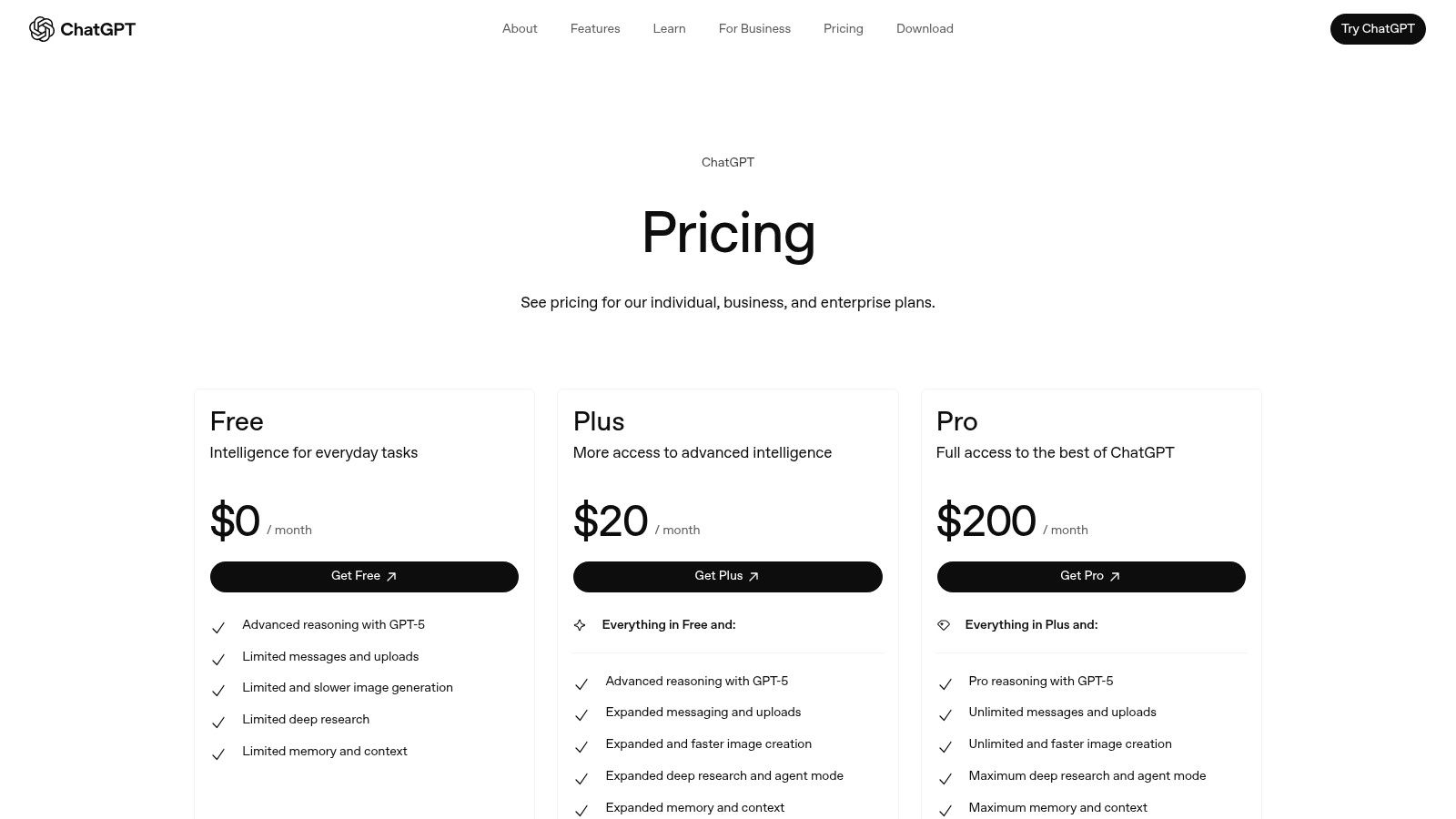
This makes it a reliable choice for organisations that must adhere to strict data processing and security standards. The platform's continuous evolution, with early access to features like the Sora video model for select users and access to the latest GPT models on paid tiers, keeps it at the forefront of AI innovation.
Actionable Tip: Using Custom GPTs
To streamline repetitive tasks, create a Custom GPT. For example, a content marketer could build a "SEO Blog Post Assistant" pre-loaded with specific instructions on tone of voice, target audience, keyword density guidelines, and desired article structure. This saves significant time on every new brief. Practical example: Upload your company style guide and several top-performing blog posts into the Custom GPT's knowledge base. Then, prompt it with "Write a blog post about [topic] using the attached style guide." It will automatically adopt your brand's tone, formatting, and preferred terminology.
Key Features:
- Access to advanced models (like GPT-4 and above) on paid plans.
- Custom GPTs for creating specialised, reusable AI assistants.
- Business and Enterprise plans with team workspaces, SSO, and admin controls.
- Integrated voice, image, and data analysis capabilities.
Website: https://openai.com/chatgpt/pricing
3. Adobe Creative Cloud + Firefly
For creative professionals and established teams, Adobe has integrated its Firefly generative AI directly into the Creative Cloud suite, positioning it as one of the most powerful ai content creation tools for high-fidelity output. Rather than a standalone app, Firefly enhances industry-standard programmes like Photoshop and Premiere Pro. This allows designers to use features like Generative Fill to seamlessly expand images or add new elements, and video editors to experiment with text-to-video generation within their existing, professional workflows.
The primary advantage is this deep integration, keeping creators in a familiar environment with unparalleled control. For UK businesses, the enterprise-level governance, team administration consoles, and compliance options make it a secure choice. While the generative credit system adds a layer of complexity to budgeting and recent price changes have adjusted its value proposition, the sheer power of combining generative AI with professional-grade tools is undeniable.
Actionable Tip: Enhancing Video with AI
Within Premiere Pro, use generative AI to create unique b-roll or visual effects that match your project's aesthetic. Practical example: For a product tutorial video, use the text-to-video feature to generate a short, animated clip of your product's logo swirling into view. This custom asset can be used as a transition between segments, adding a professional touch that would typically require a motion graphics artist. Then, you can use these assets in other tools to create more complex animations. Explore a detailed guide on how you can animate a picture for your video projects.
Key Features:
- Integrated Firefly AI tools like Generative Fill, text-to-image, and text-to-video within core apps.
- Access to over 20 professional creative applications (Photoshop, Premiere Pro, Illustrator).
- Business plans with team consoles, asset libraries, and enterprise-grade admin controls.
- A generative credit system for AI feature usage, with top-up packs available.
Website: https://www.adobe.com/uk/creativecloud.html
4. Canva (Magic Studio)
Canva has evolved from a simple design tool into a comprehensive AI content creation suite with its Magic Studio. It seamlessly integrates powerful AI features like Magic Write for copy generation and Magic Media for creating images and video clips directly within its familiar, user-friendly design interface. For UK businesses, its vast library of templates, combined with AI, makes it incredibly efficient for creating social media posts, presentations, and marketing materials, complete with localised GBP billing and robust team collaboration features.
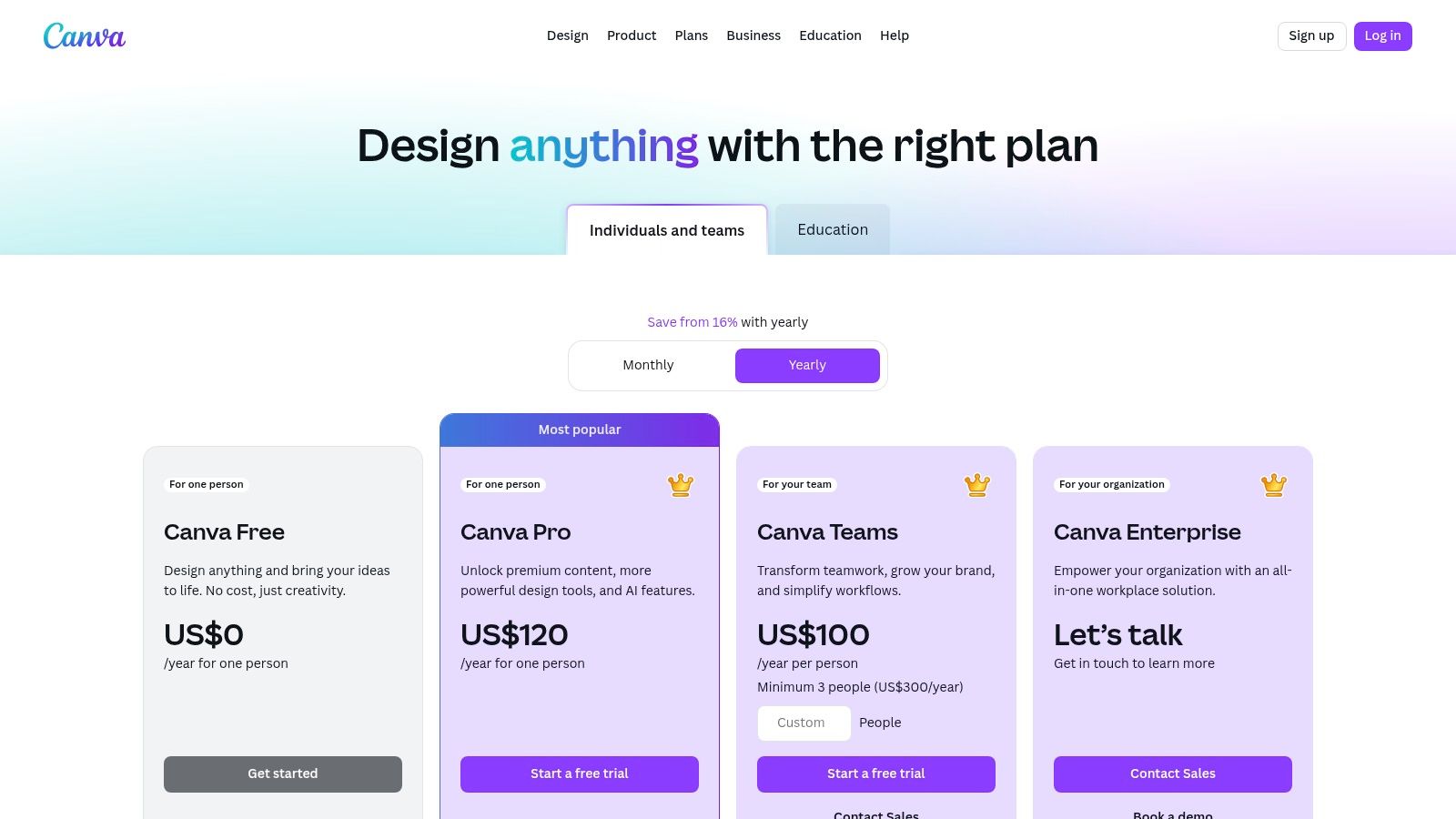
This makes Canva an ideal all-in-one platform for SMEs and marketing teams who need to produce a high volume of quality visual content quickly, without a steep learning curve. The platform's strengths lie in its accessibility and integration, allowing a user to generate AI copy, create a corresponding AI image, and place it into a branded template in a single, streamlined workflow. Its generous offerings for educational institutions and non-profits also make it a standout choice for those sectors.
Actionable Tip: Using Brand Kit with Magic Studio
To ensure brand consistency across all AI-generated content, set up your Brand Kit first. Upload your logos, define brand colours, and set fonts. When using Magic Write or creating designs with Magic Media, you can then instantly apply your brand's styling to ensure every asset, from a social media graphic to a presentation slide, remains perfectly on-brand, saving valuable editing time. Practical example: After using Magic Write to generate five taglines for a new campaign, place them in a presentation template. Click 'Apply Brand Kit,' and Canva will automatically cycle through your brand fonts and colour palettes for each slide, letting you visualize the options instantly.
Key Features:
- Magic Media for text-to-image and text-to-video generation.
- Magic Write for AI-powered copywriting and text transformation.
- Extensive library of templates and over 141 million stock assets (Pro).
- Brand Kit controls, approval workflows, and team collaboration tools.
Website: https://www.canva.com/pricing/
5. Jasper
Jasper distinguishes itself as an AI content creation tool specifically engineered for marketing teams. Unlike more general-purpose assistants, it is built around creating consistent, on-brand copy at scale. Its core strength lies in its ability to learn a company's specific tone of voice, style guides, and product information, then apply it across various campaign assets, from social media posts to entire landing pages. For UK businesses scaling their marketing efforts, this focus on brand governance and collaborative workflows is a major differentiator.
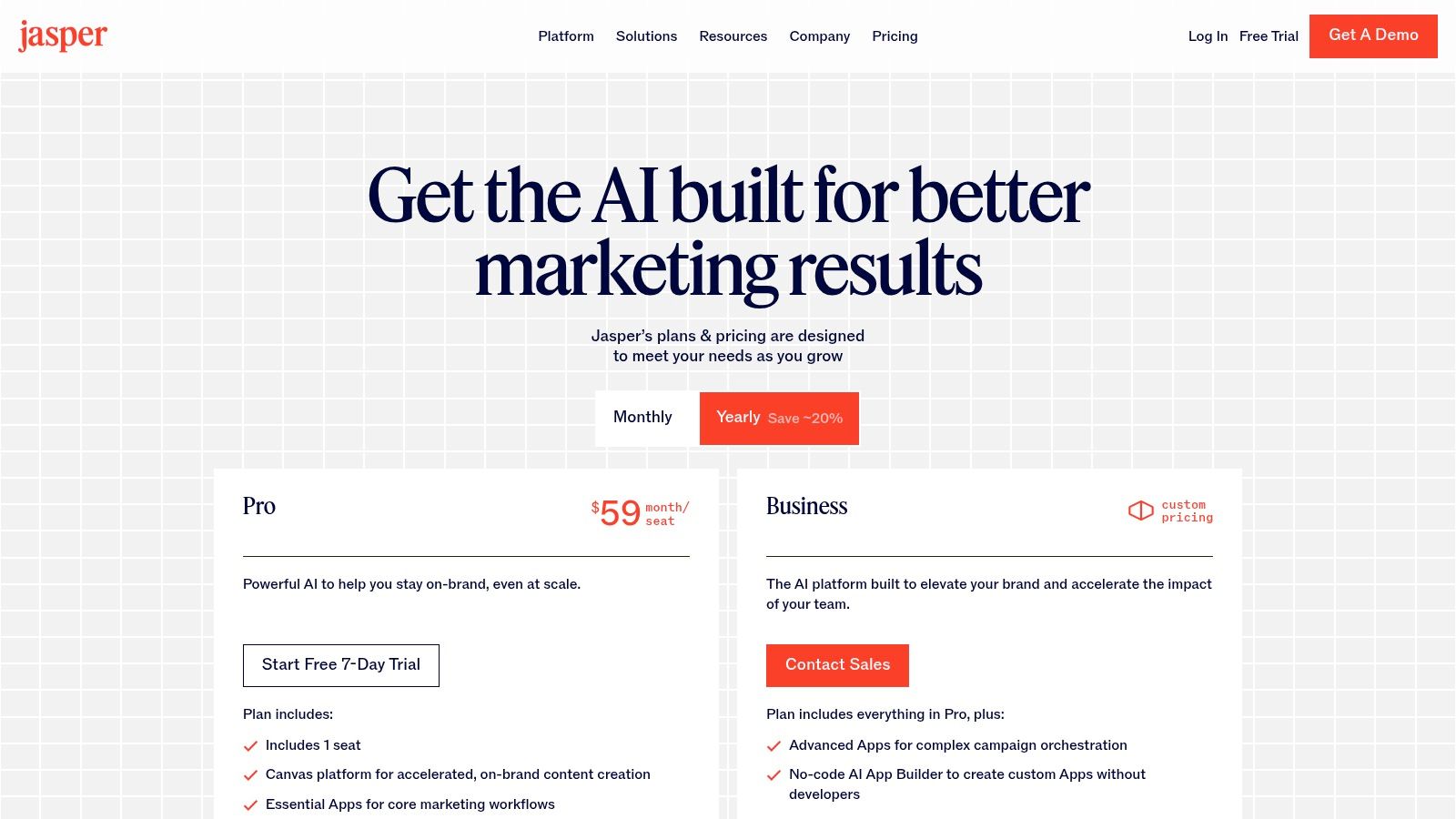
The platform is purpose-built to move beyond one-off content pieces and support cohesive, multi-channel campaigns. Its enterprise-ready features, such as SSO and advanced admin controls, make it a secure and manageable choice for larger organisations. The per-seat pricing model is suited for dedicated teams, though it can become costly as the number of users grows. Jasper’s focus remains squarely on marketing and sales copy, making it less ideal for academic or long-form technical research.
Actionable Tip: Using Brand Voice for Consistency
To ensure all AI-generated content aligns with your brand, thoroughly populate the "Brand Voice" feature. Upload key marketing documents, paste examples of your best-performing copy, and provide your website URL. Jasper will analyse these assets to create a repeatable voice. Practical example: When launching a new product, create a campaign brief within Jasper. Use your pre-defined Brand Voice and ask it to generate a LinkedIn post, a tweet, and an email announcement. All three outputs will maintain a consistent tone, messaging, and style, saving you from rewriting each one manually.
Key Features:
- Brand Voices and Knowledge Base to ensure on-brand content.
- SEO Mode for optimising copy directly within the editor.
- Campaign-level workflows and templates for cohesive asset creation.
- Business plans with team collaboration, admin controls, and SSO.
Website: https://www.jasper.ai/pricing
6. Writesonic
Writesonic distinguishes itself as one of the more forward-thinking AI content creation tools by integrating powerful writing capabilities with a suite of SEO and search monitoring features. It is specifically designed for marketing teams and SMEs that need to produce high-volume, optimised content while preparing for the future of search. The platform moves beyond simple article generation with its GEO (Generative Engine Optimisation) tools, which allow users to monitor their visibility within new AI-driven search formats like Google's AI Overviews.
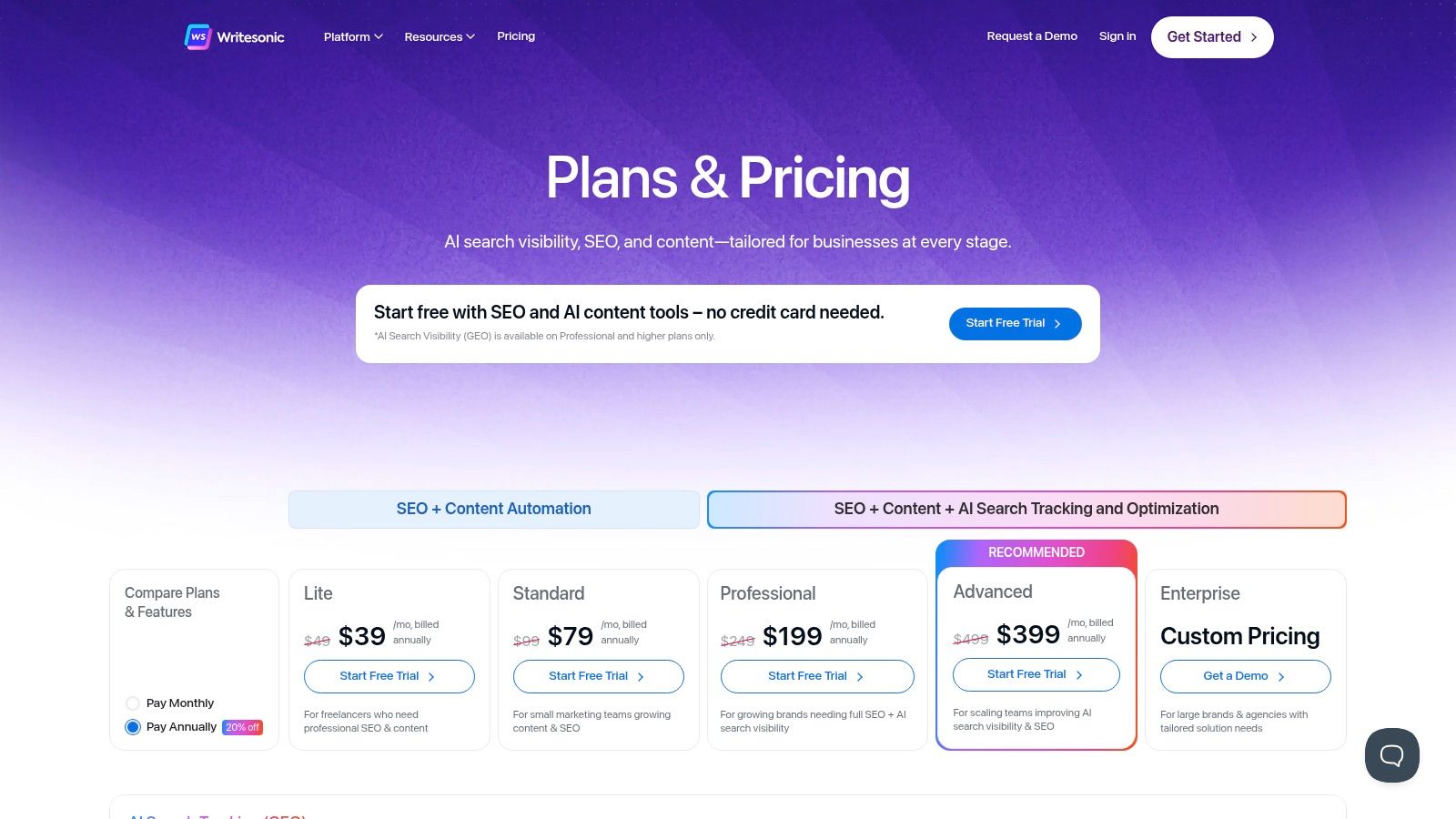
This dual focus makes it a strategic choice for businesses looking not only to create content but to ensure it performs in an evolving search landscape. By bundling AI writing, on-page SEO audits, and AI search monitoring, Writesonic offers a more holistic solution than many of its competitors. However, its broad feature set can present a learning curve for new users trying to configure all the integrations and tools effectively.
Actionable Tip: Monitor AI Overview Performance
Connect your Google Search Console account to Writesonic's GEO dashboard. Once linked, you can track which of your keywords are triggering AI Overviews and whether your content is being cited. Practical example: If you notice a competitor is frequently cited in the AI Overview for your target keyword "best running shoes for beginners," analyse their article. Use Writesonic's tools to identify what makes it stand out (e.g., a comparison table, expert quotes). Then, update your own content to include similar, high-value elements to increase its chances of being featured.
Key Features:
- AI Writer and Chatsonic for versatile article and marketing copy generation.
- GEO dashboards for monitoring visibility in Google AI Overviews.
- Built-in SEO auditing tools and integrations with Google Analytics and Search Console.
- API access is available on higher-tier plans for custom workflows.
Website: https://writesonic.com/pricing
7. Descript
Descript revolutionises audio and video editing by treating it like a word document. Instead of wrestling with complex timelines, you edit the auto-generated transcript, and the corresponding media cuts are made for you. This makes it an incredibly intuitive tool for podcasters, marketers creating video explainers, and anyone producing spoken-word content. For UK businesses, its collaborative features and straightforward workflow can drastically reduce production time for internal training videos or social media content.
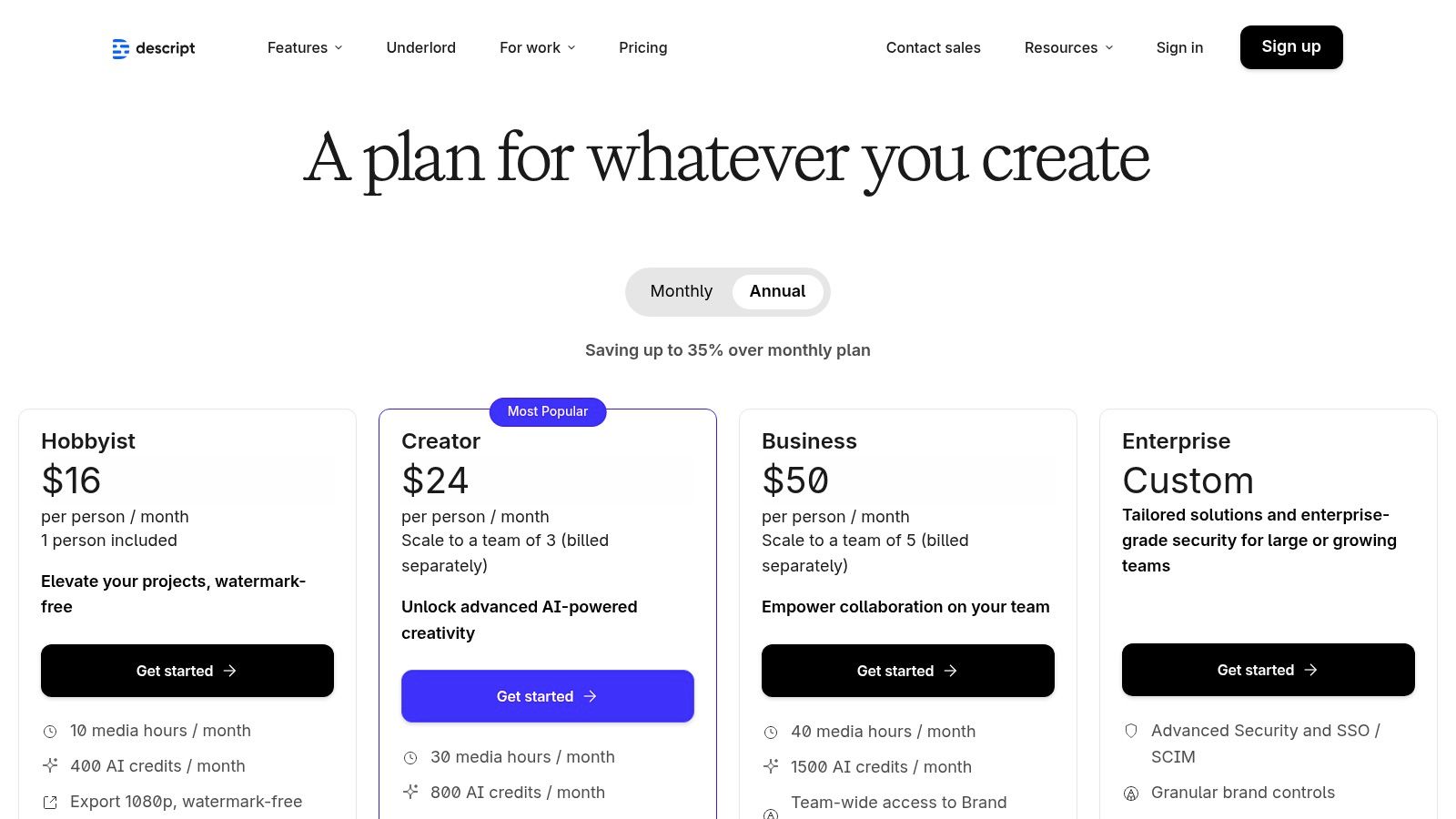
The platform's standout AI features, like one-click filler word removal ("um," "uh") and the Overdub voice cloning tool for correcting misspoken words, are significant time-savers. While powerful, features like Overdub require careful handling to ensure ethical use and consent. The integration of SquadCast for high-quality remote recording makes it a comprehensive solution for distributed teams, centralising the entire production process from interview to final edit.
Actionable Tip: Creating Social Media Clips
After editing your main podcast or video, highlight a compelling 30-60 second section of the transcript. Right-click and select "Duplicate to new composition." From there, you can instantly reformat the clip to a vertical aspect ratio (9:16), add animated captions, and export it directly for platforms like TikTok, Reels, or Shorts, turning long-form content into multiple social assets in minutes. Practical example: For a podcast interview, find a powerful quote from your guest. Isolate it, add a branded background and dynamic captions, and you have a perfect audiogram to promote the episode on Instagram.
Key Features:
- Text-based editing for both audio and video files.
- AI-powered filler word removal and studio-quality sound enhancement.
- Overdub for creating an AI clone of your voice to fix errors.
- Built-in screen recording, remote recording via SquadCast, and transcription services.
Website: https://www.descript.com/price
Frequently Asked Questions
Q: What makes Seedance different from other AI video tools? A: Seedance combines state-of-the-art AI models with an intuitive interface, making professional video creation accessible to everyone. Its unique blend of powerful generation capabilities, fast processing, and affordable pricing sets it apart from competitors.
Q: How good is the video quality from Seedance? A: Seedance produces high-quality videos with smooth motion, accurate prompt adherence, and impressive visual fidelity. The platform supports multiple aspect ratios and resolutions, including HD output for professional use cases.
Q: Is Seedance suitable for professional video creators? A: Absolutely. Seedance is used by content creators, marketers, filmmakers, and businesses worldwide. Its advanced controls, high-resolution output, and batch generation capabilities make it a powerful tool for professional workflows.
What Is Ai Content Creation Tools and Why Does It Matter?
Ai Content Creation Tools is an essential capability for modern content creators and marketers. The best tools for ai content creation tools combine AI-powered automation with professional-quality outputs — saving hours of manual work while delivering results that meet commercial standards.
In 2025, platforms like Veo 3 and Seedance have made ai content creation tools more accessible than ever, offering free-tier access alongside professional plans.
How Do You Get Started with Ai Content Creation Tools?
Getting started with ai content creation tools requires just a few steps:
- Choose the right tool for your needs (see comparison above)
- Sign up for a free account — no payment required to start
- Follow the step-by-step guide in this article
- Test with simple examples first, then scale up
Most users can produce their first professional result within 30 minutes of starting.
What Are the Best Tools for Ai Content Creation Tools in 2025?
The top tools for ai content creation tools in 2025 are:
- Veo 3 — best overall quality, free via Google Gemini
- Kling AI — best mobile experience and free tier generosity
- Runway Gen-4 — best for artistic and cinematic styles
- Pika 2.1 — best for beginners with simple interface
Each tool has strengths in different areas — the best choice depends on your specific use case, volume requirements, and budget.
8. Synthesia
Synthesia is a leading AI content creation tool specialising in video, allowing businesses to produce presenter-led videos without cameras or microphones. The UK-founded platform is ideal for creating corporate training materials, product explainers, and onboarding videos at scale. Its core strength lies in its ability to take a script and generate a polished video featuring a realistic AI avatar, which is invaluable for teams needing to localise content quickly across multiple languages.
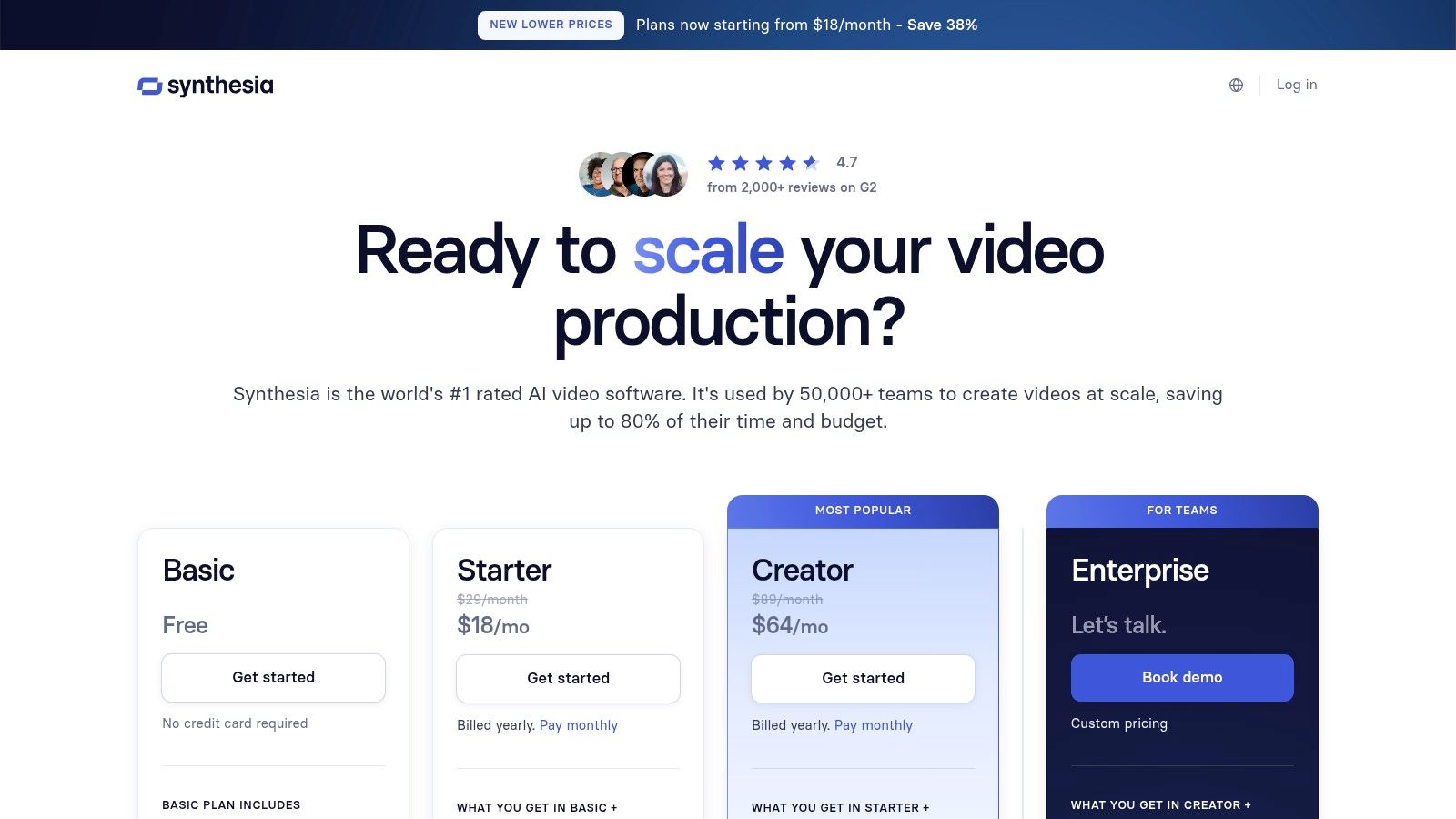
This makes it an exceptional tool for international marketing and internal communications, where consistency and speed are paramount. For organisations with strict learning management system (LMS) requirements, Synthesia's ability to export content in SCORM format is a significant advantage, ensuring seamless integration. While it’s not designed for the same creative freedom as a social media video maker, its enterprise-grade controls and focus on professional use cases make it a reliable choice for corporate video production.
Actionable Tip: Creating Multilingual Training Modules
To rapidly create localised training, first finalise your script in English. Upload it to a project and select your avatar and scene. Once the English version is approved, use the 'translate' feature to automatically generate versions in different languages. Synthesia’s AI dubbing will adjust the avatar's lip movements to match the new audio, allowing you to produce an entire suite of multilingual training videos in minutes, not weeks. Practical example: A company's HR department can create a single 'Company Policy' video in English, then generate versions in Spanish, French, and German in under an hour, ensuring consistent messaging for all global employees.
Key Features:
- 180+ diverse AI avatars with options for custom personal or studio avatars.
- Support for over 140 languages with built-in AI translation and voice cloning.
- SCORM export for easy integration with corporate learning management systems.
- API access, branded video pages, and interactive video elements.
Website: https://www.synthesia.io/pricing
9. Runway
Runway has carved out a niche as a powerful, suite-based platform for creatives focused on motion and video. It moves beyond simple text-to-video, offering a comprehensive set of AI magic tools for everything from prototyping storyboards to final video edits. With its advanced Gen-3 and Gen-4 models, Runway is one of the top-tier ai content creation tools for professionals needing granular control over their video output, making it ideal for motion designers, filmmakers, and creative agencies.

The platform operates on a credit system, which can complicate cost planning but provides flexibility. However, its Unlimited plan includes an "Explore Mode," allowing for endless, albeit potentially slower, generation for experimentation. This dual approach supports both high-stakes project work and creative discovery. For those just starting, learning how to turn a photo into a video with such tools is a great first step.
Actionable Tip: Using Motion Brush
For precise creative control, use the Motion Brush tool. Instead of relying solely on text prompts to generate movement, you can "paint" motion directly onto specific areas of a static image. Practical example: In a still photo of a cityscape at dusk, you could paint motion onto the street to make cars appear to move and onto the windows of buildings to make them flicker with light, transforming a static image into a dynamic, living scene without affecting the sky or buildings themselves. This is invaluable for adding subtle life to scenes.
Key Features:
- Advanced video generation with Gen-3 and Gen-4 models.
- Motion Brush for directing movement within a scene.
- Credit-based system with an Unlimited plan for exploration.
- Full suite of video editing tools, including 4K upscaling and clip extension.
Website: https://runwayml.com/
10. ElevenLabs
When it comes to generating lifelike, natural-sounding audio, ElevenLabs is a leader among AI content creation tools. It specialises in high-quality text-to-speech, speech-to-speech, and professional voice cloning, making it an invaluable resource for creating narrations, audiobooks, podcast intros, and video voiceovers. For UK businesses and creators, its ability to produce nuanced, emotive voice performances allows for sophisticated audio branding and content localisation.
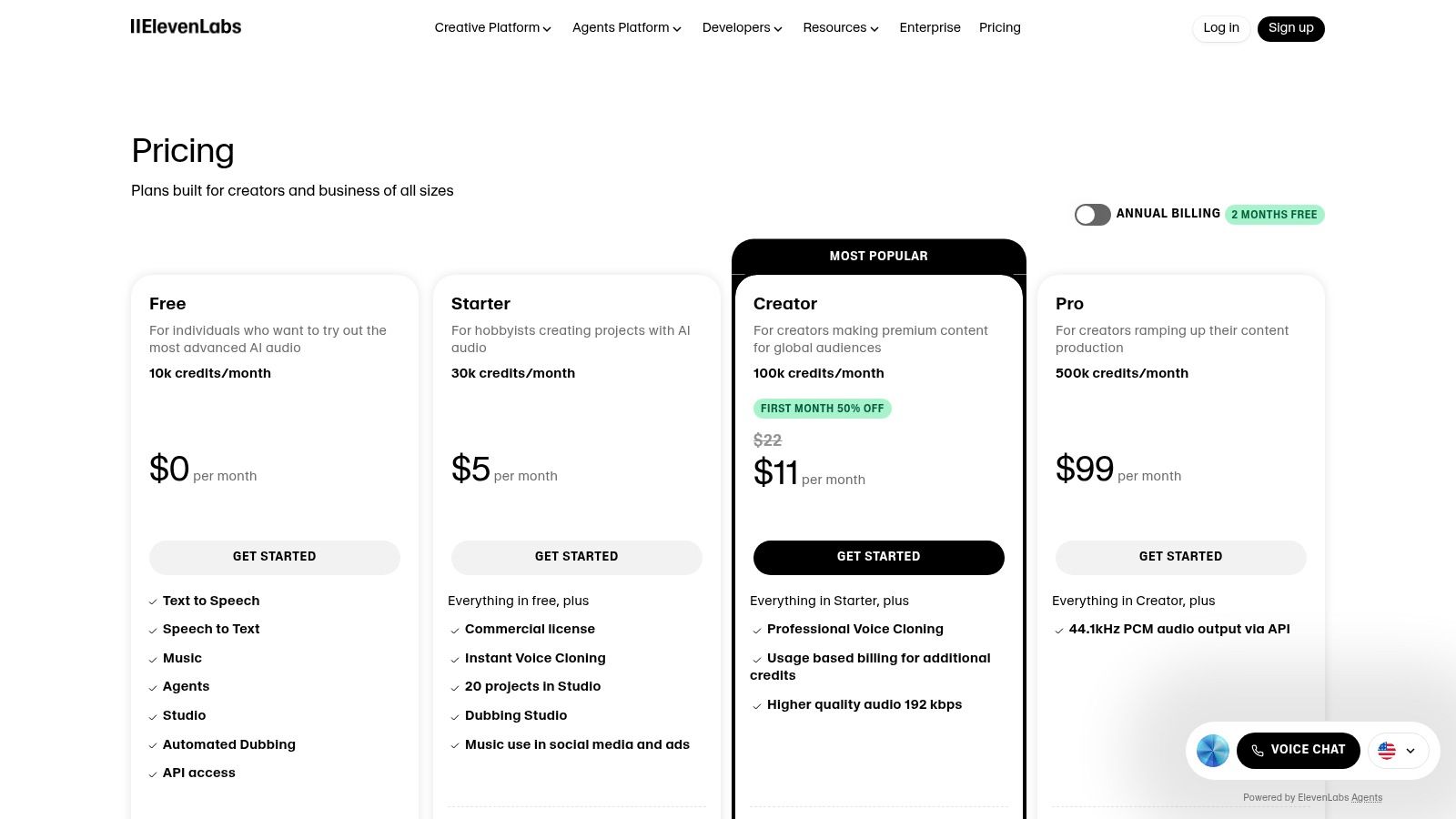
The platform provides granular control over voice outputs, including stability and clarity settings, to perfectly match the desired tone. With a clear credit-based system and commercial licensing options, ElevenLabs supports projects from individual creators to large publishers requiring scalable audio production. Its advanced voice cloning technology, while requiring consent, opens up possibilities for creating consistent brand voices or dubbing content with a speaker's original vocal identity.
Actionable Tip: Creating Custom Brand Voices
To maintain audio consistency across all marketing materials, use the Professional Voice Cloning feature to create a dedicated voice for your brand. After securing consent from a voice actor, you can generate a high-fidelity clone. Practical example: Use this cloned voice to generate the audio for all your YouTube tutorials, social media video ads, and even your company's voicemail greeting. This creates a powerful and recognisable audio signature for your brand across every touchpoint, strengthening brand recall.
Key Features:
- Advanced text-to-speech with emotional nuance and inflection control.
- Professional Voice Cloning for creating high-fidelity custom voices.
- Speech-to-speech functionality for transforming one voice into another.
- Projects workflow for long-form content like audiobooks and articles.
- Developer API for integrating voice generation into other applications.
Website: https://elevenlabs.io/pricing
11. AppSumo
While not a singular tool, AppSumo is a crucial marketplace for discovering and acquiring emerging AI content creation tools at a fraction of their standard cost. It serves as a launchpad for innovative software, offering curated lifetime deals (LTDs) and deep discounts. For marketers and creators on a budget, it’s an unparalleled resource for experimenting with niche AI writers, video generators, and design assistants without committing to expensive monthly subscriptions.
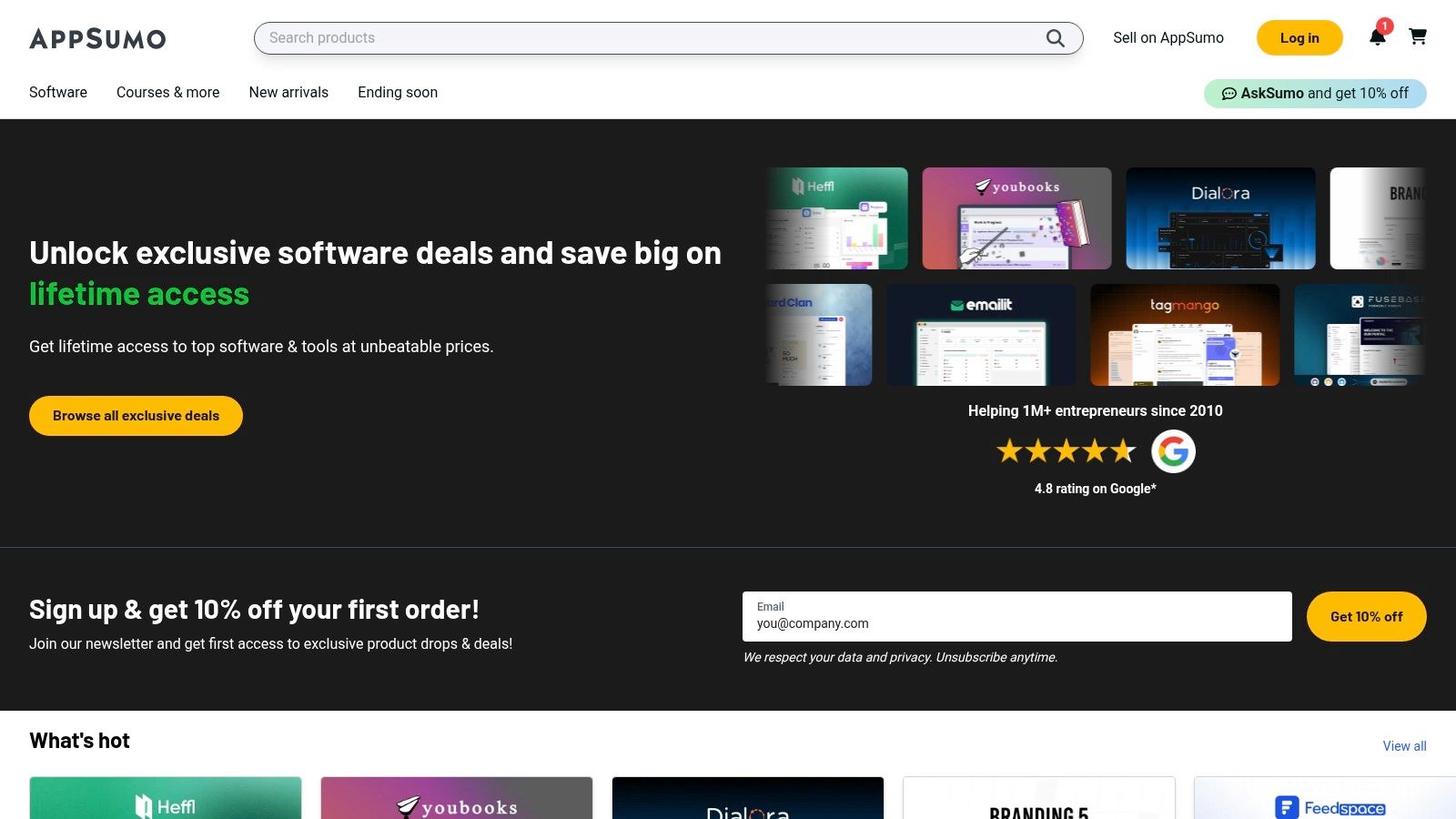
The platform's value lies in providing early access to a diverse range of AI applications that might otherwise be overlooked. However, the nature of these deals means due diligence is essential; buyers should carefully read community reviews and understand the vendor's long-term viability, as the level of support for LTDs can vary.
Actionable Tip: Vetting an AI Lifetime Deal
Before purchasing an AI tool on AppSumo, check the "Questions" section on the deal page. Look for the founder's responsiveness to queries about their product roadmap, existing bugs, and feature requests. Practical insight: If a founder consistently responds within 24-48 hours and provides detailed, transparent answers (even admitting to limitations), it’s a strong signal that they are committed to the product's long-term success. A high number of positive reviews from "verified purchasers" is also a crucial quality indicator.
Key Features:
- Frequent lifetime deals (LTDs) on a wide range of software.
- Community reviews and Q&A sections for user-driven insights.
- Curated collections and categories for AI tools, making discovery easier.
- Generous refund windows (typically 60 days) to test tools risk-free.
Website: https://appsumo.com/
12. G2
While not an AI content creation tool itself, G2 is an indispensable resource for evaluating and comparing them. It serves as a peer-review platform where you can access verified user feedback, detailed comparisons, and category grids for hundreds of AI writing assistants and generative tools. For UK marketers, its regional filters are particularly useful for shortlisting vendors that offer localised support, GBP billing, or cater specifically to the UK market, helping to validate a tool's reputation before committing to a subscription.
This platform cuts through marketing hype by providing real-world insights from users in similar roles or industries. The ability to filter by company size (SMB, Mid-Market, Enterprise) ensures the reviews are relevant to your organisation's scale and needs. While sponsored placements can influence visibility, the depth of individual reviews offers a transparent view of a tool's true performance and limitations.
Actionable Tip: Creating a Shortlist
Use G2's comparison feature to select up to four tools side-by-side. Focus on the "Features" and "Reviews" tabs, filtering reviews by "Verified Current User" and your company size. Practical example: If you are a mid-market e-commerce company in the UK, filter for reviews from users with the same profile. You might discover that while Jasper has higher overall ratings, a smaller competitor receives better feedback specifically for "e-commerce product description generation," making it a better fit for your immediate needs. This provides a quick, data-driven way to identify the top candidates.
Key Features:
- Verified user reviews and ratings for a wide range of AI tools.
- Grid reports that map out market leaders and contenders.
- Advanced filtering by region, company size, and specific features.
- Direct comparisons of features and pricing across multiple platforms.
Website: https://www.g2.com/categories/ai-writing-assistant
Top 12 AI Content Creation Tools — Quick Comparison
| Product | Core features ✨ | Quality ★ | Best for 👥 | Price / Value 💰 |
|---|---|---|---|---|
| Seedance 🏆 | Text→1080p video; native multi-shot storytelling; advanced camera & multi-character control; wide style palette | ★★★★☆ cinematic, smooth motion | Creators, marketers, SMEs, filmmakers | 💰 Free entry; pricing/rights TBD — verify for commercial use |
| OpenAI (ChatGPT) | GPT-5 access, custom GPTs, image/voice tools, limited video features | ★★★★☆ versatile AI assistant | Teams needing ideation, research, prototyping | 💰 Tiered (Solo→Enterprise); clear plans & compliance |
| Adobe CC + Firefly | 20+ pro apps + Firefly (generative images/video/audio); deep pro workflows | ★★★★★ industry-standard for pros | Professional creatives, studios, enterprises | 💰 Subscription + generative credits; higher cost |
| Canva (Magic Studio) | Templates, Magic Media (image/video), Magic Write, brand controls | ★★★★☆ fast, easy, template-first | SMEs, social teams, education, nonprofits | 💰 Freemium → Pro per-seat; scalable but can add up |
| Jasper | Brand Voices, campaign workflows, SEO mode, extensions | ★★★★☆ marketing-focused consistency | Marketing teams and agencies | 💰 Per-seat pricing; Business plans add governance |
| Writesonic | AI writing + SEO audits, GEO monitoring, integrations | ★★★☆☆ strong for SEO-driven content | SEO-focused creators & SMEs | 💰 Variable promos; confirm pricing & limits |
| Descript | Text-based audio/video editing, Overdub voice cloning, transcription | ★★★★☆ huge time-saver for spoken-word | Podcasters, video explainers, small studios | 💰 Tiered plans; edu/nonprofit discounts available |
| Synthesia | Avatar presenter videos, 140+ languages dubbing, templates & SCORM | ★★★★☆ excellent for localization | Training, onboarding, corporate comms | 💰 Credit-based tiers; Enterprise for unlimited use |
| Runway | Gen-3/Gen-4 text→video, upscaling, clip tools, API & iOS | ★★★★☆ rapid iteration for motion design | Creative teams prototyping video/storyboards | 💰 Credit system; Unlimited plan for exploration |
| ElevenLabs | Natural TTS, speech-to-speech, professional voice cloning | ★★★★★ leading naturalness & speed | Narration, dubbing, publishers, studios | 💰 Credit tiers with commercial licensing |
| AppSumo | Curated software deals, lifetime deals, refunds & reviews | ★★★☆☆ cost-effective discovery | Small teams, solopreneurs, experimenters | 💰 Deep discounts/LTDs; vet vendor longevity |
| G2 | Verified user reviews, category grids, filters, research briefs | ★★★★☆ peer-driven vendor validation | Buyers shortlisting software & vendors | 💰 Free to use; sponsored placements possible |
Choosing the Right AI Tool for Your Content Strategy
The landscape of content creation has fundamentally shifted. We've journeyed through a comprehensive list of pioneering AI content creation tools, from the text-based prowess of Jasper and Writesonic to the revolutionary video generation capabilities of Seedance and Runway. The core takeaway is clear: AI is no longer a futuristic concept but a practical, powerful, and accessible co-pilot for creators and marketers.
The sheer variety of platforms, however, can feel overwhelming. The key is not to adopt AI for its own sake, but to strategically integrate tools that solve your specific problems and amplify your unique voice. Your choice should always be guided by your primary content goals, not by the latest trend. A solo podcaster's ideal tool, like Descript for its intuitive audio editing, will differ vastly from a corporate training department's, which might lean on Synthesia for scalable video avatar presentations.
A Practical Framework for Selecting Your AI Toolkit
Before committing to a subscription, it's crucial to move from a general understanding to a specific plan of action. A deliberate selection process will save you time, money, and frustration down the line.
Here’s a simple yet effective framework to guide your decision:
- Define Your Primary Use Case: Be specific. Are you trying to write SEO-optimised blog posts, generate scripts for short-form video, create unique brand assets, or produce realistic voiceovers? A tool like ElevenLabs is a specialist in voice synthesis, whereas Canva’s Magic Studio is a versatile generalist for visual design. Clearly defining your core need is the most important first step.
- Assess Your Current Workflow: Identify the biggest bottlenecks in your content production process. Is it the initial brainstorming? The tedious process of editing video? Writing compelling copy? Pinpoint the area where AI can deliver the most significant time savings or quality improvement. This is where you should invest first.
- Consider Your Skill Level: Some tools, like Adobe Firefly, are deeply integrated into professional-grade software and offer granular control, which may have a steeper learning curve. Others, such as Canva, are designed for maximum accessibility. Be honest about the time your team can dedicate to learning a new platform.
- Budget and Scalability: Start with the free trials and freemium plans that nearly all these platforms offer. This hands-on experimentation is invaluable. As you evaluate, consider how the pricing structure aligns with your future growth. Will the tool scale with your needs, or will you hit a prohibitive paywall as your output increases?
Implementation and Ethical Considerations
Once you've chosen your tools, implementation requires a thoughtful approach. It’s not about replacing human creativity but augmenting it. Use AI to generate a first draft, brainstorm a dozen different angles, or handle repetitive tasks, freeing up human creators to focus on strategy, nuance, and emotional connection.
Remember to establish clear guidelines for AI usage within your team. This includes standards for fact-checking AI-generated text, transparently disclosing AI-generated imagery where appropriate, and ensuring the final output always aligns with your brand's authentic voice and values. As you refine your content strategy, comparing options is key; you can further explore other top AI content creation tools for marketers to ensure you make the best decision for your needs.
Ultimately, the most powerful AI content creation strategy is a bespoke one. It's a carefully curated stack of tools that harmonises with your goals, team, and budget. By approaching this new frontier with curiosity, strategic intent, and a commitment to experimentation, you can build a workflow that not only elevates your efficiency but unlocks entirely new levels of creative possibility.
Ready to transform your ideas into compelling visual stories? See how Seedance makes cinematic video creation effortless, turning simple text prompts into dynamic, engaging content. Start bringing your narrative to life today at Seedance.
Article created using Outrank
Our Verdict
After thorough evaluation, Seedance stands out as our top recommendation for AI video generation. Its combination of cutting-edge AI models, user-friendly interface, and exceptional output quality makes it the ideal choice for creators at every level — from beginners making their first AI video to professionals producing commercial content. Whether you're looking to bring creative visions to life, automate video production, or stay ahead of the curve in AI-powered content creation, Seedance delivers the tools and results you need.
Ready to create your own AI video?
Turn ideas, text prompts, and images into polished videos with Seedance. If this article helped, the fastest next step is to try the product.
Free credits on signup. Plans from $20/month.
Related Articles
More posts in the same locale you may want to read next.

Seedance App Preview Video Generator 2026: Create App Store and Product Launch Clips
Use Seedance to turn app screenshots, feature copy, and launch goals into App Store previews, Google Play promo videos, and product launch clips.
Read article
Midjourney Video Batch Size Settings: Choose 1, 2, or 4
Compare Midjourney video batch sizes 1, 2, and 4, understand SD and HD GPU costs, set --bs, and choose the right test workflow.
Read article
Invideo Agent Timeline Editing Prompts: A Practical Playbook
Use precise Invideo agent prompts to assemble, shorten, mix, caption, color-match, and review an editable timeline without changing the wrong sections.
Read article